Awesome work on these sensors!! How did you acutally got the commands out of the Crestron, how did you debug this?
I’m wondering if we could make use of the integrated proximity sensor of a TS-1070 / TSW-1070, to then disable the wallpanel-screensaver when one gets close to the touchpanel.
Even if we could access that proximity sensor, given that you recommend to have the update interval set to 300, that would not be very helpful  What is the downside if the polling interval would be set to
 1 instead, what would be the problem?
The commands are just really slow. You most certainly aren’t getting real-time updates from these.
As far as debugging, I just spent a lot of time in the pseudo-console on one of the screens typing in commands. I haven’t touched it basically since I set all that up originally, but there was a HELP command or something similar.
Hey All,
As suggested earlier in the thread I’ve started creating a template program hosted as an add-on on the HA server itself, which serves the dashboard in an iframe and proxies touch panel data (like button presses). I’ve got this mostly running and even able to interact with the touch panel hardware using Crestrons “General Web” functionality, however I’m struggling with something that’s driving me crazy:
When using the panel to load a webpage via EMS, do everyone else’s hard buttons not light up or appear to be disabled? (Update: I can successfully send a hard-button backlight enable/disable command to the touchpanel from javascript and read back the status of the boolean value as well as read and set the lcd brightness from javascript, but no matter WHAT I do, I cannot get the hard-buttons to light or trigger the event handler even when they’re enabled and set to full brightness…)
Also, for anyone else working with this panel, is there a way to see debug information/developer console for a webpage running in EMS mode?
1 Like
Everyone looking on how to set this panel up, I have condensed all the information from various posts into a little guide, which can be found here: Crestron TSW-1060 Batteryless Wallpanel Configuration Guide
2 Likes
I’m loving this, but having read through a lot of this information, I’ve seen the issue come up where the SD Card in the panel is trashed by all the activity when using this as a Home Assistant dashboard. Has their been any more research into this? As someone who has worked with Crestron devices previously, I’ve seen when the SD Card fails and your panel is toast, and it’s not simply a matter of cracking it open and replacing the SD card, unfortunately.
I use 1060 for HA around year and my first panel on original SD.
Other one comes with bad SD and I replaced it.
Still no any issues related to SD card.
Just in case I need it sometime in the future. How do you do that, just swap the card or do you need to make a sector-by-sector copy of the old SD card to the new one?
Copy from my working card to new one. Same format, different size. Everything work like it should be.
How do you make a copy, sector by sector or just with the windows-explorer?
Copy/paste under Window explorer.
1 Like
Did anyone check out this YouTube tutorial using Node-Red?
I am new here and am having a hard time folowwing the conversion process. I have a tss-7 that i want to convert to a tsw-760. I would be willing to lend some crestron help as an authorized programmer in return for help configuring this panel.
Hey everyone, new here.
I have successfully converted a few 60 series panels but i have hit a wall with the 70 series.
When i connect up via UART, i see the initial boot sequence but then it stops. i suspect its because its running V3.x
@KazWolfe have you found any way to get the root UART back on the v3 firmware for the 70 series panels?
Man, it’s been a while since I’ve posted here. Sorry!
At present, no. Version 3 changes certain things significantly and disables our UART access. There is currently no public method to gain access to an upgraded xx70 panel provided you haven’t set TELNETPORT="2" prior to upgrading. I did manage to find a security vulnerability for early 3.x devices (since patched), but I haven’t yet been given authorization to release how that exploit works.
I’ve been putting some effort into the ch5-mqtt-bridge liked prior (and here), though progress is ultimately slow because I only have so much time and I really don’t like working in frontend. I’ll pick it back up eventually.
That said, we did manage to find a way to boot the device into Fastboot mode via USB:
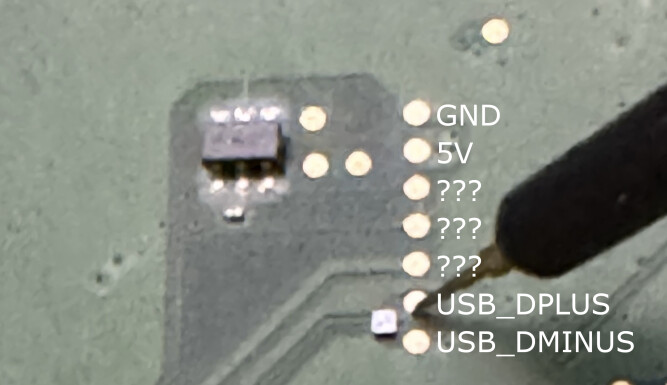
Of note: you will need to fully remove the mainboard and you will also need to provide power over that 5V rail. In my limited testing, I needed more than standard USB could provide, so external power supplies are recommended.
Then, from a standard boot, just fire off setprop sys.powerctl reboot,fastboot. I’d recommend you configure your unit to connect to Wi-Fi, as you won’t have Ethernet when the mainboard is just isolated on a bench.
It’d be awesome if someone can figure out how to run TWRP on this thing since recovery mode is pretty accessible (adb reboot recovery does it). Sadly, that’s a bit beyond my skill level. Anyone know any Android rooters?
I work with the LineageOS team but I do hardware stuff to support the software developers. That said, even with a different bootloader, you wouldn’t get very far with anything. I can guarantee stock Android isn’t going to boot. At least nothing recent. You might be able to get KitKat or something running but the touchscreen, and probably everything except the display, isn’t going to work without a lot of effort. Ports from old builds on old hardware presents a ton of technical challenges.
Even if I brought this to the team, it isn’t likely a device that they’d be willing to port. One of the bigger issues is that the market for these is fairly limited compared to phones or tablets. It would require multiple devs to have access to the devices and without free hardware, LOS would have to come out of pocket for devices and I don’t see that happening due to the first issue. It’s also an end of life device running an out of date kernel.
If someone wants to pursue this though, from what I know about the process, the first step is a complete dtb (device tree) file. Best case is that Crestron gives us a BSP (board support package). Given that they are using AOSP under their software, they are legally bound (by GNU) to provide documentation upon request. However, having gone through this with Google, what is legally required and how much an individual is willing to fight are two very different things. If you can source a board support package from Crestron, I’m certainly willing to ask around and see if anyone has interest.
My experience hasn’t been a good one with these…. My sliders are laggy. Don’t quote me but press and hold actions on buttons are buggy on these crestron tablets (if my memory serves me correctly). I had a camera that streamed fine for a while but it looks up frequently and i had to create an auto refresh for it… i have sensors the displayed dynamic data that was really weird and if i recall i tried for hours but some of my custom mushroom cards don’t load on these… i kinda gave up on these but maybe i need to look again cause i have about 15 of them laying around and Poe powered androids and iPad cases are pricey and i have a pretty big commercial project i need to deploy this at 
BSPs do exist for both the xx60 devices and the xx70 devices, so we at least do have that.
I’d agree that it’s pretty unlikely anyone would be willing to port Lineage or anything to these devices (nor do I really think it’s that necessary), but having at least a proper recovery environment for the xx70 devices would be great. As-is, once a device is on 3.x, there’s no way to gain access to them.
I guess the thought here is that a working recovery env would allow us to flash older firmware perhaps???
I can explore this option when I’ve got time and follow up.
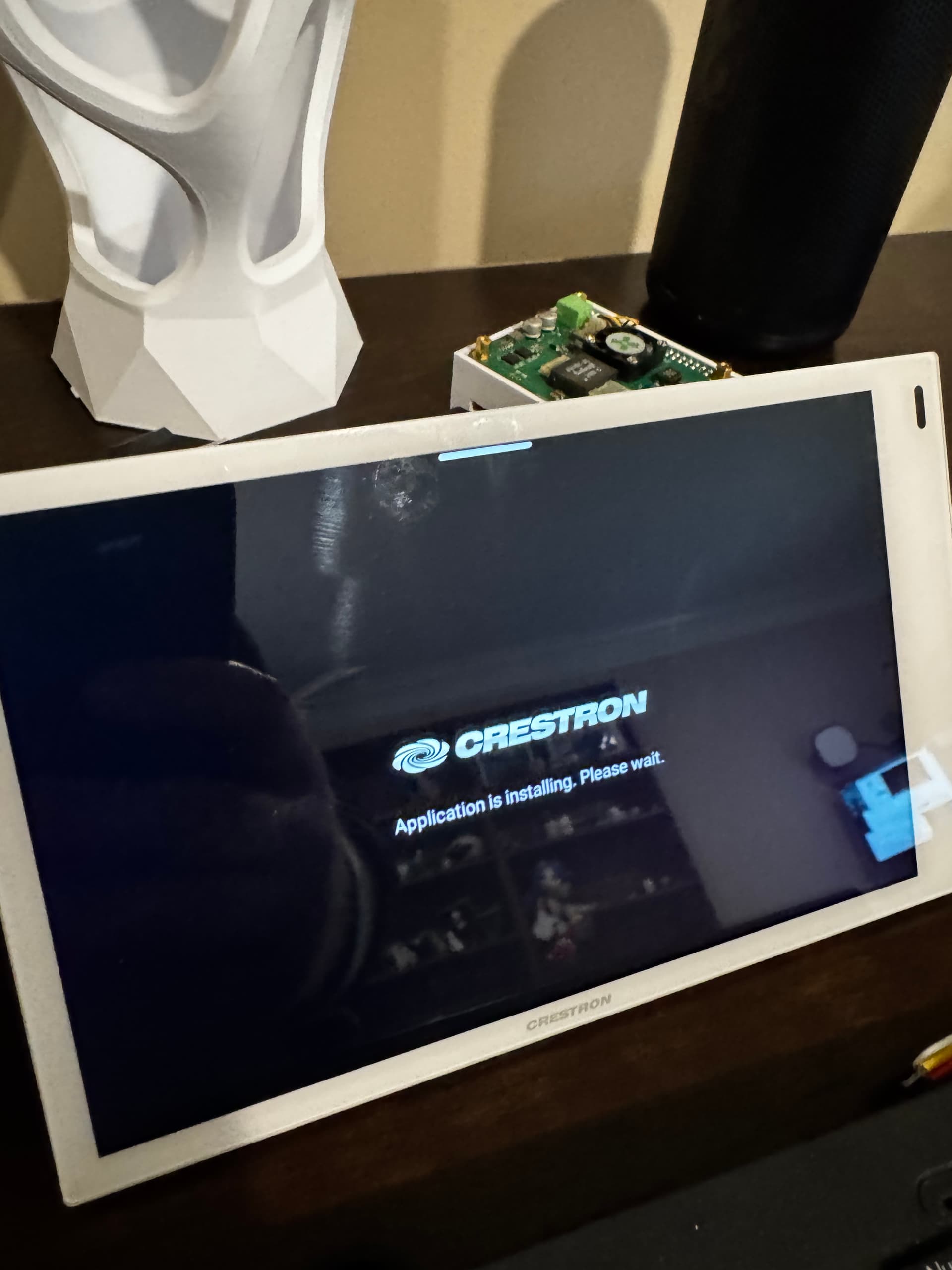
I just got a TSS-770, so i started with updating the firmware, but once I enabled EMS and put in my HA dashboard URL it is stuck on “application is installing”. Did I miss a step or do i need to do something else so the panel works?
My current thought/hope is that getting a proper recovery environment on the xx70 will finally allow us to root version 3.x onwards since we’d be able to tamper with the filesystem again. As is, there’s no good way to root a device upgraded to v3 - and no downgrade path back to v2. Even having ADB via TWRP via pogo pins would let us gain some access to the device, even if that entire setup is extremely convoluted.
There’s already a recovery mechanism that loads a file from USB, but to my knowledge we don’t have the requisite archives to do that, and I’m not sure anyone’s made any real effort to get that working. But that’d also be a potential path…