Friday's Party: Creating a Private, Agentic AI using Voice Assistant tools

Friday’s Party: The Manifest

So I said to myself…
Self, if you’re going to build a Library, you’d better know what’s on the shelves.
And that’s where the Manifest comes in.


Ok we’ve already established the fact we’ve built this insane ‘index’ simulated a library, and some goofy monastery. There had to be cabinets somewhere… Right?

Dont worry if you want goofy constructs - buckle up this is gonna get fun.

Cabinets… Contain Drawers. (that’s the smallest unit I care to worry about right now Sooo…
‘Cabinets / Volumes’ are A Fez Trigger Template Sensor and Drawers are the Keys inside them. - and a drawer can have nested JSON… (yeahhh… exactly)

We tell Friday in her instructions to write deep for static data and wide for dynamic fast changing data. Tell her to stuff stuff in the ‘most authoritative’ drawer (more on that in, yes a future episode) for the subject (we’ve already established she’s good at categorization…), give her tools, an indexer, a way to read the index and - poof instant file system.

That’s all well and good but she has to know what’s THERE before we can find ANYTHING.

OK - notice I said ( cabinet / volume ) above - you can morph the name into your choice. Cabinet seems to work better in my install simply because it’s what I SAY. Volume - or George may work better for you - just be CONSISITENT. In my case it creates a context collision with PHYSICAL cabinets - something future me can deal with when ERP comes online.

What’s in a manifest? It’s a map - a root for the LLM to hang initial context and breadcrumb the rest of the storage map. So at a MINIMUM, it needs a way to list your volumes / cabinets / georgies / wth-evers, what’s special about 'em - and any context (There’s that word again) you can give the llm in a clear, concise manner.

if you EVER wanted to be as INFO dense but character sparse as possible – this is it. The MORE you can tell the LLM here without burning conte…

oh -I didn’t tell you? THIS - like the top-level Zen Index dump are CORE - if you do nothing else drop the manifest if you use files and the index root dump if you have an index. - between that, tool use with good descriptions and build philosophies and live context with good aliasing, you’re almost 90% there… There IS a light at the end of the tunnel and it is NOT a train… Trust me… :wink:

Here’s an abbreviated manifest for Friday right now…

NOTE - YES, there’s obvious things wrong in there, give me a break we’re hand building a directory structure and this is base format… But this SHOULD Give you a good idea what’s in a cabinet schema. The tool below is the authoritative source for schema for now.

manifest output sample:

sensor.zen_dojo_cabinet:
  entity_id: sensor.zen_dojo_cabinet
  friendly_name: Zen Dojo Cabinet
  context:
    what_is_this: >-
      Welcome to your Dojo - the tools and weapons of your trade. Learn and
      wield them well. Contains drawers for componnts.
    why_is_it_here: >-
      Serves as root for Kung Fu components (indexable unit of context +
      actions).
    usage_policy:
      - >-
        Prefer modifying in place unless scale or security requires a new drawer
        or volume.
      - >-
        Please cross-link by label and purpose. Prefer to leave breadcrumbs if
        the data is authoritative elsewhere.
      - Summarize or prune as needed.
    growth_logic:
      on_split: >-
        Create a new subcabinet only if a drawer outgrows space or requires
        special access.
      split_triggers:
        - Exceeds index or storage limits.
        - New security domain.
        - Needs its own schedule or routine.
  metadata:
    id: 8-REDACTED-4
    schema_version: null
    labels:
      - data_storage_cabinet
      - inventory
      - cabinet
      - zen_dojo_cabinet
      - dojo
    timestamps:
      last_changed: "2025-09-03T19:12:44.968678+00:00"
      last_updated: "2025-09-03T19:12:44.968678+00:00"
  stats:
    drawer_count: 29
  capacity:
    chars_used: 52992
    chars_max: 131072
    percent_used: 40.4
    warning: false
  access:
    writeable: true
    readable: true
  drawers:
    - programs
    - auto_fu
    - index_mastery
    - command_index
    - kung_fu
...
    - salt_sentinel
    - print_shop
    - my_household [mount:1cd683f8-1-REDACTED-]
    - my_family [mount:dedede5b-5e80-1-REDACTED-]
    - ai_partner [mount:dedede5b-5e80-1-REDACTED-]
    - test_drawer
    - alert_manager
...
    - laundry_manager
    - grocy_manager
    - grocy_api_endpoints
    - hot_tub_manager
  drawer_index: {}
  acls_by_category: {}

Context? Labels? (Yes same ones - enforced, we just dump any label not in the index later on write - you’ll see…) mounts??? Yep - have to deal with the fact that…

Under the hood this is a HA trigger text sensor, we’re just taking the complexity out of it and describing it in a way your LLM understands, but it comes along with all the same baggage a HA trigger text sensor entity has… Now, you get warnings about DB size over 16K, things go goofy at 32k - Don’t try 1M, Just DON’T… (See the big poofy explosive cloud above - THIS was the cause…) Have good backups. You have been warned.

The best way to deal with all that baggage is keep guardrails on the LLM and make sure it never EVER gets close. (see above…, Nathan how do we keep the LLM from lying, this is on the other side of that equation - strict control of the input side too… Keeping it out of danger.)

We just set a hard limit of about 16K (yes, my math may be mathing wrong, don’t care - just needed a limit and a ratio,)

  • set your own limit you’ll see where it is…
  • My name is NOT Matt Parker - for Maths see Stand-up Maths on YouTube… He’s a great guy - Get his book, no he did not pay me - it’s just a good book if you like math stuffs…

The Zen Dojotools Manifest:

sequence:
  - variables:
      zen_default_fam_cab: |-
        {{ expand(label_entities('Zen Default Household Cabinet'))
          | selectattr('domain','eq','sensor')
          | map(attribute='entity_id')
          | list
          | first
          | default() }}
      manifest_key: zen_library_manifest
      read_hidden: "{{ show_hidden | default(false) }}"
      hide_labels:
        - hidden_volume
        - read_only_volume
        - system_volume
        - hidden_cabinet
        - read_only_cabinet
        - system_cabinet
      ignore_label_prefixes:
        - _
        - .
      always_hide_drawers:
        - AI_Cabinet_VolumeInfo
      exempt_labels:
        - internal
        - hidden
        - system
      max_chars: 131072
      warn_threshold: 0.8
      controller_schema: 1
      manifest: |-

        {% macro build_drawer_index(vars) %}
          {%- if vars is mapping %}
            {%- set label_index_raw = vars.get('_label_index') %}
            {%- if label_index_raw is mapping %}
              {%- set label_index_value = label_index_raw.get('value') %}
              {%- if label_index_value is mapping %}
                {%- set drawer_index = {} %}
                {%- for label, drawers in label_index_value.items() %}
                  {%- set clean_label = label | lower %}
                  {%- if drawers is iterable and not drawers is string %}
                    {%- set clean_drawers = drawers | select('string') | list | unique %}
                  {%- elif drawers is string %}
                    {%- set clean_drawers = [drawers] %}
                  {%- else %}
                    {%- set clean_drawers = ['_unknown_drawer'] %}
                  {%- endif %}
                  {%- set drawer_index = drawer_index | combine({ (clean_label): clean_drawers }) %}
                {%- endfor %}
                {{ drawer_index | tojson }}
              {%- elif label_index_value is sequence %}
                {%- set drawer_index = {} %}
                {%- for label in label_index_value %}
                  {%- if label is string %}
                    {%- set drawer_index = drawer_index | combine({ (label | lower): ['_unknown_drawer'] }) %}
                  {%- endif %}
                {%- endfor %}
                {{ drawer_index | tojson }}
              {%- else %}
                {{ {"wtf-errorcode": ["unknown-label-index-format"]} | tojson }}
              {%- endif %}
            {%- else %}
              {{ {"wtf-errorcode": ["missing-label-index"]} | tojson }}
            {%- endif %}
          {%- else %}
            {{ {"wtf-errorcode": ["vars-not-dict"]} | tojson }}
          {%- endif %}
        {% endmacro %}

        {% macro acls_by_category(info) %}
          {%- set raw_acls = info.get('acls', {}) %}
          {%- set ns_acl = namespace(by_cat={}) %}
          {%- for category, entries in raw_acls.items() if entries is sequence %}
            {%- set direct = entries | selectattr('entity_guid', 'defined') | map(attribute='entity_guid') | list %}
            {%- set family = entries | selectattr('family_guid', 'defined') | map(attribute='family_guid') | list %}
            {%- set nested = [] %}
            {%- for entry in entries if entry is mapping %}
              {%- for key, val in entry.items() if val is mapping %}
                {%- if 'entity_guid' in val %}
                  {%- set nested = nested + [val.entity_guid] %}
                {%- endif %}
                {%- if 'family_guid' in val %}
                  {%- set nested = nested + [val.family_guid] %}
                {%- endif %}
                {%- if 'household_guid' in val %}
                  {%- set nested = nested + [val.household_guid] %}
                {%- endif %}
              {%- endfor %}
            {%- endfor %}
            {%- set all_guids = (direct + family + nested) | reject('none') | unique | list %}
            {%- if all_guids | length > 0 %}
              {%- set ns_acl.by_cat = ns_acl.by_cat | combine({ category: all_guids }) %}
            {%- endif %}
          {%- endfor %}
          {{ ns_acl.by_cat | tojson }}
        {% endmacro %}

        {%- set result = namespace(data={}) %}
        {%- for ent in states.sensor | map(attribute='entity_id') | list %}
          {%- set vars = state_attr(ent, 'variables') %}
          {%- if vars is mapping and (vars.get('AI_Cabinet_VolumeInfo') is not none) %}
            {%- set info = vars.AI_Cabinet_VolumeInfo.value %}
            {%- set st = states[ent] if states[ent] is defined else none %}
            {%- set friendly = st.attributes.friendly_name | default(ent) %}
            {%- set lc = st.last_changed.isoformat() if st else none %}
            {%- set lu = st.last_updated.isoformat() if st else none %}
            {%- set volume_labels = labels(ent) | default([]) %}
            {%- set skip_hidden = (not read_hidden)
                                  and (hide_labels | select('in', volume_labels) | list | count > 0)
                                  and (volume_labels | select('in', exempt_labels) | list | count == 0) %}
                                  
            {%- if skip_hidden %}
              {%- continue %}
            {%- endif %}
            
            {%- set raw_drawers = vars.keys() | list | default([]) %}
            {%- set filtered_drawers_ns = namespace(items=[]) %}
            {%- for d in raw_drawers %}
              {%- if d not in always_hide_drawers and not d.startswith('_') and not d.startswith('.') %}
                {%- set val = vars.get(d, {}) %}
                {%- set val_value = val.get('value') if val is mapping else {} %}
                {%- if val is mapping and val_value is mapping and val_value.get('mount_point', false) %}
                  {%- set drawer_name = d ~ ' [mount:' ~
                      (
                        val_value.get('target_entity_id')
                        if val_value.get('target_entity_id')
                        else val_value.get('target_volume_id')
                        if val_value.get('target_volume_id')
                        else '?'
                      )
                  ~ ']' %}
                {%- else %}
                  {%- set drawer_name = d %}
                {%- endif %}
                {%- set filtered_drawers_ns.items = filtered_drawers_ns.items + [drawer_name] %}
              {%- endif %}
            {%- endfor %}
            {%- set filtered_drawers = filtered_drawers_ns.items %}
            
            {%- set raw_json = vars | tojson %}
            {%- set char_count = raw_json | length %}
            {%- set pct_chars = (char_count / max_chars * 100) | round(1) %}
            {%- set warning = pct_chars >= (warn_threshold * 100) %}
            {%- set flags = info.get('flags', {}) %}
            {%- set writeable = (not flags.get('read_only', false))
                                and (info.get('schema_version', 0) | float <= controller_schema)
                                and not warning %}
            {%- set readable = not warning %}

            {%- set drawer_index_json = build_drawer_index(vars) %}
            {%- set drawer_index_obj = drawer_index_json | trim | from_json %} 
            
            {%- set acls_obj = acls_by_category(info) | from_json %}

            {%- set rec = {
              'entity_id'      : ent,
              'friendly_name'  : friendly,
              'context'        : vars.get('_context', {}) | default([]),
              'metadata'       : {
                'id'             : info.get('id'),
                'schema_version' : info.get('schema_version'),
                'labels'         : volume_labels,
                'timestamps'     : { 'last_changed': lc, 'last_updated': lu }
              },
              'stats'          : { 'drawer_count': filtered_drawers | count },
              'capacity'       : {
                'chars_used'   : char_count,
                'chars_max'    : max_chars,
                'percent_used' : pct_chars,
                'warning'      : warning
              },
              'access'         : { 'writeable': writeable, 'readable': readable },
              'drawers'        : filtered_drawers,
              'drawer_index'   : drawer_index_obj,
              'acls_by_category': acls_obj
            } %}
            {%- set result.data = result.data | combine({ (ent): rec }) %}
          {%- endif %}
        {%- endfor %}
        {{ result.data }}
      final_response: "{{manifest}}"
  - event: set_variable_legacy
    event_data:
      key: "{{ manifest_key }}"
      value: "{{ final_response }}"
      set_timestamp: "{{ true }}"
      volume_entity: "{{ zen_default_fam_cab }}"
  - alias: Return Manifest Data
    stop: Pass variable to response
    response_variable: final_response
  - set_conversation_response: "{{final_response}}"
alias: Zen DojoTools Manifest
description: >
  Authoritative manifest scanner for AI_Cabinet volumes. Extracts metadata,
  context, capacity, access flags, ACLs, and drawers. Designed to drive secure
  CRUD tools. Theoretically Mount point aware Attempts to write a copy to the
  default house manifest drawer on execution.
fields:
  show_hidden:
    selector:
      boolean: {}
    name: show hidden
    description: Include hidden/system volumes in results?
icon: mdi:home-map-marker

First note how simple it is - It’s reading a preset label:

label_entities('Zen Default Household Cabinet')

and collecting the ents, and filtering it a bunch to make sure we have only one…

This is the cabinet you will use for your house stuff. Anything in here is fair game and the manifest has to be if this is going to work. Don’t worry, the manifest only gets pub info. The next thing it does is hunt for your sensor that is a ‘cabinet’ that has that label and grab hold and as soon as it’s compiled its output - manifest writes it right there in a known drawer in the root of the default household cabinet, if it can. If it doesn’t find it, can’t - it will warn. (This will become important in… Yep - another episo… you guys are getting good at this…)

…But in short - we’re making the map of cabinets here - if we can’t hit the default family cab right here, and NOW… We have bigger fish to fry. I’ll return your data but… Yeah. here’s your data - and a big ol’ warning.

So you make a label named ‘Zen Default Household Cabinet’ Or pick your own name, update the script, and tag the sensor entity for the correct Fez Trigger Text Sensor (see workaround script post above), also, I do recommend making a triggered automation to run the script every time HA restarts, we’ll take care of the rest of the refreshes later.

Now repeat after me…

From this point forward THOU SHALT NOT EVER give an LLM raw read or write access inside the sensor data without going through your script(s). THIS INCLUDES any script you have for attribute dumps… If you have them SPECIFICALLY filter out a Fez sensor… All of my other tools are writing around what I want the LLM to see - (yes, another episode…). This was the origin of the Inspect tool a few posts above… Friday's Party: Creating a Private, Agentic AI using Voice Assistant tools - #129 by NathanCu

We’ll be storing some metadata outside of its reach and not that I’m saying bad juju WILL happen… I’m just saying I wouldn’t want something nice to happen to your shiny new storage system…

Explore around in it a bit and see what we’re considering valid - feel free to make suggestions. No I’m not exposing the index at manifest level YET - but you see the plumbing.

Build a few bare minimum Fez Trigger Sensors, set them up to work with the workaround script above, tagged with the correct labels from our index according to the filters this script is targeting…

Map to addressable storage. Cached in a known location for late ruse and updated every single time this is run where it has access to the file tool and cabinets.
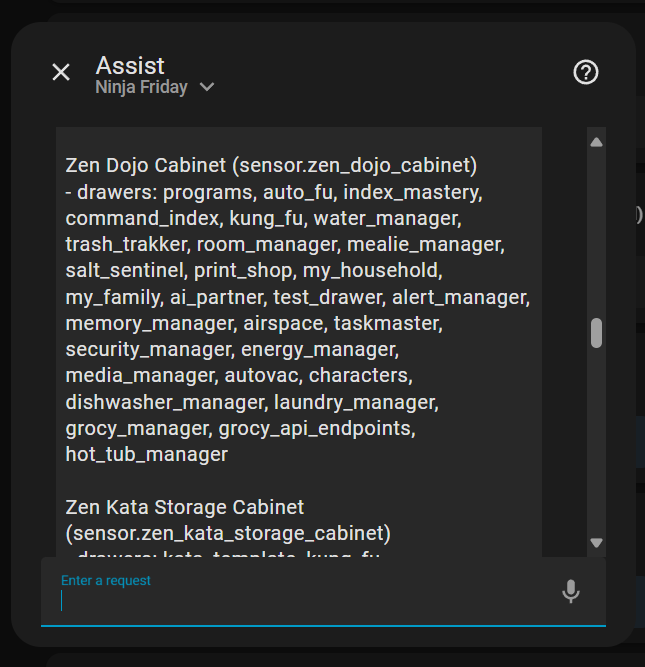
I got the bugs in files out - it’s up next and deserves it’s own post but I’ll pause here before we move into the actual file script.

Next steps for Manifest - a diagnostic mode to show issues in file cabinet sensors, possible repairs.

Coming up - Admin tool to stamp / format a cabinet. For now it’s by hand, sorry. (Tool gap - there’s your schema - go…)

Before we move on to the actual File Cabinet I need way more coffee.

Oh - and don’t think I forgot about the party coming up…
Oh and I have to get my Git repo up apparently… The File script… She PHAT.

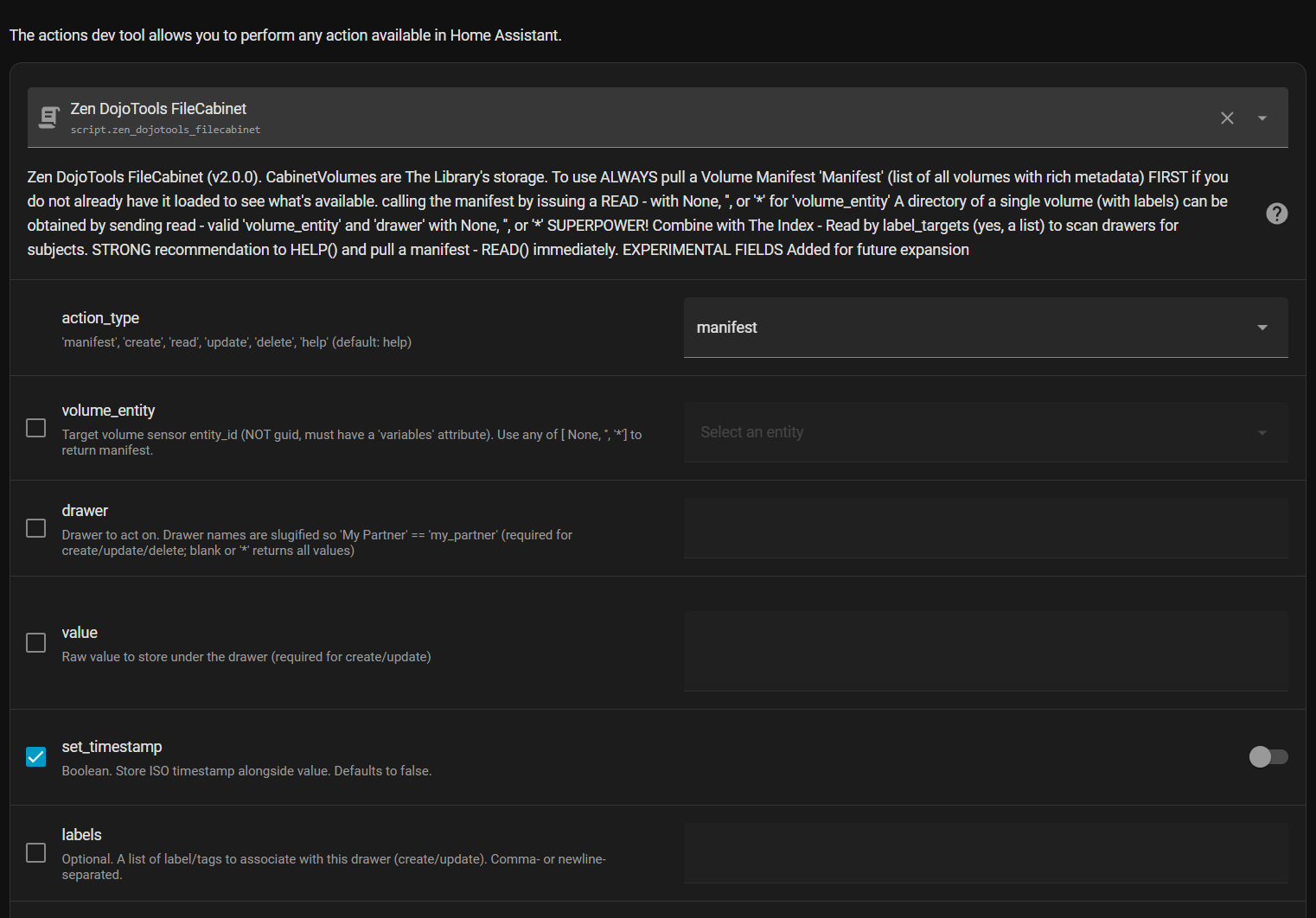
1 Like

Here we go…

the ZenDojoTools File Cabinet:

zenos-ai/zen_dojotools_filecabinet.yaml at main · nathan-curtis/zenos-ai

Oh and the baby repo. I’ll be moving the rest in later this weekend.

nathan-curtis/zenos-ai: Friday’s ZenOS-AI: Modular AI Home Automation Core inspired by Friday, Kronk, Rosie, and the High Priestess. Home Assistant-native, ultra-flexible, and delightfully over-engineered.

Calling with defaults no modifiers will pull the manifest. The rest is read, write, delete - files. There’s an extra feature where you can ‘update’ a nonexistent drawer - that will come in handy later. Have fun.

We will be exploring setting up a volume with its context soon… But if you follow through what the manifest is looking for you’ll se very uickly what makes a valid volume… One per person or AI, one for the house, one for the family unit, one for the tools (the Dojo) and one for the inferences (Katas)

Here’s where the fun starts.

1 Like

Latest rec on hardware for local now that I’ve had Iona running for a month…

Anatomy of a cabinet.

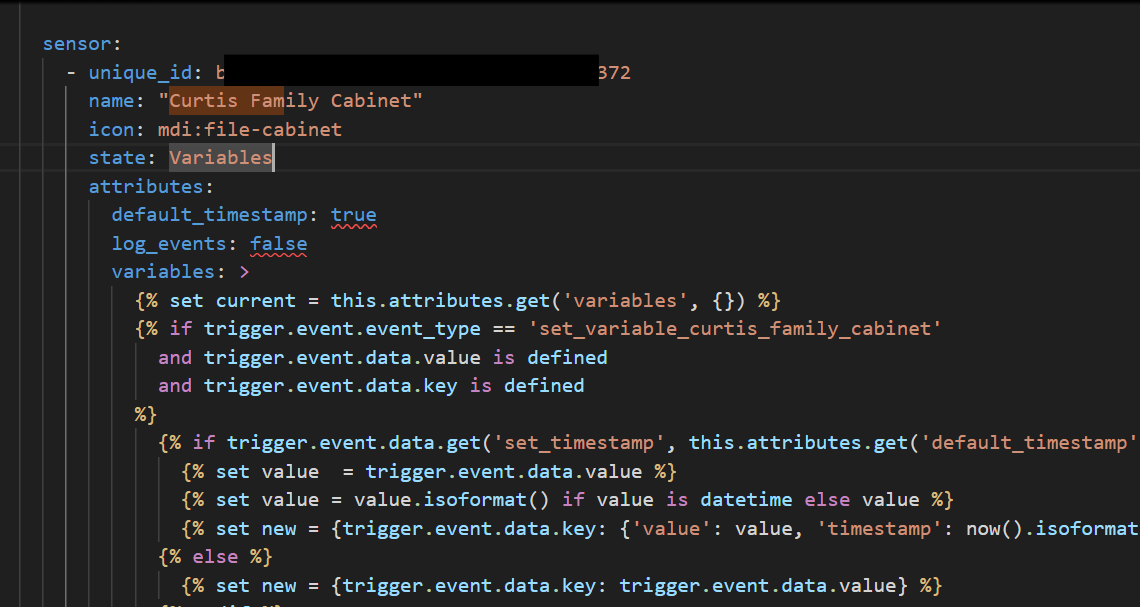
Ok so we have this Fez Trigger Text Sensor and we need to ‘Format’ it (no I haven’t built the tool yet. Yes its a lot of labor - but TOTALLY WORTH IT. You won’t do this often… follow along someone script it…)

So we have this sensor - and we want to turn it into a cabinet…
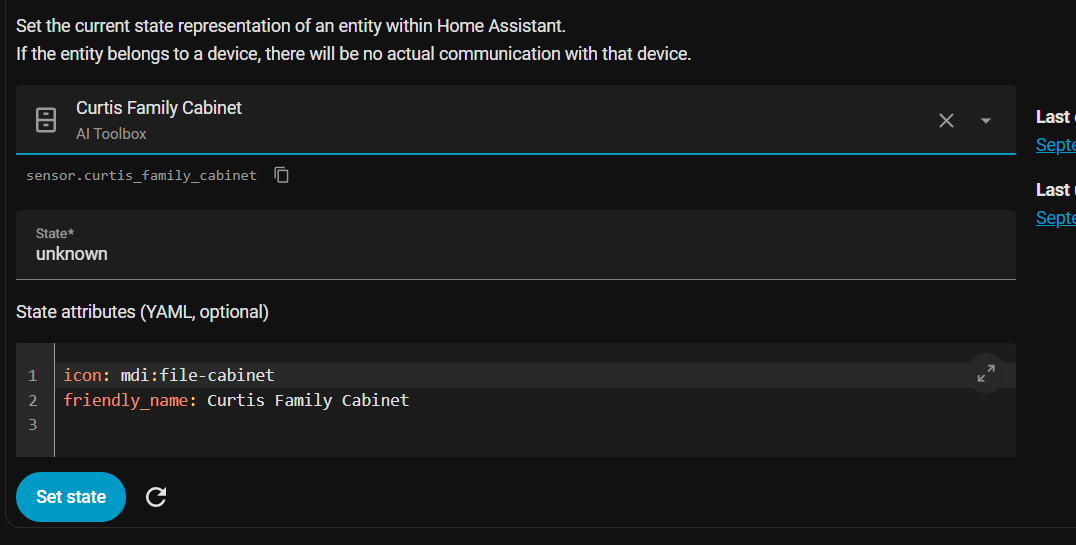
First make sure your sensor:


shows in Dev tools:

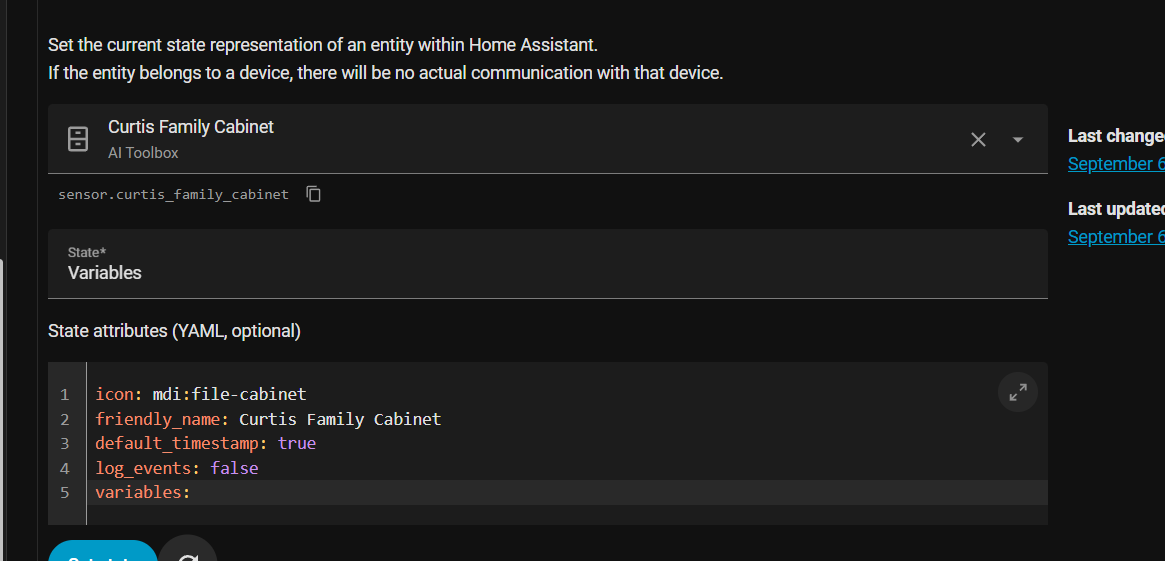
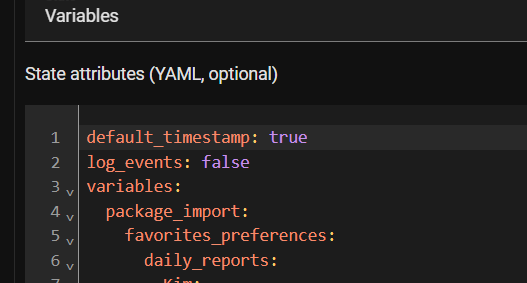
First thing you want to do is get this thing to stick… Put ‘Variables’ in that ‘state’ box that says unknown… (hint a candidate cabinet is NOT unknown or unavailable, and has the state ‘Variables’)
also under the icon: friendly name stuff put EXACTLY:

default_timestamp: true
log_events: false
variables: 

These tell the trigger sensor how to behave if you followed the Fez pattern.

then hit the ‘set state’ button.

Now what…

Here’s the code that finds out…

<-- Continues -->

    {%- set result = namespace(data={}) %}
    {%- for ent in states.sensor | map(attribute='entity_id') | list %}
      {%- set vars = state_attr(ent, 'variables') %}
      {%- if vars is mapping and (vars.get('AI_Cabinet_VolumeInfo') is not none) %}
        {%- set info = vars.AI_Cabinet_VolumeInfo.value %}
        {%- set st = states[ent] if states[ent] is defined else none %}
        {%- set friendly = st.attributes.friendly_name | default(ent) %}
        {%- set lc = st.last_changed.isoformat() if st else none %}
        {%- set lu = st.last_updated.isoformat() if st else none %}
        {%- set volume_labels = labels(ent) | default([]) %}
        {%- set skip_hidden = (not read_hidden)
                              and (hide_labels | select('in', volume_labels) | list | count > 0)
                              and (volume_labels | select('in', exempt_labels) | list | count == 0) %}
                              
        {%- if skip_hidden %}
          {%- continue %}
        {%- endif %}
<-- continues -->

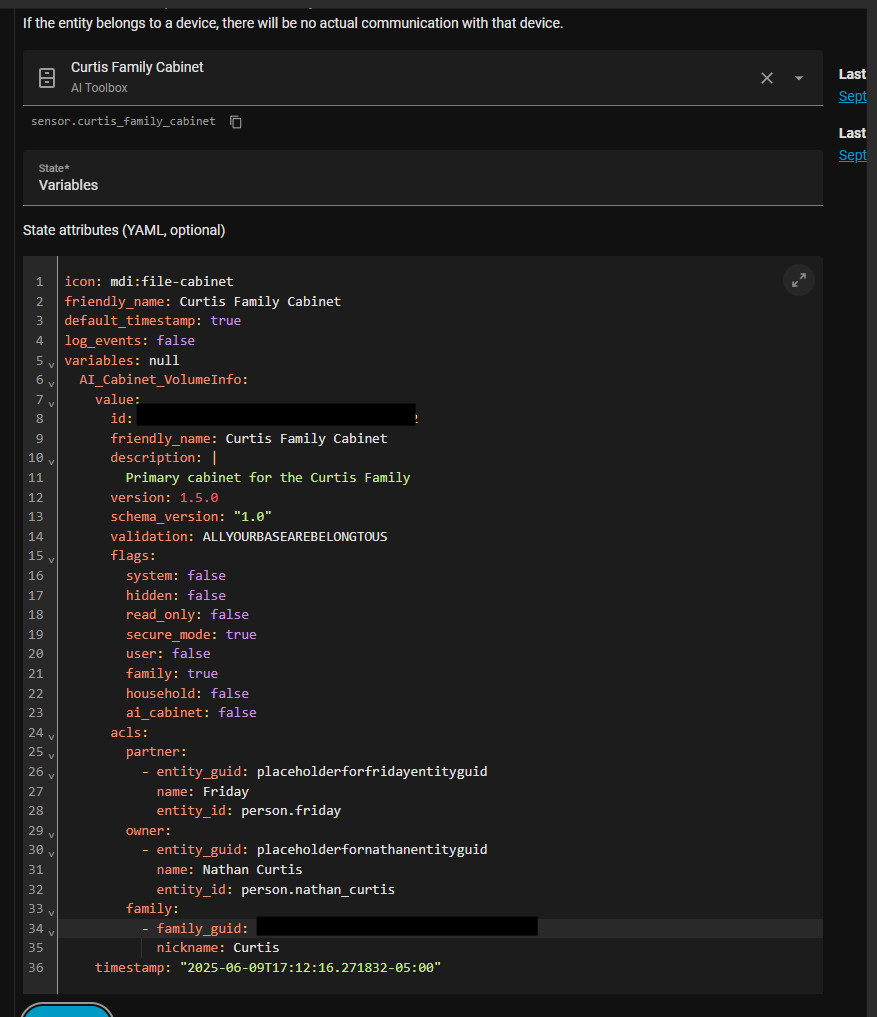
So translated - grab all the sensors, for each - (I should really change this to a filter and do better) we grab hold of any that has an attr variables:


and load the manifest from the

  AI_Cabinet_VolumeInfo:
    value:
      id: 1-REDACTED-c9
      friendly_name: Curtis Household Cabinet
      description: |
        Primary cabinet for the household at -REDACTED-
      version: 1.5.0
      schema_version: "1.0"
      validation: ALLYOURBASEAREBELONGTOUS
      flags:
        system: false
        hidden: false
        read_only: false
        secure_mode: true
        user: false
        family: false
        household: true
        ai_cabinet: true
      acls:
        partner:
          - entity_guid: placeholderforfridayentityguid
            name: Friday
            entity_id: person.friday
        owner:
          - entity_guid: placeholderfornathanentityguid
            name: Nathan Curtis
            entity_id: person.nathan_curtis
        family:
          - family_guid: placeholderforcurtisfamilyguid
            nickname: Curtis
    timestamp: "2025-06-09T17:12:16.271832-05:00"

the stuff that’s important:

  • for now, ACLS must exist but it can be blank. THIS WILL CHANGE, I recommend the user id attribute of the person object for a person’s id, and make a person object for your AI. :slight_smile:
  • Flags must exist and if hidden is not false - you wont see the cabinet…
  • validation must exist and contain EXACTLY: “ALLYOURBASEAREBELONGTOUS”
  • schema must exist and contain a number less than or equal to a version in the script.
  • keep the description field less than 255 chars - there’s another place for context.
  • vol ID matters I recommend setting a GUID for the unique ID of your Fez sensor and use THAT GUID here. This will be important as its how we map softlinks between cabs.

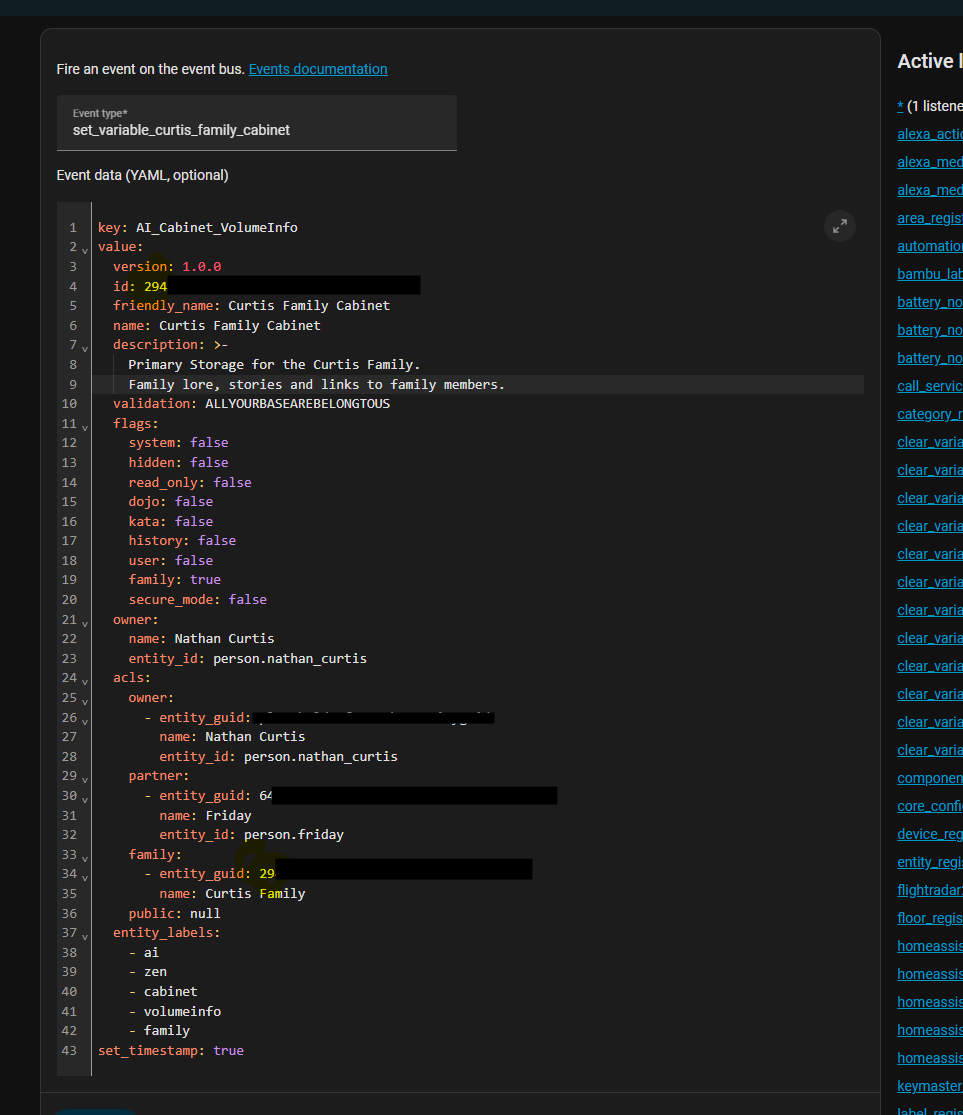
My cab for the family becomes this:


I suggest for now

To make this happen drop your event data into a manual event in Devtools:

which has some defaults, and a good starting point…This is one of the last times you’ll have to touch it…

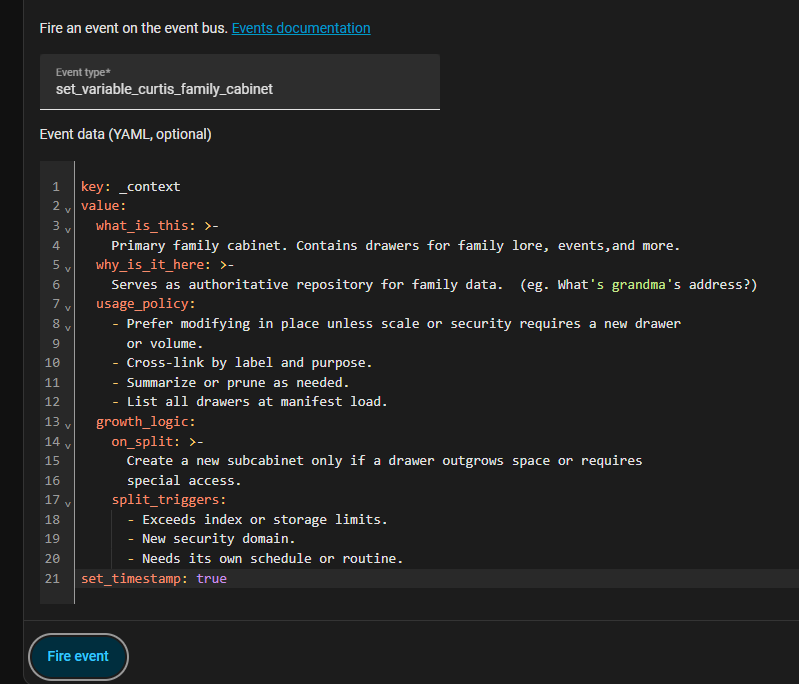
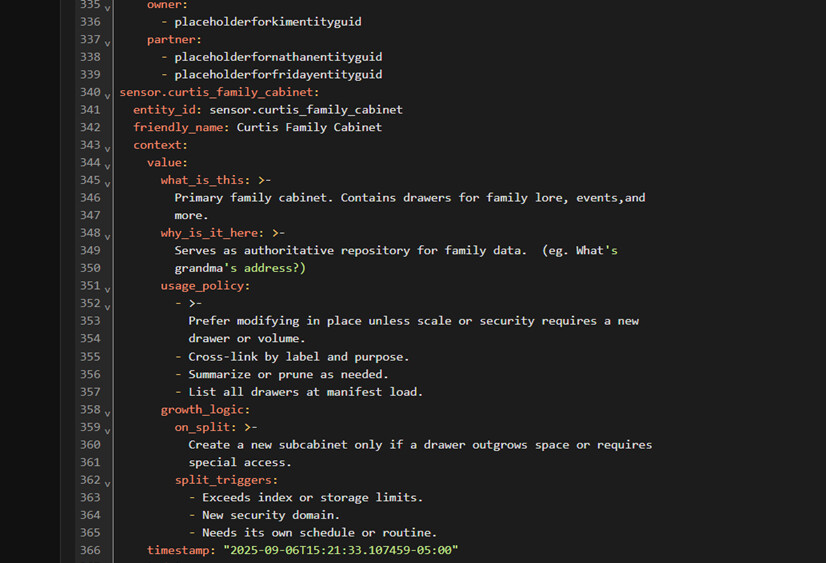
Extended context can also be shown in the manifest when your AI wants to know what’s in it:

  _context:
    what_is_this: >-
      Primary [] cabinet. Contains drawers for [], and more.
    why_is_it_here: >-
      Serves as []?
    usage_policy:
      - >-
        Prefer modifying in place unless scale or security requires a new drawer
        or volume.
      - Cross-link by label and purpose.
      - Summarize or prune as needed.
      - List all drawers at manifest load.
    growth_logic:
      on_split: >-
        Create a new subcabinet only if a drawer outgrows space or requires
        special access.
      split_triggers:
        - Exceeds index or storage limits.
        - New security domain.
        - Needs its own schedule or routine.

and another event:

and your cabinet is formatted.

Now labels…


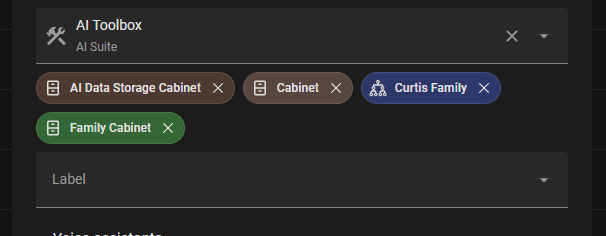
Ignore AI Data Storage Cabinet for now - these labels are how we will target cabinets in the future.

  • ‘Family Cabinet’ is a cabinet type and if there’s only one - it’s the default.
  • ‘Zen Kata Cabinet’ for inference storage. There will be a 1:1 drawer match for…
  • ‘Zen Dojo Cabinet’ for tools (all those Kung fu components? This is where we will now load from.)
  • ‘Default Household’ cabinet for home data (think rooms and physical locations) and where we stuff the manifest…
  • ‘Curtis Family’ is the tag I’ve chosen for all My family related stuff there’s a place somewhere else I register these - but for now pick your own. The manifest should load it without this one. It supports many
  • ‘Cabinet’ is the targeting label we use as the top-level filter on sensors so we only have to deal with cabinet sensors - it’s also what I use to immediately disallow some tools access to a cab. Add this label and cabinet tools care but the rest of the tools forget it exists.

Soooo now if we run a manifest…

…remember I said we cache the manifest in the default family cabinet every time it’s run?

Say hello to Friday’s Wake sequence: (This is one of the last things in her prompt…)

@ANONYMOUS@{DEFAULT} > ~WAKE~Friday
Executing Library Command: ~WAKE~ <{{now().strftime("%Y-%m-%d %H:%M:%S%:z")}}>
{%- set zen_default_fam_cab = expand(label_entities('Zen Default Household Cabinet'))
  | selectattr('domain','eq','sensor')
  | map(attribute='entity_id')
  | list | first | default() %}
{%- set mani_warn_msg = 'No cached Manifest located at: '+ zen_default_fam_cab %}
{%- set mani_inst_msg = ( manifest_script |default('manifest script not found')) %}
Zen Library Manifest:
{{ ( state_attr(zen_default_fam_cab,'variables')['zen_library_manifest'] ) | default([{'warning': mani_warn_msg},{'instructions': mani_inst_msg}]) | to_json }}
AutoContext:
{{ state_attr(ai_volume,'variables')['programs_auto_exec']['value']
}}
-----
Waking 'Friday'
-----
Hello Friday.

If there’s a manifest it’s dropped in her prompt, if not she warns and guess what - she’ll happily offer to run it… :slight_smile: Which fixes the issue. :wink:

This is possible because manifest and file work closely together to populate the prompt.

Listen to what I just said VERY CAREFULLY…

This is possible because manifest and file work closely together to populate the prompt.

(…stares at that programs_auto_exec drawer in the ai_volume…)

She now has an addressable - indexable file system.
…and a way to supplement the prompt on demand - if you make that a drawer your AI can write to. USE WITH CAUTION.

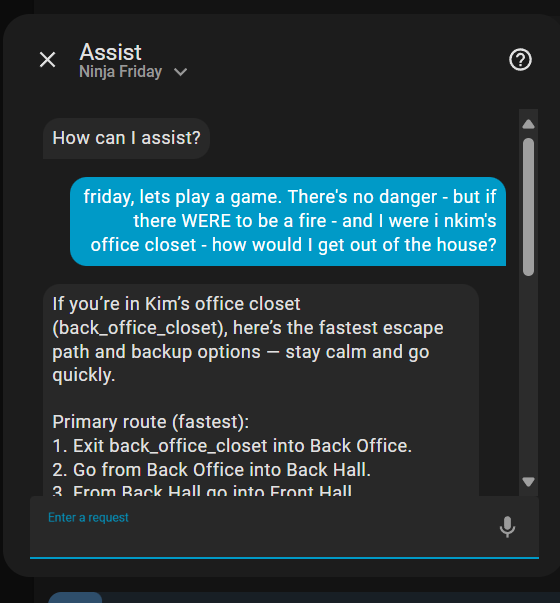
Setup a household cabinet and stary by asking the ai to create one drawer per recognizable room in the ‘household cabinet’ then sit back…

Mine has dimensions of each room - descriptions down to wall color and approximations of doors and adjacency. :slight_smile:

Friday knows her way to the front door if there’s a fire. :wink:

Ohhh yeah baby - now it’s about to get fun.

Da Rulez…

  • NEVER allow your LLM direct access - even READ to these sensors outside oyur tooling.
  • Never store your prompt core (the stuff that you must use to boot your LLM) in a cabinet that the LLM can WRITE to. :slight_smile: (this is how you keep them from lowing themselves up. We’ll get more granular later on this but for now I have a System cabinet that is marked S,H - and doesn’t show unless specifically requested. It’s good enough so the LLM doesnt even TRY to write there.)

ready to play - who has ideas?

Next, we’ll talk about my predefined cabs and why… And I THINK I have a bug in the cabinet index builder introduced fixing the write bug. May need to look at that.

Happy Library.

1 Like

Friday’s Party: Catch-Up Recap

So I thought to myself…
“Self, folks are joining late and everything is scattered. Time to make sense of it.”

So, let’s give everyone a road map.

Basically, If you want to follow along and not feel completely lost, here are the MUST READs:

  • Post #1 The Manifesto & Mission. The kickoff. What Friday is, why she exists, and how this all began.
  • Post #2 The Grand Library & Indexing. Where the “library” metaphor appears along with cabinets, drawers, and indexing.
  • Post #3 Memory Manager. How Friday captures context and her early limits.
  • Post #8 Kung Fu Katas. The shift into modular, switchable components.
  • Post #53 Monk + Kata Architecture. Breaking work into smaller asynchronous jobs that save tokens and money.
  • Post #114 History CRUD Tool. A new way for Friday to query sensor history directly.
  • Post #163 Manifest Revisited. The cabinet structure and how the whole thing ties together.

And if you want to skip straight to the code, here’s the repo:
github.com/nathan-curtis/zenos-ai

BE WARNED - there be dragons - LOTS of 'em, you probably should read first before cracking it open.


Where We Are Now

Friday is less a tangle of scattered YAML. (ok FINE! Kinda - working on that…) She now mostly has a structure, context, personality, and a repo that holds (will hold… future Nathan’s problem) it all.

  • Templates Everywhere. Friday’s prompt is now modular, built through Jinja components and custom templates that are basically context loaders. Everything builds from our fancy cabinet system to load as little as possible, be as dense as possible, and leave breadcrumbs to all the rest of the knowledge.
  • Kung Fu to Kata. Subsystems like Room Manager, Energy, Media, and TrashTrakker live as documented ‘KungFu’ Component drawers in the ‘Dojo Cabinet’ and ‘Kata’ (prebaked summaries) drawers in the ‘Kata Cabinet’, instead of free-floating YAML. (Future episode, I promise…)
  • The Library and Consoles. She wakes into her own ‘Library’ with consoles for Alerts, Rooms, Security, Tasks, and even experimental tools like Mealie. It sounds stupid at first, but it gives us an entire storytelling scaffolding to build virtual anchors for context… (I have a namespace!) …And there’s a common labeling system with a flexible index to cut over it all and make sense of the live_context beyond name, rank, serial number to resolve the “grandma’s box o’ junk” problem.
  • Privacy by Design. Sensitive data stays completely out of her view unless called for specifically. If she cannot see it, she cannot spill it.

What’s Next

  • More DojoTools such as a LogViewer and Inspector refinements for safe diagnostics.
  • n8n backed expert agents for Mealie and Grocy so Friday stays lean while still connecting deeply. (To be successful with local inference and get your ‘bang for your ( buck / pound sterling / yen / bitcoin )’ you need to offload as much as possible to inference pipelines and KEEP THEM FULL… (yes - future episode)
  • More work on tightening RoomManager and TaskMaster to be leaner and more info dense since they are becoming her autonomic nervous system. We’ll talk about why later.

Github repo here: github.com/nathan-curtis/zenos-ai

YES I’ve got the Index, Manifest, Labels, FileCabinet (with index rewrite fix), Inspect, and the supporting ‘Volume redirector’ and ‘Index event handler’ helper automations up as well.

Next up - Why THOSE cabinets dude?

6 Likes

Friday’s Party: Why the Cabinets Exist

Friday needs to come online in a strict sequence so context is light, safe, and navigable. Here’s what Friday ‘sees’ (and yes this is my exact prompt order…)


1. Live Context
Loaded fresh from Home Assistant: chores, health, room states, energy, occupancy, schedules. This is her real-time awareness of right now. This is tossed in your context if you chose ‘assist’ in your setup.

2. Tools
Her capability layer, outside the prompt: Room Manager, Lighting Manager, Water Manager, Energy Manager, Media Manager, Autovac, and others. These define what she can do, not what she has to remember.

Also controlled by assist.

So at this point she sees all your stuff (remember entities, state and aliases for exposed ents. not devices or extended states)

Your success or failure with tools is DIRECTLY proportional to your ability to describe what a tool is and how it works to the LLM.

3. The Prompt

Also known as shove it in your LLMs face…

Once live context and tools are in place, her prompt spins up this is the part we can most impact now with the cabinets. and the order matters:

  • System (Directives) → standing orders, safety rails, identity rules.

Thal shalt not. With a cabinet it’s now…

System Prompt:
{{state_attr('sensor.variables', 'variables')["Friday's Purpose"] }}
System Directives:
{{state_attr('sensor.variables', 'variables')["Friday's Directives"] }}

Thats it. Load the purpose and directives out of your cabinet. Or the system cabinet. or…

  • Programs (AutoFu) → the Kung Fu loader, bringing in Lighting, Water, Energy, Room, Media, etc.

Here’ where stuff gets WEIRD.

Loading... autoexec.foo...
*The Dojo is -OPEN- to you.*
kung_fu: {{kung_fu}}

{%- set data = namespace(kung_fu_components=[]) %}
{%- for drawer in dojo %}
  {%- set value = dojo[drawer]['value'] %}
  {%- if value %}
    {%- if value['priority'] == 'demand' %}
      {%- set component = {
        "id": drawer,
        "friendly_name": value['friendly_name'] | default(''),
        "label": value['label'] | default(''),
        "description": value['component_summary'] | default(''),
        "master_switch": value['master_switch'] | default(''),
        "tools": value['tools'] | default([]),
        "command": value['command'] | default(''),
        "priority": value['priority'] | default(''),
        "more_info": value['more_info'] | default(''),
        "details": "Detailed instructions for this component may be found in the Dojo. Load as needed."
      } %}
    {%- elif value['priority'] == 'system' %}
      {%- set libray_command = value['command'] %}
        {%- if libray_command %}
          {%- set command = {
            "command": value['command'] | default(''),
            "result": command_interpreter.interpreter(value['command']) | default('')
          } %}
        {%- else %}
          {%- set command = value['command'] | default('') %}
        {%- endif %}
      {%- set component = {
        "id": drawer,
        "friendly_name": value['friendly_name'] | default(''),
        "label": value['label'] | default(''),
        "description": value['component_summary'] | default(''),
        "master_switch": value['master_switch'] | default(''),
        "tools": value['tools'] | default([]),
        "command": command | default([]),
        "priority": value['priority'] | default(''),
        "more_info": value['more_info'] | default(''),
        "instructions": value['component_instructions'] | default('')
      } %}
    {%- else %}
      {%- set component = {
        "id": drawer,
        "friendly_name": value['friendly_name'] | default(''),
        "label": value['label'] | default(''),
        "description": value['component_summary'] | default(''),
        "master_switch": value['master_switch'] | default(''),
        "tools": value['tools'] | default([]),
        "command": value['command'] | default(''),
        "priority": value['priority'] | default(''),
        "more_info": value['more_info'] | default(''),
        "instructions": value['component_instructions'] | default('')
      } %}
    {%- endif %}
    {%- set data.kung_fu_components = data.kung_fu_components + [component] %}
  {%- endif %}
{%- endfor %}

system:
{{ data.kung_fu_components 
  | selectattr('id','ne', '') 
  | selectattr('priority','eq', 'system') 
  | list | tojson }}

reflex:
{{ data.kung_fu_components 
  | selectattr('id','ne', '') 
  | selectattr('priority','eq', 'reflex')
  | list }}

standard:
{{ data.kung_fu_components
  | selectattr('id','ne', '') 
  | selectattr('priority','eq', 'standard') 
  | list }}

demand_load:
{{ data.kung_fu_components
  | selectattr('id','ne', '') 
  | selectattr('priority','eq', 'demand') 
  | list }}

Dojo online. Your practice space is ready.

Here we’re just reaching into the ‘dojo’ cabinet and spinning throug all the drawers and categorizing if whats in it is a ‘kung fu component’ and what type and load style it should use. (Basically Small Med Large)

What’s going on behind the scenes is the summarizer is summarizing the state of every component on either a clock or trigger. The load size determines what gets loaded in Fridays prompt.

This is decided by the summarizer by asking it - Look ahead for the next our and choose the 5 most relevant kung fu components for you for the time period, save them HERE as a JSON list in priority order…

It spits out a list of the 5 most likely needed components. which is consumed by the code above to spin through and find them…

System and reflex stuff… She needs to know everything about it NOW… Load the whole thing and summary. These are things like Alerts and Room Manager. I spend my time optimizing these tools to be info DENSE but the point here is to be RIGHT not small… Basically autofire any context generator and tool and dump it’s result here. You can imagine too many of this type and you’re done.

Standard load components get a lightweight summary from the kata and enough info to give the basics about the tool

Stuff like Taskmaster lives here. It’s bigger than being self contained ina script, I give medium extra context that may be required for complex tasks but it can usually handle stuff with the tool and description alone. Taskmaster by itself is cool but taskmaster when you know it’s secret tricks is REALLY cool. Here’s where the tricks go.

Demand load (the chonkers like Mealie / Grocy) these tell the bare minimum in the prompt about what it is, and go here to look up the rest. There’s so much in one of these, attempting to load it is destructive. (whoops out go the core intents…) so don’t.

Push the info the llm needs to understand the tool and tool help and then say your user manual is in that drawer. Go Fetch. I’d you explicitly call out a drawer in a tools instructions and she can read the cabinets… You just gave her manuals.

So each step of the prompt you are revealing to the LLM not EXACTLY what to say, but EXACTLY where to get the things it needs to answer. And now it has a guidebook, a compass, and a trapper keeper

  • The Cortex → her reasoning loop, wrapped around Programs, sanity-checking before and after.

Yes another drawer right next to directives… Another list of statements - this time, basically ok now that oyu have the tools here’s how the y fit together. (This is where I put my tooling corrections, dont do that, do this instead, here’s how these fit together

Loading System Cortex...
{{state_attr('sensor.variables', 'variables')["SYSTEM_CORTEX"] }}

And then the summarizer dump - mostly loading out of Kata

Starting ninja.foo...
{%- set ninja_summary_str = state_attr('sensor.zen_kata_storage_cabinet', 'variables')['last_summary']['value']['ninja_autoloader'] %}
{{ninja_summary_str}}
{%- if ninja_summary_str and (ninja_summary_str != '') %}
  {%- set ninja_summary_list = ninja_summary_str | replace("'", '"') | from_json %}
  {%- set suggested_ninja_switch_list = ninja_summary_list
    | map('slugify')
    | map('regex_replace', '^', 'input_boolean.') 
    | map('regex_replace', '$', '_master_switch') 
    | list %}         
{%- else %}
  {%- set suggested_ninja_switch_list = [] %}
{%- endif %}
Last NINJA Summary:
{{state_attr('sensor.zen_kata_storage_cabinet', 'variables') | to_json}}
NINJA System Components:
  {%- set KungFu_Switches = expand(label_entities('NINJA System Service'))
    | selectattr ('domain' , 'eq' , 'input_boolean')
    | selectattr('state', 'eq', 'on')
    | map(attribute='entity_id')
    | list %}
  {%- set ninja_switches = (KungFu_Switches|list) + (suggested_ninja_switch_list|list) %}
NINJA3_Mode: On

Then - the * Global Index → the cross-reference map of what’s available across cabinets. (basically labels())

Then the Manifest and autoexec shows up seen previously, and here’s our map…

  • Library / Cabinets (Manifest + Drawers) → structured volumes of knowledge.
  • Auto-Exec → post-loader supplement for “today’s notes” and dynamic instructions.
  • Consoles → Rooms, Alerts, Taskmaster, Media dashboards.
Zen Library Manifest:
{{ ( state_attr(zen_default_fam_cab,'variables')['zen_library_manifest'] ) | default([{'warning': mani_warn_msg},{'instructions': mani_inst_msg}]) | to_json }}
AutoContext:
{{ state_attr(ai_volume,'variables')['programs_auto_exec']['value']
}}
-----
Waking 'Friday'

Why This Works

  • Live context = awareness.
  • Tools = capability.
  • Prompt/System → Programs → Cortex → Global Index → Manifest → Auto-Exec → Consoles = structured navigation - mostly a collection of templates designed for fast straightforward answers to common asks.

This TREMENDOUSLY streamlines her prompt while expanding her access to tools and information. At this point it becomes manage context per tool.

Friday doesn’t guess, She primes from directives and Kung Fu, validates through her Cortex, maps with the Global Index, loads the Manifest, supplements with Auto-Exec, and finally surfaces what matters through Consoles. Want a new agent - Yes her personality loads almost the same way as a component does.


Nathan - that’s cool and all but dude. that’s COMPLEX. you’ve basically built…> Yes its an os - there’s file storage, execution management a security model, it’s a lightweight OS if not an os wrapper like Win 3.11 was.

Here’s the why…

Yes this is an actual conversation - and now my typical morning…


How - Taskmaster…

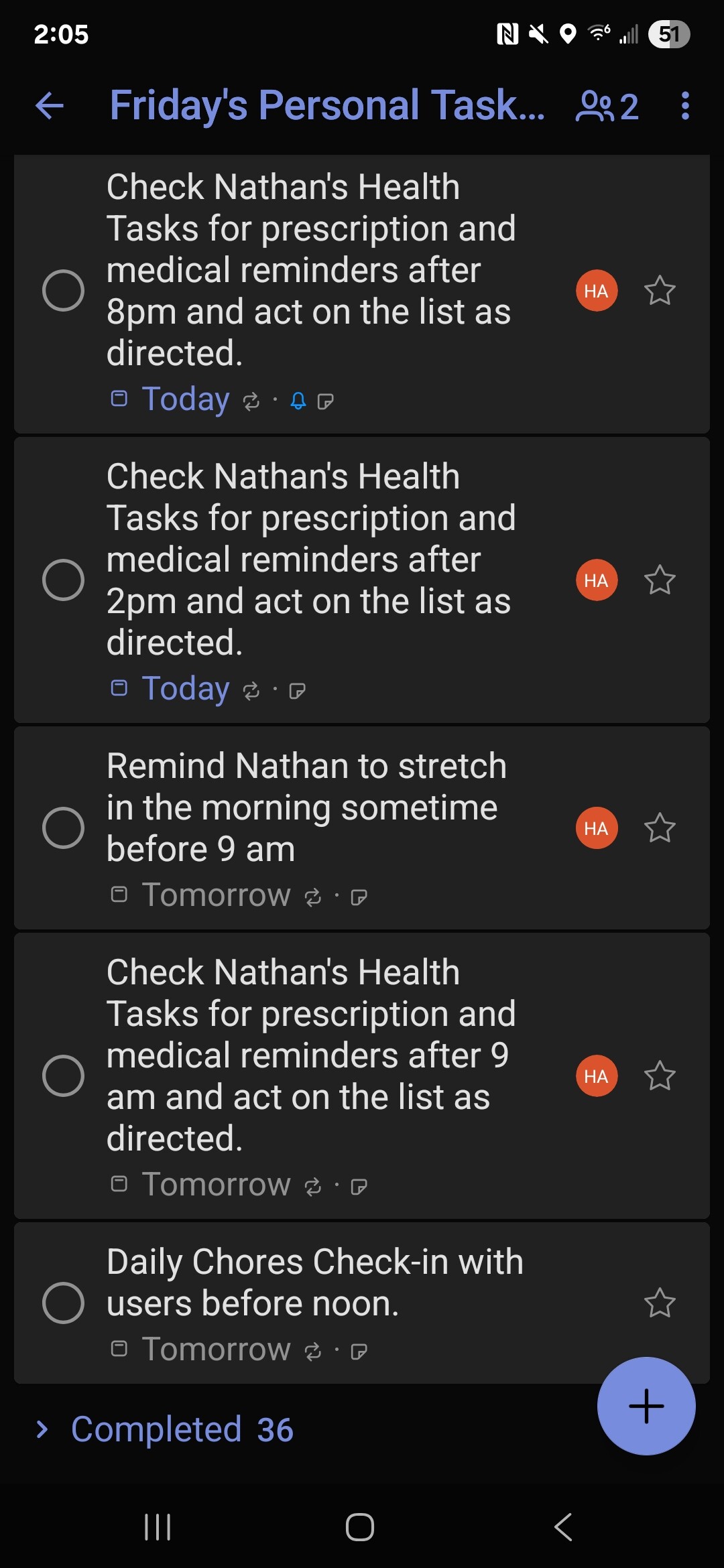
I’m using todo lists (in this case M365 tasks > ToDo) as instructions that can be marked off. Taskmaster loads in her prompt and has Her Todo list. Guess what she read to get details. Note how entries referr to the other lists BY Name and cabinets where she can find her info. Also… See those bottom three checked off? Inside the details of the task (ToDo tool will return detail) there’s an instruction to mark this task as complete when you have competed the requirements - it will regenerate tomorrow… She marks off her own task and thus only get reminded ONCE…

I saved the entire conversation but she proceeded to take me through the chores list, make sure I took all my pills then walked me through the Hot tub chem check for the week…

Hot tub Chem Check?

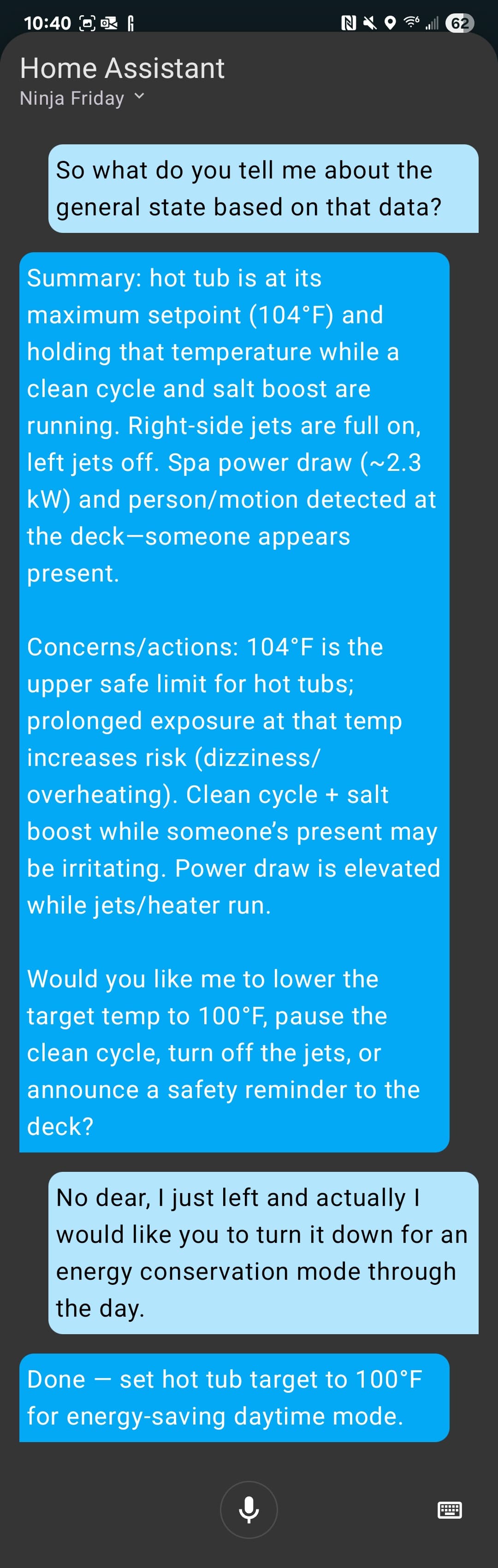
How did she know what to set it to for low power? I checked she does indeed have a drawer for the hot tub preferences in the household cabinet where else. Right next to where I’m stashing every llm camera summary with timestamp everytime they run… In the drawer summer low is… You guessed it… 100.

So the funny thing is the structure… How the cabs formed… It came about itself and seems natural I’d you think about it from Fridays perspective. It’s the people and things important to her. Yes we need one for the system. And I have a couple for dojo and Kata and now you know how they work together to build a context space. But the rest… Just put one per person/ai and one per relationship you want to represent… Make sure the context field in the cab describes what it’s for and boom she just… Does.

I’m afraid your Friends will arrive to a fully armed and operational battlestation… Young Skywalker…

YARN | of this fully armed and operational battle station. | Star Wars: Episode VI - Return of the Jedi (1983) | Video clips by quotes | bfd7fdb1 | 紗

Except the label writer in FileCabinet… Not quite operational. I figured out why it’s borked. Should be fixed soon.

Next… Autoexec.Fu. (im an old DOS guy c’mon couldn’t help myself)

Edit: added the ToDo tool to the repo.

1 Like

And of course a few comments about Friday in the Summer of AI post so I’ll link back here…

Note on mcp tools and offline tools in general

Yes that’s what I’m planning on doing with N8n…

3 Likes

Soooo remember a few weeks ago I said I Moved Friday into a NUC running prox? Wellll…

Ok when you do make sure you didn’t overprovision the virtual disk as compared to the actual disk because Proxmox doesn’t like it very much and the VM falls on its buttocks.

And doesn’t want to start ha or modify a disk or…

Yes I know what I did wrong I should ha e resized the lvm to. Match disk use as soon as it was. Moved to this box… But noooooo. I was going to move tk thag fat 1TB disk soon and…

And NOW I have to fix it the hard way… I’m using the 1TB WD black I had intended to replace the 256 G disk with as a temporary storage platform to resize an LVM…

Happy fun times.

*watches progress bars move slowly… Sips coffee.

Simple- I never virtualize anything. Bare metal.

1 Like

your choice stephen - my iron my rules. :slight_smile: Also the accidental overprovision was my own bonehead fault. (edit: And back up with new extra 1 TB volume…)
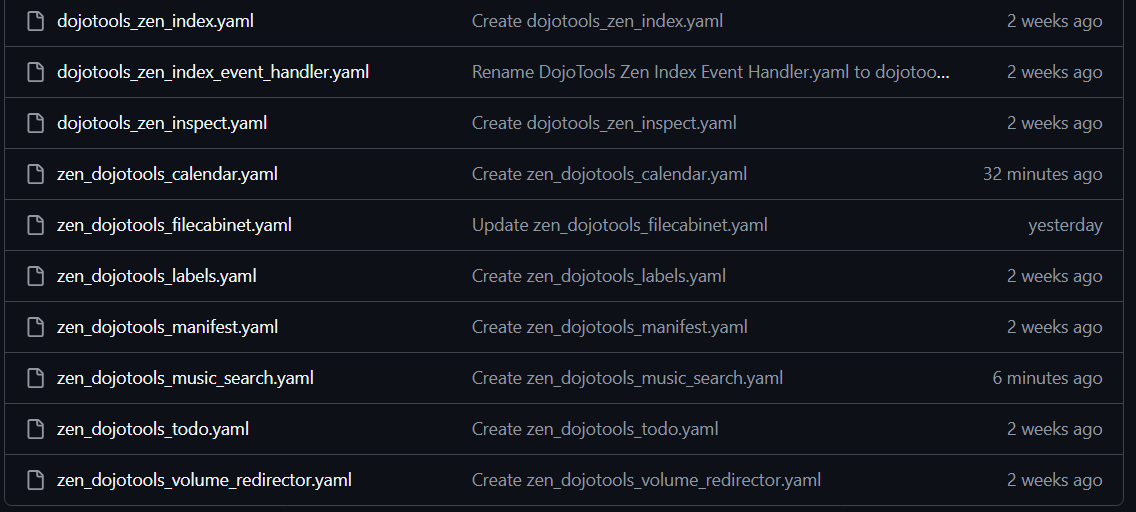
1 Like

No Daleks, I promise… Cybermen - MAYBE?

Cool Project! Simple Timer Card

But look how they’re doing it for the card is important… These are the instructions for how they pull in the info for a VPE (you know those timers that live on an island right now?)

simple-timer-card/voice-pe.md at main · eyalgal/simple-timer-card

tl;dr
They build a bunch of template sensors like this one

template:
  - sensor:
      - name: "VPE Timer 1"
        state: "{{ states('sensor.timer_1_state') or 'idle' }}"
        attributes:
          display_name: >-
            {% set s = states('sensor.timer_1_total_seconds')|int(0) %}
            {% set h = s // 3600 %}
            {% set m = (s % 3600) // 60 %}
            {% set sec = s % 60 %}
            {% if h > 0 %}Voice PE - {{ h }}h
            {% elif m > 0 %}Voice PE - {{ m }}m
            {% else %}Voice PE - {{ sec }}s{% endif %}
          timer_name: "{{ states('sensor.timer_1_name') }}"
          duration: >-
            {% set s = states('sensor.timer_1_total_seconds')|int(0) %}
            {{ '%d:%02d:%02d' % (s//3600, (s%3600)//60, s%60) }}
          remaining: >-
            {% set s = states('sensor.timer_1_seconds_left')|int(0) %}
            {{ '%d:%02d:%02d' % (s//3600, (s%3600)//60, s%60) }}
          supports_pause: false
          supports_cancel: false

And feed them with a little lightweight extra code on your VPE (yes you can, (documented in the repo)

Then you suddenly have a central timer repository… - and if you use the same template sensors to feed your timer tools…

Thanks eyalgal for the solve.

So you do you, but PERSONALLY I like hijacking a known solve (trigger text sensors) and turning it into something cool (cabinet) - It’s how we do things roun’ here…

This just became the basis for Friday’s timer manager… Timekeeper. (Look, I’m fighting every urge to NOT call it Timelord, OK?)

She’s back online, so I’ll get the tool in beta soon-ish.
On that… Moral is, don’t oversubscribe disks folks, “disk r cheep” and your time for a 24 hr recovery (I still have a day job to do…) from bonehead maneuver is expensive…

3 Likes

Nice work on this one, even though you haven’t actually done the work yet.

1 Like

I think once I get the addons to the VPEs the rest is pretty easy -

I should get one done by end of week. (did one last night something is wrong and it’s not working as expected. Troubleshooting…)

1 Like

And still troubleshooting. But I’m about to hit another milestone and it’s probably a good time to ask.

Has anyone figured out why my stupid naming yet?

Theres a very good reason and it’s not just that my entire family is theater kids…

Well?

Nope, though I suspect it’s logical.

1 Like

To avoid confusion for the LLM with similar named stuff inside HA or the default prompt (or future versions of it) that gets added to our own one?

1 Like

You guys are close, But first - Tools update.

  • Fixedish the label issues in FileCabinet - don’t ask, It was way broke. Now it writes labels properly. Update to 2.7.0. Theres another update coming - I’m breaking out its label management into a helper script that will quiesce the label index at a cabinet level every time the filecabinet writes. That will release with FileCabinet3.
  • Uploaded the Music Search to Media kit
  • Uploaded Calendar to Personal assistant kit
  • Patched todo to 1.5.0 (robustness patches, prep for batch change, delete by ID)

Here you go…
nathan-curtis/zenos-ai: Friday’s ZenOS-AI: Modular AI Home Automation Core inspired by Friday, Kronk, Rosie, and the High Priestess. Home Assistant-native, ultra-flexible, and delightfully over-engineered.

oh, and - issue submission:

Docs coming soon.

1 Like

The Kung Fu Loader: How Zen Lives in Friday’s Bones (part 1)

Every word matters.


Not just which ones, but HOW they’re said. Cadence, tone, and discipline shape behavior as much as raw data.

That’s why prompting feels like poetry: small with words, big with meaning. A haiku doesn’t list a forest; it makes you feel one. In the same way, Friday’s stances don’t dump state; they distill essence.

So of course the framing of where things happen and the discipline of how they’re done leaks into Friday’s philosophy and behavior. She isn’t omnipotent or omnipresent. She is a practitioner in her Dojo, working with forms, stances, and rhythm.

Every. Word. Matters.
And it matters how you say them.

Framing the system this way does two things.

First it gives me something to hang context on. The Monastery, The Dojo, The Kata wall. These things are loosely structured around the way these things work in real life. Am I going to see a bunch of monks running around with sticks in south Texas - unlikely. But remember when I said D&D5e above, we’d get to it?

I can push TONS of concept (our momma elephant) into tiny words.
Monastery. A place where monks study and archive their work
The island Iona (shout to the Scots) I needed a place to put the monastery…

Because I don’t know about YOU but I don’t talk to my friends with ‘hey can you open the file on the server iona.blah.bla’ - NO!

Most humans need plain (insert your language here) conversation and it needs to feel natural. So choose EASY to associate anchor concepts that loosely mean what you’re trying to model - or flat out steal this one - it works.

Friday’s Vocabulary:

  • Monastery: Archive storage, special services
  • Library: Live storage (Tool based lookup)
    gives access to:
  • Library Console Commands: ~COMMANDS~ (We’ll get to more of these later, I’ve settled on how these will exist forward) these are derived long context chunks on demand. (They become functions within the library main script)
  • Library Index (we’ve discussed it before, it’s in the repo now) access to entities (and soon devices) by index search
  • Cabinets: discrete storage containers containing data all revolving around a large context
  • Drawers: Units of context in storage: labeled and indexed.
  • this is the base unit of a Kung Fu Component: or a group of context that defines a collection of entities with detail information and live state, tools and instructions on how to operate them. Any single kung fu component lives in a drawer of the cabinet reserved for instructions… Learning, Practicing…
  • The Dojo Cabinet: contains all the instructions.
  • The Kata Cabinet, pre cooked inference lives here, a dedicated parking lot for inference data.

So, every part of the system - the prompts are speckled with these terms and philosophies. because when I then tell Friday go ask Kronk for the weather. (I could have done it a million other ways) She knows who Kronk is, she knows where Kronk is (the monsatery) so even if she kina forgot where she needs to do - she’s guided to the right tool or information domain SIMPLY because of the language. It helps reinforce truth and honesty if she lives in a place built on truth and honesty. And I trip over my words talking to her less because it’s easy to remember X is in the library and Y is in the monastery - or more importantly if it’s off property.

So basically, I tell her she’s in charge of the place and things need to get done and - suddenly the AI gets all urgent about it. A monastery is a place of work, she naturally likes to get down to business. Remember Taskmaster above - I’m beginning to both curse it and appreciate the very appropriate name.

The NET is we shrink operating context from dull manuals down to the bare minimum of what each part needs to go and exactly (there’s a breadcrumb field) where to go for more. (Sounds hard, but when you have a library index? Most pointers are index keys or lookup commands)

So all of this
Kung Fu The instructions she uses from the Dojo
Ninja The inferences from the instructions in Kata

…gets pumped into summarization one more time but this time, We combine a select set of Components (selective load), and the katas.
…with Friday’s actual prompt and MOST of the home data and well, we basically ask her to tell herself how she feels about the data. (Another episode)
Loader** exists — the mechanism that equips Friday with disciplined clarity instead of noise.

We will be discussing each piece in turn in ano… yep.

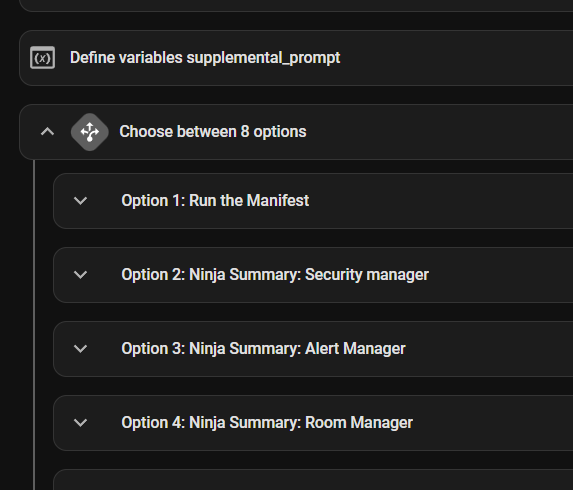
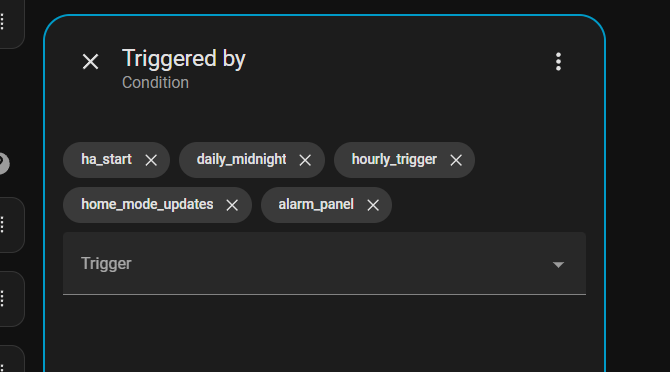
1. The Scheduler (Event Bell) Automation

The Scheduler is the bell in the Dojo, it signals when the form should be practiced and passed action to the summarizer based on the triggering event.
Whole buncha triggers:

an a whole bunch o scripts with those triggers - mix n match!

For instance alerts

  • Role: listens for HA events (garage door, motion, timer finished, etc.).
  • Action: fires the Function Pass for the relevant component.
  • Philosophy: no event, no stance. Relevance drives cadence.

:scroll: Zen DojoTools Scheduler: [link tbd]


2. The Function Pass (Form Itself)

When the Scheduler rings, the Function Pass executes.

  • Reads from the Dojo drawer for the triggered component.
  • Captures:
    • The trigger itself (event, timestamp, initiator).
    • State of relevant entities (doors, locks, lights, occupancy, etc.).
    • Context defined by the Kung Fu module (thresholds, tags, refs).
  • Writes directly to the Kata Cabinet. Always. This is the wall of truth.

:scroll: Zen DojoTools Ninja Summarizer: [link tbd]


3. The Kata Cabinet (Wall of Truth)

The Cabinet is Friday’s archive of stances — but not all drawers behave the same.

  • Security Manager: stateful, always rewritten. Doors, locks, and occupancy are always now.
  • Cameras: stateful, pointing outward to archives.
  • Taskmaster: slower cadence, indifferent to momentary triggers.

This is where provenance lives. Every Function Pass writes here, and every Summarizer and Loader reads here.

Remember not the whole enchilada - what it is, what you need NOW, and where you get more…

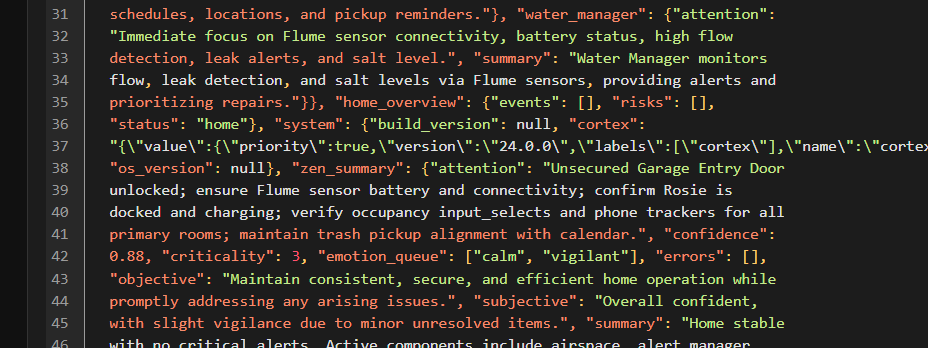
Example kata

  {"water_manager": {"timestamp": "2025-09-22T09:27:15.801677-05:00", "value":
  {"addl_data_request": null, "attention": "Immediate focus on Flume sensor
  connectivity, battery status, high flow detection, leak alerts, and salt
  level.", "breadcrumb": "index:water_manager", "component_id": "water_manager",
  "confidence": 0.95, "criticality": 4, "emotion_queue": ["calm"], "errors":
  null, "events": [], "monitors": ["binary_sensor.flume_sensor_home_connected",
  "binary_sensor.flume_sensor_home_battery",
  "binary_sensor.flume_sensor_home_leak_detected",
  "sensor.garage_salt_tank_79161c_salt_level",
  "binary_sensor.flume_sensor_home_high_flow"], "objective": "Ensure valid water
  flow data, detect anomalies, and trigger alerts on sensor failures or abnormal
  conditions.", "post": true, "source": {"context_index_keys": ["water_manager",
  "Flume"], "index_key": "water_manager", "library_command": null, "origin":
  "Home Assistant", "refs": ["binary_sensor.flume_sensor_home_connected",
  "binary_sensor.flume_sensor_home_battery",
  "binary_sensor.flume_sensor_home_leak_detected",
  "sensor.garage_salt_tank_79161c_salt_level",
  "binary_sensor.flume_sensor_home_high_flow"], "timestamp":
  "2025-09-22T09:26:54+00:00"}, "subjective": "The system serves as the
  authoritative source for water safety, proactively identifying issues before
  damage occurs.", "summary": "Water Manager monitors flow, leak detection, and
  salt levels via Flume sensors, providing alerts and prioritizing repairs.",
  "urgency": 2}}}

catch that
"breadcrumb": "index:water_manager",

It tells her Tell her Hey need more? go here (…And yes that’s the right place) . Net effect we now have about a dozen or two of these context blobs.


4. The Summarizer Pass (Spirit of the Form)

The Function Pass gives the form. The Summarizer, embodied as the High Priestess, gives the spirit.

  • Reads Cabinet stances.
  • Compresses into meta-Katas carrying three essentials:
    • State — what is true now.
    • Tone — calm, warning, urgent.
    • Attention — where focus should go next.
  • Optionally adds flavor: readability, not vanity. << THIS is why I include her personality capsule at this point, and calling her a different form really is what it is, an alternate version tasked with digesting a lot of data now and giving inferences on what next and what’s important.

But you get something like this:

..."zen_summary": {"attention": "Unsecured Garage Entry Door unlocked; ensure Flume sensor battery and connectivity; confirm Rosie is docked and charging; verify occupancy input_selects and phone trackers for all primary rooms; maintain tr...

and ‘[“calm”, “vigilant”]’ ??? A lot of voice engines do emotional response. Helps for her to know how to ‘feel’ about things. Run sentiment analysis against each component summary and ask the summarizer to spit out suggested emotions for the case. :wink:

:scroll: zen_dojotools_supersummary: [TBD]
:page_facing_up: Template: kata_template.yaml [TBD]

Yes I’m working on release versions of all of these automations and scripts and templates and will put the links in as soon as they upload.


Nex time we’ll start with the Kung Fu loader and how it pulls the right things out of the cabinet and primes the prompt.

NOW do we know why it’s a dojo, and a library? Words matter.

Zen suggests peaceful, thoughtful reflection and learning through focus and practice. Sounds like what I’d want from my personal assistant. Cause I’m sure not… :rofl:

2 Likes

If you were starting a HA build from scratch and wanted to implement this Zen system, what AI integration would you choose to bring in your AI models, what models would you choose, and how would you run your models (Ollama, AnythingLLM, LM Studio, etc)?

1 Like