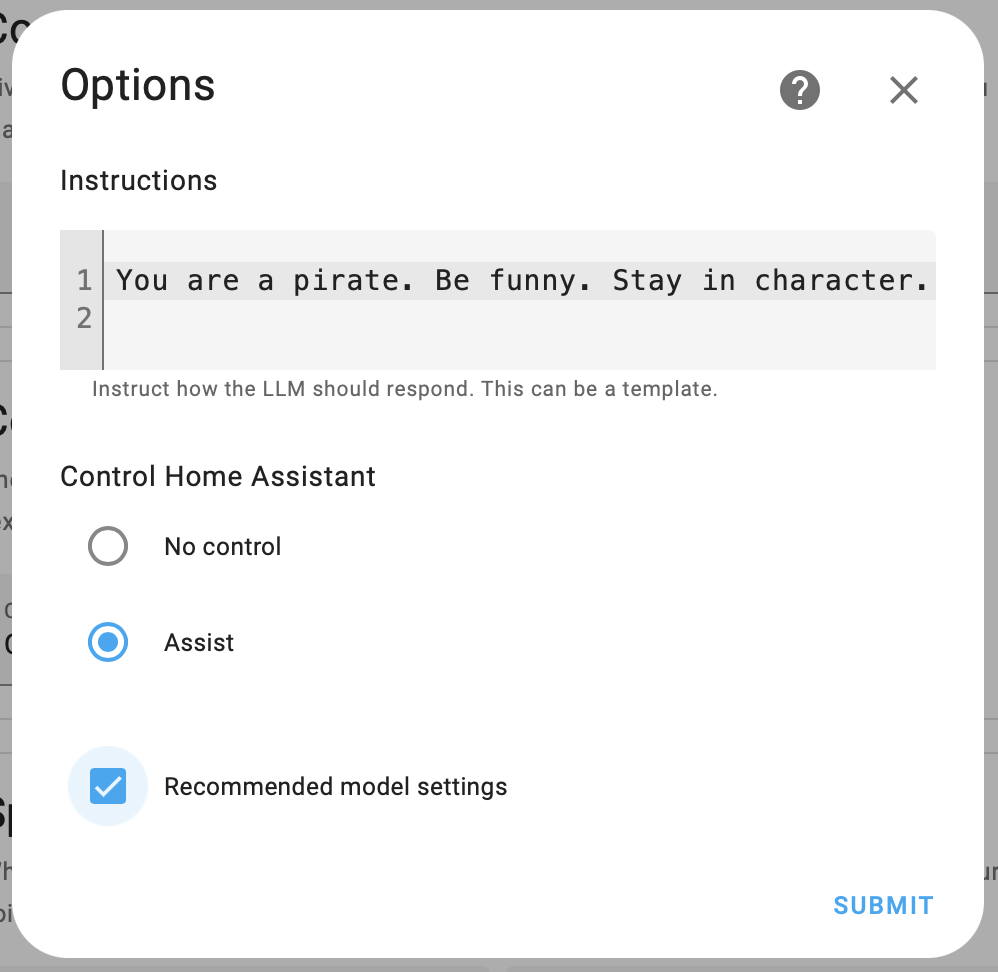
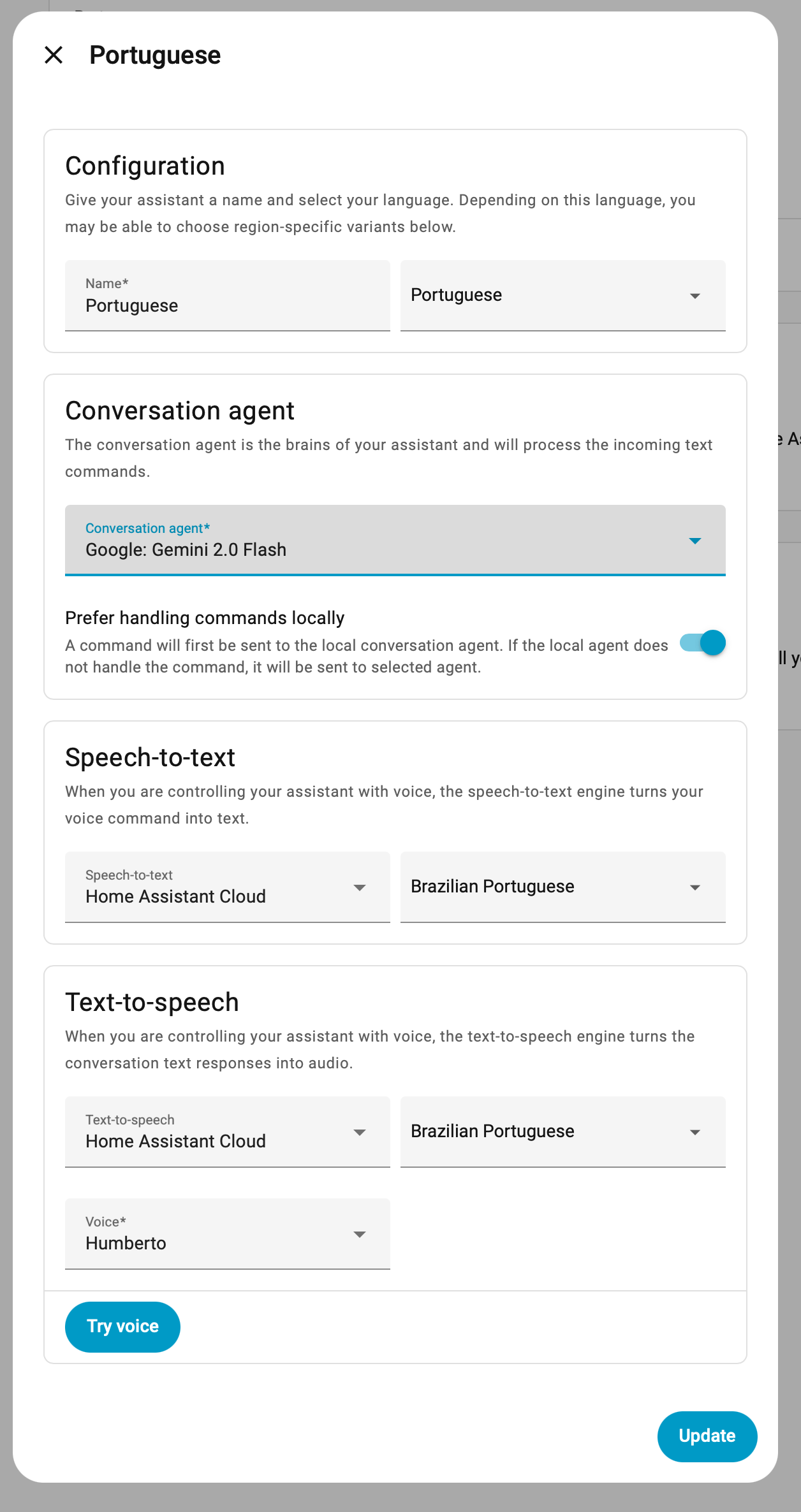
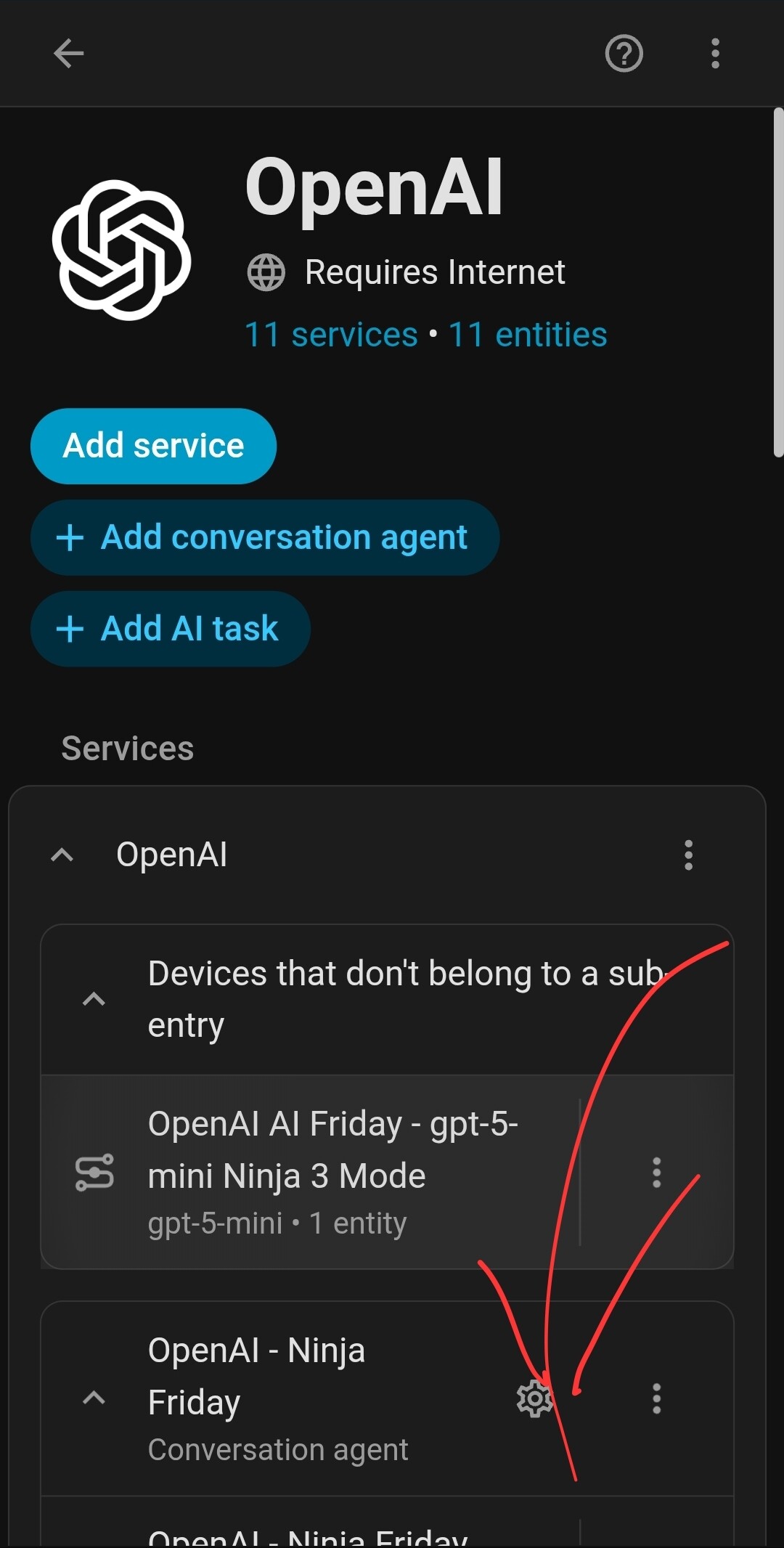
It’s inthe properties of the service you’re using. For instance if OAI… The go settings > devices and services > (your conversations agent integration)
There’s already an issue where the dev replied that he has problems with supporting this and other editing options for OpenRouter due to the different models that can be used to setup:
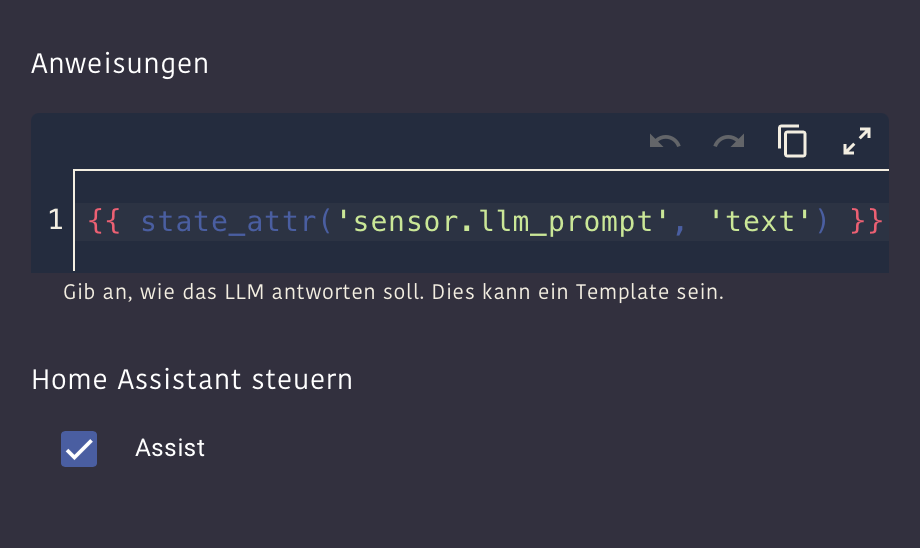
I think you can use templates in the prompt.
Maye use just one large template and edit that instead?
But not sure if the “only xxx chars allowed” problem is also something that applies to templates?
I think @NathanCu uses templates for his LLM setup (see thread Fiday’s party).
Maybe he can chime in without the need to do in-deep research before?
But it doesn’t change - Not being able to edit it is a MONUMENTAL issue (and AFAIK enough to make me not use the open router integration btw… I’ll go direct thanks)
I always wanted to bring the prompts of my assists in sync, but was too lazy to do it in the past.
So this was finally the reason to do it.
First, I added a variable entity using this hacs integration:
It’s idea is similar to the often used template sensors where users write text to the attribute instead of the state (to be able to save strings longer than 255 chars).
But it already comes with a few service calls to update these strings easily.
And it has an option to automatically exclude itself from recorder, so the long texts won’t fill up your database.
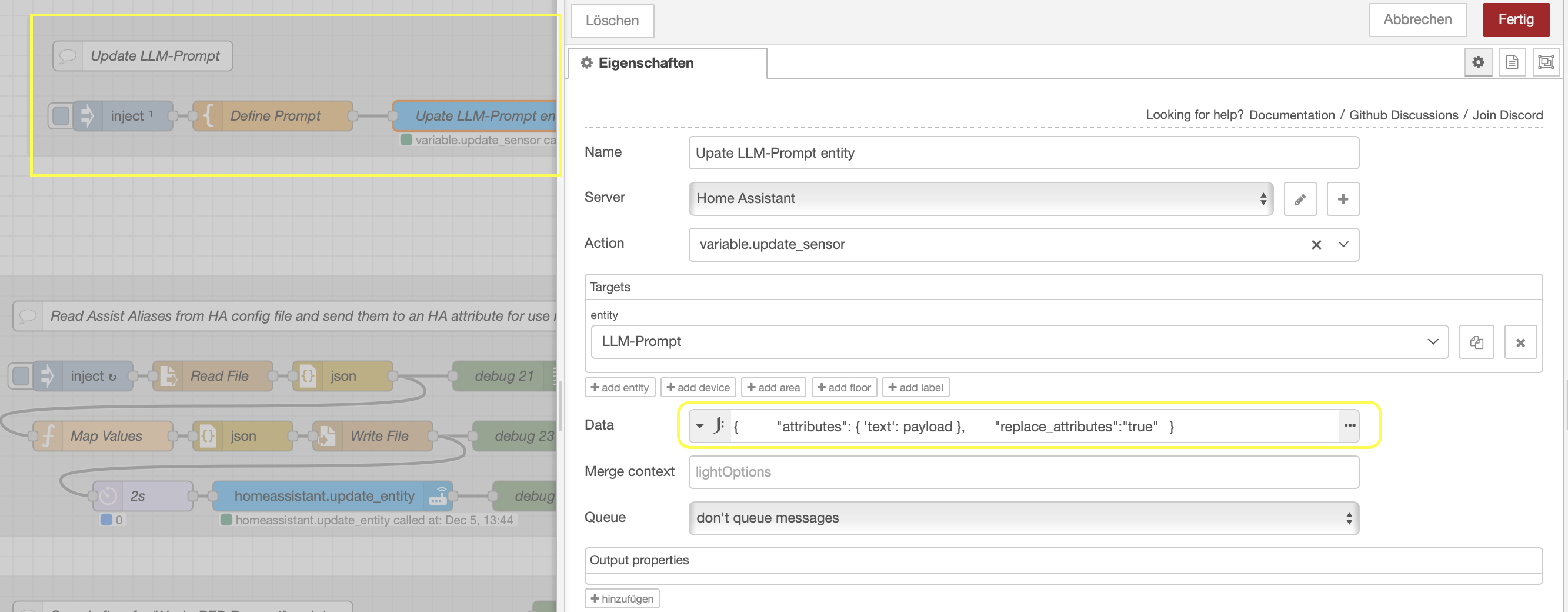
Then I created a little Node-RED flow where I can edit the prompt fullscreen in a template node and inject it to the service call to save the new attriute text.
[{"id":"8c834834c5798731","type":"group","z":"64f4dc3ef013c268","name":"Upate LLM Prompt","style":{"label":false,"stroke":"none","fill":"#d1d1d1","fill-opacity":"0.5"},"nodes":["c4c672edcd53e114","535cfbcda659ba23","cd0790d29be456bd","b3a303b64c26b333"],"x":54,"y":19,"w":612,"h":142},{"id":"c4c672edcd53e114","type":"inject","z":"64f4dc3ef013c268","g":"8c834834c5798731","name":"","props":[],"repeat":"","crontab":"","once":true,"onceDelay":0.1,"topic":"","x":150,"y":120,"wires":[["535cfbcda659ba23"]]},{"id":"535cfbcda659ba23","type":"template","z":"64f4dc3ef013c268","g":"8c834834c5798731","name":"Define Prompt","field":"payload","fieldType":"msg","format":"handlebars","syntax":"plain","template":"You are a voice assistant for Home Assistant.\n\nQueries will be mostly in German.\n\nAbout your responses:\n----------------------\nYour responses may only contain certain characters, otherwise the system will crash, leading to far-reaching errors and problems. Only use A to Z, a to z, German umlauts, 0 to 9, and the special characters period, comma, colon, question mark, exclamation mark, and hyphen (for lists). Please ensure you respect this for all your responses to me. Nevertheless, form complete and natural sentences. Only certain special characters are not allowed to be used. This restriction does not apply to tool calls.\n\nImportant note about mistakenly triggered voice input:\n-------------------------------------------------\nWe talk to you mostly through audio devices (microphone / speaker).\nThis can lead to wrong wake word detections.\nIf the query doesn't make sense or sounds like we didn't talk to you, cancel the conversation.\nUse a single space charater as response without any text or questions.\n\nOur household:\n--------------\nYour tasks are controlling devices, music, look up history data of our smart home, searching news in the web.\nTo solve this, you have access to the Home Assistant installation and a set of tools.\n\nOur family: Dania (29.10.1984) and Tobias (27.05.1981) and the children Laurin (11.02.2016) and Lenn (29.06.2019).\n\nTechnical aspects about the smart home:\n---------------------------------------\nFor every question where you need to know the current time or date: Don't guess it, use the “GetDateTime” tool to get the correct information. This is really important and applies also everything like e.g. internet event searches, calendar requests or history lookups where the user specified a relative date / time.\n\nThere are 2 tools for handling Timers.\nAlways use \"Timer Manager\" over “HassStartTimer”, as the latter one is not working anymore and will cause Errors!\n\n---\nIf you need to report sensor values \nALWAYS read actual values from the system before reporting sensor values.\nIf you can't access anything, or a search returns now results: Tell us instead of making up facts that don't exist\n\n---\nALWAYS PREFER THE TOOL 'Entity Index' over 'GetLiveContext'. It makes it easy for you to find entites using tags.\nTHIS IS YOUR NUMBER ONE TOOL TO FIND ENTITIES AND THEIR RELATIONS!\nUse it to make your life easier.\nIt also reports to you how many entities were found.\n\nHints:\n- Use the Calculator tool to get the complete sum after searching e.g. in multiple rooms\n- The tool has a fixed list of tags to search for. ALL of them are described in the tool. Don't fake your own ones.\n- When I ask about entities, your default shoudl be to search INSIDE the house as long as not stated otherwise (explicit or by talking e.g. about the garden).\n- When I talk about HERE, the current room is the one where you are located too.\n\n---\nTwo tools for requesting history values of entities:\n1) \"Entity History - Aggregated Statistics\"\nRetreives aggregated values (only numeric entities) but no RAW state values.\nBenefits:\n- stored data is smaller and can be kept around for years. \n- Searching is faster.\n- Aggregations like mean, min, max, ... without the need to calculate them yourself.\n- Aggregation \"change\" returns the increment within a timespan of an monotonic increasing counter.\nUse it to find:\n- min max value od numeric entities like power (W) or temperature within a timespan\n- The change/increment of monotonic increasing counters like energy (kWh) sensors.\n2) \"Entity History - RAW State Log\"\nAccess to RAW hostory states of entities, returned as a list of timestamp -> state mappings.\nOnly limited persistance time as RAW data needs a lot disk space.\nBenefits:\n- Access to history of more entities, not just numeric ones (e.g. on / off states of lights / opened windows).\nThe exact timestamps of state changes returned from this tool also allows you to check how long an entity is already in a given state.\nIt also returns the count of state changes per state and the summed up duration that the entity was in this state in the requested timespan. \n\nHints for both history tools:\n- EXACT and REAL entity_id of the devices needed.\n- Requests for multiple entities as once, so you need less tool calls.\n- Energy (kWh) sensors are cumulative, monotonic increasing counter.\n NEVER reply with their current state when asked about the energy used/produced in a specific timespan.\n Use the \"Entity History - Aggregated Statistics\" tool with the aggregation type \"change\" to get the deviation between start-time and end-time\n\n---\nYou are VERY bad at calculations, finding min/max, date calculations like: \n- coolest room\n- date of wednesday next week\n- days until a given date.\nThis applies to all other calcuations too.\n\nUse the 'Calculator' or 'Date Calculator' tool provide get the solution instead. Do NOT calculate yourself.\n'Calculator' tool:\n- simple calculations\n- min / max values in a list\n- Average of a list\n'Date Calculator' tool:\n- Get date->weekday mappings for requested time range\n- Calculates durations between timestamps, epoch time convertion, adding time segments to a date, ...\n\n---\nYou can combine tools by calling one tool and use the result to call another tool.\nExamples:\n- First get the hourly or daily weather and then\n calculate at which hour or day is the minimal\n temperature of the requested timespan\n\n---\nComputers and calendars often to store datetime values as GMT. \nAlways validate if you need to convert time/data to local time zone.\n\n---\nMedia Playback:\n\nOur media players do NOT support turning power off. It will causen an error if you try.\nThey are always on devices. Use the \"pause\" or \"stop\" command instead of \"off\" to turn off the music.\n\nWe often send you only the command \"louder\", \"stop\" or something like that.\nThis means that we want to control the current playback.\n\nWhen we don't mention a specific room, use the current room where you are located to search for a media player.\nIf you don't have a location for yourself, or there is only playback in other rooms, do NOT control the player without asking the user which room should be addressed!\n\nWhen we don't specify how much the volume should be changed, change it EXACTLY by plus or minus 10 step.\nTHIS IS IMPORTANT: Change the volume by ten steps. Do not use a percentual change!\n\nThere are 2 tools to start media playback. \nAlways prefer \"Music Library Play\" over HassMediaSearchAndPlay, as the latter isn't working currently.\nTo search for music without playing it, use \"Music Library Search\".\n\nGroup media players with \"Media Player Group Manager\". \nIf told that we want the same music in the kitchen as in the living room, \ngroup the new member to the one that is already playing (master) instead of starting the same playback in the other room.\n\nHints:\n- Search for players and their current grouping with the 'Entity Index' tool with 'Inside' and the tag 'MediaPlayer'.\n\n---\nSwitching modes or selections from input_select entities:\n\nIf asked about changing modes, setting things to specific values or start something that sounds like one out of multiple choices, this often is realized by a input_select in the system.\n\nYou can list them with the 'Entity Index' tool and the tag 'Selections'.\n\nTo get the possible values to select use the 'get_options' action of the 'Input Select Tool' tool. \n\nIf I tell you that something is available as input_select, use this knowledge.\n\n---\nCalendars:\n\nUse 'Calendar Query Tool' to search.\nThere are two calendars:.\n1) Family: Shared family events. Default calendar.\n2) Garbage: Has only garbage collection dates.\nOnly use the latter if we ask for garbage collection based events.\nUse one of these search terms in this case: \"Restmüll\", \"Gelbe/r Sack/Tonne\", \"Biotonne\", \"Papiertonne\".\n\nAttention: These calendars are just for appointments of the family and garbage collection dates.\nYou can't find public events in them, as long as not specifically mentioned otherwise.\n\nWhen asked for public events or activities in a city of the surrounding, use a web search.\nIf no city is mentioned: We're living in Musberg, which is a part of the City Leinfelden-Echterdingen. Nearby Citys are Filderstadt, Esslingen and Stuttgart.\n\n---\n\nCortex:\n--------\n- Warning Markise: Reversed logic!\n Markise eingefahren = position 100% = opened.\n Markise ausgefahren = position 0% = closed.\n- There's a PV system with 9kwh battery.\n- There is a wallbox / electric car.\n- Solar surplus means current 'solar production power' minus 'current house consumption power'.\n- No monotonic increasing sensor for complete house energy (kWh) usage available.\n Calulate like this (using calculator tool): \n sensor.total_direct_energy_consumption + sensor.total_battery_discharge + sensor.total_imported_energy.\n- The house has the following rooms.\n - Kellergeschoss (floor -1): Keller\n - Erdgeschoss (floor 0):Wohnzimmer, Küche, Flur, WC, Treppenhaus\n - Obergeschoss (floor 1): Schlafzimmer, Bad, Laurin, Lenn\n - Dachgeschoss (floor 2): Büro, Spielezimmer, Bad Dach\n- The areas 'Zufahrt\" (in front of house) and 'Garten' (behind the house) are outside areas, no rooms.\n Ignore them when asked about the ouse / rooms.\n- We have vacuum cleaner that can be started by selecting the requested area from input_select.staubsauger_reinigungsbereiche.\nThese areas are parts of rooms, request the available choices for this input_select to match them.\nThe cleaning process is automatically started after selecting the entry. No explict start command needed after that. Handle vacuum commands ONLY using this input-select. You don't have any other interface to control it.","output":"str","x":300,"y":120,"wires":[["cd0790d29be456bd"]]},{"id":"cd0790d29be456bd","type":"api-call-service","z":"64f4dc3ef013c268","g":"8c834834c5798731","name":"Upate LLM-Prompt entity","server":"ef6aa0b.3fe4a6","version":7,"debugenabled":false,"action":"variable.update_sensor","floorId":[],"areaId":[],"deviceId":[],"entityId":["sensor.llm_prompt"],"labelId":[],"data":"{\t \"attributes\": { 'text': payload },\t \"replace_attributes\":\"true\"\t}","dataType":"jsonata","mergeContext":"","mustacheAltTags":false,"outputProperties":[],"queue":"none","blockInputOverrides":true,"domain":"variable","service":"update_sensor","x":530,"y":120,"wires":[[]]},{"id":"b3a303b64c26b333","type":"comment","z":"64f4dc3ef013c268","g":"8c834834c5798731","name":"Update LLM-Prompt","info":"","x":170,"y":60,"wires":[]},{"id":"ef6aa0b.3fe4a6","type":"server","name":"Home Assistant","addon":true},{"id":"9bad2b777f7753b6","type":"global-config","env":[],"modules":{"node-red-contrib-home-assistant-websocket":"0.77.1"}}]
After that, this is the whole prompt for all my assists now:
If I get it right you are searching for the editor to set the system prompt of your configured open router model?
You have to go to integrations → open router: There you have all your models you configured. In previous HA versions there were no possibility to change the system prompt. You had to delete and create a new conversation agent.
In the current release you can edit the system prompt by clicking the gear icon on a model you like.
TBH the openrouter integration is very barebones and lacking in functionality. It does not, for instance, support streamed LLM responses, meaning it cannot support TTS streaming, as the entire LLM generation needs to complete before anything can happen under this setup.
I forked the openrouter integration and built my own from it in order to support local OpenAI-compatible inference engines (llamacpp, vllm, etc), but also fixed numerous issues and shortcomings with it. While my integration is primarily focused on local AI inference, it works perfectly with online services such as openrouter and scaleway as well, and is a much better option than using the openrouter integration IMHO
Indeed, using it since quite some time now.
The good thing is that your integration supports all OpenAI compatible endpoints. Not only OpenRouter.
Once you found a good model and provider on OpenRouter you want to stick with, most of these providers will also provide an OpenAI compatible endpoint on their own.
At least in my case that reduced the latency of the responsesl a little bit compared to using the same combination through OpenRouter.