Done, many thanks for your help. Do I need a reboot or a reload of yaml?
Just to check, can you show the history panel (not pop-up) for the filtered sensor as well as the source sensor (sensor.solax_swapuwz36r_total_feed_in_energy)
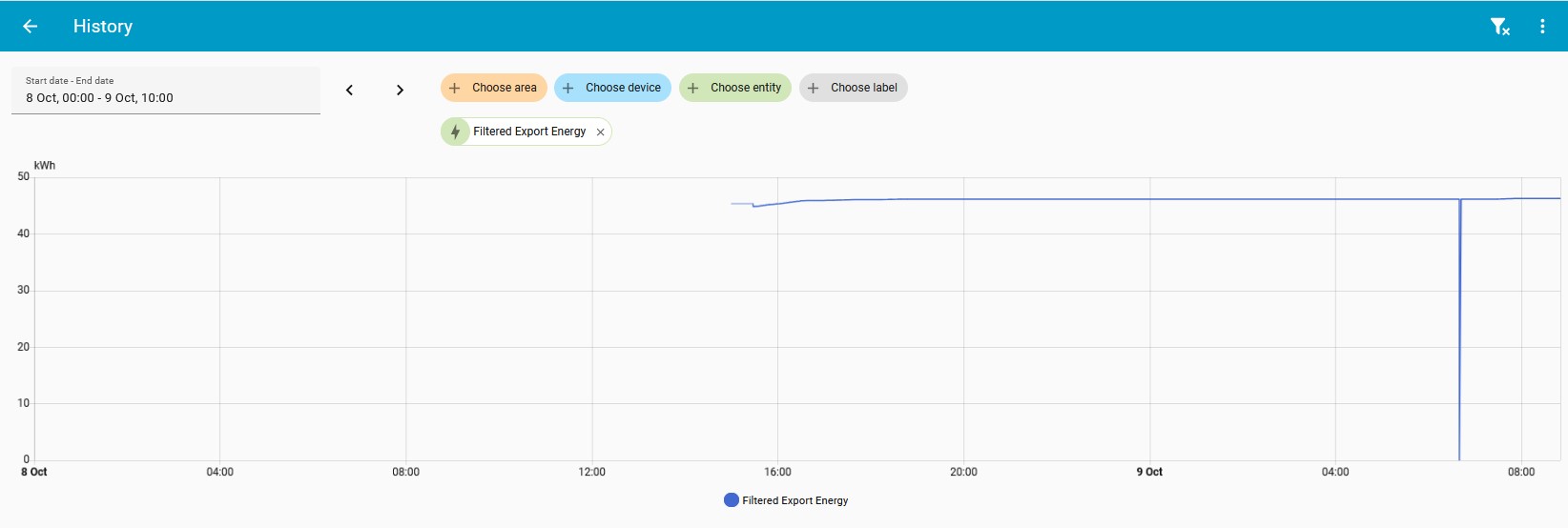
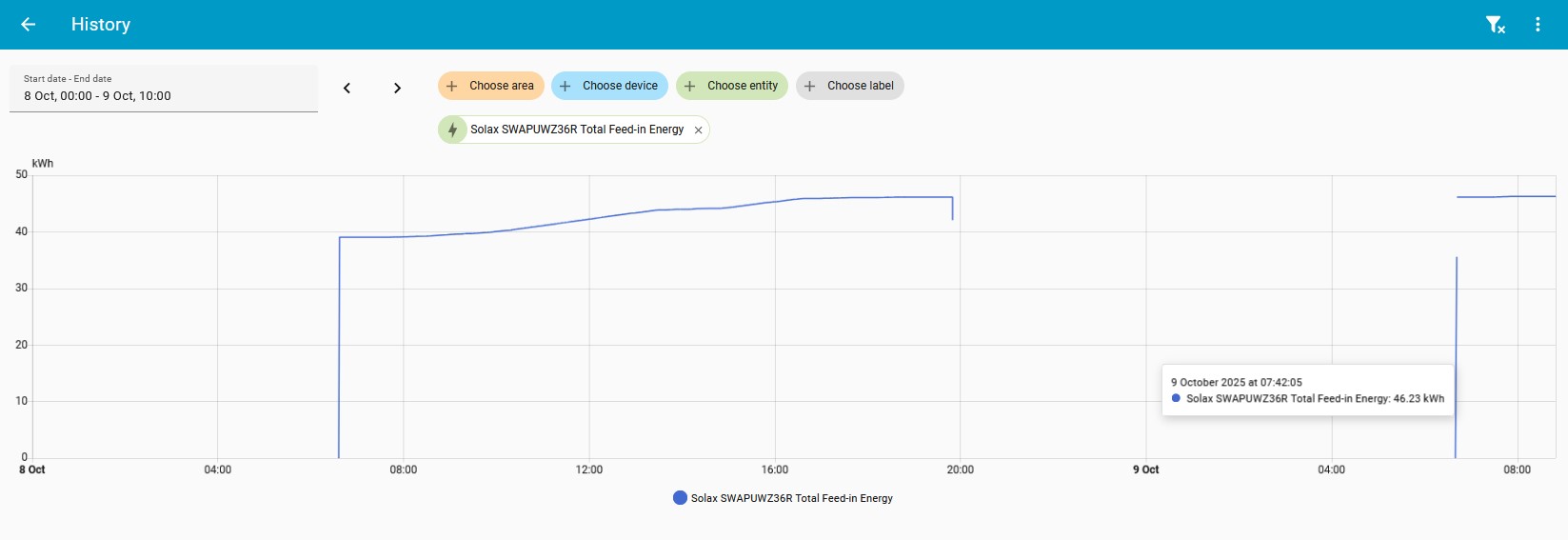
Ok, unfortunately that approach is not going to work.
The return from zero to a number below the actual total will stuff it up.
Will that ever be a problem? The totals will keep getting bigger

Edit, you are right. The previous day, it has a peak of 46.16 kWh, then drops to 42.14 before it shuts off.
When it starts up, there is a couple of points zero, then 35.52, then 46.16 kWh
I would probably do:
availability: "{{ states('sensor.solax_swapuwz36r_total_feed_in_energy')|float(0) > 0 }}"
That won’t help. There are intermediate values greater than zero. These will all be logged as consumption.
I was thinking, if the base sensor is 0 (or unavailable), the filtered one is unavailable. Woulnt that filter out 0?
Need a way to remember the previous day’s maximum and not log any values until that is exceeded.
It won’t filter out this:
35.52 → 46.16 will be falsely logged.
Ah, ok. Didn’t realize the data is that polluted. Wonder how that happens though. Maybe a summation of individually absent sensors.
The underlying integration needs fixing. There are issues logged.
The reason the above solution does not work is because it goes unavailable, and when it does then the last state is lost. So it needs to be an always available sensor. If the base is not available, it should retain state. Simplest I can think of is no availability template and this as state:
state: "{{ [ states('sensor.solax_swapuwz36r_total_feed_in_energy')|float(0), this.state|default(0) ] | max }}"
If it has the proper unit, state class and device class it can be fed straight into the energy dashboard, no need to wrap it in a utility meter.
Unfortunately because of the defaults it is still possible for that to go to 0 then back to the total at a later time. Which will log a huge increase. e.g
if the sensor goes unavailable → 0, then both will be 0 and thus the max will be 0.
Yes, but they will both need to be 0 so it will likely be rare since this sensor should not lose its value. Or does it? Will the value not be restored on restart? In that case it should be a trigger based template sensor. Those are restored, have very clear conditions on when they are updated and should therefore not be evaluated with this.state unavailable.
Or do you have another idea that the OP can use until the integration is fixed?
Hi, I was having the same issue, and swapped to cron management of the utility meters. This only works when using yaml, so not so much the front end editor.
daily_load_energy:
  name: Daily Load Energy
  unique_id: daily_load_energy
  source: sensor.load_energy
  delta_values: false
  net_consumption: false
  periodically_resetting: false
  always_available: true
  cron: 0 0 * * *
  tariffs: [General, EV Saver]
hourly_load_energy:
  name: Hourly Load Energy
  unique_id: hourly_load_energy
  source: sensor.load_energy
  delta_values: false
  net_consumption: false
  periodically_resetting: false
  always_available: true
  cron: 0 * * * *
weekly_load_energy:
  name: Weekly Load Energy
  unique_id: weekly_load_energy
  source: sensor.load_energy
  delta_values: false
  net_consumption: false
  periodically_resetting: false
  always_available: true
  cron: 0 0 * * 0
  tariffs: [General, EV Saver]
monthly_load_energy:
  name: Monthly Load Energy
  unique_id: monthly_load_energy
  source: sensor.load_energy
  delta_values: false
  net_consumption: false
  periodically_resetting: false
  always_available: true
  cron: 0 0 4 * *
  tariffs: [General, EV Saver]
So the Daily happens at midnight every day.
The hourly at the 0 minute of every hour.
The weekly at 00:00 on Sunday (morning.)
The monthly at 00:00 on the 4th of the month (morning.)
Hope this helps.
cron string Required
This option is mutually exclusive of
cycleandoffset. It provides an advanced method of defining when should the counter be reset. It follows common crontab syntax but extended to support more advanced scheduling. See the croniter library.
See Utility Meter - Home Assistant for more details about cron usage.
Craig
Not in this case unfortunately. It’s not a midnight crossing issue. It’s bad data from the integration at sunrise and sunset.

Yes which is what will happen when the sensor goes unavailable → 0 and this.state default is used (as it will not be a number).
Yes, if you do not consider the context. But the context is key here. If the filtered sensor retains state, then this does not happen for the filtered sensor. If normal template sensors do not retain state (I’m not sure) then a trigger based template sensor certainly will, as I suggested before.
So afaik in that case the filtered sensor will never evaluate unavailable or 0 (a trigger based template sensor does not do it, but it could even filter it out).
If the original sensor is unavailable/lower that will also not be recorded due to max. It wil take the original sensor every time that is higher. So it will be an ever increasing sensor that will never be 0.
The only way I can see this go wrong is if the original sensor updates to an unwanted value before the filtered sensor has it’s retained state. But that too I do not think can ever happen for a trigger based template sensor.
I think this is what it does, and not just at the end of the day, but all the time.
- trigger:
    - trigger: state
      entity_id: sensor.solax_swapuwz36r_total_feed_in_energy
      not_to:
       - "0"
        - unknown
        - unavailable
  sensor:
    - name: Filtered Export Energy
      device_class: energy
      state_class: total_increasing
      unit_of_measurement: kWh
      state: >
        {{
         [
           states('sensor.solax_swapuwz36r_total_feed_in_energy') | float(0),
           this.state | float(0)
         ] | max
        }}