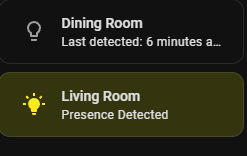
i tried the suggestions but i cant get rid of the empty space on top and bottom of the card. i can use padding from bottom and top with card_mod, and it will move the text up or down, but in the process also make the card larger. how do i get rid of the empty space? i want to stack around 8 of these, so removing empty space would be great.
The space is the gap between cards. A few suggestions…
- Theme
--row-gap. However this will be universally applied. - Use a vertical stack and theme
--stack-card-gap. However this will be universaly applied to all vertical stacks. - Use a container card with card-mod to style
--row-gap. e.g. vertical-stack. With card-mod 3.4.5 you will need to usecustom:mod-cardto be able to apply card-mod to vertical stack. With v4.0.0-beta.4 vertical-stack is natively supported. - With card-mod v4.0.0-beta.4 style
--row-gapdirectly to the section which is now supported. You can edit the section in YAML to apply card-mod directly. - Use another container card that allows to set gap between cards. e.g. expander-card (MelleD fork) with card
expanded: true,display: grid,gap: 0andshow-button-users: [](Last setting removes the expand/collpase title). expander-card is active in maintenance and a good option in my opnion, but perhaps not if you don’t want that functionaility.
2 Likes
Hey community!
I am having trouble with animating a template chip icon under a conditional chip.
I have tried many different variations, but can’t seem to figure it out.
This is my current code. The card_mod code I am focusing on is at the very end.
type: conditional
conditions:
  - condition: state
    entity: sensor.gdacs_tropical_cyclone_count
    state: '0'
chip:
  type: template
  icon: mdi:weather-hurricane
  icon_color: red
  content: |
    {% set storms = states.geo_location
      | selectattr('attributes.source','equalto','gdacs')
      | selectattr('attributes.event_type','equalto','Tropical Cyclone')
      | list %}
    {% set n = storms | length %}
    {% if n == 1 %}
      {{ storms[0].name.split(': ',1)[1].split('-')[0] | title }}
    {% else %}
      {{ n }} storms
    {% endif %}
  tap_action:
    action: fire-dom-event
    browser_mod:
      service: browser_mod.popup
      data:
        title: Active Hurricanes
        fullscreen: true
        size: fullscreen
        content:
          type: iframe
          url: https://www.accuweather.com/en/hurricane
          card_mod:
            style: |
              ha-card {
                height: 90vh !important;
                margin: 0;
                padding: 0;
              }
              iframe {
                height: 90vh !important;
                border: none !important;
              }
  card_mod:
    style:
      .: >
        @keyframes spin { 0%{transform:rotate(0)} 100%{transform:rotate(360deg)}
        }
      mushroom-template-chip$:
        mushroom-chip$:
          ha-state-icon$:
            .: |
              :host {
                animation: spin 4s linear infinite !important;
                transform-origin: 50% 50%;
              }
The first card mod changes a browser_mod popup
And here is the DOM in the HTML

Any help would be much appreciated!!!
This is not working for me.
My card:
type: custom:mushroom-template-card
primary: Lights
secondary: ""
icon: mdi:lightbulb
tap_action:
action: navigate
navigation_path: lights
double_tap_action:
action: none
hold_action:
action: none
color: amber
vertical: true
features_position: bottom
card_mod:
  style: |
    ha-state-icon {
      --icon-symbol-size: 40px;
    }
Take a look at recent examples. There has been Breaking Changes as of late
Test this out…
card_mod:
  style:
    mushroom-template-chip:nth-child(1)$: |
      ha-state-icon {
        animation: spin 1s linear infinite;
      }
      @keyframes spin {
        100% { transform: rotate(360deg); }
      }
Double check that your conditional setup is correct. The :nth-child will go to (2) if you assign another entity to the condition.
Thank you for your reply!
I applied your code, and it doesn’t seem to be spinning the icon. I did a hard refresh on the page and whatnot as well to double check.
Is there anything else I can show you that might help to troubleshoot? Here is the full YAML for the entire Mushroom Chip block and a screenshot of the Hurricane icon. I am unsure if this will tell anything.
type: custom:mushroom-chips-card
chips:
  - type: entity
    entity: input_select.house_status
    tap_action:
      action: none
    icon_color: primary
  - type: weather
    entity: weather.forecast_home
    show_conditions: true
    show_temperature: true
  - type: conditional
    conditions:
      - condition: state
        entity: sensor.gdacs_tropical_cyclone_count
        state: "0"
    chip:
      type: template
      icon: mdi:weather-hurricane
      icon_color: red
      content: |
        {% set storms = states.geo_location
          | selectattr('attributes.source','equalto','gdacs')
          | selectattr('attributes.event_type','equalto','Tropical Cyclone')
          | list %}
        {% set n = storms | length %}
        {% if n == 1 %}
          {{ storms[0].name.split(': ',1)[1].split('-')[0] | title }}
        {% else %}
          {{ n }} storms
        {% endif %}
      tap_action:
        action: fire-dom-event
        browser_mod:
          service: browser_mod.popup
          data:
            title: Active Hurricanes
            fullscreen: true
            size: fullscreen
            content:
              type: iframe
              url: https://www.accuweather.com/en/hurricane
              card_mod:
                style: |
                  ha-card {
                    height: 90vh !important;
                    margin: 0;
                    padding: 0;
                  }
                  iframe {
                    height: 90vh !important;
                    border: none !important;
                  }
      card_mod:
        style:
          mushroom-template-chip:nth-child(1)$: |
            ha-state-icon {
              animation: spin 1s linear infinite;
            }
            @keyframes spin {
              100% { transform: rotate(360deg); }
            }
alignment: center

Shift the word card_mod: all the way to the left.
2 Likes
Yes. That ended up working! Thanks a ton 
@LiQuid_cOOled , @Ojima
Just wanted to leave a thank you both for finally getting my circulation pump animation working.
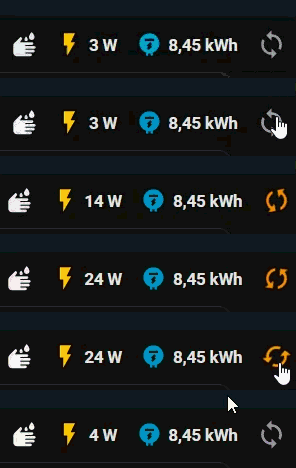
I was bashing my head against the examples, trying minimal setups, yet nothing worked. Copied the hurricane code and almost jumped from excitement as it spun on my cluttered test dashboard. A few adaptations later and it finally works.
I think it was that pesky | at styles, but I’m not sure. It’s not the first time it feels like I’m doing the same thing over and over and suddenly it works. And people say C++ is hard…
If anyone happens to need an example of several mushroom chips with different card_mod styles on top of the animation, here is my (shortened) code:
In the end, separating the animation form ha-card with .: | was the last puzzle piece.
type: custom:mushroom-chips-card
chips:
  - type: template
   <<card goes here>>
  - type: entity
   <<card goes here>>
  - type: entity
    <<card goes here>>
  - type: template
    icon: mdi:sync
    entity: switch.shelly_mini1pmg3_temp_klaeranlage_switch_0
    icon_color: "{{ 'accent' if states(entity) == 'on' else 'grey' }}"
    card_mod:
      style: |
        ha-card {
        border: none;
        --chip-background: none;
        --chip-icon-size: 30px;
        }
card_mod:
  style:
    mushroom-template-chip:nth-child(4)$: |
      ha-state-icon {
        {%if states('switch.shelly_mini1pmg3_temp_klaeranlage_switch_0') == 'on' %}
          animation: spin 1s linear infinite;
        {%endif%}
      }
      @keyframes spin {
        100% { transform: rotate(-360deg); }
      }
    .: |
      ha-card {
        --chip-font-size: 16px;
        --chip-icon-size: 26px;
        border: none;
        --chip-background: none;
      }
      :host {
        --mush-chip-spacing: 0px; /* default is 8px */
      }
3 Likes
@LiQuid_cOOled : Hi! Would you have an idea and can help me please? Many many thanks in advance!!
Hi, I understand there may have been some changes to mushroom that have affected the code I used to display images based on the depth of water in my tank. I’d appreciate some help it getting them to display again.
type: horizontal-stack
cards:
  - type: custom:mushroom-title-card
    title: Water tank
    subtitle_tap_action:
      action: none
    title_tap_action:
      action: none
  - type: custom:mushroom-template-card
    primary: "{{ states(entity) }}%"
    secondary: >-
      {{ ((states('sensor.water_tank_current_volume') | float) / 1000 ) | int}}
      kL
    icon: none
    entity: sensor.water_tank_level_percent
    hold_action:
      action: none
    double_tap_action:
      action: none
    icon_color: ""
    badge_color: ""
    multiline_secondary: false
    tap_action:
      action: none
    features_position: bottom
    card_mod:
      style:
        mushroom-shape-icon$: |
          .shape {
            {% set water_level = states(entity) | int %}
            {% if water_level > 80 %}
              background: url('/local/community/my-icons/water_5.png') no-repeat center;
            {% elif water_level > 60 %}
              background: url('/local/community/my-icons/water_4.png') no-repeat center;
            {% elif water_level > 40 %}
              background: url('/local/community/my-icons/water_3.png') no-repeat center;
            {% elif water_level > 20 %}
              background: url('/local/community/my-icons/water_2.png') no-repeat center;
            {% else %}
              background: url('/local/community/my-icons/water_1.png') no-repeat center;
            {% endif %}
            background-size: contain;
            --shape-color: none;
          }
First of all… you all are wonderful. I am in the same boat as many people… things have changed in a big and better way but i am not following. If this community would be so kind to take my code and modernize it. I have tried a few changes and they keep breaking but i have not found the time to sit down and look through the github and this post for everything. Things i will try and figure out on my own after is i do want to move the badge over, and maybe have a border around it so make it pop… but so far nothing is working.
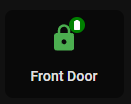
  - type: custom:mushroom-template-card
    primary: Front Door
    icon: |
      {% if is_state('lock.front_door_lck', 'locked') %}
        mdi:lock
      {% elif is_state('lock.front_door_lck', 'unlocked') %}
        mdi:lock-open
          {% endif %}
    tap_action:
      action: toggle
    entity: lock.front_door_lck
    badge_icon: |-
      {% set bl = states('sensor.front_door_lck_battery_level') | int %}
      {% if bl < 10 %} mdi:battery-outline
      {% elif bl < 20 %} mdi:battery-10
      {% elif bl < 30 %} mdi:battery-20
      {% elif bl < 40 %} mdi:battery-30
      {% elif bl < 50 %} mdi:battery-40
      {% elif bl < 60 %} mdi:battery-50
      {% elif bl < 70 %} mdi:battery-60
      {% elif bl < 80 %} mdi:battery-70
      {% elif bl < 90 %} mdi:battery-80
      {% elif bl < 100 %} mdi:battery-90
      {% elif bl == 100 %} mdi:battery
      {% else %} mdi:battery-unknown
      {% endif %}
    badge_color: |-
      {% set bl = states('sensor.front_door_lck_battery_level') | int %}
      {% if bl < 10 %} red
      {% elif bl < 20 %} red
      {% elif bl < 30 %} red
      {% elif bl < 40 %} orange
      {% elif bl < 50 %} orange
      {% elif bl < 60 %} #008000
      {% elif bl < 70 %} #008000
      {% elif bl < 80 %} #008000
      {% elif bl < 90 %} #008000
      {% elif bl < 100 %} #008000
      {% elif bl == 100 %} #008000
      {% else %} grey
      {% endif %}
    picture: ""
    hold_action:
      action: none
    double_tap_action:
      action: none
    secondary: ""
    color: |2-
                  {% set state=states('lock.front_door_lck') %}
                  {% if state=='locked' %}
                  green
                  {% elif state=='unlocked' %}
                  orange
                  {% endif %}
    features_position: bottom
    vertical: true
    card_mod:
      style: |
        ha-tile-icon{
          --mdc-icon-size: 30px;
          }
        ha-card {
          background: transparent;
          background-color: rgba(0, 0, 0, 0.45) !important;
          {% if is_state('binary_sensor.front_door_ct_contact', 'on') %}
          animation: blink 1s linear infinite;
          }
          @keyframes blink {
            50% {opacity: 0;}
          }
          {%- endif %}}

        mushroom-badge-icon$ {
          {% set bl = states('sensor.front_door_lck_battery_level') | int %}
          {% if bl <= 10 %}
          animation: blink 1s linear infinite;
          }
          @keyframes blink {
            50% {opacity: 0;}
          }
          {% else %}
          {% endif %}
Hi together,
I would like to bring my chips closer to each other, similar as mentioned at https://github.com/thomasloven/lovelace-card-mod/issues/414 . I tried with card_mod with --mush-chip-spacing: -5px. I currently have set to 0px, but need it even closer
Many many thanks!!
My dashboard card (one example)…

My code (example)…
type: custom:mushroom-chips-card
chips:
  - type: template
    entity: binary_sensor.all_devices_online
    icon: |
      {% if is_state(entity, 'on') %}
        mdi:network-off-outline
      {% else %}
        mdi:check-network-outline
      {% endif %}
    icon_color: |
      {% if is_state(entity, 'on') %}
        var(--corian-red)
      {% else %}
        var(--corian-gray)
      {% endif %}
    tap_action:
      action: more-info
    double_tap_action:
      action: navigate
      navigation_path: /dashboard-haus/infrastruktur
    card_mod:
      style: |
        ha-card {
          border-width: 0px !important;
        }
  - type: template
    entity: binary_sensor.hausbatterien
    icon: |
      {% if is_state(entity, 'on') %}
        mdi:battery-alert-variant-outline
      {% else %}
        mdi:battery
      {% endif %}
    icon_color: |
      {% if is_state(entity, 'on') %}
        var(--corian-red)
      {% else %}
        var(--corian-gray)
      {% endif %}
    tap_action:
      action: more-info
    double_tap_action:
      action: navigate
      navigation_path: /dashboard-haus/infrastruktur
    card_mod:
      style: |
        ha-card {
          border-width: 0px !important;
        }
  - type: template
    entity: sensor.beschattungsfreigabe
    icon: |
      {% if is_state(entity, 'on') %}
        mdi:shield-sun
      {% else %}
        mdi:shield-moon-outline
      {% endif %}
    icon_color: |
      {% if is_state(entity, 'on') %}
        var(--corian-blue)
      {% else %}
        var(--corian-gray)
      {% endif %}
    tap_action:
      action: more-info
    double_tap_action:
      action: navigate
      navigation_path: /dashboard-haus/klima
    card_mod:
      style: |
        ha-card {
          border-width: 0px !important;
        }
  - type: template
    entity: binary_sensor.hausfenster
    icon: |
      {% if is_state(entity, 'on') %}
        mdi:window-open
      {% else %}
        mdi:window-closed
      {% endif %}
    icon_color: |
      {% if is_state(entity, 'on') %}
        var(--corian-amber)
      {% else %}
        var(--corian-gray)
      {% endif %}
    tap_action:
      action: more-info
    double_tap_action:
      action: navigate
      navigation_path: /dashboard-haus/sicherheit
    card_mod:
      style: |
        ha-card {
          border-width: 0px !important;
        }
  - type: template
    entity: binary_sensor.haustueren
    icon: |
      {% if is_state(entity, 'on') %}
        mdi:door-open
      {% else %}
        mdi:door
      {% endif %}
    icon_color: |
      {% if is_state(entity, 'on') %}
        var(--corian-amber)
      {% else %}
        var(--corian-gray)
      {% endif %}
    tap_action:
      action: more-info
    double_tap_action:
      action: navigate
      navigation_path: /dashboard-haus/sicherheit
    card_mod:
      style: |
        ha-card {
          border-width: 0px !important;
        }
alignment: end
card_mod:
  style: |
    ha-card {
      position: absolute;
      top: 10px;
      right: 12px;
      #box-shadow: 0px 1px 3px 0px rgba(158, 158, 158, 0.7) !important;
      background: rgba(0, 0, 0, 0.6) !important;
      border-radius: 8px !important;
    }
    :host {
      --chip-icon-size: 22px !important;  /* Default is 24px */
      --mush-chip-spacing: -5px; /* Standard ist 8px */
    }
Why not just template the picture field
Just an example of what I mean 
  - type: custom:mushroom-template-card
    primary: "{{ states(entity) }}%"
    secondary: "{{ ((states('sensor.water_tank_current_volume') | float) / 1000 ) | int(0)}}kL"
    entity: sensor.water_tank_level_percent
    multiline_secondary: false
    tap_action:
      action: none
    features_position: bottom
    picture: |
      {% set water_level = states(config.entity) |int(0) %}
          {% if water_level > 80 %} /local....
          {% elif water_level > 60 %} /local....
          {% elif water_level > 40 %} /local....
          {% elif water_level > 20 %} /local....
          {% else %}
          {% endif %}
1 Like
Thanks. I’ll try it. I have very little experience with this stuff so appreciate the assistance.
I’d just followed the example someone posted and have been using for a couple of years successfully.
Card mod is an alternative but not really necessary for what you are trying to achieve. Either way I can assist further if you run into a roadblock.
1 Like