Hi, new to the forum but not a complete noob with these things.
I have searched for home assistant wont boot and supervisor not running but I dont appear to find my problem, happy to be corrected.
Environment;
pi4
Installation method Home Assistant Supervised
Core2025.8.3
Frontend20250811.1
What happened?
The HA system was running fine these last few weeks (and has been for months) although it felt like it was getting slower to respond both in the GUI and in the response to some automations (like PIRs triggering lights to come on which used to be instant now felt like they took a few seconds). This could be a red herring.
Then last night i connected to the web GUI on my phone (local connection on same network) and it appeared very lethargic so I rebooted the whole system from the GUI (not an HA restart a full reboot).
It then dropped off the network and didnt come back. After some time (hours) I tried a power reset without success and started to work through some troubleshooting. I now have the SD card installed into another pi (because I was starting to imagine even the pi might be at fault).
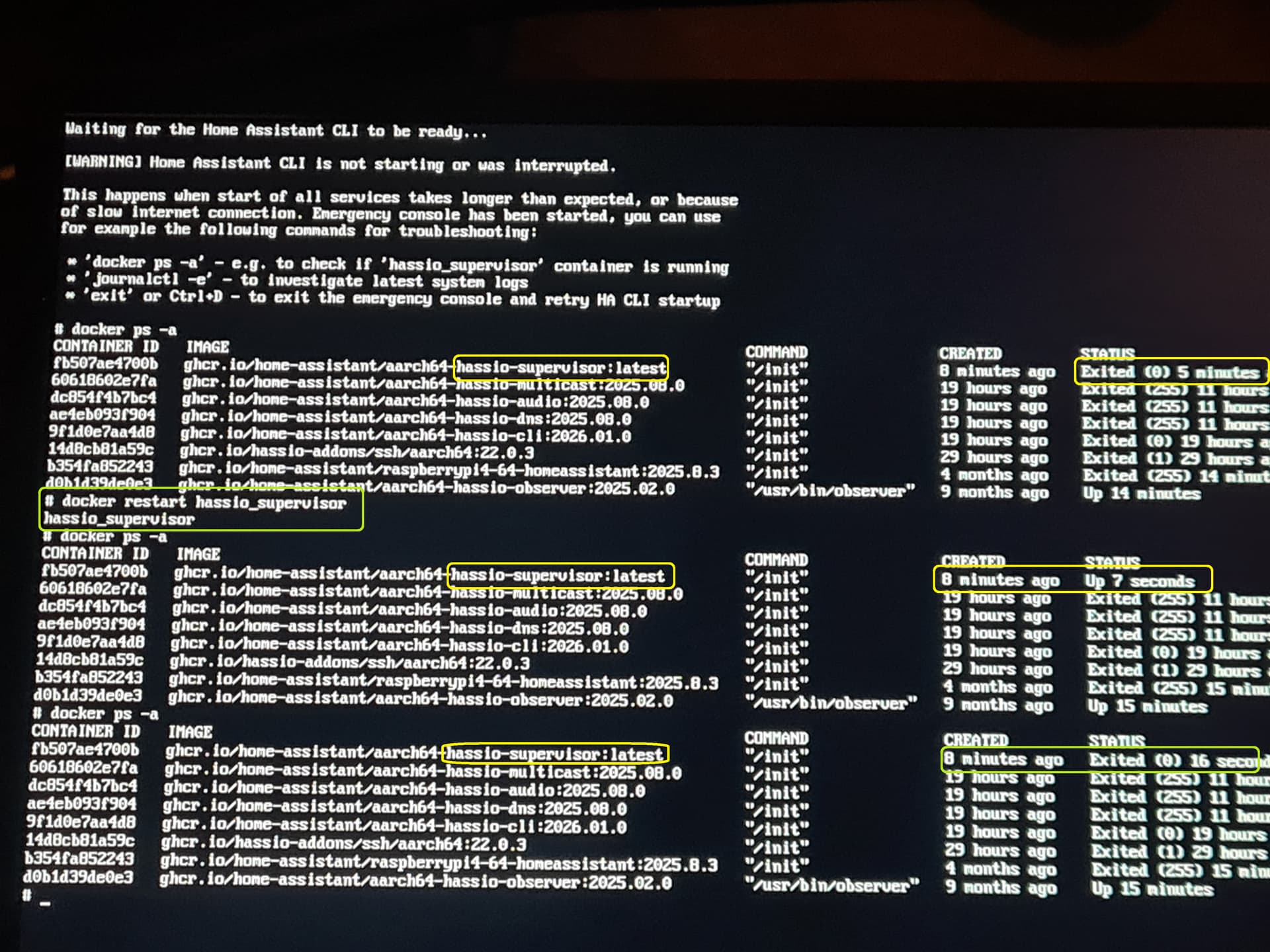
The new pi (old SD) is now connected to a monitor, runs through a boot sequence until it gets to a prompt about trying to start the CLI. This times out and drops me to an emergency CLI. Even if i type login it will time out again.
From the CLI I can see that the observer is running, the supervisor is not running and homeassistant is not running (docker ps -a). I dont know precisely what these do but I am inferring from the functional name.
if I try to start the supervisor alone it exits after a brief period (seconds) but this may be expected .
If I start homeassistant it will start and I can log into the web gui using my existing username and password and my rooms and devices are still there but other things are missing from the menu like esphome, SSH terminal. it also reports an error about a backup location being missing. I suspect this is all because the supervisor is not running?
my questions are;
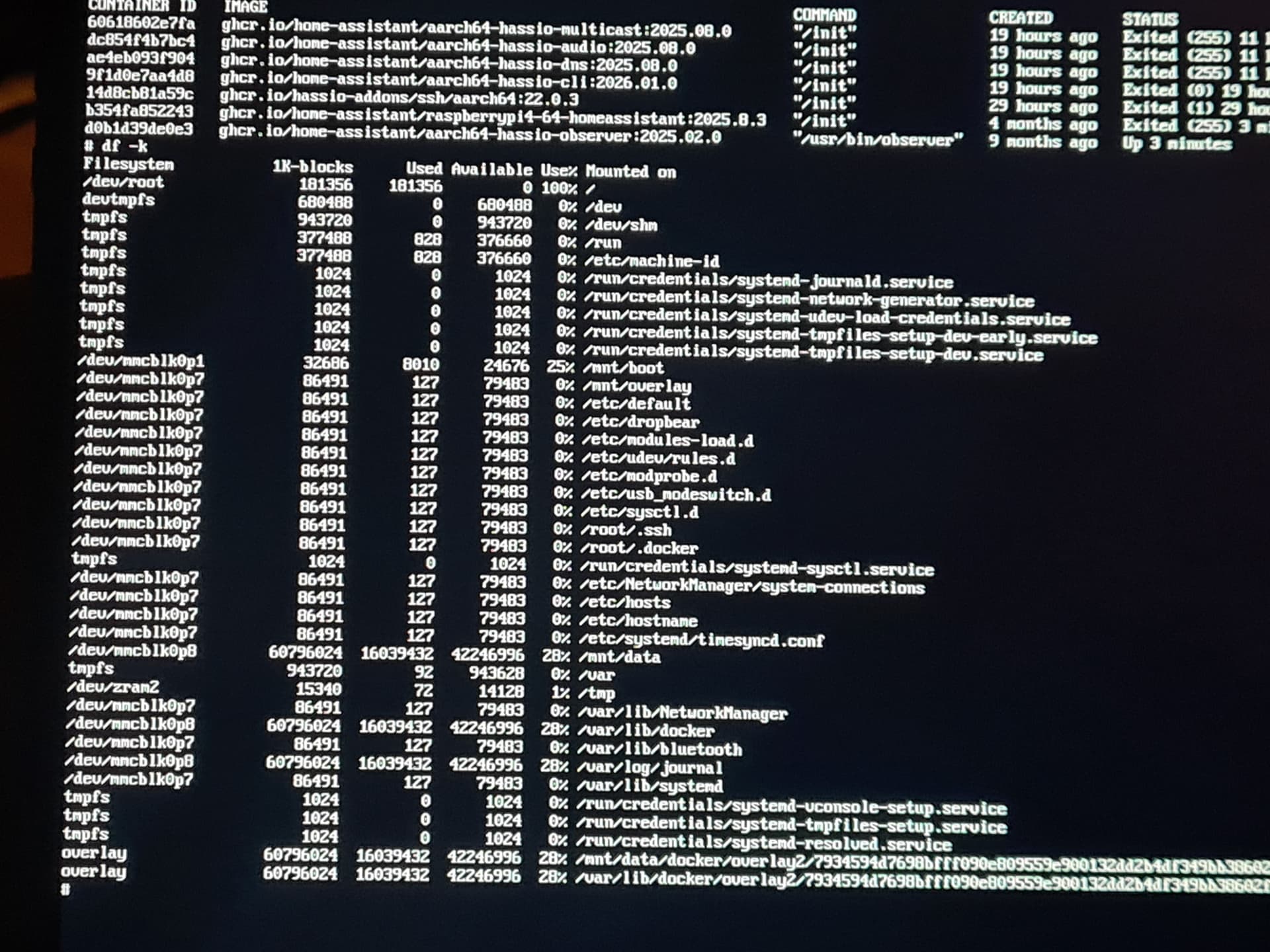
What do we think has happened? Im still suspicious now about the integrity of the SD card, its a good quality item but the way it has failed makes me look in that direction
Any obvious suggestions of what to try next?
Is there a way to recover this from the GUI or CLI
Im thinking build a new blank home assistant install and try to recover a backup of my config and add-ons but I dont know where to look on the SD card to recover the data I would need any suggestions?
i’m making progress. I have home assistant back up and running 90%, some of the integrations need some minor attention due to expired authentication so im working through those.
I created a new sd card with a vanilla HA install for the pi and booted from that.
once the system has started (which can take a few minutes to complete as its a fresh build) the home assistant initial login screen has an option for recover from backup.
Using the old SD card in a PC I saved a backup and uploaded that to the new installed instance.
For anyone trying to do similar that stumbles on this thread in future my backups were located in /mnt/data/supervisor/backup as documented in the excellent home assistant docs and other threads in this community. Note this is the actual disk path on the SD card read directly and not how it may appear when viewing in home assistant or via a samba share. https://community.home-assistant.io/t/backup-folder-location/170046/6
To read the SD card and locate the backup files I used disk internals free linux reader.
The other thing you will need is a decryption key as the backups are enrypted, fortunately I had saved this previously but for anyone that gets here that has not done so you may be able to recover yours following the steps below.
attempt to boot from the SD card until you reach the emergency CLI timeout as pictured in the first post of this thread.
check if home assistant is running docker ps -a and look for homeassistant and if not try to start it directly (see 3.)
from here attempt to start your home assistant core using the following command docker restart homeassistant there may be a brief pause before it returns the container name home assistant and returns control to the command line
check if its now running docker ps -a
if it is you should be able to now login as normal using the web GUI although many of your extensions may be missing
download your “emergency kit” encryption key from Settings → System → Backups → Settings and History → Encryption key → Show Encryption Key