I seem to have understood that PIN D3 is not only linked to the physical button but also to the HA switch… can you confirm this? Because I removed the soldering and actually the Respeaker no longer mutes on HA.
Physically the button will mute the mic. But with unsoldered D3 there’s no way to do it from HA, because there’s no bond between XMOS mute button and ESPHome anymore.
That’s what I warned you about.
There is the way to know the state - but not operate it.
I thought it was just referring to the physical button… (which I don’t need). I’ll find an alternative solution…
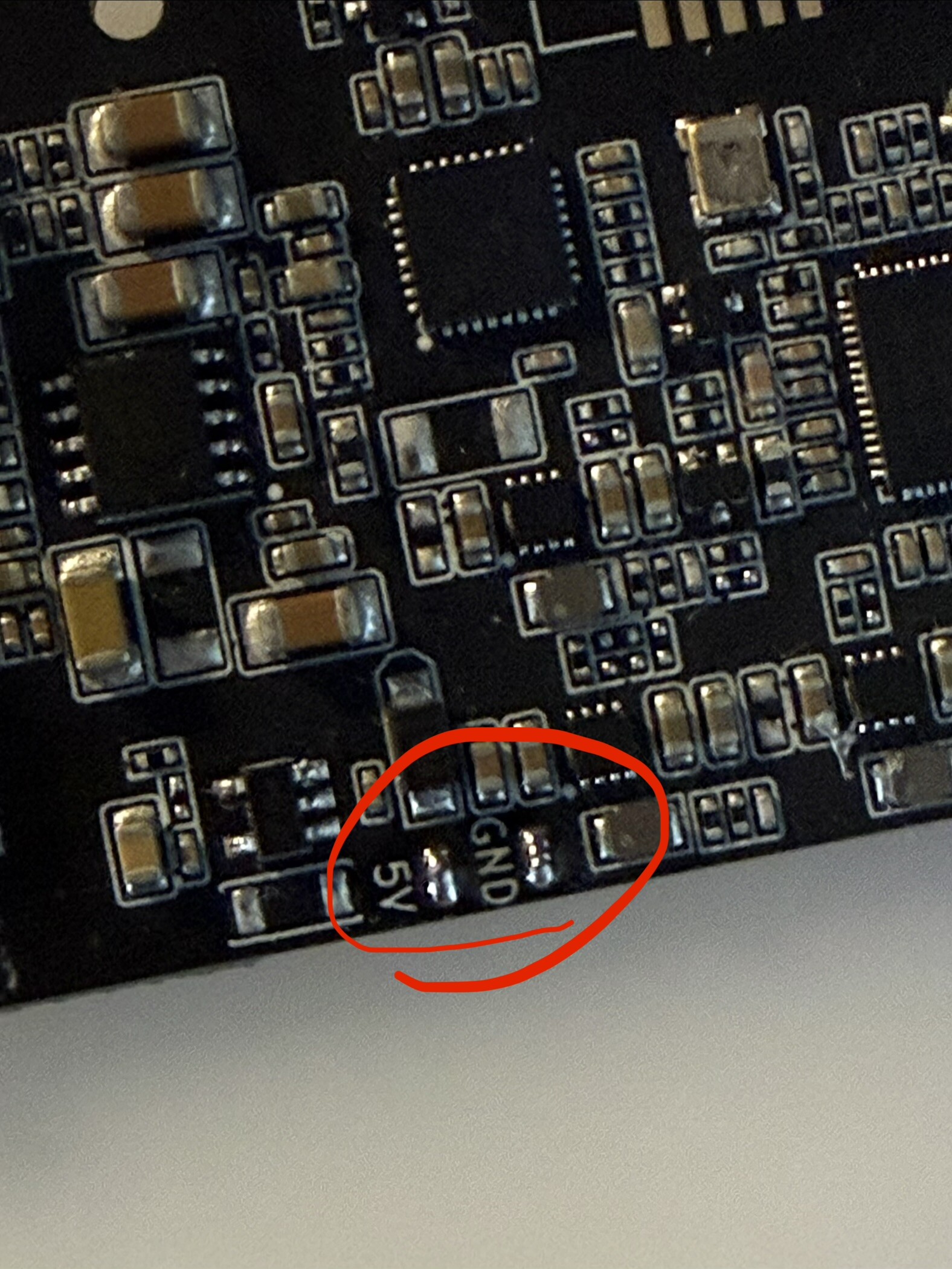
I do it in my devices. Works good.
in the end I got another one with Alixpress offers at around 26€…
I think this is a fair price for this product
1 Like
Good morning, sorry for the inconvenience and especially for the question; I have a Respeaker Lite and I’d like to change the wake sound, which is currently “- id: wake_word_triggered_sound
file: https://github.com/esphome/home-assistant-voice-pe/raw/dev/sounds/wake_word_triggered.flac”. I tried changing it by creating a sound folder and adding a -flac file, but it doesn’t work. Can anyone give me a tip? Maybe I’m doing something wrong. Thanks.
All files are downloaded and added to the firmware on the build step. They’re expected to be accessible via web - so you need to upload your file to some web server and have direct download link to it. You may do it with GitHub - create repo, add file, copy direct link, paste instead of the default in YAML - and build.
I personally have file sharing self-hosted service, so when i need something like this - i share it with my own “cloud” 
have you considered exposing the phase id’s to HA?, that way we can use another esp for display, or dashboard 
You definitely can do that.
There are also phases of assist_satellite entity, that are exposed by default.
I don’t want to trick out separate sensor for this in default YAML…
yeah the VoiceSensor Assist satellite entity exposes the 4 standard phases, but not all of them (10 total for my devices, 7 for yours/VoicePE).
it’s not a big change, i added a script:
  - id: set_phase
    parameters:
      phase: int
    then:
      - lambda: id(voice_assistant_phase) = phase;
      - text_sensor.template.publish:
          id: voice_assistant_phase_sensor
          state: !lambda |-
            char buf[8];
            snprintf(buf, sizeof(buf), "%d", phase);
            return std::string(buf);
and replaced all the phase lines from this:
- lambda: id(voice_assistant_phase) = ${voice_assist_replying_phase_id};
to this:
    - script.execute:
        id: set_phase
        phase: ${voice_assist_replying_phase_id}
and of course added the template sensor:
  - platform: template
    id: voice_assistant_phase_sensor
    name: "Voice Assistant Phase ID"
    update_interval: never
it’s harmless to have in yaml if not using it, but very nice to use for running display on another device, like in this video i posted here:
facebook dot com/share/v/17YEqTv6z1/
(imagine the esp32-s3 zero is a respeaker lite)
very interesting…
so you run Assistant on an ESP32S3 Zero? (I’m on Respeaker and ESP32S3… but I’m always evaluating new options on the other hand).
Maybe you could open a separate topic… which here would be OFFTOPIC
It’s N4R2, so although limited, should work.
I have a huge favor to ask, as I’m a complete novice at this  But first, thank you for creating such a wonderful project I have my Respeaker Lite and I’ve uploaded the software directly to the speaker via USB. The software version it shows is 2025.10.0 (ESPHome 2025.9.3), and I don’t have the option to update the ESP version on this Respeaker. Please tell me if upgrading to the latest ESP version changes the speaker’s operation? Or should I leave it as is? And could someone send me the complete YAML file of the ESP code for the speaker, including the software package and the Sound Detect configuration? Please email me at [email protected]. I need the complete YAML file that I can compile in ESP Home Assistant and upload to the speaker with this option: Local Voice Assistant with OnBoard Wake Word Detection - ReSpeaker Lite | fixtSE
You don’t need to have latest ESPHome version. If it works for you - leave it as is. There was no significant updates to the functionality in months (since PE is stable, this one is too). I believe there will be changes regarding Resonate protocol shortly, but they’re in development at the moment.
Regarding full working YAML - take one from the repository.
Okay, is there a yaml file in the repository with this added option? SoundSense
Sound Detection States
Silence: Prolonged period (>15s) of very low ambient noise
Quieting: Recent transition to low ambient noise
Active: Normal ambient sound activity
Noise: Sudden spikes in sound levels
Presence: Sustained elevated sound levels, indicating ongoing activity or presence. I’m asking because your code is great, but I’m missing this option And if I may ask, what is the purpose of the Resonate change you mentioned?
No. If you use Fixt’s custom YAML, ash him for updates please.
1 Like
yes limited… but I have a couple of speakers that I would like to set to function only as “Announce” without a microphone… and I think it could work perfectly.
1 Like