I am having some pretty random issue with my home network? my ISP? which manifests as
- small updates to HACS components or to Add-ins install OK
- larger updates such as Frigate or HA itself fail with messages like the below
- ESPhome updated OK, but compiling an ESP project fails when downloading the .zip bundles it needs
HA is wired ethernet direct to the router
I have disabled IPv6 in HA
I have disabled ad-blocking in Adguard, and changed HA to use unfiltered DNS
I have tried reducing the MTU on my HA instance ethernet interface to 1400
Browser network tests such as speedtest.net and https://speed.cloudflare.com/ show no issues
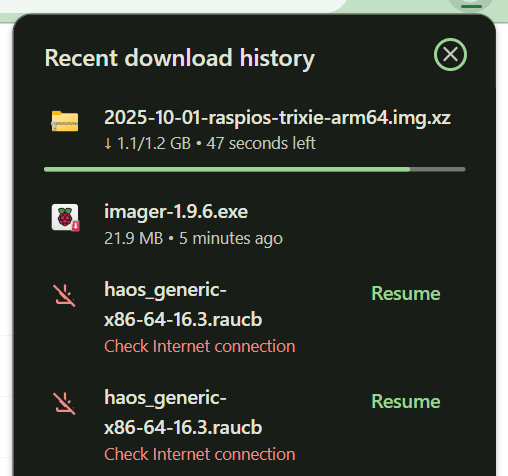
Taking the URLs from the error log and downloading them in the browser fails, but browser downloads are resumable. Resuming continues for a few tens of MB before failing again
Any suggestions where else to look? Has anyone else seen similar?
Logger: homeassistant.components.websocket_api.http.connection
Source: components/websocket_api/commands.py:317
integration: Home Assistant WebSocket API (documentation, issues)
First occurred: 00:51:15 (10 occurrences)
Last logged: 13:53:42

[140633597865760] Error during service call to update.install: Error updating Home Assistant Operating System: Can't fetch OTA update from https://os-artifacts.home-assistant.io/16.3/haos_generic-x86-64-16.3.raucb: Response payload is not completed: <ContentLengthError: 400, message='Not enough data to satisfy content length header.'>. ConnectionResetError(104, 'Connection reset by peer')
[140633597865760] Error during service call to update.install: Error updating Frigate: read tcp 192.168.1.5:52348->185.199.108.154:443: read: connection reset by peer
[140633618916320] Error during service call to update.install: Error updating Home Assistant Operating System: Can't fetch OTA update from https://os-artifacts.home-assistant.io/16.3/haos_generic-x86-64-16.3.raucb: Response payload is not completed: <ContentLengthError: 400, message='Not enough data to satisfy content length header.'>. ConnectionResetError(104, 'Connection reset by peer')
[140633587086848] Error during service call to update.install: Error updating Home Assistant Operating System: Can't fetch OTA update from https://os-artifacts.home-assistant.io/16.3/haos_generic-x86-64-16.3.raucb: Response payload is not completed: <ContentLengthError: 400, message='Not enough data to satisfy content length header.'>. ConnectionResetError(104, 'Connection reset by peer')
[140633587086848] Error during service call to update.install: Error updating Frigate: read tcp 192.168.1.5:36754->185.199.110.154:443: read: connection reset by peer
2025-11-05 14:16:17.620 homeassistant NetworkManager[464]: <info>  [1762352177.6202] manager: NetworkManager state is now CONNECTED_GLOBAL
2025-11-05 14:16:17.645 homeassistant systemd[1]: systemd-timesyncd.service: Deactivated successfully.
2025-11-05 14:16:17.646 homeassistant systemd[1]: Stopped Network Time Synchronization.
2025-11-05 14:16:17.649 homeassistant systemd[1]: Starting Network Time Synchronization...
2025-11-05 14:16:17.830 homeassistant systemd[1]: Started Network Time Synchronization.
2025-11-05 14:16:17.982 homeassistant systemd-timesyncd[225898]: Contacted time server 132.163.97.1:123 (132.163.97.1).
2025-11-05 14:16:17.983 homeassistant systemd-timesyncd[225898]: Initial clock synchronization to Wed 2025-11-05 14:16:18.027878 GMT.
2025-11-05 14:16:27.848 homeassistant systemd[1]: NetworkManager-dispatcher.service: Deactivated successfully.
2025-11-05 14:16:33.882 homeassistant dockerd[588]: time="2025-11-05T14:16:33.882268264Z" level=info msg="Download failed, retrying (1/5): read tcp 192.168.1.5:33424->185.199.108.154:443: read: connection reset by peer"
2025-11-05 14:16:33.901 homeassistant dockerd[588]: time="2025-11-05T14:16:33.901648525Z" level=info msg="Download failed, retrying (1/5): read tcp 192.168.1.5:33422->185.199.108.154:443: read: connection reset by peer"
2025-11-05 14:16:42.103 homeassistant dockerd[588]: time="2025-11-05T14:16:42.103312779Z" level=info msg="Download failed, retrying (1/5): read tcp 192.168.1.5:53906->185.199.109.154:443: read: connection reset by peer"
2025-11-05 14:16:42.107 homeassistant dockerd[588]: time="2025-11-05T14:16:42.107186822Z" level=info msg="Download failed, retrying (2/5): read tcp 192.168.1.5:33440->185.199.108.154:443: read: connection reset by peer"
2025-11-05 14:16:42.109 homeassistant dockerd[588]: time="2025-11-05T14:16:42.109471491Z" level=info msg="Download failed, retrying (2/5): read tcp 192.168.1.5:33436->185.199.108.154:443: read: connection reset by peer"
2025-11-05 14:16:58.859 homeassistant dockerd[588]: time="2025-11-05T14:16:58.857434323Z" level=info msg="Download failed, retrying (2/5): read tcp 192.168.1.5:34350->185.199.109.154:443: read: connection reset by peer"
2025-11-05 14:16:58.889 homeassistant dockerd[588]: time="2025-11-05T14:16:58.889464499Z" level=info msg="Download failed, retrying (3/5): read tcp 192.168.1.5:44708->185.199.111.154:443: read: connection reset by peer"
2025-11-05 14:16:58.891 homeassistant dockerd[588]: time="2025-11-05T14:16:58.891392450Z" level=info msg="Download failed, retrying (3/5): read tcp 192.168.1.5:50340->185.199.109.154:443: read: connection reset by peer"