Switchbot Universal Remote

But are you able to control multiple devices without having to switch between them each time you want to perform an action? E.g. I want to be controlling the Apple TV with the arrow keys/enter/etc. but controlling my Denon for volume. Similar to Harmony activities.

Regardless, I’ve long since returned this remote. My cheap RF remote is working perfectly with home assistant. Bonus with RF is not needing to have line of site(-ish) with the IR receiver when pressing buttons.

Not OP, but just saying you can absolutely assign any arbitrary device/action without changing Switchbot screens/templates. The remote doesn’t care whether signal A is for one device, or signal B is for another in the described DIY HA script based integration. However, that UI experience is fully dependant on your implementation effort in Home Assistant. Out of the box with Switchbot, it’s terrible and likely unsupported.

I explicitly needed this in my use case of multiple ecosystem lights (some hue, some smart plugs). I literally keep my remote on one “Switchbot template” and it controls I believe five different device ecosystems (hue, Kasa, fireplace, samsung, true IR old audio)

Hi, I’m from Germany and would like to use the remote as well. This has already been ordered. Do I have to have the switchbot hub 2 or does the hub mini also work?

Hi!

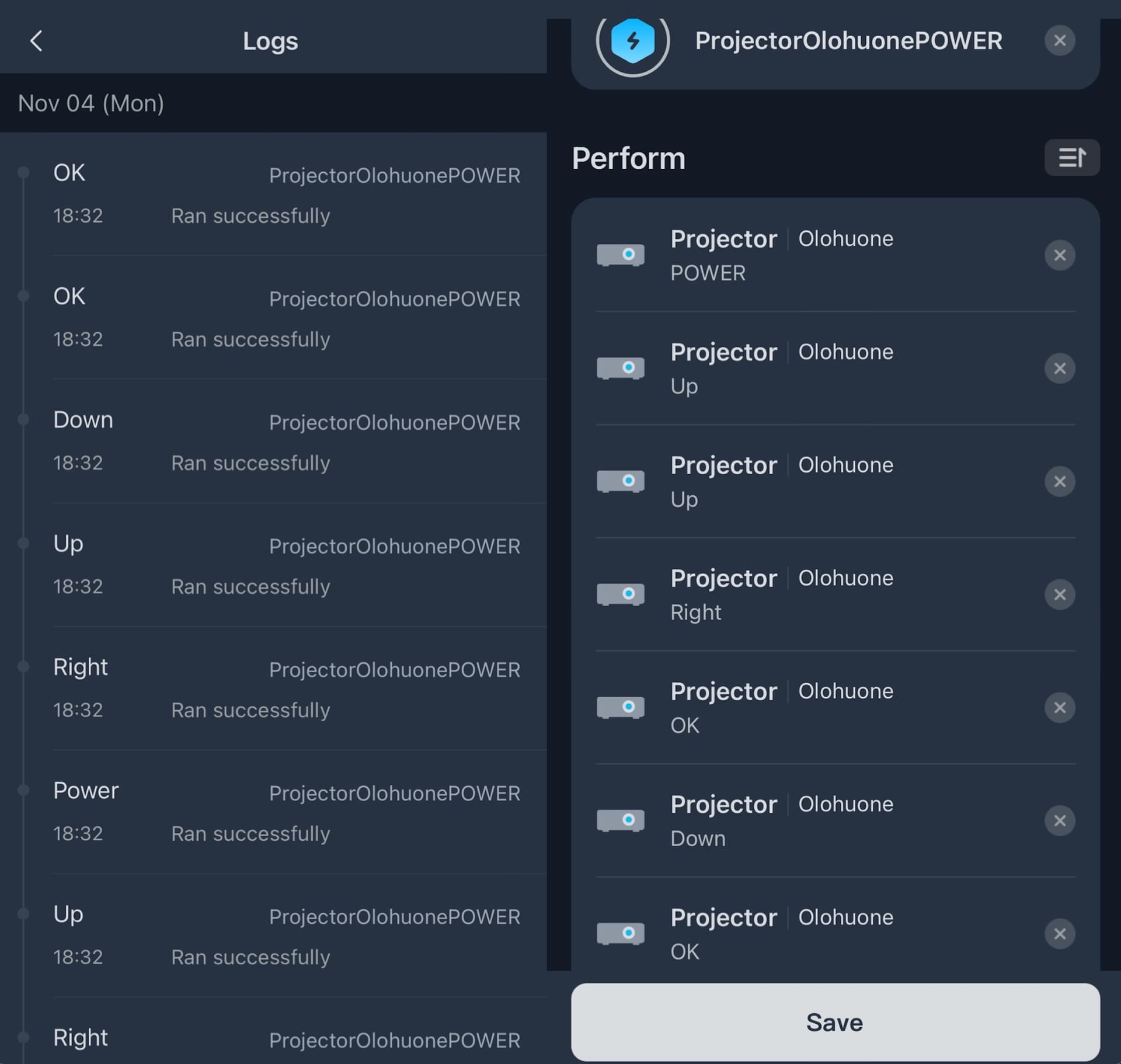
I’ve been playing with the Universal Remote for a couple of days. Unfortunately with the 4.2 firmware and 9.2 switchbot app version it is still very buggy. I’m extremely interested in the IR snooping/sending because at the moment the Switchbot app and the Hub2 recorded IR command actions is just absolutely horrible. Even though i can record and control the individual IR signals from my U5 remote via IR the automations just won’t work. They are absolutely bonkers and the execution order of the recorder actions is different almost every time when i execute the same action.

Here’s a screenshot of the Action i want to execute in order to switch the input to HDMI2: It’s supposed to power on the projector, go up twice, right once, select the input menu, go down once and then select the hdmi2 as input. On the left side of the screenshot you can see that it’s just totally different steps of execution. And the execution order is different each and every time. I don’t understand why this is happening.

So my question to you @eliz and @Cornmacabre are you getting successfull automation executions with this ESP32 + IR Hack? As it is at the moment the SwitchBot Universal Remote seems very much a work in progress.

can you add a very short delay between each command? that’s how to solve the same issue on sofabaton macros so I assume its the same on the Switchbot system too.

Agreed on the disappointment in reliability of even stock-standard stuff with the remote software. Who knows if/when they’ll iron it out.

Using the IR hack method, triggered actions are as reliable as what home assistant (or MQTT) can accomplish natively, which should be very good. Think of the remote essentially as just a bridge to trigger actions or sequences of actions preprogrammed in HA – Including a sequence of outbound IR signals to your AV devices.

The esp32 would send it, not the remote or hub2. We accept the convoluted IR pathway (SB remote > IR esp32 > HA automation/macro > IR esp32 > IR end device) for the reliability and automation flexibility.

Consider adding say 50 millisecond pauses between the IR actions you’re interested in programming so it isn’t just blasting out all at once.

I personally haven’t tested anything more than two sequential actions, but since posting months ago the method has been rock solid for me. Admittedly less AV oriented tho. Best of luck, cheers!
Hello, does anyone have a solution for the buttons not appearing on the remote? I’m experiencing the same issue - while the buttons are visible in Home Assistant, I can’t enable Matter as a third-party control on the remote.

I’m using the Hub Mini Matter version and it works well. I assume it would work with the earlier non-matter version as well.

The only small drawback is that the air conditioner UI on the remote will always display temp and humidity as – since the mini hubs lack temp and humidity sensors. I’d prefer they simply hide those areas entirely.

I also got the remote, and just now realized its limitation. Do you thinks it would be possible to get it working via bluetooth to home assistant or esphome without the hub ?

1 Like

Mine will be send back.
It is all based on either Bluetooth or IR
not on tcpIP

in my case i have A chromecast - yamaha amplifier - sony bravia tv all connected via home assistant.

I have everything running in home assistant with scenes as well . i only want a remote with physical buttons to control all devices through HAOS .

i cannot even connect to Emulated roku on home assistant to controll everything

This may be possible via Bluetooth and ESPHome using an external BLE HID component, as the latest remote firmware v4.2 supports Bluetooth Classic where it can act like a keyboard/remote input for devices.

I found a link to this ESPHome component in another post, but did not try it out myself or the more active fork: GitHub - fsievers22/esphome-ble-remote: ESPHome external component for a BLE HID client

Screenshots of the app attached. I have already initiated a return for my remote though as I don’t have the time right now to mess with this. Maybe I’ll get one again if someone can confirm, as the remote hardware itself seems nice enough.


Just want to jump in here to keep the reference.

I’ve got a new(ish) Sony Bravia that uses buetooth for the remote versus IR. I do have other IR devices (Roku, most specifically) that currently I have to use a separate remote to control.

All this is tied to a Yamaha TSR-700 AVR via a fiber HDMI eArc cable for audio play. Unfortunately, the AVR is in a different room…

There is an impedance issue somewhere that causes the sound to drop for a moment every now and again. I’ve tried different HDMI cables, to no avail. No rhyme or reason as best I can tell. I do know, when I turn on the ceiling fan that’s on the same circuit (?) it will drop out.

I ran a TOSLINK Fiber out from the TV to the AVR, but then I need an way to control the volume of the AVR. This could be done via HASS with the right interface. LOML is adamantly opposed to using a phone as a remote.

I’ve looked at the Sofabaton remotes, but looks like the HASS interface is decidely sub-optimal for the mixed interface I would need to do.

Anyway, thanks all for your discussion. I’ve got the Switchbot Remote with Matter hub in a purchase basket. Just looking to make certain it can be used for my purposes.

cheers,

Thanks for sharing.

For some reason I could not get this to work with my Athmos IR device purchased from the same Aliexpress link. The device would frequently disconnect from the ESPHome API with the following error:

Connection error occurred: [Errno 104] Connection reset by peer
INFO Processing unexpected disconnect from ESPHome API

In my case, disabling encryption stabilized the connection. I’m unsure if this is possibly due to a change in Athmos hardware or in ESPHome/HA. I opened the device and confirmed that it is using the same ESP 8285 chip, though it was oddly missing the metal shield commonly found on ESP devices.

I’m posting the steps that worked for me in case others run into this as well.

  1. Comment out the encryption: and key: lines
  2. Rebuild and install without those lines
  3. Remove the device from Home Assistant
  4. Allow Home Assistant to automatically re-add the new device

Step 3 & 4 are required, otherwise HA will still try to use the encrypted API, which will result in errors:

[api.connection:107]: : Reading failed: BAD_INDICATOR errno=11
1 Like

Did you ever solve this? I have the same issue. Have both hub and remote added, but no matter option when adding 3rd party.

I gave up…

Has anyone seen any update from Switchbot? Now, when they are fully onboard with HA, it should be fairly easy for them to add the functionality to operate any entuity from HA via Universal Remote.

I wouldn’t hold your breath – I’m watching that development too as someone who has multiple SB device. It seems unlikely given their dependency of having the Hub 2 sync with the remote, and the role of both devices is App dependent. The Home Assistant IR Hack approach doesn’t fundamentally even need their remote, any presumably ESP32 IR Transmitter+Receiver or better BLE+IR device does all the work after the trigger is recieved. Consider that you’re essentially “spoofing” the remote to send IR commands Home Assistant is preconfigured to use other hardware and automations to toggle scenes or stage AV+Climate stuff… what this hack is doing can essentially be accomplish with any IR remote.

IMO the Matter four-button stuff is a total red-herring… it’s just TOO SLOW and unreliable after the pain to configure. My guess is you can only expect them to implement the four matter buttons in HA via homekit (which should have been a day 1 feature), as the IR hack approach here fundamentally requires an IR receiver and Transmitter that IS NOT the remote: entities exposed or not.

According to Switchbot’s support this is currently not support on Andoid. They claim to work on it:

So sorry for that. Our R&D department is working hard to adapt to Android models. Please be patient and wait.

Using the learned Pronto IR command from blasting it out from an IR transmitter via ESPHome:

0000 006D 0000 0008 0030 0020 0010 0020 0030 0040 0010 0010 0010 0010 0010 0010 0010 0010 0010 0030

I can send it now via the switchbot hub and remote. But these IR signals are non exact, so how would I go about writing a automation to listen/trigger based on that IR pronto command ?

e.g. a value of 0010 could have a wobble of 00[0C-14]

Based on a couple of decades experience with IR, including elaborate home automation setups, my recommendation is to replace any gear that relies on it for control.

TV/AVR/Settop box can all be controlled from a single remote, typically the settop remote. Replace any Roku device with an AppleTV or AndroidTV or GoogleTV device as they all use Bluetooth. HDMI CEC will take care of power, input, navigation and volume commands. Don’t buy off-brand settop/streaming box or you’ll likely have issues with CEC. Apple is 100%, NVIDIA Shield is just about 100% today and so are the Onn devices from Walmart.

If you’re not using an AVR/amp and only a TV, I can’t recommend LG TVs as they all have issues with volume control. Otherwise they’re fine. Samsung and Sony shouldn’t have any issues with CEC.

For integration with HASS, use IP, which all these devices should also support.

The only device I have in my home today that uses an IR remote is a mini-split air conditioner. And it has a USB port into which I’ve put an ESP32 module for IP control over WiFi from HASS.