Patrch
October 11, 2025, 6:30pm
1
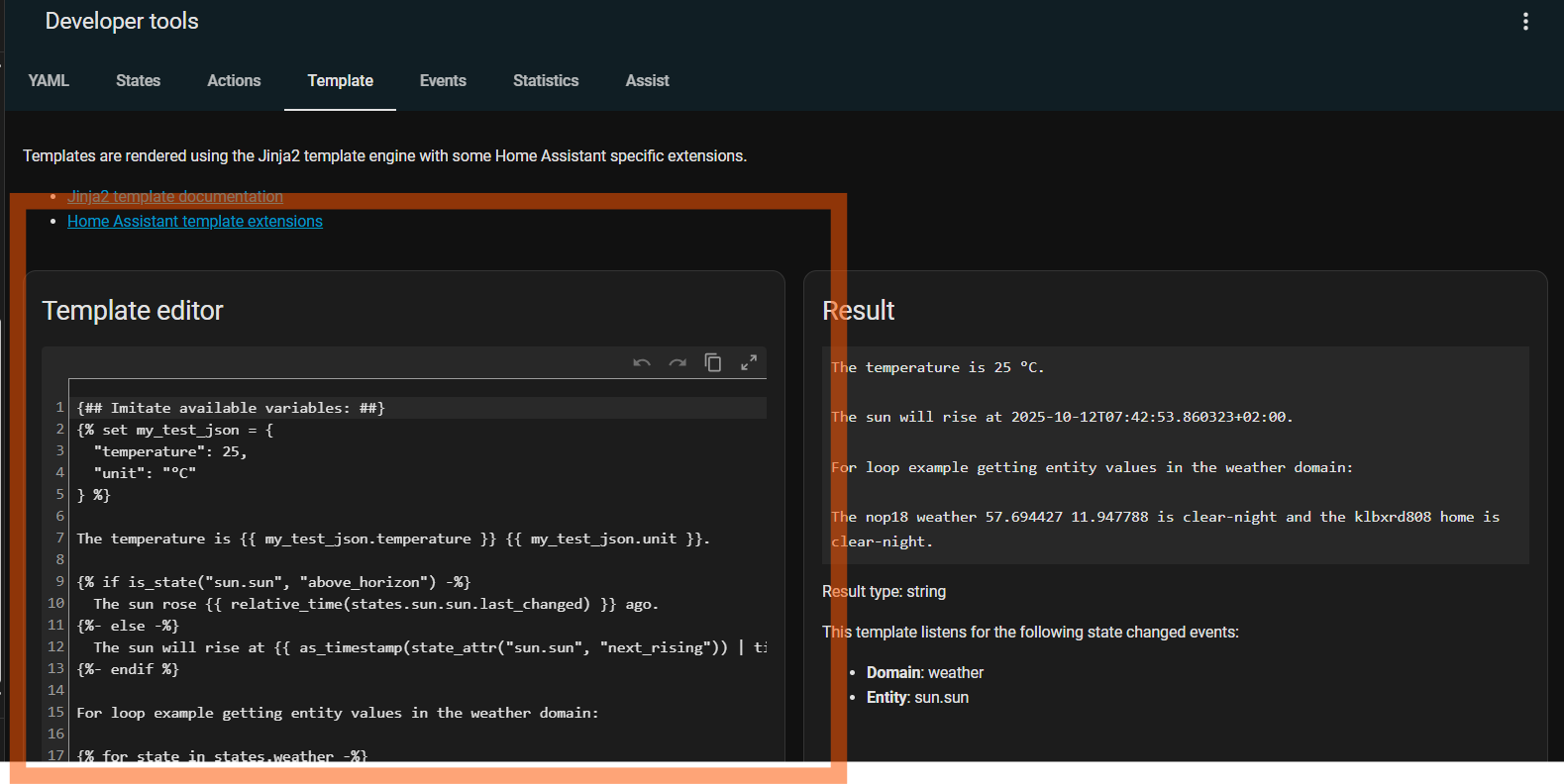
just updated core to 10.2 went into the development tools template editor … it previously had colored syntax … now it looks like this (chrome and edge and duckduckgo - computer and mobile):
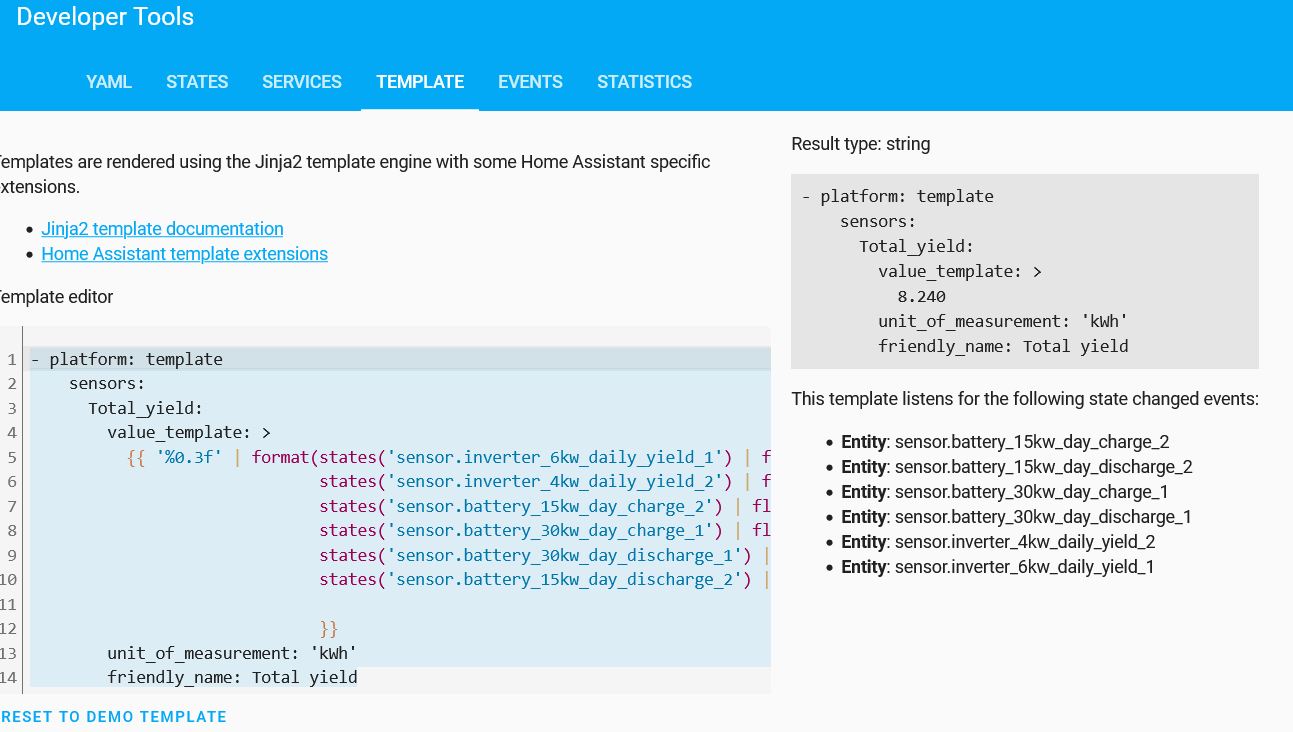
before there was colored syntax for comments, all the {% and {# and sensors, etc…eg, like this that i found in a websearch:
I guess it isn’t just me, did I miss the info and how to turn it back on somewhere?
juergenjw
October 11, 2025, 6:37pm
2
I can confirm your find. Colored syntax on my 2025.9.3 system, no color on 2025.10.2, browser used is firefox.
1 Like
Patrch
October 11, 2025, 6:41pm
3
thanks, just found there was a frontend update, maybe it came in with that:
dev ← bump-frontend-20251001.2
opened 09:40AM - 10 Oct 25 UTC
https://github.com/home-assistant/frontend/releases/tag/20251001.2
NEEDS: htt… ps://github.com/home-assistant/frontend/actions/runs/18402664496
(ref release info : 2025.10: Undo, redo, and draw me too - Home Assistant )
tom_l
October 11, 2025, 11:02pm
4
Yeah there’s an open issue for this.
opened 02:23AM - 11 Oct 25 UTC
### Checklist
- [x] I have updated to the latest available Home Assistant versi… on.
- [x] I have cleared the cache of my browser.
- [x] I have tried a different browser to see if it is related to my browser.
- [x] I have tried reproducing the issue in [safe mode](https://www.home-assistant.io/blog/2023/11/01/release-202311/#restarting-into-safe-mode) to rule out problems with unsupported custom resources.
### Describe the issue you are experiencing
Since updating to Home Assistant Core 2025.10.2, the integrated YAML editor (used in Automations, Scripts, and Scenes) has lost both syntax highlighting and autocompletion.
The text now appears as plain text without any color, and no suggestions are shown when editing YAML keys or values.
This happens consistently on both desktop browsers and the Android mobile app.
### Describe the behavior you expected
The YAML editor should display syntax highlighting and provide autocompletion for available keys, entities, services, etc., as it did before the 2025.10.2 update.
### Steps to reproduce the issue
1. Update Home Assistant Core to 2025.10.2
2. Open an automation or script
3. Switch to Edit in YAML mode
4. Observe that syntax highlighting and autocompletion are missing
### What version of Home Assistant Core has the issue?
2025.10.2
### What was the last working version of Home Assistant Core?
2025.10.1
### In which browser are you experiencing the issue?
Google Chrome 128.0.6522.195 (Desktop and Android) Also reproducible in Firefox and the official Home Assistant Android app.
### Which operating system are you using to run this browser?
Android 16 (Samsung S23 Ultra) Windows 11 (Desktop)
### State of relevant entities
```txt
```
### Problem-relevant frontend configuration
```yaml
None. Occurs with default dashboard and without custom themes or frontend modifications.
```
### JavaScript errors shown in your browser console/inspector
```txt
No relevant errors.
```
### Additional information
<img width="1080" height="2199" alt="Image" src="https://github.com/user-attachments/assets/86ee3892-1602-4b4f-b4f1-824ada84cdc6" />
Please don’t add “me too” posts.
3 Likes