Thank both, @Didgeridrew and @nessa
I was blind… 
Thank both, @Didgeridrew and @nessa
I was blind…
I have two Tuya accounts, each having different devices, and since this update, I am only seeing the devices from one of the accounts.
So, I am still seeing both accounts in the Tuya integration, but now both show the devices from the first account. And the account they are actually in show most devices as ‘unsupported’.
I had to rollback the upgrade as my supla integration (via local mqtt) stopped working due to MQTT changes…
Really appreciate your work.
But not shure if the removal of more and more things like the http part from the yaml really makes things easier… I liked the simplicity it had that way. Now you have to scroll and click around like a madman. It would be nice if both ways would work.
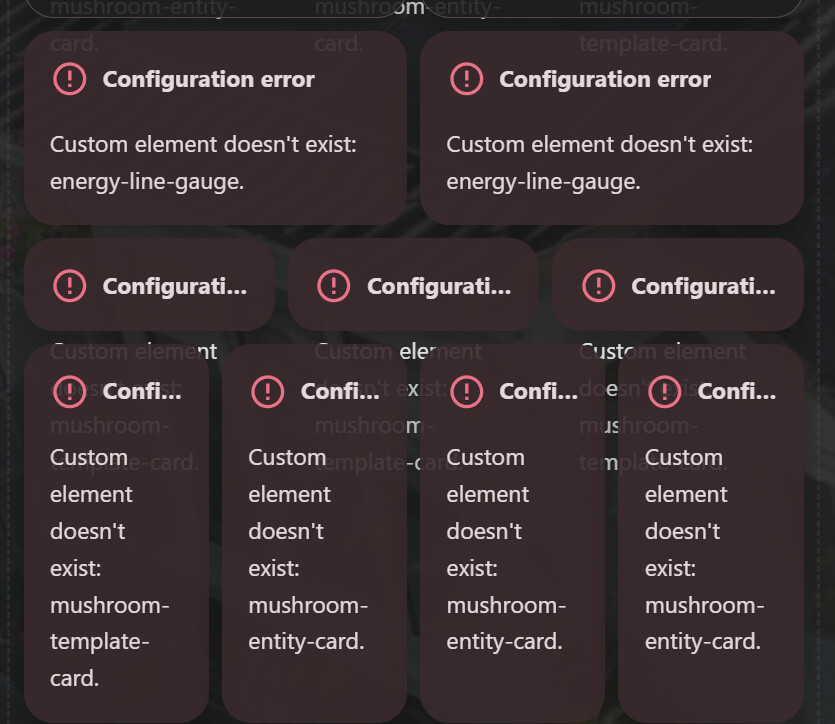
Not had any issues with recent release but this one seems to break a number of things for me:
Anyone any idea what to do here? Is it possible to rollback easily?
EDIT: Redownloaded Apex Card from HACS, reload config and everything is ok now!
Some earlier work looked at building entity IDs automatically from the area a device belongs to. Your feedback told us this suited some people but not everyone. So this release takes a more flexible route and puts you in charge: you can rename an entity ID yourself, and control how it is ordered, so your entities follow whatever naming pattern makes sense to you.
Yes, I don’t use areas and I don’t care about areas. I just removed area from entity ID 
Requiring users to yell blue murder loudly and repeatedly before replacing a poorly thought out scheme with what should have been implemented in the first place isn’t really that amazing.
Unfortunately, that’s not how software development works. You have to start somewhere and do the best you can with your current knowledge, information, and available time. At some point, you’ll reach a stage where you have to make changes. And if there are many areas that need changing, you have to prioritize. I haven’t worked on any HA issues yet, so I’m grateful for new features and improvements and am happy to see them.
And yes, certain things annoy me too—I find myself wondering: How could they have developed it that way?
(To find the answer, go back to the top and start reading again.)
I genuinely hope they add a manual way to do this in the future. E.g have a “Physical Device” field, or something similar. I fear that their “simplicity for new users” might make this a no go, but perhaps warrants a feature request discussion.
Update doesn’t play nice with my Emporia Vue integration.
Logger: homeassistant.util.package
Source: util/package.py:222
First occurred: 5:38:31 PM (3 occurrences)
Last logged: 5:38:32 PM

Unable to install package boto3==1.37.1: × No solution found when resolving dependencies: ╰─▶ Because you require boto3==1.37.1 and boto3==1.42.97, we can conclude that your requirements are unsatisfiable.
Logger: homeassistant.setup
Source: setup.py:276
First occurred: 5:38:32 PM (1 occurrence)
Last logged: 5:38:32 PM

Setup failed for custom integration 'emporia_vue': Requirements for emporia_vue not found: ['boto3==1.37.1'].
If it was a one off I could understand your point of view but they have done this repeatedly.
How can they be so out of touch with their userbase?
solved see reply update seems to have broken notify.mobile_app was using this for an automation to turn on and off DND on my phone anyone have any advice?
i figured it out i needed to edit the action to notify.mobile_app_name of phone integrated by app
Really disliking being unable to see all the entities of devices that were set up via multiple integrations on a single screen. This is the opposite direction I think many people wanted this to go- if anything, it would have been useful to make it possible to manually link devices that couldn’t be auto-combined.
Installed it, and 5 minutes later reverted to a back-up from last night. My LCARS display got messed-up and became very inresponsive. My bad…should have saved the logs before I restored.
Thanks for reporting. I have the same outcome, but different message in logs: “You do not have permission to perform this action”. Best I can tell it is on the HA side (WebSocket API?) as I see this in the log. Was thinking it might just be me. Same result for both music_assistant.play_media and media_player.play_media. Wondering if it has something to do with the Network Settings migration, but don’t know enough to figure out what it might be.
Same here, but this reference was helpful to get mine going. I was feeling rather shy, editing the Emporia manifest.json file, but backups build confidence [chuckle].
@magico13 already has it fixed. Just reload in HACS.
Iammeter integration is broken. I had to quickly restore the backup.
IamMeter integration warns deprecated components will stop working · Issue #167483 · home-assistant/core · GitHub