Just used it for movie night what’s up with yours
1 Like
Thanks for your reply!
I run it on a light and it starts a fade, then stops after the first step or so.
Example: if I use 5s fade-out with Ease-In-Out Quad, 0 to 255 scaling. Starting at 50% powered on, I run the script it goes to 39% and just quits.
Edit: So if I run it 4 times, it will take a light from 50% to 0% in 5seconds.
Don’t know what lights you have but I find some lights simply don’t behave well with this script. My Philips WIZ lights fade great everytime, my Wyze lights are hit and miss… ad when they miss it can be quite eratic. I have a couple of Tapo lights to replace them with, but I haven’t tried them yet.
Did either of you experiment with this, or enabling the debug option for more info?
- Minimum delay per step
- If your lamp isn’t fading evenly—and especially if your lamp might appear to be pumping or ungracefully stair-stepping as it goes through the fade—you might try bumping this up a bit, such as to 150 ms or 200 ms (or possibly even a little higher).
Yes. By the Wyze light ‘can be quite erratic’ I mean it will be at 50%, jump to 75%, and then fade nicely to approx. 10% and stop (most times it will just fade nicely to 10% before stopping). It will not fade to off no matter step size. Conversely it will not fade up from off either, I have to add actions before/after to turn it on/off. It will also occasionally show in HA as being on when it is most definitely off, turning it off shows off for a minute before falsely showing on again. It’s just a bad light.
I continuously get “float division by zero”. I’m using the 2.0 script already.
{
  "trace": {
    "last_step": "action/2",
    "run_id": "39bfdad5d77f54b06a79d7a2fd3748d4",
    "state": "stopped",
    "script_execution": "error",
    "timestamp": {
      "start": "2026-01-04T11:23:05.313181+00:00",
      "finish": "2026-01-04T11:23:08.328844+00:00"
    },
    "domain": "automation",
    "item_id": "1690010649472",
    "error": "ZeroDivisionError: float division by zero",
    "trigger": null,
    "trace": {
      "trigger": [
        {
          "path": "trigger",
          "timestamp": "2026-01-04T11:23:05.313241+00:00",
          "changed_variables": {
            "this": {
              "entity_id": "automation.wakey_scene_trans",
              "state": "on",
              "attributes": {
                "id": "1690010649472",
                "last_triggered": "2026-01-04T11:22:38.059066+00:00",
                "mode": "single",
                "current": 0,
                "friendly_name": "Wakey-Scene-Trans"
              },
              "last_changed": "2026-01-04T11:12:27.322435+00:00",
              "last_reported": "2026-01-04T11:22:41.073754+00:00",
              "last_updated": "2026-01-04T11:22:41.073754+00:00",
              "context": {
                "id": "01KE4BXD3AYFZRQCXJX3NYBGCN",
                "parent_id": "01KE4BXD3AYFCDTQZ2G3NQCGMT",
                "user_id": null
              }
            },
            "trigger": {
              "platform": null
            }
          }
        }
      ],
      "action/0": [
        {
          "path": "action/0",
          "timestamp": "2026-01-04T11:23:05.313535+00:00",
          "changed_variables": {
            "context": {
              "id": "01KE4BY7Q1WAYE565S19174MD7",
              "parent_id": "01KE4BY7Q0KNQSHAZPB14VPSZQ",
              "user_id": null
            }
          },
          "result": {
            "params": {
              "domain": "light",
              "service": "turn_on",
              "service_data": {
                "brightness_pct": 1,
                "device_id": [
                  "2f76b60ccc04ea809bd8a1e7cae9e3db"
                ]
              },
              "target": {
                "device_id": [
                  "2f76b60ccc04ea809bd8a1e7cae9e3db"
                ]
              }
            },
            "running_script": false
          }
        }
      ],
      "action/1": [
        {
          "path": "action/1",
          "timestamp": "2026-01-04T11:23:05.315996+00:00",
          "result": {
            "delay": 3,
            "done": true
          }
        }
      ],
      "action/2": [
        {
          "path": "action/2",
          "timestamp": "2026-01-04T11:23:08.318556+00:00",
          "child_id": {
            "domain": "script",
            "item_id": "ashley_s_light_fader",
            "run_id": "c85190f8c33a144e669e3e2ad8e4bd81"
          },
          "error": "ZeroDivisionError: float division by zero",
          "result": {
            "params": {
              "domain": "script",
              "service": "ashley_s_light_fader",
              "service_data": {
                "lampBrightnessScale": "zeroToOneHundred",
                "easingTypeInput": "auto",
                "endBrightnessPercent": 65,
                "endBrightnessEntityScale": "zeroToOneHundred",
                "autoCancelThreshold": 10,
                "shouldStopIfTheLampIsTurnedOffDuringTheFade": true,
                "shouldResetTheStopEntityToOffAtStart": false,
                "shouldInvertTheValueOfTheStopEntity": false,
                "minimumStepDelayInMilliseconds": 100,
                "shouldTryToUseNativeLampTransitionsToo": false,
                "isDebugMode": false,
                "transitionTime": {
                  "hours": 0,
                  "minutes": 1,
                  "seconds": 0
                },
                "light": "light.ceiling_local",
                "endColorTemperatureKelvin": 6400
              },
              "target": {}
            },
            "running_script": true
          }
        }
      ]
    },
    "config": {
      "id": "1690010649472",
      "alias": "Wakey-Scene-Trans",
      "description": "",
      "triggers": [
        {
          "value_template": "{{ as_timestamp(states('sensor.pixel_8_next_alarm')) - 60 < as_timestamp(now()) }}",
          "trigger": "template"
        }
      ],
      "conditions": [
        {
          "condition": "device",
          "type": "is_off",
          "device_id": "2f76b60ccc04ea809bd8a1e7cae9e3db",
          "entity_id": "e1666d73e47c70b31e2ef0706051bf8c",
          "domain": "light"
        }
      ],
      "actions": [
        {
          "data": {
            "brightness_pct": 1
          },
          "target": {
            "device_id": [
              "2f76b60ccc04ea809bd8a1e7cae9e3db"
            ]
          },
          "action": "light.turn_on",
          "enabled": true
        },
        {
          "delay": {
            "hours": 0,
            "minutes": 0,
            "seconds": 3,
            "milliseconds": 0
          },
          "enabled": true
        },
        {
          "action": "script.ashley_s_light_fader",
          "metadata": {},
          "data": {
            "lampBrightnessScale": "zeroToOneHundred",
            "easingTypeInput": "auto",
            "endBrightnessPercent": 65,
            "endBrightnessEntityScale": "zeroToOneHundred",
            "autoCancelThreshold": 10,
            "shouldStopIfTheLampIsTurnedOffDuringTheFade": true,
            "shouldResetTheStopEntityToOffAtStart": false,
            "shouldInvertTheValueOfTheStopEntity": false,
            "minimumStepDelayInMilliseconds": 100,
            "shouldTryToUseNativeLampTransitionsToo": false,
            "isDebugMode": false,
            "transitionTime": {
              "hours": 0,
              "minutes": 1,
              "seconds": 0
            },
            "light": "light.ceiling_local",
            "endColorTemperatureKelvin": 6400
          }
        }
      ],
      "mode": "single"
    },
    "blueprint_inputs": null,
    "context": {
      "id": "01KE4BY7Q1WAYE565S19174MD7",
      "parent_id": "01KE4BY7Q0KNQSHAZPB14VPSZQ",
      "user_id": null
    }
  },
  "logbookEntries": [
    {
      "name": "Wakey-Scene-Trans",
      "message": "triggered",
      "source": null,
      "entity_id": "automation.wakey_scene_trans",
      "context_id": "01KE4BY7Q1WAYE565S19174MD7",
      "domain": "automation",
      "when": 1767525785.313322
    },
    {
      "state": "4.5",
      "entity_id": "sensor.brightness_decke",
      "when": 1767525785.4112356,
      "context_event_type": "automation_triggered",
      "context_domain": "automation",
      "context_name": "Wakey-Scene-Trans",
      "context_message": "triggered",
      "context_entity_id": "automation.wakey_scene_trans"
    },
    {
      "name": "Ashley’s Light Fader",
      "message": "started",
      "entity_id": "script.ashley_s_light_fader",
      "context_id": "01KE4BY7Q1WAYE565S19174MD7",
      "domain": "script",
      "when": 1767525788.3187952,
      "context_event_type": "automation_triggered",
      "context_domain": "automation",
      "context_name": "Wakey-Scene-Trans",
      "context_message": "triggered",
      "context_entity_id": "automation.wakey_scene_trans"
    },
    {
      "state": "on",
      "entity_id": "script.ashley_s_light_fader",
      "icon": "mdi:lightbulb-on-50",
      "when": 1767525788.3206553,
      "context_event_type": "automation_triggered",
      "context_domain": "automation",
      "context_name": "Wakey-Scene-Trans",
      "context_message": "triggered",
      "context_entity_id": "automation.wakey_scene_trans"
    },
    {
      "state": "off",
      "entity_id": "script.ashley_s_light_fader",
      "icon": "mdi:lightbulb-on-50",
      "when": 1767525788.3260262,
      "context_event_type": "automation_triggered",
      "context_domain": "automation",
      "context_name": "Wakey-Scene-Trans",
      "context_message": "triggered",
      "context_entity_id": "automation.wakey_scene_trans"
    }
  ]
}
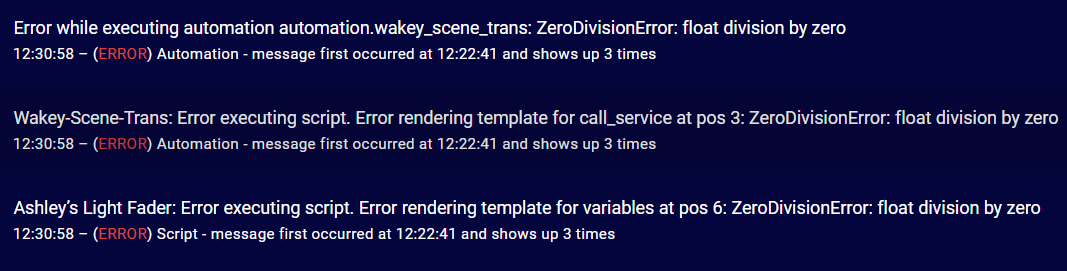
Any ideas please?
Edit: I re-added another fader and disabled the previous one in the same automation, with the same settings, and for some reason, it now seems to work? Will keep an eye out for further log errors.
1 Like
Thanks for your reply.
I think all my lights stopped working for some reason. Eventually I disabled all the auto-cancel-style settings and that makes the script work again for my lights.
Just not perfectly ideal in some situations. Part of me thinks it’s a networking issue, but a weird one at that if it’s allowing one step of the fade to happen than no others after.
Debug log gives:
Logger: homeassistant.components.system_log.external
Source: components/system_log/__init__.py:331
integration: System Log (documentation, issues)
First occurred: 1:05:42 PM (20 occurrences)
Last logged: 1:05:59 PM

    Set Studio Overhead to 17 brightness. (Linear brightness would have been 13.) Delay is 100 ms. Elapsed time is 1.19 seconds. (endBrightness is 0.)
    Set Studio Overhead to 15 brightness. (Linear brightness would have been 12.) Delay is 100 ms. Elapsed time is 1.31 seconds. (endBrightness is 0.)
    Set Studio Overhead to 12 brightness. (Linear brightness would have been 11.) Delay is 100 ms. Elapsed time is 1.43 seconds. (endBrightness is 0.)
    Set Studio Overhead to 9 brightness. (Linear brightness would have been 10.) Delay is 100 ms. Elapsed time is 1.55 seconds. (endBrightness is 0.)
    Stopped Ashley’s Light Fader because Studio Overhead was found to be at 21%, a difference of 12 percentage points from the expected brightness of 9%, which is higher than the auto-cancel threshold of 10 percentage points.
Not sure why I would’ve manually changed this setting, but I put it to 3% now, and I’m still having odd results. If I set the fade-out to 0% and then change the script to be 100% to try a reverse fade. The light doesn’t always turn on. I still end up disabling the auto-cancel and it fixes the issue.
TL;DR
Right now running Turn on x light + ashley script for x light in parallel seems to be the way for me right now.
I see your delay is still at 100 ms, have you tried what parautenbach suggested?
Yes, I tried 200ms. No difference.
@Danimal4326 That’s a good catch—thanks!
I’ll incorporate those fixes into the next update.
Just a quick heads-up to those in this thread that I’ve updated the script to adapt to a breaking change that’s coming in Home Assistant 2026.1.
(As long as you update to version 2.01 of the script, you should be fine; if you don’t update to 2.01, the script will break under Home Assistant 2026.1 and later.)
5 Likes
It would be really handy if you added a version number to the script Alias so folks would know if they’re out of date 
Ooops I see, you have it in the description. Which isn’t as easily visible from the scripts screen.
1 Like
@_mav If you might like, I’d be happy to look into this further?
To get a better idea of what may be happening there, though, would you be open to enabling debug mode and then capturing a log excerpt of a test run where this weirdness happens? (I described the step-by-step process for enabling debugging and such in an earlier comment.)
And just to add, I don’t want to imply that your existing log bits are unappreciated (because they are!), but to really get an idea for what’s going on, I’ll probably need time stamps for each log entry, for one. (And the steps from that earlier comment will enable that.)
@Arakon Just to check—are you good to go now? Or are you still experiencing any weirdness with the script?
@tykeal For whatever it’s worth, I’m hesitant to add the script’s version number to its alias just since I wouldn’t want to break any existing automations’ references to the script?
Nonetheless, as you had also noticed, I did add the script’s version number to its description.
Totally understand. I’m a little more used to tracking blueprints and it’s become common practice (at least for me) to stick the version into the blueprint name.
1 Like
I had the exact same issue with another automation (evening color temp shifting), but oddly, not for the morning color temp shifting that was set up exactly the same way.
Again, just re-adding the script seems to have fixed it, so I have no idea what was going on there.
1 Like
Thank you for your reply @handcoding! 
2026-01-10 06:59:04.302 WARNING (MainThread) [homeassistant.components.system_log.external] easeInOutSine easing type with 100 ms delay. remainingTimeInMilliseconds = 4992, and absoluteBrightnessSpan = 125
2026-01-10 06:59:04.303 WARNING (MainThread) [homeassistant.components.system_log.external] startBrightness = 2, endBrightness = 127, and processingDelayInMilliseconds = 4
2026-01-10 06:59:04.535 WARNING (MainThread) [homeassistant.components.system_log.external] Stopped Ashley’s Light Fader because Studio Overhead was turned off during the fade.
Are these any help?
If it’s any consolation, I think something at the core of my setup is completely wrong right now. I might need to repair all my lights into my smart home perhaps. It could also be something weird like networking.
When on my HA dashboard, I can simply toggle lights on and off with no perceivable issues at all.
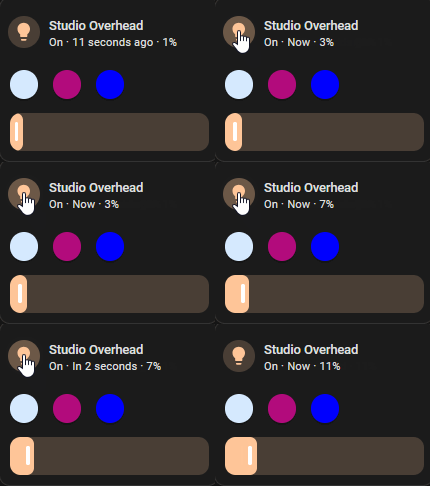
Edit: Also just noticing the weirdest thing, when I toggle lights on and off through the dashboard, many minutes after attempting scripts, they continue (possibly where they left off?) with a fade pattern? (image attached below)
Edit#2:
Log #2 – Trying to turn on a light from off/0%
2026-01-10 07:29:08.437 WARNING (MainThread) [homeassistant.components.system_log.external] easeOutCubic easing type with 100 ms delay. remainingTimeInMilliseconds = 4992, and absoluteBrightnessSpan = 127
2026-01-10 07:29:08.438 WARNING (MainThread) [homeassistant.components.system_log.external] startBrightness = 0, endBrightness = 127, and processingDelayInMilliseconds = 4
2026-01-10 07:29:08.456 WARNING (MainThread) [homeassistant.components.system_log.external] Set Studio Overhead to 1 brightness. (Linear brightness would have been 0.) Delay is 100 ms. Elapsed time is 0.03 seconds. (endBrightness is 127.)
2026-01-10 07:29:08.532 WARNING (MainThread) [homeassistant.components.light] Got
kelvinargument inturn_onservice, which is deprecated and will break in Home Assistant 2026.1, please usecolor_temp_kelvinargument2026-01-10 07:29:08.578 WARNING (MainThread) [homeassistant.components.system_log.external] Set Studio Overhead to 11 brightness. (Linear brightness would have been 4.) Delay is 100 ms. Elapsed time is 0.16 seconds. (endBrightness is 127.)
2026-01-10 07:29:08.698 WARNING (MainThread) [homeassistant.components.system_log.external] Set Studio Overhead to 19 brightness. (Linear brightness would have been 7.) Delay is 100 ms. Elapsed time is 0.28 seconds. (endBrightness is 127.)
2026-01-10 07:29:08.823 WARNING (MainThread) [homeassistant.components.system_log.external] Set Studio Overhead to 27 brightness. (Linear brightness would have been 10.) Delay is 100 ms. Elapsed time is 0.4 seconds. (endBrightness is 127.)
2026-01-10 07:29:08.933 WARNING (MainThread) [homeassistant.components.system_log.external] Stopped Ashley’s Light Fader because Studio Overhead was found to be at 0%, a difference of 11 percentage points from the expected brightness of 11%, which is higher than the auto-cancel threshold of 10 percentage points.
Edit#3 – Log#3:
Everytime I turn the script on and off I get this kelvin issue:
2026-01-10 07:35:19.229 WARNING (MainThread) [homeassistant.components.light] Got
kelvinargument inturn_onservice, which is deprecated and will break in Home Assistant 2026.1, please usecolor_temp_kelvinargument2026-01-10 07:35:24.515 WARNING (MainThread) [homeassistant.components.light] Got
kelvinargument inturn_onservice, which is deprecated and will break in Home Assistant 2026.1, please usecolor_temp_kelvinargument
Using your newest script - v2.01 – do I need to flush running processes some how to start using the new script?
Edit#4 – Log #4 – hopefully a red herring :
:
2026-01-10 07:42:24.296 ERROR (MainThread) [aidot.device_client] recv json error : The length of the provided data is not a multiple of the block length.
2026-01-10 07:42:24.297 ERROR (MainThread) [aidot.device_client] recv json error : The length of the provided data is not a multiple of the block length.
2026-01-10 07:42:24.297 ERROR (MainThread) [aidot.device_client] recv json error : ‘utf-8’ codec can’t decode byte 0xe1 in position 129: invalid continuation byte
On the light I’m trying to run this on.
@_mav I’m not quite sure what might be happening here. Out of curiosity, the next time that you notice this, could you check to see whether any debugging log entries might be appearing in your system logs? (And that’s assuming that you were to have left debugging mode still enabled.)
This is rather weird, and there shouldn’t be any need to flush any processes. I have a couple of ideas for things that you could potentially check on, though:
You could check to see whether there might be any remaining kelvin: calls within your instance of the script:
- First, open the Ashley’s Light Fader script on your system, and then go to the “…” menu and choose “Edit in YAML”.
- From there, press Cmd+F (macOS) or Ctrl+F (Windows) to open a find window and then search for “
kelvin:”. - As you go through each of the matches in the script, do any of them say “
kelvin:” rather than “color_temp_kelvin:”?
You could check to see whether you might somehow have an older or duplicated version of the script that’s still in your system somewhere:
- Using a file-editor add-on of your choice (such as the built-in File Editor add-on), open
/homeassistant/scripts.yaml. (This is the file that contains the collection of all of the scripts that are on your system.) - From there, go through the above steps to search for any instances of “
kelvin:”. - And if you find any matches that say “
kelvin:” (rather than “color_temp_kelvin:”), you should be able to also see from the surrounding context as to which script those matches might belong to?
I can tell what’s happening here. In short:
- You’ve requested a light fade from level 0 to level 127. And you’ve requested that that happen within a span of 5 seconds.
- Going by the log entries, I can see that the first set-brightness command (for 1 brightness) was sent to the light at
07:29:08.456. - From there, the script then sends set-brightness commands to the light for:
- 11 brightness (
07:29:08.578) (122 ms later), - 19 brightness (
07:29:08.698) (120 ms later), - and 27 brightness (
07:29:08.823) (125 ms later).
- 11 brightness (
- Then, at
07:29:08.933(110 ms later), the script aborts because the light was found to still be at 0 brightness.
What this means is that—because the requested fade was so steep—the script had to send set-brightness commands to the lamp extremely rapidly, at a pace of merely 120 ms or so between each set-brightness command.
The very best and very fastest smart lights on the market miiiight be able to process set-brightness commands at that pace. But the reality is that the processor in an average smart light simply can’t keep up with set-brightness commands being sent that rapidly.
All in all, what your logs tell me is that the first set-brightness command was sent at 07:29:08.456, and by 07:29:08.933 the script ended up aborting 477 ms after the start time because the light was still found to be at 0 brightness.
So—since the light was still found to be at 0 brightness—this tells me that that particular light apparently takes more than 477 ms to process a single set-brightness command. That time frame, while perhaps slower than average among smart lights, isn’t entirely out of the norm either.
If you might be up for it, here’s what I might recommend trying to confirm whether the cause of this weirdness might be the light’s processing speed:
- Try setting up a demo/test automation that runs Ashley’s Light Fader on this particular light, but try having the script run the fade over a span of 60 seconds (rather than over a span of 5 seconds). And rather than going from 0 brightness to 127 brightness, try going from 0 brightness to—say—50 brightness.
- Doing this should hopefully work correctly. And if it does, that would suggest that this particular lamp’s processor might not have been able to keep pace with the steep incline of the original fade that you had been trying to run.
1 Like
Hi there. I tried to implement the Skript Toma simple automation. But my lamp behaves odd. It starts the automation with a delay of a few seconds. Then it turns on the light and raises the light intensity to max within a second and then it turns of.
Do you have an idea where this might come from?
Thanks in advance