Have you used the traces in automation to see where it is stopping.
Very helpful
Click on the trace timeline
If error it will tell you
@Britespark I just wanted to note that you should not run dryers during the night (i.e when you sleep). They are one of the most common reasons for fire nowadays, and at least in my country (Norway) the fire departments have seen a spike in more serious fires because of them (and people noticing them too late).
@Rod_Poplarchick I’ve been searching for a solution to my automation issue and think this blueprint can help. I’m having issues with it, however, because I’m using a Smartthings multi sensor and the blueprint doesn’t recognize it. I tried to edit it but I got an error Missing input definition for moving… Could you provide any insight.
Sorry I don’t have anything smart things or any other cloud based devices
So I would not know where to start
Remove
device_class: vibration
from the ‘vibration_sensor’ section and see if you can find the sensor. The list will be longer. Your sensor MAY not be of device_class vibration.
You could also do a custom on it and change the class to vibration, but that one is a guess…
It still must be an input_boolean in order to work in the BP.
2 Likes
I have found this to be a very common request, and pretty easy to add in the BP.
Feel Free to copy if you like…
1 Like
Thank you! I was able to get it working. I guess it was what you posted here but I didn’t see the specific option I changed in the article. I changed the “show as” option in the entities settings to vibration which then allowed the blueprint to see it and it worked perfectly. So to anyone else, this blueprint will work with the Smartthings/Aeotec multi-sensor, you just need to change that setting.
3 Likes
Just curious if anyone here is running this with zigbee2mqtt and if so what do you have your sensor timeout set to?
1 Like
Did you ever figure out a good answer on this? Wondering the same thing.
So the Aqara sensor never worked well so I switched to the TuYa TS0210 control via MQTT | Zigbee2MQTT which works like a charm using 10sec sensor timeout.
I am using a thirdreality vibration sensor brought in through z2m and attempting to use it to alert when the dryer is done. This blueprint sees the device so I suspect it would work as expected.
But rather than having it trigger a notification, what I would like to do is have it toggle an input_boolean on when the dryer starts and then off when it ends. I want to pass this input_boolean to alexa and use the alexa app to announce the dryer has finished.
I want to do it this way because currently the Alexa Media Player integration has had some problems of late and I’d prefer to just pass the job over and not have to worry about it.
That being said, it is obvious how to turn off the input_boolean. But I need help with turning it on when the sensor first detects the motion. This blueprint has a “pre-action” section:
Is it as simple as adding that same concept in for the one shared in this thread?
Hey man!
Im using amost the same sensor but its not working for me. What are your settings for the blueprint?
Thanks
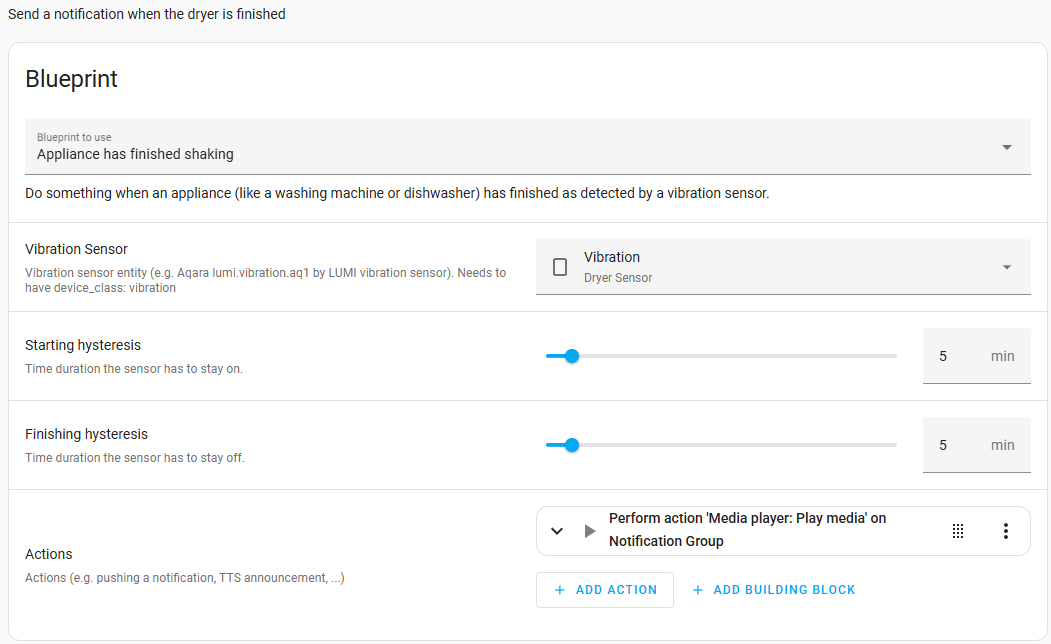
These are the settings I’m using. I had to adjust the sensitivity of the sensor as my washer vibration was being picked up by it as well.
1 Like
I finally have this installed correctly, I think, but it won’t trigger. I have the sensor selected and the hysteresis values set. The sensor is working, as shown below in a few lines from the history from a washer run this morning. I have a different sensor (Third Reality) and maybe it doesn’t work the same way as the Aqara one this was designed for. Maybe that reports intervals it was on or off, whereas this one just reports on-off binary values/times. I’m at a loss how to debug this.
|binary_sensor.vibration_sensor|on|2025-07-23T19:38:39.538Z|
|binary_sensor.vibration_sensor|off|2025-07-23T19:38:42.557Z|
|binary_sensor.vibration_sensor|on|2025-07-23T19:47:50.610Z|
|binary_sensor.vibration_sensor|off|2025-07-23T19:47:53.632Z|
|binary_sensor.vibration_sensor|on|2025-07-23T19:58:28.764Z|
|binary_sensor.vibration_sensor|off|2025-07-23T19:58:31.781Z|
1 Like