Yeah, I had another idea in mind, then had to change. I will add another option later you can choose between the an expandable file tree or the double click style… I felt like having the double click is better for sftp feature.
You can now choose in settings which style you prefer in v2.2.1
New update is out you can enable sftp in settings.
1 Like
Where do I do that? The double-click behavior is unchanged.
In settings - Appearance- Collapsible tree mode
Oh sh… Reason is that I didn’t see the slider. Dark grey on black is almost not visible and the screen seems to end with the file icons.

You should permanently use the highlight color.
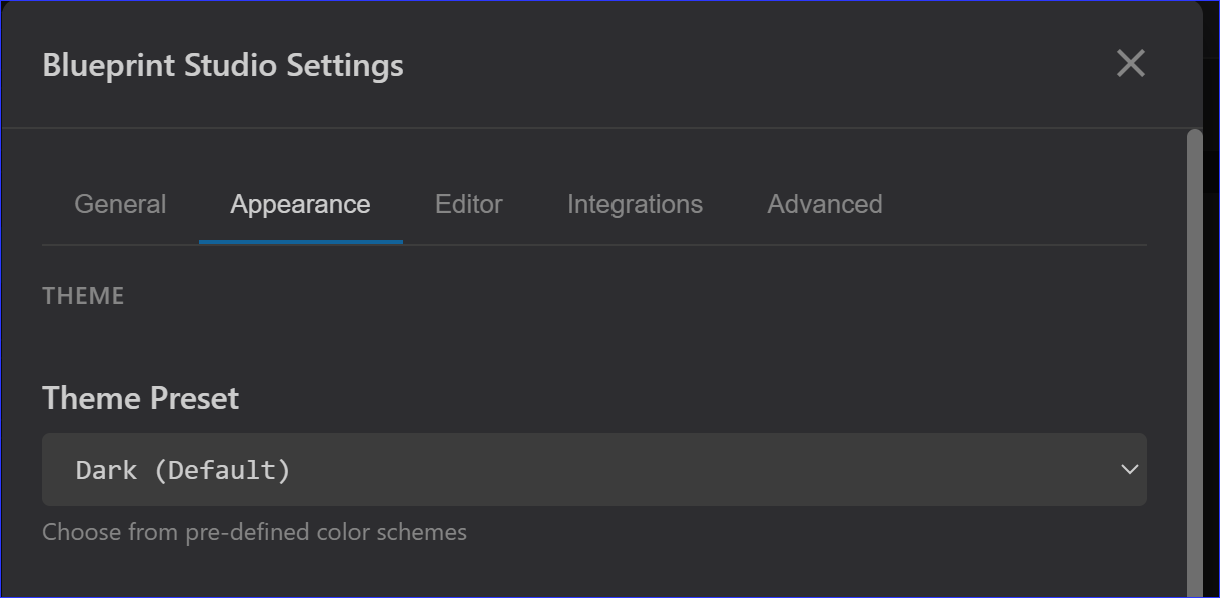
I’ll do it next update
Available in new update
1 Like
Upcoming update
# Blueprint Studio v2.3.0

### ✨ Interactive Terminal, Themes & Mobile Experience

This major release transforms Blueprint Studio into a true cross-platform IDE with a powerful terminal, native mobile support, and a beautiful new theme engine.

#### 🖥️ Interactive Terminal (xterm.js + PTY)
A real, stateful terminal for Home Assistant power users.
*   **True Shell Access**: Runs a persistent `bash` or `sh` session. Environment variables and directory changes stick for the entire session.
*   **SSH Quick Connect**: Save your favorite servers and connect instantly via the new dropdown menu.
*   **Secure & Audited**: Commands are restricted to a safe allow-list (`ha`, `git`, `pip`, `ssh`, etc.) and logged for security.
*   **Flexible Layout**: Toggle as a bottom panel (`Ctrl+Shift+T`) or dock it as a main editor tab. Resizable via drag handle.

#### 📱 Mobile & Tablet Experience
*   **Native Feel (PWA)**: Install as a standalone, full-screen app.
*   **Touch Gestures**: Swipe the sidebar open/closed effortlessly.
*   **Adaptive UI**: Dynamic viewport handling (`100dvh`), notch support, and compact toolbars for maximum space.

> **💡 How to install PWA Mode:**
> *   **iOS:** Open in Safari -> Tap **Share** -> **Add to Home Screen**.
> *   **Android:** Open in Chrome -> Tap **Menu (⋮)** -> **Install App**.
> *   **Desktop:** Click the **Install** icon in the address bar.

#### 🎨 Theme System Overhaul
*   **Auto (Match HA)**: Automatically syncs with your Home Assistant theme (colors + Dark/Light mode) in real-time.
*   **Glass Theme**: A premium "Glassmorphism" preset with translucent panels and 3D depth.
*   **Midnight Blue**: A deep, high-contrast dark theme.

#### 🔄 Persistent Workspace
*   **Session Restoration**: Browser refreshes no longer wipe your SFTP session. Blueprint Studio now remembers your active connection and the exact folder you were browsing.
*   **Tab Persistence**: Remote files opened in tabs are now saved and restored with their content, cursor position, and scroll state intact.
*   **Smart Reconnection**: Upon reloading the app, it automatically reconnects to your last used SFTP server and navigates back to your working directory.

#### 📑 Improved Editor Workflow
*   **Multi-Tab Support**: Fixed an issue where opening SFTP files wouldn't always register them in the tab bar. Remote files now open reliably in new tabs, allowing you to multitask between local and remote configurations.
*   **Tree Mode for SFTP**: The "Collapsible Tree Mode" setting now works for SFTP connections. Toggle it in Settings to switch between classic folder navigation and a modern, expandable tree structure with recursive browsing.
*   **Unified "Open File"**: The internal file opening system now seamlessly handles `sftp://` paths, meaning features like "Open in new tab" and asset previews work consistently for remote files.

#### 📁 Enhanced File Operations
*   **Styled SFTP Modals**: Replaced generic browser prompts with integrated UI modals for all remote operations (Create, Rename, Move, Duplicate, Delete).
*   **Contextual Creation**: Right-click anywhere in the sidebar's empty space (both local and SFTP) to quickly create files or folders in your current directory.
*   **Improved File Menu**: You can now create New Files/Folders directly from the right-click menu of an existing remote file, defaulting to its parent directory.
*   **Full Path Visibility**: The "New File" and "New Folder" modals now show your full absolute path (starting with `/config/`), making it clear exactly where your files are being created.

#### 🖼️ Enhanced Asset Preview
*   **Remote Image Navigation**: When viewing an image from an SFTP server, you can now use the **Previous** and **Next** buttons (or arrow keys) to browse through other images in that same remote folder without closing the viewer.
*   **Better File Type Detection**: Improved detection logic ensures text-based files on remote servers open in the code editor rather than defaulting to binary mode.


---

**Full Changelog**: [v2.2.3...v2.3.0](https://github.com/soulripper13/blueprint-studio/compare/v2.2.3...v2.3.0)
Sorry, but i cannot find the install icon for PWA mode on my Android S22 and also on my desktop…
Where is it?
Actually i didn’t put it in the release as there is a manifest.json conflictiing with HACS validation system. I will see to it in the next update.
Hi guys!
I have a bit of a problem with github… i did all according to instructions, but i keep getting “connection test failed” when i click “test connection”. Consequently no files are transferred to github.
I did create token, as “username” i used my username - is that correct? I also tried to enter my real name and surname, but nothjing… I must doing something wrong here…
Note that i also tried to login with username-password, and in settings it says “you are logged in as…” , but test failed keeps popping…
EDIT: it seems that i solved it… i created readme.md on my repo, just to “initialize it” and manually added at least one file to the repo, i guess… and after that it “magically” started to work… what can i say… i’m total noob in github…
To author: many thanks for this addon! I’m testing it because studio code is quite memory hungry and i hope that this one isn’t (as much)…
1 Like
It seems that i can’t figure out indentation settings. I have set to 2 spaces, but when i close and re-open studio tab again indents to 6 (or sometimes 8) spaces. Setting in bottom right corner shows 6, although i have selected 2 ?
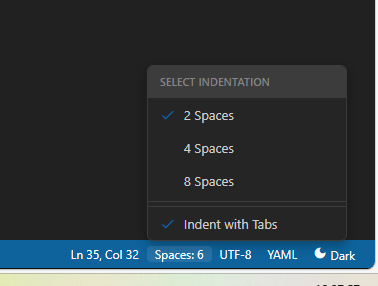
It depends on the file that you opened. If originally it was 2 it will automatically go to 2 and so on. While editiing if you change the setting then it will start using that new setting.
hm…i’m not sure i understand… now that you mentioned i do see that each file i open has it’s own “spaces” setting in bottom line. If i change it to 2, close and re-open it returns to set before - some open with 4, some with 6, one even went up to 10 - it seems that program doesn’t remember my setting…?
What’s “annoying” is that by pressing TAB cursor moves right the number of spaces, set in bottom, not selected in menu if i start from beggining of the line. It seems that tab in the middle of the line works ok, though.
In HA 2 spaces indentation is most common…
What’s even the meaning of first and second “spaces” setting (again, as per my picture)? Also what’s “indent by tabs” ? Nothing changes when i press tab…
Why the indent setting keeps changing between files
This is by design — the editor auto-detects the indentation of each file you open and temporarily switches to match it. So if one file uses 4 spaces and another uses 6, the status bar will
reflect that. Your global setting in the menu is the default for new/empty files, but existing files override it on open. This is actually a common feature in editors like VS Code.
The fix coming: In the next update, your global setting will always be preserved in state — so the Settings panel and status bar stay consistent.
What does Indent with Tabs do?**
For Home Assistant, nothing useful — leave it OFF. HA uses spaces exclusively, and enabling tabs will break YAML parsing. It’s there for people editing JavaScript or other file types where tabs are common.
1 Like
Great, thanks a lot for detailed explanation. And, again, excellent work thanks!
Thank you for this! I had the same error, solved it with a readme.md 
@soulripper13 - Amazing tool, thank you!!! Look lovely, I always hated the white left part in edit file app.
1 Like
New Release it out.
# Blueprint Studio 2.4.0 — PWA Power, Blueprint Magic, SFTP & SSH Supercharged

**Released: March 20, 2026**

This release transforms Blueprint Studio into a more native, mobile-friendly, and powerful automation IDE — right inside Home Assistant.

You can now **install Blueprint Studio as a real app** on your phone, tablet, or desktop. Blueprints have never been easier to create or use. SFTP and SSH got major usability and security upgrades. And behind the scenes: faster streaming, bigger uploads, cleaner code, and many long-standing rough edges polished away.

## ✨ Headline Features

### Instant Blueprints — “Use Blueprint” Form
- Brand-new side-by-side form that turns any blueprint into a ready-to-save automation
- Smart controls: entity pickers, sliders, toggles, time/date pickers, duration spinners, template editors…
- Live YAML preview updates as you type (debounced)
- Two-way sync: edit the blueprint YAML → form refreshes automatically
- Save directly to `automations.yaml` (auto-reloads HA) or to a new file
- Persists across browser refreshes and tab switches

### One-Click Blueprint Conversion (Ctrl/Cmd + K → Convert to Blueprint)
Improved multi-pass extraction now intelligently pulls out:
- Entities → domain-filtered selectors
- Magic numbers (brightness, temperature, percentages…) → number inputs with units & limits
- Delays, `for:` durations, time triggers, automation modes, condition states
- Safe naming, collision avoidance, incrementing suffixes
- Optional description field support

### Full Progressive Web App (PWA) Support
- Install Blueprint Studio to your home screen — full-screen, offline-capable experience
- Works beautifully on iOS, Android, Windows, macOS
- Dedicated install button in Settings → General

### SSH & Terminal Overhaul
- Secure public-key (RSA/Ed25519/ECDSA) + password authentication
- Save, edit, delete SSH hosts with one-click auto-connect
- Credentials stored safely in browser (no more plaintext on disk)
- Command injection fixes + proper argument escaping
- Auto-reconnect on last-used host

### SFTP — Now on par with local file tree
- Modified-file dots, bulk actions, pin-to-top favorites
- Drag-and-drop ZIP → extract directly on server
- Recursive delete, contextual actions (“Run in Terminal”, “Copy Path”)
- Connection pooling → much faster browsing & operations
- Clean sidebar + compact connection dropdown

### Modern Markdown & AI Experience
- Side-by-side live Markdown preview with syntax highlighting
- Code-block copy buttons everywhere (editor preview + AI chat)
- Persistent AI chat history & sidebar state
- Unified rendering engine across file previews and Copilot

### Performance & Large-file Breakthroughs
- True streaming for video/audio previews and folder ZIP downloads
- Multipart uploads bypass HA’s 16 MB limit (local + SFTP)
- Zero-copy file serving, raw-byte SFTP handling
- No more memory spikes on big transfers

### Security & Stability Polish
- SSH command injection fixed (`shlex.quote`)
- Main API now uses proper HA auth middleware (no custom bypass)
- Removed plaintext credential leaks on disk
- WebSocket reconnection logic → real-time updates survive long idle periods / network drops
- Fake filesystem watcher removed (cleaner, less noise)

### Quality-of-Life & Editor Improvements
- Format Code now respects your tab size & spaces/tabs preference
- Global search: All/Files/Entities tabs, inline & file-level replace, dismiss matches
- Folder upload auto-cleans macOS junk (`__MACOSX`, `.DS_Store`)
- 10-language localization refresh
- Many more file types recognized & editable out-of-the-box

Blueprint Studio 2.4.0 feels faster, safer, and far more capable — especially if you live in blueprints, remote servers, or want your automation workbench available anywhere.

Enjoy the upgrade — and happy automating! 🚀
I just discovered a bug for the github changes panel will fix it soon.