I can’t figure out how to send a PM. Am I too new as a member?
@Andrew75 glad v12.3.0 cleared up your side. v12.3.1 is out:
Translations. The integration now ships in 6 full UI locales: de en fr nl it es (329 strings each). HA picks
the file matching your frontend language with no reconfig — for your install that's fr automatically. Per-locale alarm
vocab follows HA core style: ES Armado/Desarmado, NL Ingeschakeld/Uitgeschakeld, FR Mode confidentialité / Armé (Présent/Absent), IT Inserito/Disinserito. Technical terms (Bosch, LAN, RTSP, FFmpeg, go2rtc, camera model
names) stay in English in every locale, matching how HA users in those locales actually talk about these in practice.
Signal alert captions. The 📂 https://... Media Browser link line is gone from snapshot + video pushes. It was
duplicating context that's already in the attachment. The header stays: 📸 <camera> Snapshot (HH:MM:SS) and 🎬 <camera> Video (HH:MM:SS, NN KB).
FCM Unexpected exception during read. Still tracking. The firebase-messaging lib swallows the underlying exception
and logs only that line, so there's no signal from the library side to act on. If you hit it again on v12.3.1 and can grab
the surrounding context with:
ha core logs 2>&1 | grep -E -B30 "fcmpushclient.*Unexpected" | tail -100
that would let me see whether the read loop is dying on a TLS reset, a transient HTTP 5xx from Google, a malformed push
payload, or something else.
Release notes + assets: Release v12.3.1 — 4 new UI languages; cleaner Signal alert captions · mosandlt/Bosch-Smart-Home-Camera-Tool-HomeAssistant · GitHub
A larger round of features for the Bosch Smart Home Camera HA integration just shipped. Most of it was driven by today's Bosch cloud 5xx burst — the integration now stays useful when the cloud goes down.
Cloud-maintenance banner. The integration pulls the official Bosch community RSS feed (Wartungsarbeiten + Statusmeldungen). When Bosch announces a maintenance window, the dashboard card shows a banner with title, time window (07:00–10:00 MESZ) and a link to the community post. A new sensor sensor.bosch_<cam>_bosch_cloud_wartung exposes the state (active / scheduled / past / recent / unknown / idle) for automations.
Lifecycle notifications. Three notifications per maintenance window: announced, started, ended. Deduped by (RSS link, state) so a scheduled window does not spam. Routes via alert_notify_system with a fallback to alert_notify_service.
Cloud up/down alerts. When the Bosch cloud returns 5xx for more than 60 seconds in a row, a notification fires ("Bosch Cloud nicht erreichbar"). The first successful tick after that triggers a recovery message. Suppressed while a maintenance window is active so you don't get duplicates.
LAN fallback for privacy + front light. This is the meaty one: as long as the camera is reachable on the LAN, the privacy and light switches keep working even when the Bosch cloud is completely down. The switch call falls through from cloud to direct RCP write to the camera. A binary_sensor.bosch_<cam>_lan_reachable shows the TCP-ping status. A persistent store remembers the LAN IPs so the fallback works across HA restarts.
Status sensor with disconnect override. When the Bosch cloud still reports ONLINE but the latest event was a TROUBLE_DISCONNECT (sometimes weeks old), the status sensor flips to offline instead of trusting the stale cloud value.
Per-camera online/offline alerts. Each camera now fires its own notification on a real availability change — first observation after a restart stays silent (baseline), unknown flaps are ignored so a cloud hickup does not spam.
Full notes:
- v12.4.11: Release v12.4.11 — Cloud up/down transition alerts · mosandlt/Bosch-Smart-Home-Camera-Tool-HomeAssistant · GitHub
- Blog overview with diagrams: https://www.mosandl.eu/bosch-smart-home-kameras-in-home-assistant-migration-und-neue-integration/
The LAN-fallback paths were live-tested during today's Bosch 503 outage. Report issues on GitHub or in this thread.
Really nice, many thanks!! I directly tested and created also some feature requests / bug report 
@RkcCorian  saw them. working on it. will update you over the git issues.
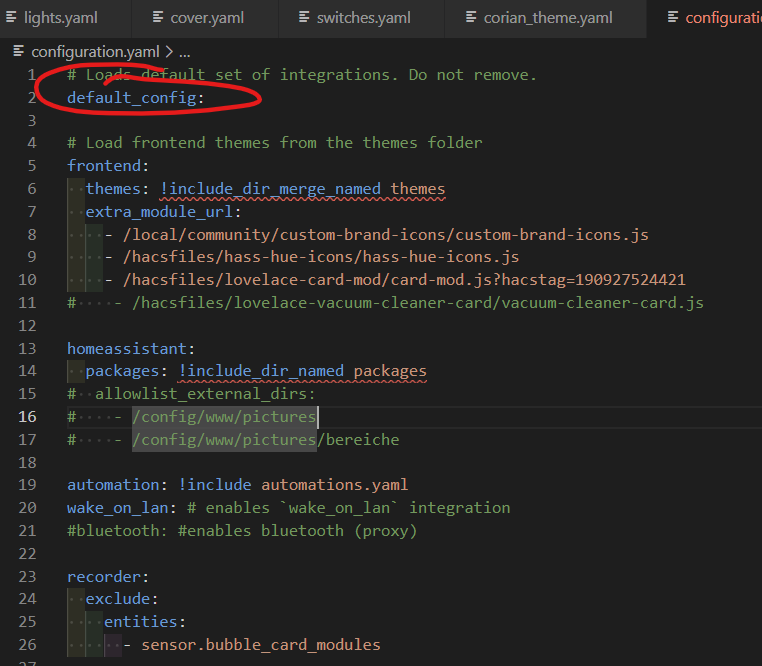
I'm not yet experienced with cameras in HA (which I will change now ). But when I start the stream it takes a while. On Edge with Win11 it shows HLS is loading and it will work there without error message. But on my Android (S23 Ultra) it shows "HLS-Modus (kein WebRTC über Tunnel)". Not sure what the difference is here. When I checked in the documentation it tells to add default_config to the configuration.yaml. As it seems that HLS is active not sure what I could change to optimized this.
Many thanks upfront for a hint!!!
v13.4.1 is out and addresses the points from the last few posts.
The in-card Design and Modus switchers are gone. Both are now set in YAML (theme: and mode:) or in the card's visual editor under "Design", with defaults iOS and Auto. That also answers the earlier question about "Modus": it only tinted the card chrome day/night, it was never a camera setting, so it made more sense as a config option than a button.
The overview card now respects the width of its dashboard column instead of overflowing, an overview tile no longer jumps when you open its three-dot menu, and the single card picks up the same subtle hover the tiles already had.
For themed dashboards there are two new card options, border_radius and box_shadow, so the cards can match the rest of your layout:
type: custom:bosch-camera-card
camera_entity: camera.your_camera
border_radius: "10px"
box_shadow: "0px 0px 4px 1.5px rgba(255, 255, 255, 0.5)"
They default to the standard look, and a theme that sets ha-card-border-radius: 0 no longer flattens the card corners.
Two smaller fixes: the "Live" badge now turns green the moment the video plays instead of sitting on "Verbinde" for a few seconds, and on the 360° Indoor the audio toggle no longer needs a camera pan to switch back on.
Update through HACS and hard-refresh the browser if a card looks unchanged.
On the WebRTC vs HLS question (separate from the release):
There are two ways the card plays a live stream:
- WebRTC — near-instant, low latency. Used on your local network and on desktop browsers that can reach the camera through the integration's proxy.
- HLS — chunked HTTP streaming. A few seconds of buffering before playback, but it works everywhere, including over a remote tunnel and on mobile.
The "HLS-Modus (kein WebRTC über Tunnel)" note on your S23 means that session is reaching Home Assistant over a remote tunnel (Nabu Casa, or your own reverse proxy / Cloudflare). WebRTC through a tunnel needs a TURN server, which most setups don't have, so the card deliberately skips WebRTC there and goes straight to HLS instead of waiting for a WebRTC attempt to time out. On Edge/Win11 you are most likely on the local network, so it uses the faster path ("HLS is loading" there is just hls.js spinning up the player).
So nothing is broken — the difference is local vs. remote access, not the device itself. To get the fast path on the S23 at home, make sure the Companion app uses your Home Assistant internal (LAN) URL on Wi-Fi (Settings -> Companion App -> Home Assistant URL). Then it connects locally and WebRTC kicks in.
The "takes a while" on first start is the camera waking up: the integration opens the connection, the camera starts its RTSP stream, and HLS buffers the first segments. Subsequent starts within a session are much quicker (~2 s) because the stream is pre-warmed.
default_config: in configuration.yaml only ensures the stream / go2rtc / webrtc components are loaded, which is what the card uses. If you already have default_config: there is nothing more to add. HLS being active over remote is expected, not a misconfiguration.
Many many thanks for your fast support and feedback!!!
I'm currently in holiday, so my phone goes via Nabu Casa and my Win11 Laptop via WireGuard. That might be the reason for the HLS. I will check again when I'm back from vacation.
Any hint where I can improve this to have also faster reaction when not beeing at home?
Greetings!
For remote access (Nabu Casa / WireGuard) the card streams over HLS — WebRTC needs a TURN server to traverse a tunnel, which Nabu Casa and most setups don't provide for this, so HLS away from home is expected. That buffering is what you feel as the slower reaction.
Two things help:
- At home, make sure the Companion app uses your local Home Assistant URL (Settings → Companion App → Home Assistant URL). Then it connects on the LAN and WebRTC kicks in, which is near-instant.
- Away from home, lower the HLS buffer: Integration → Options → HLS buffer profile → set it to "latency" (smaller buffer, faster reaction, at the cost of being more sensitive to jitter on a weak link).
It's all written up if you want the details — see the README sections "Streaming & Reliability", "WebRTC / go2rtc", "HLS Buffer Tuning" and "REMOTE / Cloud differences", and there's a longer write-up on my site: https://www.mosandl.eu/bosch-smart-home-kameras-in-home-assistant-migration-und-neue-integration/
True sub-second latency while fully remote would need a TURN server; that's on the parked list for now.
I tested now from home... still I get the same delay and it tells me that HLS is used. But I have the default config active (at minimum what I think  ). Do you have any hint or way how to check? Currently I cannot point to your integration / lovelace card or to my own setup.
Many thanks!!!
Good that you tested from home. If it still shows HLS on the LAN, the most likely cause is that the browser is not actually taking the local path, or the WebRTC pieces are not all loaded.
The URL matters more than where you physically are. If you open Home Assistant through its external address (Nabu Casa, a reverse proxy, a DuckDNS name) while sitting at home, the traffic still goes out and back, which counts as remote, so the card uses HLS. Open it via the internal http://<ha-ip>:8123 and the WebRTC/LAN path can kick in. In the Companion app that is the Internal URL in the server settings.
WebRTC here needs three core integrations active: go2rtc, webrtc and stream. Under Settings, Devices and Services, check that all three are present and not in an error state. go2rtc is built into Home Assistant OS; on a Container or Core install it can be missing. If it is there, do Settings, Devices and Services, go2rtc, Reload, then hard-refresh the dashboard.
If you are on the internal URL with go2rtc loaded and it still falls back, a short debug log will tell us why. Turn on the integration's debug logging (the integration, Configure, Debug logging), open the stream for about 30 seconds, and post the lines that mention go2rtc or TLS proxy. Those show whether the WebRTC handshake is even being attempted, or whether it is failing and falling back.
For the remote case, as I mentioned above, HLS over the tunnel is expected; the latency buffer profile helps, and true sub-second while fully remote would need a TURN server. The reason to test from home was to confirm the LAN gives you WebRTC, so the goal now is just to make sure the browser is really on that local path.
I have also added a short WebRTC vs HLS troubleshooting checklist to the README in the latest release, covering exactly these steps.
Hmmm... none of the mentioned are active within the integration section. I can also not add them manually.
I add my fully configuration.yaml...
# Loads default set of integrations. Do not remove.
default_config:

# Load frontend themes from the themes folder
frontend:
  themes: !include_dir_merge_named themes
  extra_module_url:
    - /local/community/custom-brand-icons/custom-brand-icons.js
    - /hacsfiles/hass-hue-icons/hass-hue-icons.js
    - /hacsfiles/lovelace-card-mod/card-mod.js?hacstag=190927524421

homeassistant:
  packages: !include_dir_named packages

automation: !include automations.yaml
wake_on_lan: # enables `wake_on_lan` integration
#bluetooth: #enables bluetooth (proxy)

recorder:
  exclude:
    entities:
      - sensor.bubble_card_modules
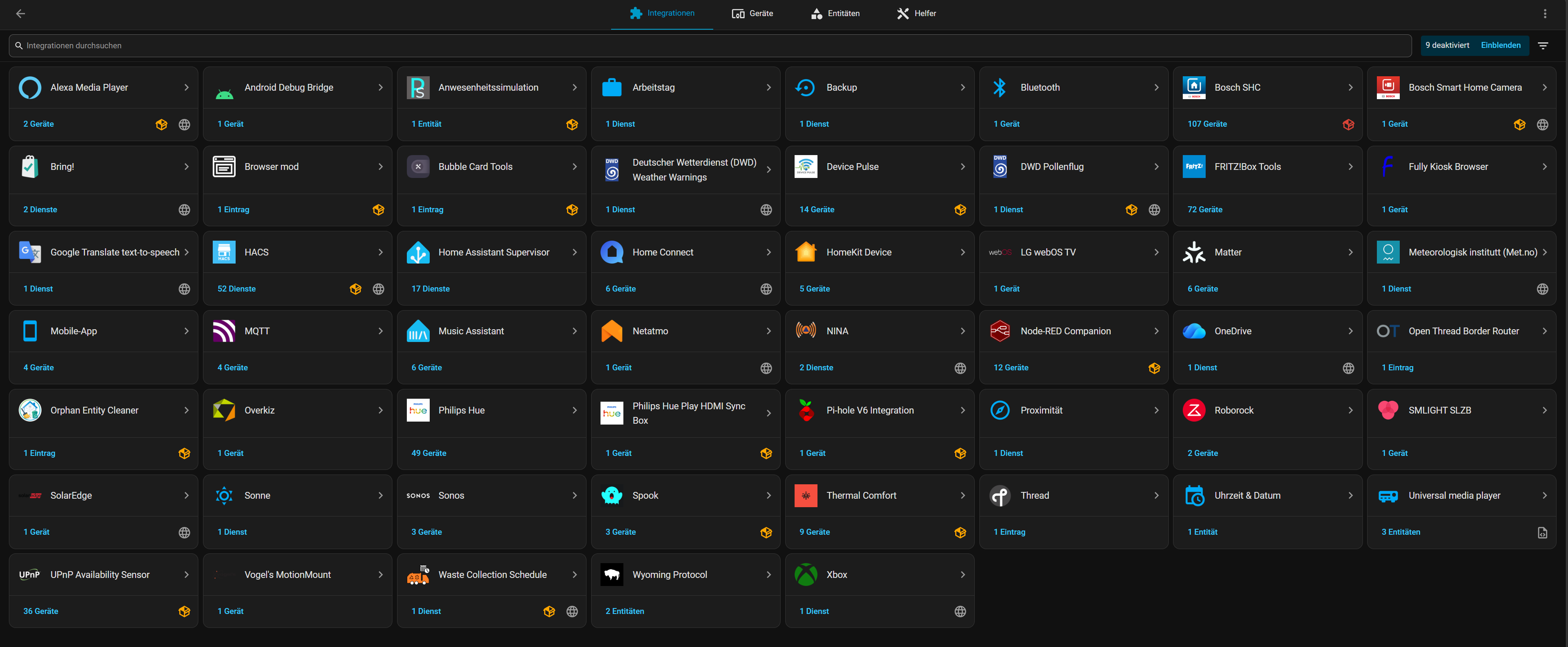
Good news: your default_config: already loads everything needed, so there is nothing to add by hand. Not being able to add them from the integration list is actually the expected behaviour — default_config provisions them automatically and HA hides them from the "Add integration" search for that reason. They are not missing.
Quick clarification on the three pieces:
go2rtc— on HAOS and Container installs this appears as its own entry under Settings → Devices & Services (since HA 2024.11), with a Reload action. If you don't see it and you're on a Core (bare Python) install, the bundled go2rtc binary isn't included and would have to run separately.stream— silent background component, no tile anywhere. Normal.webrtc— there is no integration with that exact name in the UI. It loads internally when needed, so not seeing it in the list is fine.
The more likely reason you always land on HLS, even at home, is the URL you open HA with. WebRTC needs a direct connection from the browser to go2rtc; if you reach HA through an external address (Nabu Casa, a DuckDNS name, a reverse-proxy domain) while sitting on your home Wi-Fi, that path counts as remote and the card falls back to HLS.
Quick test: open HA on your phone or laptop via the local address, for example
http://192.168.x.x:8123
with your HA's actual LAN IP, then open the camera. If the stream starts fast and near-instant there, it was just the cloud URL routing you out and back. Set your internal URL under Settings → System → Network and make sure the Companion app uses it when you're home.
If it still falls back on the local IP, go2rtc itself is worth a look: Settings → System → Logs, filtered for go2rtc — any init error shows there.
I'm already on local IP address. But I cannot see a go2rtc integration.
When I activate
go2rtc:
  debug_ui: true
  username: your_username
  password: your_password
I can access go2rtc
Two things.
First, the missing "go2rtc integration" is expected, not a fault. With default_config: go2rtc runs as a bundled background process and does not show up as a tile under Settings → Devices & Services. It's still running, which your debug UI on :11984 already proves. Nothing to fix there.
Second, for the HLS-instead-of-WebRTC issue, the simplest way to get me a useful log, no YAML needed:
- Settings → Devices & Services → Bosch Smart Home Camera → the ⋮ menu → Enable debug logging
- Open the camera and let it fall back to HLS
- Same ⋮ menu → Disable debug logging
Home Assistant then downloads the log file automatically. Attach it here and I'll take a look.
Official steps, in case the menu isn't obvious: Troubleshooting your configuration - Home Assistant
I tried to share only the relevant parts of the log. Many many thanks upfront!!
2026-06-08 20:10:48.790 DEBUG (MainThread) [custom_components.bosch_shc_camera.camera] Bosch Wohnzimmerkamera: skipping image refresh — privacy mode is ON
2026-06-08 20:10:48.796 DEBUG (MainThread) [custom_components.bosch_shc_camera.camera] Bosch Wohnzimmerkamera: skipping image refresh — privacy mode is ON
2026-06-08 20:10:48.851 DEBUG (MainThread) [custom_components.bosch_shc_camera.camera] Bosch Wohnzimmerkamera: cache stale (117404s) — fetching fresh synchronously
2026-06-08 20:10:48.851 DEBUG (MainThread) [custom_components.bosch_shc_camera.camera] Bosch Wohnzimmerkamera: fresh fetch failed — returning cached (117404s old)
2026-06-08 20:10:48.894 DEBUG (MainThread) [custom_components.bosch_shc_camera] Finished fetching bosch_shc_camera data in 0.105 seconds (success: True)
2026-06-08 20:10:53.439 DEBUG (MainThread) [custom_components.bosch_shc_camera.shc] cloud_set_privacy_mode: 815E141A-0A4E-4D36-939A-1643E7FD1330 -> OFF (HTTP 204)
2026-06-08 20:10:53.440 DEBUG (MainThread) [custom_components.bosch_shc_camera.shc] Privacy-OFF snapshot trigger for 815E141A (hw=INDOOR, delay=5.0s)
2026-06-08 20:10:58.509 DEBUG (MainThread) [custom_components.bosch_shc_camera] fetch_live_snapshot: proxy cache MISS for 815E141A-0A4E-4D36-939A-1643E7FD1330 — PUT /connection done
2026-06-08 20:10:58.886 DEBUG (MainThread) [custom_components.bosch_shc_camera] _rcp_session: ACK HTTP 200 for proxy-15.live.cbs.boschsecurity.com:42090 (sessionid=0x3b070407)
2026-06-08 20:10:58.969 DEBUG (MainThread) [custom_components.bosch_shc_camera] Finished fetching bosch_shc_camera data in 0.072 seconds (success: True)
2026-06-08 20:11:00.250 INFO (MainThread) [custom_components.bosch_shc_camera.switch] Live stream ON for Wohnzimmerkamera
2026-06-08 20:11:00.312 INFO (MainThread) [custom_components.bosch_shc_camera] webrtc-watchdog: refreshed go2rtc provider _supported_schemes (was 14 schemes, now 14)
2026-06-08 20:11:00.435 DEBUG (MainThread) [custom_components.bosch_shc_camera] PUT /connection type=LOCAL → HTTP 200 (297 bytes)
2026-06-08 20:11:00.435 INFO (MainThread) [custom_components.bosch_shc_camera] Live connection opened! type=LOCAL → {'bufferingTime': 500, 'user': 'cbs-41772507', 'password': '[rM***(25 chars)', 'urls': ['192.168.168.43:443'], 'imageUrlScheme': 'https://{url}/snap.jpg', 'videoUrlScheme': 'rtsp://{url}/rtsp_tunnel?inst=1&enableaudio=1&fmtp=1&maxSessionDuration=60', 'httpsUrlScheme': 'https://{url}/', 'rtspUrl': None}
2026-06-08 20:11:00.450 INFO (MainThread) [custom_components.bosch_shc_camera.tls_proxy] TLS proxy for 815E141A started on 127.0.0.1:35997 -> 192.168.168.43:443 (threading)
2026-06-08 20:11:00.451 DEBUG (MainThread) [custom_components.bosch_shc_camera] LOCAL pre-warm for 815E141A (360 Innenkamera, hw=INDOOR): delay=1s, retries=3, wait=3s, buffer=2s, min_total=25s
2026-06-08 20:11:02.061 DEBUG (MainThread) [custom_components.bosch_shc_camera] fetch_live_snapshot: RCP 0x099e unavailable for 815E141A-0A4E-4D36-939A-1643E7FD1330 — using snap.jpg
2026-06-08 20:11:02.707 DEBUG (MainThread) [custom_components.bosch_shc_camera] fetch_live_snapshot: 815E141A-0A4E-4D36-939A-1643E7FD1330 → 163420 bytes
2026-06-08 20:11:02.708 DEBUG (MainThread) [custom_components.bosch_shc_camera.camera] Bosch Wohnzimmerkamera: background refresh — 163420 bytes
2026-06-08 20:11:02.717 DEBUG (MainThread) [custom_components.bosch_shc_camera.image] bosch image entity 815E141A-0A4E-4D36-939A-1643E7FD1330: notified refresh at 2026-06-08 18:11:02.716825+00:00
2026-06-08 20:11:06.454 DEBUG (MainThread) [custom_components.bosch_shc_camera.tls_proxy] Pre-warm RTSP failed on port 35997 (attempt 1/3):
2026-06-08 20:11:08.347 DEBUG (tls_proxy_815E141A) [custom_components.bosch_shc_camera.tls_proxy] TLS proxy 815E141A: connected to 192.168.168.43:443 (TLS TLSv1.2, cipher ECDHE-RSA-AES256-GCM-SHA384)
2026-06-08 20:11:08.348 DEBUG (Thread-45 (_pipe)) [custom_components.bosch_shc_camera.tls_proxy] TLS proxy 815E141A [C→CAM] 140 bytes: DESCRIBE rtsp://127.0.0.1:35997/rtsp_tunnel?inst=1&enableaudio=1&fmtp=1&maxSessionDuration=60 RTSP/1.0\r\nCSeq: 1\r\nAccept: application/sdp\r\n\r\n
2026-06-08 20:11:08.387 DEBUG (MainThread) [custom_components.bosch_shc_camera.camera] LOCAL snap via proxy failed:
2026-06-08 20:11:08.466 DEBUG (MainThread) [custom_components.bosch_shc_camera.camera] LOCAL snap via proxy failed:
2026-06-08 20:11:10.827 DEBUG (MainThread) [custom_components.bosch_shc_camera] fetch_live_snapshot: proxy cache HIT for 815E141A-0A4E-4D36-939A-1643E7FD1330 (38s remaining)
2026-06-08 20:11:10.892 DEBUG (MainThread) [custom_components.bosch_shc_camera] Finished fetching bosch_shc_camera data in 0.066 seconds (success: True)
2026-06-08 20:11:11.166 DEBUG (MainThread) [custom_components.bosch_shc_camera] fetch_live_snapshot: RCP 0x099e unavailable for 815E141A-0A4E-4D36-939A-1643E7FD1330 — using snap.jpg
2026-06-08 20:11:12.399 DEBUG (MainThread) [custom_components.bosch_shc_camera] fetch_live_snapshot: 815E141A-0A4E-4D36-939A-1643E7FD1330 → 169171 bytes
2026-06-08 20:11:12.401 DEBUG (MainThread) [custom_components.bosch_shc_camera.camera] Bosch Wohnzimmerkamera: background refresh — 169171 bytes
2026-06-08 20:11:12.402 DEBUG (MainThread) [custom_components.bosch_shc_camera] fetch_live_snapshot: proxy cache HIT for 815E141A-0A4E-4D36-939A-1643E7FD1330 (36s remaining)
2026-06-08 20:11:12.407 DEBUG (MainThread) [custom_components.bosch_shc_camera.image] bosch image entity 815E141A-0A4E-4D36-939A-1643E7FD1330: notified refresh at 2026-06-08 18:11:12.406694+00:00
2026-06-08 20:11:12.755 DEBUG (MainThread) [custom_components.bosch_shc_camera] fetch_live_snapshot: RCP 0x099e unavailable for 815E141A-0A4E-4D36-939A-1643E7FD1330 — using snap.jpg
2026-06-08 20:11:14.162 DEBUG (MainThread) [custom_components.bosch_shc_camera] fetch_live_snapshot: 815E141A-0A4E-4D36-939A-1643E7FD1330 → 169518 bytes
2026-06-08 20:11:14.162 DEBUG (MainThread) [custom_components.bosch_shc_camera.camera] Bosch Wohnzimmerkamera: background refresh — 169518 bytes
2026-06-08 20:11:14.166 DEBUG (MainThread) [custom_components.bosch_shc_camera.image] bosch image entity 815E141A-0A4E-4D36-939A-1643E7FD1330: notified refresh at 2026-06-08 18:11:14.165698+00:00
2026-06-08 20:11:14.457 DEBUG (MainThread) [custom_components.bosch_shc_camera.tls_proxy] Pre-warm RTSP failed on port 35997 (attempt 2/3):
2026-06-08 20:11:14.472 DEBUG (MainThread) [custom_components.bosch_shc_camera.camera] LOCAL snap via proxy failed:
2026-06-08 20:11:14.965 DEBUG (MainThread) [custom_components.bosch_shc_camera.camera] LOCAL snap via proxy failed:
2026-06-08 20:11:18.331 DEBUG (MainThread) [custom_components.bosch_shc_camera.camera] LOCAL snap via proxy failed:
2026-06-08 20:11:18.333 DEBUG (MainThread) [custom_components.bosch_shc_camera.camera] LOCAL snap via proxy failed:
2026-06-08 20:11:19.463 WARNING (tls_proxy_815E141A) [custom_components.bosch_shc_camera.tls_proxy] TLS proxy 815E141A: failed to connect to 192.168.168.43:443 — _ssl.c:1063: The handshake operation timed out
2026-06-08 20:11:20.832 DEBUG (MainThread) [custom_components.bosch_shc_camera.camera] LOCAL snap via proxy failed:
2026-06-08 20:11:20.834 DEBUG (MainThread) [custom_components.bosch_shc_camera.camera] LOCAL snap via proxy failed:
2026-06-08 20:11:20.958 DEBUG (MainThread) [custom_components.bosch_shc_camera] Finished fetching bosch_shc_camera data in 0.062 seconds (success: True)
2026-06-08 20:11:22.460 DEBUG (MainThread) [custom_components.bosch_shc_camera.tls_proxy] Pre-warm RTSP failed on port 35997 (attempt 3/3):
2026-06-08 20:11:22.461 WARNING (MainThread) [custom_components.bosch_shc_camera] LOCAL pre-warm failed for 815E141A without REMOTE fallback — clearing warm-up flag so privacy toggle stays responsive
2026-06-08 20:11:22.461 DEBUG (MainThread) [custom_components.bosch_shc_camera] LOCAL 815E141A: waiting 3s more (22s elapsed, min 25s)
2026-06-08 20:11:24.866 DEBUG (MainThread) [custom_components.bosch_shc_camera.camera] LOCAL snap via proxy failed:
2026-06-08 20:11:25.454 DEBUG (MainThread) [custom_components.bosch_shc_camera] go2rtc API not reachable on any endpoint — using TLS proxy + HLS
2026-06-08 20:11:25.454 DEBUG (MainThread) [custom_components.bosch_shc_camera] Session keepalive started for 815E141A (gen=1, heartbeat=30s, renewal=3500s)
2026-06-08 20:11:25.455 INFO (MainThread) [custom_components.bosch_shc_camera.switch] Live stream active for Wohnzimmerkamera (LOCAL) — rtsp://cbs-41772507:%5BrMI%5Dd48%7C%3BgGQj%24Mo%[email protected]:35997/rtsp_tunnel?inst=1&enableaudio=1&fmtp=1&maxSessionDuration=3600
2026-06-08 20:11:28.514 DEBUG (tls_proxy_815E141A) [custom_components.bosch_shc_camera.tls_proxy] TLS proxy 815E141A: connected to 192.168.168.43:443 (TLS TLSv1.2, cipher ECDHE-RSA-AES256-GCM-SHA384)
2026-06-08 20:11:28.515 DEBUG (Thread-47 (_pipe)) [custom_components.bosch_shc_camera.tls_proxy] TLS proxy 815E141A [C→CAM] 140 bytes: DESCRIBE rtsp://127.0.0.1:35997/rtsp_tunnel?inst=1&enableaudio=1&fmtp=1&maxSessionDuration=60 RTSP/1.0\r\nCSeq: 1\r\nAccept: application/sdp\r\n\r\n
2026-06-08 20:11:31.057 DEBUG (MainThread) [custom_components.bosch_shc_camera] Finished fetching bosch_shc_camera data in 0.096 seconds (success: True)
2026-06-08 20:11:33.063 DEBUG (tls_proxy_815E141A) [custom_components.bosch_shc_camera.tls_proxy] TLS proxy 815E141A: connected to 192.168.168.43:443 (TLS TLSv1.2, cipher ECDHE-RSA-AES256-GCM-SHA384)
2026-06-08 20:11:33.064 DEBUG (Thread-49 (_pipe)) [custom_components.bosch_shc_camera.tls_proxy] TLS proxy 815E141A [C→CAM] 211 bytes: DESCRIBE rtsp://127.0.0.1:35997/rtsp_tunnel?inst=1&enableaudio=1&fmtp=1&maxSessionDuration=3600 RTSP/1.0\r\nAccept: application/sdp\r\nRequire: www.onvif.org/ver20/backchannel\r\nUser-Agent: go2rtc/1.9.14\r\nCSeq: 1\r\n\r\n
2026-06-08 20:11:33.095 DEBUG (Thread-50 (_pipe)) [custom_components.bosch_shc_camera.tls_proxy] TLS proxy 815E141A [CAM→C] 185 bytes: RTSP/1.0 401 Unauthorized\r\nCSeq: 1\r\nWWW-Authenticate: Digest realm="Please log in with a valid username",nonce="352f2cf752e641732cba5d9f20b74c19",opaque="",stale=FALSE,algorithm=MD5\r\n\r\n
2026-06-08 20:11:34.862 DEBUG (MainThread) [custom_components.bosch_shc_camera.camera] LOCAL snap via proxy failed:
2026-06-08 20:11:35.460 DEBUG (tls_proxy_815E141A) [custom_components.bosch_shc_camera.tls_proxy] TLS proxy 815E141A: connected to 192.168.168.43:443 (TLS TLSv1.2, cipher ECDHE-RSA-AES256-GCM-SHA384)
2026-06-08 20:11:35.461 DEBUG (Thread-51 (_pipe)) [custom_components.bosch_shc_camera.tls_proxy] TLS proxy 815E141A [C→CAM] 142 bytes: OPTIONS rtsp://127.0.0.1:35997/rtsp_tunnel?inst=1&enableaudio=1&fmtp=1&maxSessionDuration=3600 RTSP/1.0\r\nCSeq: 1\r\nUser-Agent: Lavf62.3.100\r\n\r\n
2026-06-08 20:11:35.480 DEBUG (Thread-52 (_pipe)) [custom_components.bosch_shc_camera.tls_proxy] TLS proxy 815E141A [CAM→C] 185 bytes: RTSP/1.0 401 Unauthorized\r\nCSeq: 1\r\nWWW-Authenticate: Digest realm="Please log in with a valid username",nonce="3b5e6172761657534e1737da25c52609",opaque="",stale=FALSE,algorithm=MD5\r\n\r\n
2026-06-08 20:11:35.484 DEBUG (Thread-51 (_pipe)) [custom_components.bosch_shc_camera.tls_proxy] TLS proxy 815E141A [C→CAM] 432 bytes: OPTIONS rtsp://127.0.0.1:35997/rtsp_tunnel?inst=1&enableaudio=1&fmtp=1&maxSessionDuration=3600 RTSP/1.0\r\nCSeq: 2\r\nUser-Agent: Lavf62.3.100\r\nAuthorization: <redacted>\r\n\r\n
2026-06-08 20:11:35.500 DEBUG (Thread-52 (_pipe)) [custom_components.bosch_shc_camera.tls_proxy] TLS proxy 815E141A [CAM→C] 106 bytes: RTSP/1.0 200 OK\r\nCSeq: 2\r\nPublic: DESCRIBE, SETUP, TEARDOWN, PLAY, SET_PARAMETER, GET_PARAMETER, PAUSE\r\n\r\n
2026-06-08 20:11:35.502 DEBUG (Thread-51 (_pipe)) [custom_components.bosch_shc_camera.tls_proxy] TLS proxy 815E141A [C→CAM] 458 bytes: DESCRIBE rtsp://127.0.0.1:35997/rtsp_tunnel?inst=1&enableaudio=1&fmtp=1&maxSessionDuration=3600 RTSP/1.0\r\nAccept: application/sdp\r\nCSeq: 3\r\nUser-Agent: Lavf62.3.100\r\nAuthorization: <redacted>\r\n\r\n
2026-06-08 20:11:35.591 DEBUG (Thread-52 (_pipe)) [custom_components.bosch_shc_camera.tls_proxy] TLS proxy 815E141A [CAM→C] 908 bytes: RTSP/1.0 200 OK\r\nCSeq: 3\r\nCache-control: no-cache\r\nContent-Type: application/sdp\r\nContent-Base: rtsp://127.0.0.1:35997/rtsp_tunnel\r\nContent-Length: 753\r\n\r\nv=0\r\no=- 0 0 IN IP4 192.168.168.43\r\ns=LIVE VIEW\r\nc=IN IP4 0.0.0.0\r\nt=0 0\r\na=control:rtsp://127.0.0.1:35997/rtsp_tunnel?inst=1&enableaudio=1&fmtp=1&maxSessionDuration=3600\r\nm=video 0 RTP/AVP 35\r\na=rtpmap:35 H264/90000\r\na=control:rtsp://127.0.0.1:35997/rtsp_tunnel?inst=1&enableaudio=1&fmtp=1&maxSessionDuration=3600&
2026-06-08 20:11:35.611 DEBUG (Thread-51 (_pipe)) [custom_components.bosch_shc_camera.tls_proxy] TLS proxy 815E141A [C→CAM] 504 bytes: SETUP rtsp://127.0.0.1:35997/rtsp_tunnel?inst=1&enableaudio=1&fmtp=1&maxSessionDuration=3600&stream=video RTSP/1.0\r\nTransport: RTP/AVP/TCP;unicast;interleaved=0-1\r\nCSeq: 4\r\nUser-Agent: Lavf62.3.100\r\nAuthorization: <redacted>
2026-06-08 20:11:35.687 DEBUG (Thread-52 (_pipe)) [custom_components.bosch_shc_camera.tls_proxy] TLS proxy 815E141A [CAM→C] 127 bytes: RTSP/1.0 200 OK\r\nCSeq: 4\r\nSession: 1234605b5759191;timeout=30\r\nTransport: RTP/AVP/TCP;unicast;interleaved=0-1;ssrc=0804071b\r\n\r\n
2026-06-08 20:11:35.688 DEBUG (Thread-51 (_pipe)) [custom_components.bosch_shc_camera.tls_proxy] TLS proxy 815E141A [C→CAM] 530 bytes: SETUP rtsp://127.0.0.1:35997/rtsp_tunnel?inst=1&enableaudio=1&fmtp=1&maxSessionDuration=3600&stream=audio RTSP/1.0\r\nTransport: RTP/AVP/TCP;unicast;interleaved=2-3\r\nCSeq: 5\r\nUser-Agent: Lavf62.3.100\r\nSession: 1234605b5759191\r\nAuthorization: <redacted>
2026-06-08 20:11:35.702 DEBUG (Thread-52 (_pipe)) [custom_components.bosch_shc_camera.tls_proxy] TLS proxy 815E141A [CAM→C] 127 bytes: RTSP/1.0 200 OK\r\nCSeq: 5\r\nSession: 1234605b5759191;timeout=30\r\nTransport: RTP/AVP/TCP;unicast;interleaved=2-3;ssrc=0904072b\r\n\r\n
2026-06-08 20:11:35.703 DEBUG (Thread-51 (_pipe)) [custom_components.bosch_shc_camera.tls_proxy] TLS proxy 815E141A [C→CAM] 474 bytes: PLAY rtsp://127.0.0.1:35997/rtsp_tunnel?inst=1&enableaudio=1&fmtp=1&maxSessionDuration=3600 RTSP/1.0\r\nRange: npt=0.000-\r\nCSeq: 6\r\nUser-Agent: Lavf62.3.100\r\nSession: 1234605b5759191\r\nAuthorization: <redacted>\r\n\r\n
2026-06-08 20:11:35.716 DEBUG (Thread-52 (_pipe)) [custom_components.bosch_shc_camera.tls_proxy] TLS proxy 815E141A [CAM→C] 54 bytes: RTSP/1.0 200 OK\r\nCSeq: 6\r\nSession: 1234605b5759191\r\n\r\n
2026-06-08 20:11:37.960 DEBUG (tls_proxy_815E141A) [custom_components.bosch_shc_camera.tls_proxy] TLS proxy 815E141A: connected to 192.168.168.43:443 (TLS TLSv1.2, cipher ECDHE-RSA-AES256-GCM-SHA384)
2026-06-08 20:11:37.961 DEBUG (Thread-53 (_pipe)) [custom_components.bosch_shc_camera.tls_proxy] TLS proxy 815E141A [C→CAM] 169 bytes: DESCRIBE rtsp://127.0.0.1:35997/rtsp_tunnel?inst=1&enableaudio=1&fmtp=1&maxSessionDuration=3600 RTSP/1.0\r\nUser-Agent: go2rtc/1.9.14\r\nCSeq: 1\r\nAccept: application/sdp\r\n\r\n
2026-06-08 20:11:37.998 DEBUG (Thread-54 (_pipe)) [custom_components.bosch_shc_camera.tls_proxy] TLS proxy 815E141A [CAM→C] 185 bytes: RTSP/1.0 401 Unauthorized\r\nCSeq: 1\r\nWWW-Authenticate: Digest realm="Please log in with a valid username",nonce="2d747b2c727a1478232740683d996535",opaque="",stale=FALSE,algorithm=MD5\r\n\r\n
2026-06-08 20:11:38.015 DEBUG (Thread-53 (_pipe)) [custom_components.bosch_shc_camera.tls_proxy] TLS proxy 815E141A [C→CAM] pipe error: [Errno 104] Connection reset by peer
2026-06-08 20:11:38.016 DEBUG (Thread-49 (_pipe)) [custom_components.bosch_shc_camera.tls_proxy] TLS proxy 815E141A [C→CAM] pipe error: [Errno 104] Connection reset by peer
2026-06-08 20:11:41.915 DEBUG (Thread-52 (_pipe)) [custom_components.bosch_shc_camera.tls_proxy] TLS proxy 815E141A [CAM→C] 43 bytes: ㏁��
Hi @RkcCorian, thanks for the logs. Two separate things going on:
1. The stale snapshot is by design
DEBUG ... Wohnzimmerkamera: skipping image refresh, privacy mode is ON
DEBUG ... cache stale (117404s), fetching fresh synchronously
DEBUG ... fresh fetch failed, returning cached (117404s old)
117404 s is about 32.6 hours. Privacy was on that whole time, and the integration deliberately does not refresh the still image while the shutter is closed. The picture you see is the last frame from before privacy went on. Nothing to fix on that side.
2. The real issue: HA cannot reach your camera locally
WARNING ... TLS proxy 815E141A: failed to connect to 192.168.168.43:443
            _ssl.c:1063: The handshake operation timed out
WARNING ... LOCAL pre-warm failed for 815E141A without REMOTE fallback
DEBUG   ... TLS proxy [C->CAM] pipe error: [Errno 104] Connection reset by peer
The HA host is not getting a TLS connection through to your camera at 192.168.168.43. After that fails, the integration falls back to HLS through the Bosch cloud, which works but adds latency and routes the stream via the internet instead of your LAN.
Required: HA must be able to reach the camera on TCP/443
The Bosch cameras only need one port from HA:
- TCP/443 on the camera IP. Used for snapshots, the camera REST API, and the RTSPS live stream. Everything is tunnelled through that single TLS connection on port 443.
That is the only port the integration itself needs. No UDP, no extra ports, no inbound port-forward on your router.
If you also want WebRTC (sub-second latency) instead of HLS, the go2rtc add-on additionally uses these on the HA host:
- TCP/8555 for WebRTC signaling
- UDP/8555 for WebRTC media (falls back to TCP if UDP is blocked)
Why it likely fails for you
192.168.168.43 looks like a different subnet from a typical home LAN, so two common causes:
- The camera is on a different VLAN or guest network than HA, and the router/firewall blocks HA from reaching it on 443. The HA host's IP needs to be allowed outbound to the camera's IP on TCP/443.
- Cabling/Wi-Fi: the camera is up on the cloud (so the Bosch app works) but unreachable on the LAN from HA's side. Same fix, allow LAN-to-camera traffic on 443.
Quick check from the HA host
With SSH or the "Advanced SSH & Web Terminal" add-on, run:
nc -vz 192.168.168.43 443
or
curl -k -v https://192.168.168.43/ --connect-timeout 5
If both time out or get "connection refused", the issue is between HA and the camera (network/firewall), not the integration. The log lines you posted are the integration handling that situation gracefully and falling back to cloud HLS so you still get a stream.
If you want to confirm which side blocks it, run
ip route get 192.168.168.43
on the HA host, that prints which interface and source IP HA tries to use, and a tcpdump -i any host 192.168.168.43 and port 443 shows whether SYN packets even get an answer.
Side note on go2rtc
DEBUG ... go2rtc API not reachable on any endpoint, using TLS proxy + HLS
go2rtc is not running on your HA, which is why you only get HLS instead of WebRTC. For WebRTC: Settings -> Add-ons, install and start go2rtc, then reload the Bosch integration. WebRTC still depends on TCP/443 HA -> camera being reachable, same prerequisite.
I have just added a dedicated Network Connectivity section to the README (under Architecture) with the full port table, a topology diagram, and these troubleshooting steps, so this is documented going forward: GitHub - mosandlt/Bosch-Smart-Home-Camera-Tool-HomeAssistant: Bosch Smart Home Camera — Home Assistant custom integration (HACS) · GitHub