Home Assistant is guilty! Guilty of pulling me down the “local AI” rabbit hole and of spending far too much money on the dream of a personal, locally‑run Jarvis that can help my family and me with everything.
When the voice integration launched, my journey began with my first investment: a Mac Mini 4 with 32 GB ram. I intended to use it to feed Home Assistant with local LLMs. After some early successes with models like Qwen 2.5, I quickly realized that the Mini simply isn’t powerful enough for a fast, capable LLM‑powered smart home.
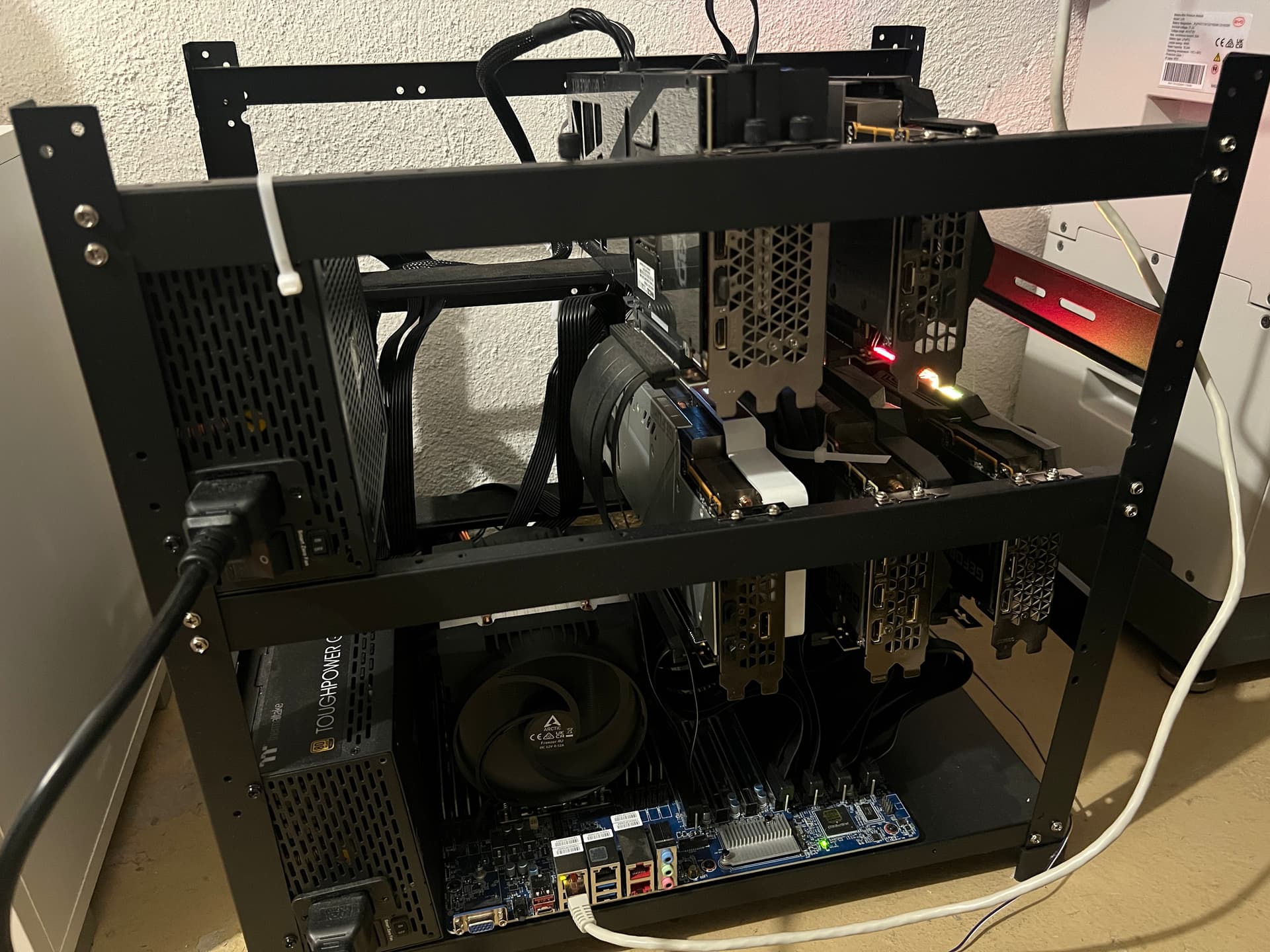
Using old PC parts and my first used RTX 3090, I’ve now built a full‑blown LLM rig: 4 × RTX 3090 plus a RTX 5090 (the latter for rapid STT, TTS, and AI‑image generation). I’m finally at a point where I can say the local Jarvis is almost done. Thanks to the hardware, I’ve moved from great models like Gemma 3 and Mistral 3.2 to GPT‑OSS‑120B, which works beautifully with Home Assistant. Since GPT‑OSS lacks vision, I’m also running Gemma 3 to analyze camera images.
The biggest hurdle—still—is the voice side, especially because I need German for my family. Whisper 3 and a German variant of it work most of the time, but they’re not 100 % perfect. Voice PE only has two microphones, so recognition drops when I’m more than two metres away. Still, it’s acceptable overall. The real challenge is a good‑sounding German TTS voice. Piper is fast, but the German voices are… not the most pleasant 
If you wander the LLM space, you quickly notice how many excellent TTS solutions exist—almost all English‑only. Kokoro, which is linguistically diverse, sadly has no German support. After a week of battling with countless tests and new Linux tricks, I finally succeeded! Thanks to Chatterbox and a few custom integrations, I now have a lovely German voice. It was a gritty fight, but worth it.
What I’d love most right now is an OpenAI‑compatible API integration with a custom endpoint. In the LLM world, the OpenAI API is the de‑facto standard, and I’d love to plug it directly into Home Assistant (please, please). There is a custom integration*, but it doesn’t perform as well as the native Ollama integration.
### Details & Repositories I use for my HA‑Jarvis
LLM part – Ollama
-
GPT‑OSS‑120B – controls HA and handles conversation (runs on 3 × RTX 3090)
-
Gemma 3 – vision (runs on 1 × RTX 3090)
(Here again I’d love a custom OpenAI‑API endpoint to hook in back‑ends like LLAMA.CPP or VLLM. Custom integrations exist in theory, but they’re flaky; I’ve wasted too much time on them. The native Ollama integration works reliably for now.)*
STT (runs on RTX 5090)
-
Whisper 3 Large Turbo, German model – see Installation - Speaches Documentation
-
Model: TheTobyB/whisper-large-v3-turbo-german-ct2 · Hugging Face
TTS (also on the same RTX 5090)
-
Chatterbox – faster branch: GitHub - rsxdalv/chatterbox at faster
-
OpenAI‑API server for Chatterbox: https://github.com/devnen/Chatterbox‑TTS‑Server
-
German voice for Chatterbox: https://huggingface.co/SebastianBodza/Kartoffelbox‑v0.1
STT + TTS Wyoming integration
To bring the above STT/TTS solutions into HA I use a Wyoming bridge. The excellent project GitHub - roryeckel/wyoming_openai: OpenAI-Compatible Proxy Middleware for the Wyoming Protocol now even streams STT + TTS. It translates any OpenAI‑API‑compatible STT/TTS service into the Wyoming protocol for Home Assistant—absolutely essential!
Additional goodies
- **Open AI API custom endpoint (Many thanks Michelle )
- n8n integration – GitHub - EuleMitKeule/webhook-conversation: 🤖 Home Assistant integration for using webhook-based systems as conversation agents.
Thanks to the brilliant work of * @EuleMitKeule *, the HA LLM can be made far smarter. With n8n workflows, HA MCP, the vast world of n8n tools, and MCP servers, you can extend the HA LLM into countless domains. Streaming and file (camera image) handling are already built in!
-
Hardware thanks – A huge shout‑out to ** @formatBCE ** for supporting SEEED Studio gear. Alongside the Voice PE, we have other satellite alternatives that integrate nicely into HA. The newest XFV3800 model, with its four microphones, has further boosted my speech‑recognition accuracy.
-
Music Assistant team – Thanks for the voice integrations: GitHub - music-assistant/voice-support: Music Assistant blueprints
-
@TheFes – Thanks for the voice blueprints: GitHub - TheFes/ha-blueprints: Home Assistant Blueprints for (voice) commands
All in all, I’m not yet at the perfect local Jarvis, but I’m damn close. Any tips, suggestions are more than welcome  I cant wait for upcoming AI/LLM/VOICE updates Many thanks to the entire HA team for making this possible
Picture off my LLM monster