Control smart lights with Shelly with automated detached mode

I had to do one more change, I had to check both if (response === null || response === undefined) otherwise it would still crash.

This verion works perfectly for me:

let switchId = 0; // For Shelly 1 Plus it's always 0. Change if needed
let checkPeriod = 10 * 1000; // in ms
let haUrl = 'http://YOUR_HOME_ASSISTAN_URL_OR_IP:8123'; // As sugested by bvhme
let mode = "detached"; // Could be "detached", "flip", "follow" or "momentary". Use "detached" when HA is in control

function updateConfig(oldConfig) {
  //Aplly the new config only if the switch is not already working in the desired mode  
  if (oldConfig.in_mode !== mode) {
    Shelly.call("Switch.SetConfig", { id: switchId, config: { in_mode: mode } });
    // If moving to HA controlled mode, make sure that the relay is switched on
    if (mode === "detached") Shelly.call("Switch.Set", { id: switchId, on: true });
  }
}

function setSwitchFromRespons(response) {
  // If HA is accessible the response code is 200 update the current mode and the new configuration
  // response.code was giving error in original code modified to flip if response is null
  if (response === null || response === undefined) {
    mode = "flip";
  } else if (response.code === 200) {
    mode = "detached";
  } else {
    mode = "flip";
  }

  // Get the current output configuration and pass it to updateConfig
  Shelly.call("Switch.GetConfig", {id: switchId}, updateConfig)
}

function testHA() {
  // For RPC command HTTP.GET, both url and body are required. 
  Shelly.call("HTTP.GET", {url: haUrl, body:{}}, setSwitchFromRespons);
}

// Timer.set(period_in_ms, reapeate_indefinitely, function)
Timer.set(checkPeriod, true, testHA);
1 Like

I’ve made one adjustment, this is to not let the script run a timer constantly but to only trigger the script when the button is actually used, you could also use both if you want of course :slight_smile:

Shelly.addEventHandler(function(event) {
  if (event.name === "input" && event.id === 0) testHA();
});

Where did you add/replace that code?

If this was a reply to me, you can either replace the line that starts with timer.set or you can add it below or above the timer.set line, as long as it’s below the function.

Quote? Because Apparently the quote box needs a title.
If this was a reply to me, you can either replace the line that starts with timer.set or you can add it below or above the timer.set line, as long as it’s below the function.

I suck at posting/replying/quoting.

No worries! hope it helps :slight_smile:

Hallo,
thank you for providing your Code.
I tried it with shelly 1 Mini Gen 3 but its not working.
The Shelly is in detached mode and i control the light by using the input entity.

I filled in my local Home Assistant IP Adress.
Do i have to do further Changes?

I am new in Shelly scripting, so im sorry :slight_smile:

Thank you!

Could you share your code?

This is my current code:

function testHA() { Shelly.call("HTTP.GET", {url: 'http://homeassistant.home:8123', body:{}, ssl_ca: '*'}, function(resp) {
    let mode = (resp && resp.code === 200)? "detached" : "flip";
    Shelly.call("Switch.GetConfig", {id: 0}, function(oldConfig) {
      if (oldConfig.in_mode !== mode) {
        Shelly.call("Switch.SetConfig", { id: 0, config: { in_mode: mode } });
        if (mode === "detached") Shelly.call("Switch.Set", { id: 0, on: true });
      }
    });
  })
}

Timer.set((30 * 1000), true, testHA);
2 Likes

I was having the same issues as kv1507. After using his code I got it working. I’d like to slim this down similar to yours AlesAlitis. I’m not great at programming, how do I write this?

Here is the code I’m currently using.

let switchId = 0; // For Shelly 1 Plus it's always 0. Change if needed
let checkPeriod = 10 * 1000; // in ms
let haUrl = 'http://http://homeassistant.local:8123'; // As sugested by bvhme
let mode = "detached"; // Could be "detached", "flip", "follow" or "momentary". Use "detached" when HA is in control

function updateConfig(oldConfig) {
  //Aplly the new config only if the switch is not already working in the desired mode  
  if (oldConfig.in_mode !== mode) {
    Shelly.call("Switch.SetConfig", { id: switchId, config: { in_mode: mode } });
    // If moving to HA controlled mode, make sure that the relay is switched on
    if (mode === "detached") Shelly.call("Switch.Set", { id: switchId, on: true });
  }
}

function setSwitchFromRespons(response) {
  // If HA is accessible the response code is 200 update the current mode and the new configuration
  // response.code was giving error in original code modified to flip if response is null
  if (response === null || response === undefined) {
    mode = "flip";
  } else if (response.code === 200) {
    mode = "detached";
  } else {
    mode = "flip";
  }

  // Get the current output configuration and pass it to updateConfig
  Shelly.call("Switch.GetConfig", {id: switchId}, updateConfig)
}

function testHA() {
  // For RPC command HTTP.GET, both url and body are required. 
  Shelly.call("HTTP.GET", {url: haUrl, body:{}}, setSwitchFromRespons);
}

// Timer.set(period_in_ms, reapeate_indefinitely, function)
Timer.set(checkPeriod, true, testHA);

So I choose a different approach using a fallback method. On every input event (toggling the switch), it checks if HA is reachable, if not, it programmatically sets to relay to the switch’s state. You can keep the switch setting in detached mode.

let switchId = 0;
let url = 'http://server:8123';
function check(event) {
  Shelly.call("HTTP.GET", {url: url, body:{}, timeout: 2 }, function(resp) {
    let reachable = (resp && resp.code === 200);    
    if (!reachable) {
       print("override switch behaviour");
       Shelly.call("Switch.Set", { id: event.id, on: event.info.state }, function(){});
    }
  });
}
Shelly.addEventHandler(function(event) {
  if (event.name === "input" && event.id === switchId) {
    check(event);
  }
});
4 Likes

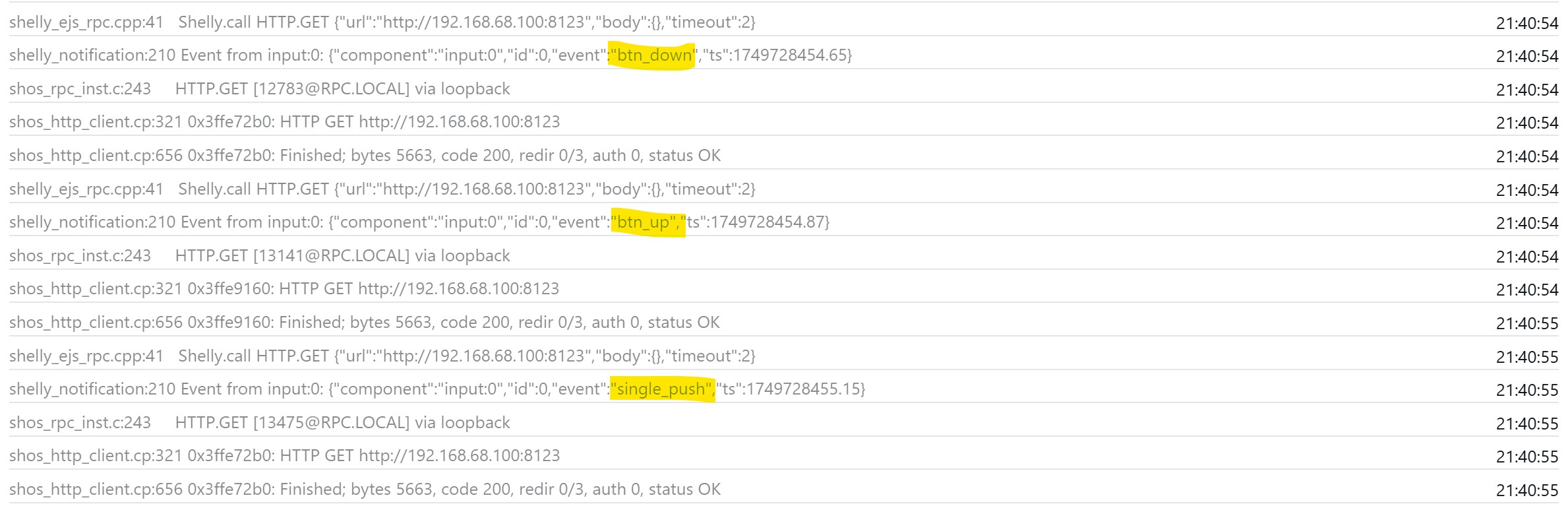
This approach is great! The issue I’m having is that I’ve got my momentary switches, rather than “Switch.Set” I’ve used “Switch.Toggle” which works, but because it’s momentary I get three events per button push to the lights flash.

Is there a way to only get the HA check to occur only when “event”:“single_push” occurs?

Sorry for the very late reply. My code is just a compacted and less readable version of the one you are using. Here it is with using the variables:

let switchId = 0; // For Shelly 1 Plus it's always 0. Change if needed
let checkPeriod = 10 * 1000; // in ms
let haUrl = 'http://http://homeassistant.local:8123'; // As suggested by bvhme
let mode = "detached"; // Could be "detached", "flip", "follow" or "momentary". Use "detached" when HA is in control

function testHA() { Shelly.call("HTTP.GET", {url: haUrl, body:{}, ssl_ca: '*'}, function(resp) {
    let mode = (resp && resp.code === 200)? "detached" : "flip";
    Shelly.call("Switch.GetConfig", {id: switchId}, function(oldConfig) {
      if (oldConfig.in_mode !== mode) {
        Shelly.call("Switch.SetConfig", { id: switchId, config: { in_mode: mode } });
        if (mode === "detached") Shelly.call("Switch.Set", { id: switchId, on: true });
      }
    });
  })
}

Timer.set(checkPeriod, true, testHA);

I expect HA to log the state of the momentary switch and you should be able to use this in automations. I don’t have any at home so I cannot test it

This is my version that I use as a fallback in case Home Assistant is unavailable (for whatever reason) (no power, WiFi down, etc.).

The script distinguishes between smart lights (ZigBee) and “classic” lights, which are simply “dumb” lights that can only be switched on and off.

In the case of smart lights, it is ensured that a necessary power cycle is carried out if the switch is ON but the lamps are not lit.

The connection to HA is only checked when the button is pressed, hence the 2-second waiting time (timeout) until the switch does something.

Debugging is currently still included in the script, but I will remove it for performance reasons.

What do you think about the script?

// ======================================================
// Home Assistant Watchdog (Shelly Script)
// ======================================================
//
// Features:
// - Monitors Home Assistant (HA) availability
// - Supports two relay operation modes:
//     • "classic" → Local toggle if HA is offline
//     • "smart"   → Relay always ON; external system controls the load (HA/Zigbee)
// - Provides local fallback control if HA is offline
// - Detects unexpected smart-light behavior and performs power-cycling
// - Ensures relay consistency when HA is online
// - Debug output enabled for testing
//
// ======================================================


// -------------------------
// Configuration Parameters
// -------------------------

let relayMode = "smart";                   // "classic" or "smart"
let homeAssistantUrl = "http://192.168.188.10:8123"; 
let powerThresholdW = 3;                     // Load threshold in Watts
let switchId = 0;                            // Switch/Input ID (default: 0)


// -------------------------
// Helper Function: Check HA Availability
// -------------------------

function checkHaStatus(callback) {
  Shelly.call("HTTP.GET", { url: homeAssistantUrl, timeout: 2 }, function(response, error) {
    let haIsAvailable = false;

    if (error) {
      print("[HA-Watchdog] HTTP error →", JSON.stringify(error));
    } else if (response && response.code === 200) {
      haIsAvailable = true;
    }

    print("[HA-Watchdog] Connectivity =", haIsAvailable);
    callback(haIsAvailable);
  });
}


// -------------------------
// Helper Function: Smart-Light Fallback
// -------------------------

function handleSmartLightFallback() {
  Shelly.call("Switch.GetStatus", {id: switchId}, function(status, error) {
    if (error) {
      print("[Smart-Light] Error reading relay status:", JSON.stringify(error));
      return;
    }

    let relayOn = !!status.output;
    let loadPower = (status.apower !== undefined) ? status.apower : 0;

    print("[Smart-Light] Relay =", relayOn, "Power =", loadPower);

    if (!relayOn) {
      print("[Smart-Light] Relay OFF → turning ON");
      Shelly.call("Switch.Set", {id: switchId, on: true});
    } else if (loadPower > powerThresholdW) {
      print("[Smart-Light] Relay ON but load > threshold → turning OFF");
      Shelly.call("Switch.Set", {id: switchId, on: false});
    } else {
      print("[Smart-Light] Relay ON, Power ≤ threshold → performing Power-Cycle");
      Shelly.call("Switch.Set", {id: switchId, on: false}, function() {
        Timer.set(2000, false, function() {
          print("[Smart-Light] Relay ON after Power-Cycle");
          Shelly.call("Switch.Set", {id: switchId, on: true});
        });
      });
    }
  });
}


// -------------------------
// Event Handler: Input Events
// -------------------------

Shelly.addEventHandler(function(event) {
  if (event.name !== "input") return;
  print("[Event] Received:", JSON.stringify(event));

  if (!event.info || event.info.event !== "single_push") return;

  // -------------------------
  // Classic-Light Mode
  // -------------------------
  if (relayMode === "classic") {
    if (event.id === switchId && event.info.component === "input:" + switchId) {
      checkHaStatus(function(haAvailable) {
        if (haAvailable) {
          print("[Classic-Light] HA online → no local action");
          return;
        }

        // HA offline → toggle relay
        Shelly.call("Switch.GetStatus", {id: switchId}, function(status, error) {
          if (error) {
            print("[Classic-Light] Error reading relay status:", JSON.stringify(error));
            return;
          }
          let relayOn = !!status.output;
          Shelly.call("Switch.Set", {id: switchId, on: !relayOn});
          print("[Classic-Light] Relay toggled → now", !relayOn);
        });
      });
    }
    return;
  }

  // -------------------------
  // Smart-Light Mode
  // -------------------------
  if (relayMode === "smart") {
    if (event.id === switchId && event.info.component === "input:" + switchId) {
      checkHaStatus(function(haAvailable) {
        if (haAvailable) {
          // HA online → ensure relay ON
          Shelly.call("Switch.GetStatus", {id: switchId}, function(status, error) {
            if (error) {
              print("[Smart-Light] Error reading relay status:", JSON.stringify(error));
              return;
            }
            if (!status.output) {
              print("[Smart-Light] HA online & relay OFF → turning ON");
              Shelly.call("Switch.Set", {id: switchId, on: true});
            } else {
              print("[Smart-Light] HA online & relay ON → nothing to do");
            }
          });
        } else {
          // HA offline → apply fallback behavior
          print("[Smart-Light] HA offline → executing fallback");
          handleSmartLightFallback();
        }
      });
    }
    return;
  }

});

Hi, I was looking for this exact script in the event of network failure (or me being dumb), once I do some fancy stuff with lights.

So far no issues on gen3 Shelly devices, even with timeout set to 1 second :slight_smile:

PS: I did remove check for single_push event, since my switches are mostly old school shitches, not buttons. Was there any specific reason to check this condition?

if (!event.info || event.info.event !== “single_push”) return;

Absolutely class work!