Control your Jura coffee machine

Thanks guys. I have had some success with the Jura X9 Impressa.
There is a connector on the steam generator relay board beside the DB9 connector.
For the life of me, I could not make heads or tails of the read eeprom responses - they do not seem to reflect the brew counter counts shown on the display. Also the tray water/status is inconsistent and not representative of the machine.

The important part is that I can brew products and turn the machine on and off.
I used a NodeMCU clone without level shifters, getting the power from the same header (5v) to vin pin, and knock on wood - it’s chooching away with the 5v Rx and 3v Tx.

I created alexa voice routines to properly stack the multi-brews required and used the scheduler component to turn the machine on and off on work-mornings automatically.

# disable serial logging when using GPIO01/03
logger:
  baud_rate: 0
uart:
  tx_pin: GPIO1
  rx_pin:
    number: GPIO3
    inverted: no
  baud_rate: 9600
  #debug:
    #direction: BOTH
    #dummy_receiver: false
    #after:
    #  delimiter: "\n"
    #sequence:
    #  - lambda: UARTDebug::log_string(direction, bytes);
  id: uart_bus
  #rx_buffer_size: 512

#stream_server:
#   uart_id: uart_bus
#   port: 1234

switch:
  - platform: template
    name: 'Coffee Maker'
    icon: "mdi:coffee-maker"
    id: jura_on_off_switch
    turn_on_action:
      - uart.write: [0xDF, 0xDB, 0xDB, 0xDF]  ## 'A'
      - delay: 8ms
      - uart.write: [0xFB, 0xFF, 0xDB, 0xDF]  ## 'N'
      - delay: 8ms
      - uart.write: [0xFB, 0xFB, 0xFF, 0xDB]  ## ':'
      - delay: 8ms
      - uart.write: [0xDB, 0xDB, 0xFF, 0xDB]  ## '0'
      - delay: 8ms
      - uart.write: [0xDF, 0xDB, 0xFF, 0xDB]  ## '1'
      - delay: 8ms
      - uart.write: [0xDF, 0xFF, 0xDB, 0xDB]  ## '\r'
      - delay: 8ms
      - uart.write: [0xFB, 0xFB, 0xDB, 0xDB]  ## '\n'
    turn_off_action:
      - uart.write: [0xDF, 0xDB, 0xDB, 0xDF]  ## 'A'
      - delay: 8ms
      - uart.write: [0xFB, 0xFF, 0xDB, 0xDF]  ## 'N'
      - delay: 8ms
      - uart.write: [0xFB, 0xFB, 0xFF, 0xDB]  ## ':'
      - delay: 8ms
      - uart.write: [0xDB, 0xDB, 0xFF, 0xDB]  ## '0'
      - delay: 8ms
      - uart.write: [0xFB, 0xDB, 0xFF, 0xDB]  ## '2'
      - delay: 8ms
      - uart.write: [0xDF, 0xFF, 0xDB, 0xDB]  ## '\r'
      - delay: 8ms
      - uart.write: [0xFB, 0xFB, 0xDB, 0xDB]  ## '\n'
    optimistic: true
    assumed_state: true
button:
  - platform: template
    name: 'Select Decaffe'
    icon: "mdi:cup-water"
    id: jura_select_decaffe
    on_press:
      - uart.write: [0xFB, 0xDF, 0xDB, 0xDF]  ## 'F'
      - delay: 8ms
      - uart.write: [0xDF, 0xDB, 0xDB, 0xDF]  ## 'A'
      - delay: 8ms
      - uart.write: [0xFB, 0xFB, 0xFF, 0xDB]  ## ':'
      - delay: 8ms
      - uart.write: [0xDB, 0xDB, 0xFF, 0xDB]  ## '0'
      - delay: 8ms
      - uart.write: [0xFF, 0xDB, 0xFF, 0xDB]  ## '3'
      - delay: 8ms
      - uart.write: [0xDF, 0xFF, 0xDB, 0xDB]  ## '\r'
      - delay: 8ms
      - uart.write: [0xFB, 0xFB, 0xDB, 0xDB]  ## '\n'
      - delay: 1000ms
      - uart.write: [0xFB, 0xDF, 0xDB, 0xDF]  ## 'F'
      - delay: 8ms
      - uart.write: [0xDF, 0xDB, 0xDB, 0xDF]  ## 'A'
      - delay: 8ms
      - uart.write: [0xFB, 0xFB, 0xFF, 0xDB]  ## ':'
      - delay: 8ms
      - uart.write: [0xDB, 0xDB, 0xFF, 0xDB]  ## '0'
      - delay: 8ms
      - uart.write: [0xFF, 0xDB, 0xFF, 0xDB]  ## '3'
      - delay: 8ms
      - uart.write: [0xDF, 0xFF, 0xDB, 0xDB]  ## '\r'
      - delay: 8ms
      - uart.write: [0xFB, 0xFB, 0xDB, 0xDB]  ## '\n'
  - platform: template
    name: 'Brew Coffee'
    icon: "mdi:cup-water"
    id: jura_make_coffee
    on_press:
      - uart.write: [0xFB, 0xDF, 0xDB, 0xDF]  ## 'F'
      - delay: 8ms
      - uart.write: [0xDF, 0xDB, 0xDB, 0xDF]  ## 'A'
      - delay: 8ms
      - uart.write: [0xFB, 0xFB, 0xFF, 0xDB]  ## ':'
      - delay: 8ms
      - uart.write: [0xDB, 0xDB, 0xFF, 0xDB]  ## '0'
      - delay: 8ms
      - uart.write: [0xDF, 0xDB, 0xFF, 0xDB]  ## '1'
      - delay: 8ms
      - uart.write: [0xDF, 0xFF, 0xDB, 0xDB]  ## '\r'
      - delay: 8ms
      - uart.write: [0xFB, 0xFB, 0xDB, 0xDB]  ## '\n'
  - platform: template
    name: 'Brew Espresso'
    icon: "mdi:cup-water"
    id: jura_make_espresso
    on_press:
      - uart.write: [0xFB, 0xDF, 0xDB, 0xDF]  ## 'F'
      - delay: 8ms
      - uart.write: [0xDF, 0xDB, 0xDB, 0xDF]  ## 'A'
      - delay: 8ms
      - uart.write: [0xFB, 0xFB, 0xFF, 0xDB]  ## ':'
      - delay: 8ms
      - uart.write: [0xDB, 0xDB, 0xFF, 0xDB]  ## '0'
      - delay: 8ms
      - uart.write: [0xFB, 0xDB, 0xFF, 0xDB]  ## '2'
      - delay: 8ms
      - uart.write: [0xDF, 0xFF, 0xDB, 0xDB]  ## '\r'
      - delay: 8ms
      - uart.write: [0xFB, 0xFB, 0xDB, 0xDB]  ## '\n'
  - platform: template
    name: 'Brew Double'
    icon: "mdi:cup-water"
    id: jura_make_double
    on_press:
      - uart.write: [0xFB, 0xDF, 0xDB, 0xDF]  ## 'F'
      - delay: 8ms
      - uart.write: [0xDF, 0xDB, 0xDB, 0xDF]  ## 'A'
      - delay: 8ms
      - uart.write: [0xFB, 0xFB, 0xFF, 0xDB]  ## ':'
      - delay: 8ms
      - uart.write: [0xDB, 0xDB, 0xFF, 0xDB]  ## '0'
      - delay: 8ms
      - uart.write: [0xDB, 0xDF, 0xFF, 0xDB]  ## '4'
      - delay: 8ms
      - uart.write: [0xDF, 0xFF, 0xDB, 0xDB]  ## '\r'
      - delay: 8ms
      - uart.write: [0xFB, 0xFB, 0xDB, 0xDB]  ## '\n'

sensor:
  - platform: uptime
    name: "Uptime"

  - platform: wifi_signal
    name: "WiFi Signal"
    update_interval: 60s

Thanks guys. I have had some success with the Jura X9 Impressa.
There is a connector on the steam generator relay board beside the DB9 connector.
For the life of me, I could not make heads or tails of the read eeprom responses - they do not seem to reflect the brew counter counts shown on the display. Also the tray water/status is inconsistent and not representative of the machine. The commands do come back starting with a lower-case of what I sent… so it’s not a serial line readback issue as far as I can tell.

The important part is that I can brew products and turn the machine on and off.
I used a NodeMCU clone without level shifters, getting the power from the same header (5v) to vin pin, and knock on wood - it’s chooching away with the 5v Rx and 3v Tx.

I created alexa voice routines to properly stack the multi-brews required and used the scheduler component to turn the machine on and off on work-mornings automatically.

# disable serial logging when using GPIO01/03
logger:
  baud_rate: 0
uart:
  tx_pin: GPIO1
  rx_pin:
    number: GPIO3
    inverted: no
  baud_rate: 9600
  #debug:
    #direction: BOTH
    #dummy_receiver: false
    #after:
    #  delimiter: "\n"
    #sequence:
    #  - lambda: UARTDebug::log_string(direction, bytes);
  id: uart_bus
  #rx_buffer_size: 512

#stream_server:
#   uart_id: uart_bus
#   port: 1234

switch:
  - platform: template
    name: 'Coffee Maker'
    icon: "mdi:coffee-maker"
    id: jura_on_off_switch
    turn_on_action:
      - uart.write: [0xDF, 0xDB, 0xDB, 0xDF]  ## 'A'
      - delay: 8ms
      - uart.write: [0xFB, 0xFF, 0xDB, 0xDF]  ## 'N'
      - delay: 8ms
      - uart.write: [0xFB, 0xFB, 0xFF, 0xDB]  ## ':'
      - delay: 8ms
      - uart.write: [0xDB, 0xDB, 0xFF, 0xDB]  ## '0'
      - delay: 8ms
      - uart.write: [0xDF, 0xDB, 0xFF, 0xDB]  ## '1'
      - delay: 8ms
      - uart.write: [0xDF, 0xFF, 0xDB, 0xDB]  ## '\r'
      - delay: 8ms
      - uart.write: [0xFB, 0xFB, 0xDB, 0xDB]  ## '\n'
    turn_off_action:
      - uart.write: [0xDF, 0xDB, 0xDB, 0xDF]  ## 'A'
      - delay: 8ms
      - uart.write: [0xFB, 0xFF, 0xDB, 0xDF]  ## 'N'
      - delay: 8ms
      - uart.write: [0xFB, 0xFB, 0xFF, 0xDB]  ## ':'
      - delay: 8ms
      - uart.write: [0xDB, 0xDB, 0xFF, 0xDB]  ## '0'
      - delay: 8ms
      - uart.write: [0xFB, 0xDB, 0xFF, 0xDB]  ## '2'
      - delay: 8ms
      - uart.write: [0xDF, 0xFF, 0xDB, 0xDB]  ## '\r'
      - delay: 8ms
      - uart.write: [0xFB, 0xFB, 0xDB, 0xDB]  ## '\n'
    optimistic: true
    assumed_state: true
button:
  - platform: template
    name: 'Select Decaffe'
    icon: "mdi:cup-water"
    id: jura_select_decaffe
    on_press:
      - uart.write: [0xFB, 0xDF, 0xDB, 0xDF]  ## 'F'
      - delay: 8ms
      - uart.write: [0xDF, 0xDB, 0xDB, 0xDF]  ## 'A'
      - delay: 8ms
      - uart.write: [0xFB, 0xFB, 0xFF, 0xDB]  ## ':'
      - delay: 8ms
      - uart.write: [0xDB, 0xDB, 0xFF, 0xDB]  ## '0'
      - delay: 8ms
      - uart.write: [0xFF, 0xDB, 0xFF, 0xDB]  ## '3'
      - delay: 8ms
      - uart.write: [0xDF, 0xFF, 0xDB, 0xDB]  ## '\r'
      - delay: 8ms
      - uart.write: [0xFB, 0xFB, 0xDB, 0xDB]  ## '\n'
      - delay: 1000ms
      - uart.write: [0xFB, 0xDF, 0xDB, 0xDF]  ## 'F'
      - delay: 8ms
      - uart.write: [0xDF, 0xDB, 0xDB, 0xDF]  ## 'A'
      - delay: 8ms
      - uart.write: [0xFB, 0xFB, 0xFF, 0xDB]  ## ':'
      - delay: 8ms
      - uart.write: [0xDB, 0xDB, 0xFF, 0xDB]  ## '0'
      - delay: 8ms
      - uart.write: [0xFF, 0xDB, 0xFF, 0xDB]  ## '3'
      - delay: 8ms
      - uart.write: [0xDF, 0xFF, 0xDB, 0xDB]  ## '\r'
      - delay: 8ms
      - uart.write: [0xFB, 0xFB, 0xDB, 0xDB]  ## '\n'
  - platform: template
    name: 'Brew Coffee'
    icon: "mdi:cup-water"
    id: jura_make_coffee
    on_press:
      - uart.write: [0xFB, 0xDF, 0xDB, 0xDF]  ## 'F'
      - delay: 8ms
      - uart.write: [0xDF, 0xDB, 0xDB, 0xDF]  ## 'A'
      - delay: 8ms
      - uart.write: [0xFB, 0xFB, 0xFF, 0xDB]  ## ':'
      - delay: 8ms
      - uart.write: [0xDB, 0xDB, 0xFF, 0xDB]  ## '0'
      - delay: 8ms
      - uart.write: [0xDF, 0xDB, 0xFF, 0xDB]  ## '1'
      - delay: 8ms
      - uart.write: [0xDF, 0xFF, 0xDB, 0xDB]  ## '\r'
      - delay: 8ms
      - uart.write: [0xFB, 0xFB, 0xDB, 0xDB]  ## '\n'
  - platform: template
    name: 'Brew Espresso'
    icon: "mdi:cup-water"
    id: jura_make_espresso
    on_press:
      - uart.write: [0xFB, 0xDF, 0xDB, 0xDF]  ## 'F'
      - delay: 8ms
      - uart.write: [0xDF, 0xDB, 0xDB, 0xDF]  ## 'A'
      - delay: 8ms
      - uart.write: [0xFB, 0xFB, 0xFF, 0xDB]  ## ':'
      - delay: 8ms
      - uart.write: [0xDB, 0xDB, 0xFF, 0xDB]  ## '0'
      - delay: 8ms
      - uart.write: [0xFB, 0xDB, 0xFF, 0xDB]  ## '2'
      - delay: 8ms
      - uart.write: [0xDF, 0xFF, 0xDB, 0xDB]  ## '\r'
      - delay: 8ms
      - uart.write: [0xFB, 0xFB, 0xDB, 0xDB]  ## '\n'
  - platform: template
    name: 'Brew Double'
    icon: "mdi:cup-water"
    id: jura_make_double
    on_press:
      - uart.write: [0xFB, 0xDF, 0xDB, 0xDF]  ## 'F'
      - delay: 8ms
      - uart.write: [0xDF, 0xDB, 0xDB, 0xDF]  ## 'A'
      - delay: 8ms
      - uart.write: [0xFB, 0xFB, 0xFF, 0xDB]  ## ':'
      - delay: 8ms
      - uart.write: [0xDB, 0xDB, 0xFF, 0xDB]  ## '0'
      - delay: 8ms
      - uart.write: [0xDB, 0xDF, 0xFF, 0xDB]  ## '4'
      - delay: 8ms
      - uart.write: [0xDF, 0xFF, 0xDB, 0xDB]  ## '\r'
      - delay: 8ms
      - uart.write: [0xFB, 0xFB, 0xDB, 0xDB]  ## '\n'

sensor:
  - platform: uptime
    name: "Uptime"

  - platform: wifi_signal
    name: "WiFi Signal"
    update_interval: 60s

Hiya. I have managed to flash ESPHome on the official wifi dongle, but im not sure whats next. I looked at the github repo which you posted and it seems its for custom made ESP32 connected to the service port, not the official module? Im not sure what config i should put in ESPHome to flash it onto the original wifi dongle, besides that status_led and uart you have posted above.
Particularly, what should i do with .py and .h files?

1 Like

Hey, I’ve had a Jura impressa F7 (F-series) for years and have been running a variant of the RyanAlden github code on it for years. I run it on a Wemos D1 as the post starts.

But in the past few weeks I’ve made a lot of improvements to it. I can now read a lot more sensors (almost all counter positions!) namely:

  • Single espresso
  • Double espresso
  • Single coffee
  • Double coffee
  • Single cappuccino (*)
  • Single ristretto (*)
  • Double ristretto (*)
  • Movements of the brewing unit (*)
  • Cleanings performed
  • Descaling performed (*)
  • Number of coffee grounds in the drawer (*)

(*) all these sensors are new compared to the original esphome interaction from Ryan Alden

I also optimized it more for the small SRAM memory that a Wemos D1 (8266 chip) has. I’m going to continue with it myself. i still miss the counters for:

  • hot water
  • steam usage

i also want to port it to an ESP32 chip so you can use more SRAM and have a separate dedicated UART port.

It’s still a work in progress, so if you have any improvements, feel free to post a pull request or “issue” on github!

P.S. the release is a stable version but does not contain all the latest found sensors and SRAM optimizations. and for the ESP32 variant a new branch has been created.

link to my repository: GitHub - alco28/Jura-F7-ESPHOME: Automate your Jura Impressa F* coffee machine. gives full control of all options and counts your consumption.

1 Like

@alco : is it possible to use this code slso for a z10?

thanks!

hi @alco
nice work.
As i dont know if it will work for E8 EC i got a question:
How fast are these counters refreshed?
My pain point with E8 is, that milk beverages come from the right outlet, while non-milk beverages come from the main coffee out.
About 6 cappuchinos in the last 2 weeks gone straight to the tray :frowning:
My dream is to monitor the event, when a milk beverage is done and play a sound on my alexa that you “F*CKING PLACE THE MUG UNDER THE MILK STEAMER” :smiley:

Has anyone had any luck with a Jura ENA 3, ENA 4, ENA 5 or ENA 9 One-Touch, Specifically the units released around 2008.
I have an ENA 3 and ENA 5 (both contain interchangeable parts) and would be great to get them upgraded to Home Assistant (one is used as spares, so i effectively have a unit available for development) I’ve found this, so thats a starting point to port to esphome

I know its using the Jura V1 protocol, (which the bulk of units here dont look to use)

The jura x9 impressa looks to be the closest match age wise, i will try and track down the progress there

Some codes for Jura F9:

FA:02 : Wartung / Rinse button
FA:06 : 1 Tasse Normal / 1 cup normal button
FA:07 : 2 Tassen Normal / 2 cup normal button
FA:09 : Milchschaeumer aufheizen / Heat up milk foamer
FA:10 : Configure: Staerke - Mild / Touch button select: Mild stength
FA:11 : Configure: Staerke - Normal / Touch button select: Medium strength
FA:12 : Configure: Staerke - Stark / Touch button select: Strong
FA:15 : Reinigungsprogram starten / Start cleaning program
FA:18 : Enter Menu (Long press “P”)
FA:19 : “Start” button
FA:0A : Hot Water
FA:0B : Pulver Kaffee / Powder Coffee
FA:0D : Configure: Grosse Tasse / Large cup
FA:0E : Configure: Medium Tasse / Medium cup
FA:0F : Configure: Espresso Tasse / Espesso cup

Source: Not an issue, just feedback for Jura F9 codes · Issue #4 · ryanalden/esphome-jura-component · GitHub

Hi,
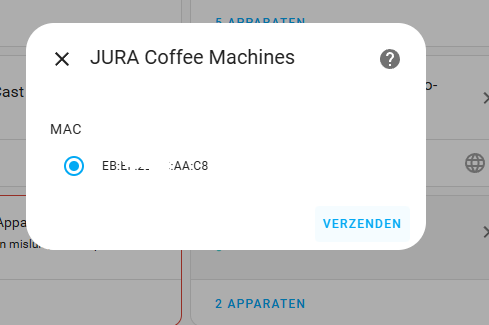
When integrating the HACS jura integration, I only see the screen below. My machine is Jura F7.
Anyone knows what might be the situation here?

The MAC address was visible:

Good afternoon! Did you manage to set up the automation correctly? If yes, please share the configuration file. I’m not getting anywhere, I’m a beginner ((

Thank you for your kind words! Let me explain how the counters work and address your question.

Counter Refresh Rate

The counters are refreshed almost instantly because the system communicates with the Jura machine via UART commands. Each time a command is sent, the machine responds with the current state of its internal counters. This means that as soon as an event (like brewing a coffee or making a milk beverage) is completed, the updated counter values are available. The refresh rate is essentially limited by the UART communication speed and the polling interval set in the ESPHome configuration.

Your E8 EC and Milk Beverage Monitoring

Regarding your E8 EC, the issue with milk beverages coming from the right outlet while non-milk beverages use the main coffee outlet is indeed a challenge. To address this, you could monitor the specific counter associated with milk-based beverages. For example:

  • When the counter for milk beverages increments, you can trigger an automation in Home Assistant to play a sound on your Alexa device.

Example Automation

Here’s a high-level idea of how you could achieve this:

  1. Use ESPHome to expose the milk beverage counter as a sensor in Home Assistant.
  2. Create an automation in Home Assistant that triggers when the milk beverage counter increases.
  3. Add an action to play a sound on Alexa, reminding you to place the mug under the milk steamer.

Why This Works

Since the counters are updated immediately after the machine processes a command, you can rely on the milk beverage counter to detect when a milk-based drink is being made. This ensures that your automation is triggered in real-time.

Hi everyone,

I’m excited to share the release of version 1.10 of my Jura-F7-ESPHOME integration! :tada: This update includes several improvements and new features:
  • Esphome 2025.x compatible: Fix the issue with the new custom_component structure.
  • Instant Counter Updates: Thanks to optimized UART communication, counters now refresh in real-time.
  • Expanded Sensor Support: Added support for more counters, including milk-based beverages and cleaning cycles.
  • Improved Memory Efficiency: Optimized for devices with limited SRAM, ensuring smoother operation.
  • ESP32 Compatibility: A dedicated branch for ESP32 users, leveraging its additional UART ports and memory.

Feel free to check out the release v.1.1.0 at my GitHub repository for more details. As always, feedback and contributions are welcome!

Happy brewing! :coffee:
@alco

2 Likes

don’t, works only with the BLE module: Home Assistant custom component for control Jura Coffee Machines via Bluetooth module.

Hi everyone,

First of all, I want to thank you all for the great work you’ve done on the Jura program — really impressive job!

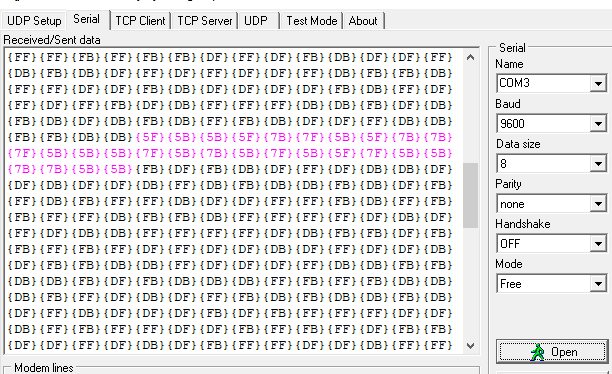
I have a Jura Z10 with a Wi-Fi module, and I’m trying to inject data directly via UART (I soldered wires to the pins) just to test if the coffee machine responds to any input before diving deeper into protocol analysis.

For testing, I’m sending encoded data corresponding to the command AN:02, as follows:

5F5B 5B5F 7B7F 5B5F 7B7B 7F5B 5B5B 7F5B 5F5B 7F5B 5F7F 5B5B 7B7B 5B5B

Decoded:

5F5B 5B5F → ‘A’
7B7F 5B5F → ‘N’
7B7B 7F5B → ‘:’
5B5B 7F5B → ‘0’
5F5B 7F5B → ‘2’
5F7F 5B5B → ‘\r’
7B7B 5B5B → ‘\n’

Unfortunately, the machine doesn’t respond to these data — no turns off the coffee maker.

Has anyone here already tried communicating with the Z10 model this way and can confirm if this encoding or command format is correct?
Or does Jura require some kind of initial handshake or authentication before it starts accepting UART data?

Thanks in advance for any hints, and once again, huge respect for all the amazing work you’ve done on this project!

Hi Miro,

Unfortunately the UART communication method doesn’t work on (most? all?) newer Jura machines, because they have implemented some sort of yet-unbroken encryption, see here for details. Fortunately, the Bluetooth method works perfectly.

For the Z10, you’ll need the Jura Smart Connect Bluetooth adapter (the blue one, instead of the white Wi-Fi one), and also a way to send Bluetooth commands from Home Assistant (a Bluetooth Proxy using an M5Stack or Shelly device are both good options). Finally, install the Jura Coffee Machines integration via HACS , and configure Bluetooth in HA.

BTW if you feel comfortable opening the Z10, you can add a Shelly with relay running ESPHome and get power-on control as well. I use this setup with the Bluetooth proxy on the same Shelly, mains-powered, wired up to the power button inside the Z10.

1 Like

Hi,
Thank you for the information. I thought the protocol in this project would work for new coffee machines:

I saw that there was coding and wondered what would be enough to send the command. I wanted to send commands via UART.