@chintito4ever Another one, I cant find your Dashboard code, can you help out please? I need help. …
icon: mdi:airplane
path: flight-stats
type: sections
max_columns: 3
sections:
  - type: grid
    cards:
      - type: custom:stack-in-card
        mode: vertical
        cards:
          - type: custom:bubble-card
            card_type: separator
            name: Hourly Flights
            icon: mdi:airplane
          - type: custom:apexcharts-card
            graph_span: 1d
            span:
              start: day
            yaxis:
              - id: tv
                show: false
            series:
              - entity: sensor.flights_above_hourly
                color: teal
                type: column
                group_by:
                  func: last
                  duration: 1h
                show:
                  as_duration: hour
                  datalabels: true
                yaxis_id: tv
            apex_config:
              grid:
                show: false
              dataLabels:
                offsetY: -10
                background:
                  enabled: false
                style:
                  colors:
                    - var(--primary-text-color)
              plotOptions:
                bar:
                  columnWidth: 60%
                  borderRadius: 4
              xaxis:
                axisTicks:
                  show: false
                axisBorder:
                  show: false
                labels:
                  offsetY: -5
                  datetimeFormatter:
                    day: hh
              yaxis:
                decimals: 0
                crosshairs:
                  show: true
                axisTicks:
                  show: true
                tickAmount: 5
                labels:
                  show: true
                  maxwidth: 4
              tooltip:
                enabled: false
      - type: tile
        entity: sensor.flights_above_hourly
      - type: tile
        entity: sensor.flights_above_monthly
      - type: tile
        entity: sensor.flights_above_today
      - type: tile
        entity: sensor.flights_above_yearly
      - type: custom:stack-in-card
        mode: vertical
        cards:
          - type: custom:bubble-card
            card_type: separator
            name: Daily Flights
            icon: mdi:airplane
          - type: custom:apexcharts-card
            update_interval: 1min
            graph_span: 7d
            span:
              start: day
              offset: "-6d"
            series:
              - entity: sensor.flights_above_today
                type: column
                show:
                  datalabels: true
                group_by:
                  func: last
                  duration: 1d
            apex_config:
              chart:
                type: bar
                height: 300
                toolbar:
                  show: false
                dropShadow:
                  enabled: true
                  top: 0
                  left: 0
                  blur: 1.5
                  opacity: 0.5
                  color: "#fcb874"
              plotOptions:
                bar:
                  columnWidth: 50%
                  borderRadius: 4
              xaxis:
                axisTicks:
                  show: false
                axisBorder:
                  show: false
                labels:
                  offsetY: -5
                  datetimeFormatter:
                    day: ddd
              yaxis:
                decimals: 0
                crosshairs:
                  show: true
                axisTicks:
                  show: true
                tickAmount: 4
                labels:
                  show: true
                  maxwidth: 4
              tooltip:
                enabled: false
              fill:
                type: solid
                colors:
                  - "#077056"
                  - "#9debd7"
  - type: grid
    cards:
      - type: vertical-stack
        cards:
          - type: entities
            entities:
              - entity: sensor.flightradar24_current_in_area
                name: In area
          - type: iframe
            url: >-
              https://www.flightradar24.com/simple?lat=40.63&lon=-73.98&z=11&label11=reg&size=small
            aspect_ratio: "16:20"
      - type: vertical-stack
        title: Flightradar24
        cards:
          - type: entities
            entities:
              - entity: sensor.flightradar24_current_in_area
                name: In area
              - entity: sensor.flightradar24_entered_area
          - type: conditional
            conditions:
              - condition: numeric_state
                entity: sensor.flights_in_last_2_minutes
                above: 0
            card:
              type: markdown
              content: >-
                {% set data = state_attr('sensor.flightradar24_current_in_area',
                'flights') %}  {% for flight in data %}
                  <ha-icon icon="mdi:airplane"></ha-icon>
                  {{ flight.flight_number }} - {{ flight.airline_short }} - {{ flight.aircraft_model }}
                  {{ flight.airport_origin_city }}{% if flight.airport_origin_country_code %}
                  <img src="https://flagsapi.com/{{ flight.airport_origin_country_code }}/shiny/16.png"
                  title='{{ flight.airport_origin_country_name }}'/>{% endif %} ->
                  {{ flight.airport_destination_city }}{% if flight.airport_destination_country_code %}
                  <img src="https://flagsapi.com/{{ flight.airport_destination_country_code }}/shiny/16.png"
                  title='{{ flight.airport_destination_country_name }}'/>{% endif %}
                {% endfor %}
  - type: grid
    cards:
      - type: markdown
        content: >
          {% set flight = state_attr('sensor.flightradar24_current_in_area',
          'flights')[0] %}

          <ha-icon icon="mdi:airplane"></ha-icon> **Flight Number:** {{
          flight.flight_number }}


          <ha-icon icon="mdi:shield-airplane"></ha-icon> **Airline:** {{
          flight.airline }}


          <ha-icon icon="mdi:airplane-search"></ha-icon> **Aircraft Model:** {{
          flight.aircraft_model }}


          <ha-icon icon="mdi:airport"></ha-icon> **Origin:** {{
          flight.airport_origin_city }} ({{ flight.airport_origin_code_iata
          }})


          <ha-icon icon="mdi:airport"></ha-icon> **Destination:** {{
          flight.airport_destination_city }} ({{
          flight.airport_destination_code_iata }})


          <ha-icon icon="mdi:airplane-takeoff"></ha-icon> **Scheduled
          Departure:** {{ flight.time_scheduled_departure |
          timestamp_custom('%I:%M %p') }}


          <ha-icon icon="mdi:airplane-landing"></ha-icon> **Scheduled Arrival:**
          {{ flight.time_scheduled_arrival | timestamp_custom('%I:%M %p') }}


          <ha-icon icon="mdi:airplane-clock"></ha-icon> **Flight Time:** {{
          ((flight.time_scheduled_arrival - flight.time_scheduled_departure) /
          3600) | int }}h {{ (((flight.time_scheduled_arrival -
          flight.time_scheduled_departure) % 3600) / 60) | int }}m


          <ha-icon icon="mdi:altimeter"></ha-icon> **Altitude:** {{
          flight.altitude }} ft


          <ha-icon icon="mdi:speedometer"></ha-icon> **Ground Speed:**
          {{(flight.ground_speed * 1.15078) | round(0)}} MPH
        title: Flight Information
      - type: custom:flex-table-card
        strict: false
        sort_by:
          - flights-
        entities:
          include: sensor.flightradar24_current_in_area
        card_mod:
          style: |
            ha-card {
              background: none;
              border: 0;
              box-shadow: none;
              overflow: auto;
              padding-top: 5px;
              font-size: 12px;
            }
            tbody tr:hover {
              background-color: coral !important
            }
        css:
          table+: "padding: 16px 0px 16px 16px;"
          tbody tr+: "user-select: text"
          tbody tr td:nth-child(2)+: "min-width: 1fr;width: 1fr;"
          tbody tr td:nth-child(3)+: "min-width: 1fr;width: 1fr;"
          tbody tr td:nth-child(4)+: "min-width: 1fr;width: 1fr; white-space: nowrap;"
          tbody tr td:nth-child(5)+: "min-width: 1fr;width: 1fr;"
          th+: "border-bottom: 1px solid rgb(127,127,127);"
        columns:
          - name: TAIL
            data: flights
            align: center
            modify: |
              if(x.airline_icao != null)
                '<img src="https://content.airhex.com/content/logos/airlines_' + x.airline_icao + '_50_50_f.png?proportions=keep">'
              else {
                  '<img src="https://content.airhex.com/content/logos/airlines_' + x.airline_icao + '_50_50_f.png?proportions=keep">';
              }
          - name: REGO
            data: flights
            align: center
            modify: |
              if(x.aircraft_registration != null)
                {x.aircraft_registration}
              else {
                  '<span style="color:grey;"><i>' + "N/A" + '</i></span>';
              }
          - name: ALT (m)
            data: flights
            align: center
            modify: |
              if(x.altitude != null)
                {var data = x.altitude * 0.3048;
                data.toFixed(0)
                }
              else {
                  '<span style="color:grey;"><i>' + "N/A" + '</i></span>';
              }
          - name: SPD (km/h)
            data: flights
            align: center
            modify: |
              if(x.ground_speed != null)
                {var data = x.ground_speed * 1.852;
                data.toFixed(0)
                }
              else {
                  '<span style="color:grey;"><i>' + "N/A" + '</i></span>';
              }
          - name: ORIGIN
            data: flights
            modify: |
              if(x.airport_origin_name != null) {
                var countryFlag = '';
                if (x.airport_origin_country_code) {
                  countryFlag = '<img src="https://flagsapi.com/' + x.airport_origin_country_code + '/shiny/16.png" title="' + x.airport_origin_country_name + '"/> ';
                }
                countryFlag + x.airport_origin_city;
              } else {
                '<span style="color:grey;"><i>' + "N/A" + '</i></span>';
              }
          - name: DESTINATION
            data: flights
            modify: |
              if(x.airport_destination_name != null) {
                var countryFlag = '';
                if (x.airport_destination_country_code) {
                  countryFlag = '<img src="https://flagsapi.com/' + x.airport_destination_country_code + '/shiny/16.png" title="' + x.airport_destination_country_name + '"/> ';
                }
                countryFlag + x.airport_destination_city;
              } else {
                '<span style="color:grey;"><i>' + "N/A" + '</i></span>';
              }
cards: []
1 Like
Hi, how do I notify my mobile phone when a specific flight number has taken off or landed? I have added 4 flight numbers to track.
This is what I have so far but unfortunately I get an error. If I take out trigger.event.data then the error goes away but I don’t get any values from the fields and the event doesn’t trigger anyway.
alias: Flight FI645 has taken off
description: ""
triggers:
  - trigger: state
    entity_id:
      - device_tracker.fi645
    attribute: on_ground
    from: "0"
    to: "1"
    for:
      hours: 0
      minutes: 5
      seconds: 0
conditions: []
actions:
  - action: notify.mobile_app_beakers_s22_ultra
    metadata: {}
    data:
      message: >-
        Flight {{trigger.event.data.flight_number}} leaving
        {{trigger.event.data.airport_origin_city}} bound for
        {{trigger.event.data.airport_destination_city}} took off at
        {{trigger.event.data.time_real_departure}} eta
        {{trigger.event.data.time_estimated_arrival}}
    enabled: false
  - action: notify.mobile_app_beakers_s22_ultra
    metadata: {}
    data:
      message: >-
        Flight {{flight_number}} leaving {{airport_origin_city}} bound for
        {{airport_destination_city}} took off at {{time_real_departure}} eta
        {{time_estimated_arrival}}
mode: single
Can you tell me how you created the monthly and yearly flights sensors?
it’s mentioned in this thread…have look here
Custom Component: Flightradar24 - #97 by chintito4ever
1 Like
I am using your code but everytime a flight is my current area i get tons of these errors:
2025-02-22 13:27:40.374 ERROR (MainThread) [homeassistant.helpers.event] Error while processing template: Template<template=({% set flight = state_attr('sensor.flightradar24_current_in_area', 'flights')[0] %}
<ha-icon icon="mdi:airplane"></ha-icon> **Flight Number:** {{ flight.flight_number }}

<ha-icon icon="mdi:shield-airplane"></ha-icon> **Airline:** {{ flight.airline }}

<ha-icon icon="mdi:airplane-search"></ha-icon> **Aircraft Model:** {{ flight.aircraft_model }}

<ha-icon icon="mdi:airport"></ha-icon> **Origin:** {{ flight.airport_origin_city }} ({{ flight.airport_origin_code_iata }})

<ha-icon icon="mdi:airport"></ha-icon> **Destination:** {{ flight.airport_destination_city }} ({{ flight.airport_destination_code_iata }})

<ha-icon icon="mdi:airplane-takeoff"></ha-icon> **Scheduled Departure:** {{ flight.time_scheduled_departure | timestamp_custom('%I:%M %p') }}

<ha-icon icon="mdi:airplane-landing"></ha-icon> **Scheduled Arrival:** {{ flight.time_scheduled_arrival | timestamp_custom('%I:%M %p') }}

<ha-icon icon="mdi:airplane-clock"></ha-icon> **Flight Time:** {{ ((flight.time_scheduled_arrival - flight.time_scheduled_departure) / 3600) | int }}h {{ (((flight.time_scheduled_arrival - flight.time_scheduled_departure) % 3600) / 60) | int }}m

<ha-icon icon="mdi:altimeter"></ha-icon> **Altitude:** {{ flight.altitude }} ft

<ha-icon icon="mdi:speedometer"></ha-icon> **Ground Speed:** {{(flight.ground_speed * 1.15078) | round(0)}} MPH) renders=242>
Traceback (most recent call last):
  File "/usr/src/homeassistant/homeassistant/helpers/template.py", line 2100, in timestamp_custom
    result = dt_util.utc_from_timestamp(value)
TypeError: 'NoneType' object cannot be interpreted as an integer

During handling of the above exception, another exception occurred:

Traceback (most recent call last):
  File "/usr/src/homeassistant/homeassistant/helpers/template.py", line 643, in async_render
    render_result = _render_with_context(self.template, compiled, **kwargs)
  File "/usr/src/homeassistant/homeassistant/helpers/template.py", line 2756, in _render_with_context
    return template.render(**kwargs)
           ~~~~~~~~~~~~~~~^^^^^^^^^^
  File "/usr/local/lib/python3.13/site-packages/jinja2/environment.py", line 1295, in render
    self.environment.handle_exception()
    ~~~~~~~~~~~~~~~~~~~~~~~~~~~~~~~~~^^
  File "/usr/local/lib/python3.13/site-packages/jinja2/environment.py", line 942, in handle_exception
    raise rewrite_traceback_stack(source=source)
  File "<template>", line 12, in top-level template code
  File "/usr/src/homeassistant/homeassistant/helpers/template.py", line 2109, in timestamp_custom
    raise_no_default("timestamp_custom", value)
    ~~~~~~~~~~~~~~~~^^^^^^^^^^^^^^^^^^^^^^^^^^^
  File "/usr/src/homeassistant/homeassistant/helpers/template.py", line 1932, in raise_no_default
    raise ValueError(
    ...<2 lines>...
    )
ValueError: Template error: timestamp_custom got invalid input 'None' when rendering template '{% set flight = state_attr('sensor.flightradar24_current_in_area', 'flights')[0] %}
<ha-icon icon="mdi:airplane"></ha-icon> **Flight Number:** {{ flight.flight_number }}

<ha-icon icon="mdi:shield-airplane"></ha-icon> **Airline:** {{ flight.airline }}

<ha-icon icon="mdi:airplane-search"></ha-icon> **Aircraft Model:** {{ flight.aircraft_model }}

<ha-icon icon="mdi:airport"></ha-icon> **Origin:** {{ flight.airport_origin_city }} ({{ flight.airport_origin_code_iata }})

<ha-icon icon="mdi:airport"></ha-icon> **Destination:** {{ flight.airport_destination_city }} ({{ flight.airport_destination_code_iata }})

<ha-icon icon="mdi:airplane-takeoff"></ha-icon> **Scheduled Departure:** {{ flight.time_scheduled_departure | timestamp_custom('%I:%M %p') }}

<ha-icon icon="mdi:airplane-landing"></ha-icon> **Scheduled Arrival:** {{ flight.time_scheduled_arrival | timestamp_custom('%I:%M %p') }}

<ha-icon icon="mdi:airplane-clock"></ha-icon> **Flight Time:** {{ ((flight.time_scheduled_arrival - flight.time_scheduled_departure) / 3600) | int }}h {{ (((flight.time_scheduled_arrival - flight.time_scheduled_departure) % 3600) / 60) | int }}m

<ha-icon icon="mdi:altimeter"></ha-icon> **Altitude:** {{ flight.altitude }} ft

<ha-icon icon="mdi:speedometer"></ha-icon> **Ground Speed:** {{(flight.ground_speed * 1.15078) | round(0)}} MPH' but no default was specified

The above exception was the direct cause of the following exception:

Traceback (most recent call last):
  File "/usr/src/homeassistant/homeassistant/helpers/template.py", line 760, in async_render_to_info
    render_info._result = self.async_render(  # noqa: SLF001
                          ~~~~~~~~~~~~~~~~~^^^^^^^^^^^^^^^^^
        variables, strict=strict, log_fn=log_fn, **kwargs
        ^^^^^^^^^^^^^^^^^^^^^^^^^^^^^^^^^^^^^^^^^^^^^^^^^
    )
    ^
  File "/usr/src/homeassistant/homeassistant/helpers/template.py", line 645, in async_render
    raise TemplateError(err) from err
homeassistant.exceptions.TemplateError: ValueError: Template error: timestamp_custom got invalid input 'None' when rendering template '{% set flight = state_attr('sensor.flightradar24_current_in_area', 'flights')[0] %}
<ha-icon icon="mdi:airplane"></ha-icon> **Flight Number:** {{ flight.flight_number }}

<ha-icon icon="mdi:shield-airplane"></ha-icon> **Airline:** {{ flight.airline }}

<ha-icon icon="mdi:airplane-search"></ha-icon> **Aircraft Model:** {{ flight.aircraft_model }}

<ha-icon icon="mdi:airport"></ha-icon> **Origin:** {{ flight.airport_origin_city }} ({{ flight.airport_origin_code_iata }})

<ha-icon icon="mdi:airport"></ha-icon> **Destination:** {{ flight.airport_destination_city }} ({{ flight.airport_destination_code_iata }})

<ha-icon icon="mdi:airplane-takeoff"></ha-icon> **Scheduled Departure:** {{ flight.time_scheduled_departure | timestamp_custom('%I:%M %p') }}

<ha-icon icon="mdi:airplane-landing"></ha-icon> **Scheduled Arrival:** {{ flight.time_scheduled_arrival | timestamp_custom('%I:%M %p') }}

<ha-icon icon="mdi:airplane-clock"></ha-icon> **Flight Time:** {{ ((flight.time_scheduled_arrival - flight.time_scheduled_departure) / 3600) | int }}h {{ (((flight.time_scheduled_arrival - flight.time_scheduled_departure) % 3600) / 60) | int }}m

<ha-icon icon="mdi:altimeter"></ha-icon> **Altitude:** {{ flight.altitude }} ft

<ha-icon icon="mdi:speedometer"></ha-icon> **Ground Speed:** {{(flight.ground_speed * 1.15078) | round(0)}} MPH' but no default was specified
Can you tell me why i get that and how to correct it?
This is true, but it only shows for example the day and then resets. How do you make it save state and let you have a history?
not 100% sure I understand the question you are asking but the linked post you’re replying to is pointing to using the inbuild HA helper for Utility Meter to record the number of flights tracked over a day/week/month, etc
you can read more on Utility Meter here Utility Meter - Home Assistant
if you are looking more for a history of what flight was overhead at a past time then there is discussion of that in this thread too (just search for “history” and you’ll get the detail)
Came across this question via a Google search, but one possible solution is outlined in this earlier post.
I’m using Node-RED to create two sensors - one for latitude and one for longitude based on the geocoded_location sensor provided by the mobile app integration. Similar to the linked post, the state of those gets inserted into the templated iframe URL.
At least, that’s the theory! I’m having some issues getting the iframe to actually render using this approach. I’ll update this post with code if I can get this working.
Is there a way to get the direction (compass heading) in which I would have to look to see the plane, and include that in a notification?
flight.heading is one of the sensor attributes when there is a flight in range…this tells you the compass heading of the flight in degrees so should give you what you are looking for I think
It will give them which direction the plane is heading not the heading from where the user is standing…
To know which direction the plane is from the user would require a lot more complex calculation.
yes of course that’s what the integration gives…it’s tracking the flight not the person so how could it do anything else…
edit…
and to add it’s as simple as this, if I am getting a notification that tells me a flight has entered the area I’m tracking and has a heading of 0 degrees (so flying north) then it’s not exactly rocket science to know that I look to the south to see the flight approaching me so we don’t need to overcomplicate this at all.
Your technically correct that a person would look South but that’s a180° window. I suspect @aaroneisele55 is looking for a direction within a couple of degrees which would be difficult to calculate.
yeah they might be, but haven’t responded so how do you know…
my point is that if a flight tracked by this integration has a heading of 0 degrees it’s coming from exact south to exact north…if it has heading 90 degrees it’s coming west to east…if it’s heading 112 degrees then it’s coming from 292 degrees and so on…
The integration actually gives the heading degrees exactly so it’s as simple as +/- 180 degrees and that’s where it’s coming from…it’s not the science of rockets…obviously you have to know where you are looking but that’s another story 
(and not trying to be argumentative just factual, so hope it comes across that way)
Sorry if I misunderstood you, but I would like to get some kind of alert in the format “PLANE MODEL from ORIGIN to DESTINATION, HEADING X°”
where X° is the direction I have to look in from my location, so I can e.g take a compass, face in that direction and immediately find that plane…
Is this even possible or did I set myself an impossible goal?
My end goal is to point a pan/tilt camera mounted on my roof to that plane and take a photo of it…
I’ve figured it out given the data in your installation. Am testing it.
that all sounds doable as I see it…so approach as per my original reply on this
there’s an example in the first post on how to create an automation to notify you of a flight in range…you can change that up to suit your needs
you’ll need to do a bit of maths/templating here as the Integration will give the flight heading (where it’s going) and you want where it’s coming from so it’s just a case of adding or subtracting 180 depending on the actual flight heading.
In order to know what direction to look for the plane, the plane’s heading is not important. The integration would need to know the OP’s latitude and longitude and the plane’s latitude and longitude and do math on those values.
EDIT: To illustrate because it’s hard to describe with words, the red dot represents the OP and the three planes are all flying due north and have just entered his observation area. Just knowing the planes’ heading will not tell the OP which direction to look to see the plane.
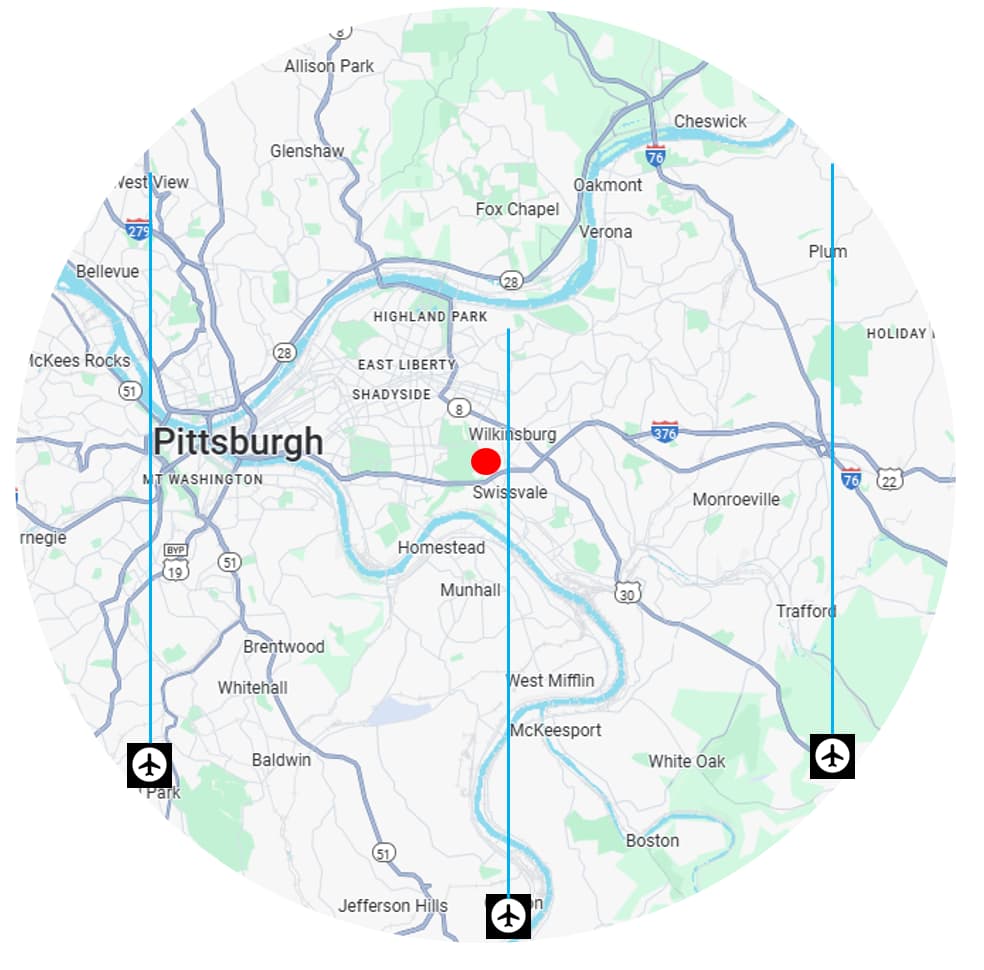
1 Like
yeah I hear you…that makes perfect sense…
I’m just basing it off my own setup as I do something similar for observing flights over my house… I have the integration monitoring on a narrow enough area overhead my location so the flight heading tells me exactly where to look…
you are right that the pic paints a thousand words…of course what I’m suggesting doesn’t work over a huge area like you have illustrated, though I’d thought the OP wanted to capture a flight flying directly over a fixed location which is why I was suggesting the approach I did…
thanks for coming back anyway 