thanks for reply. I just gave a try to OpenWeatherMap
I like it because offers more sensors than AEMET. I do not know which is more reliable, but I will make a comparation soon. And I will use OpenWeatherMap like backup, or who knows… maybe main because AEMET gets down frequently
The original goal of the guide was to provide alternatives to Openweathermap which don’t require voluntary disclosure of creditcard information…
Although I still strongly encourage everyone to keep your creditcard information private and reduce the risk of creditcard theft, the whole point of home assistant is to give you choices.
1 Like
fair enough. but you can use disposable cards(like I did) , virtual cards etc
also the service permits the first 1000/day free. and you can configure the number of calls
in the end it’s a free service
1 Like
Prepared new version of integration and it’s now pending PR on Github.



 Slovenian Weather Integration
  - Home Assistant Custom Component
Slovenian Weather Integration is a custom component for Home Assistant, leveraging real-time weather data from ARSO (Agencija Republike Slovenije za okolje). It provides detailed weather information and forecasts tailored to users in Slovenia and neighboring regions.
 Features
 Real-Time Weather Conditions: Temperature, humidity, wind speed, gusts, pressure, visibility, dew point, and weather conditions.
 3-Hour, Twice-Daily & Daily Forecasts: Up to 6 days of detailed forecasts, including precipitation and wind data.
How to install:
HACS Installation:
or
 Manual Installation
- Download or clone this repository.
- Copy the
custom_components/slovenian_weather_integrationfolder to your Home Assistantcustom_componentsdirectory: - Restart Home Assistant to recognize the new integration.
 Setup
Setup
- Go to Configuration → Devices & Services in Home Assistant.
- Click Add Integration.
- Search for ARSO Weather Integration.
- Follow the prompts to select your desired location(s).
 Supported Features
- Temperature (°C)
- Humidity (%)
- Pressure (hPa)
- Wind Speed (km/h)
- Dew Point (current weather only)
- Visibility (km) (current weather only)
- Precipitation (mm) (forecasts only)
Supported Features
Current Temperature (°C)
Humidity (%)
Pressure (hPa)
Wind Speed (km/h)
Cloud Conditions (translated to Home Assistant-compatible terms)
Daily and Hourly Forecasts
Dew point ---> only in current weather
Wind gust speed (km/h)
Visibility (km) ---> only in current weather
Precipitation (mm)   ---> only in forecasts
Wind Gust Speed (km/h) ---> only in forecasts
State attributes
datetime: "2024-09-16"
temperature: 2
templow: 0
precipitation: 0
wind_speed: 38
wind_bearing: NW
wind_gust_speed: 0
condition: cloudy
pressure: 1013
Weather forecasts are not part of the entity’s state, they’re instead made available by a separate API.
he integration implements two of the async methods async_forecast_daily, async_forecast_hourly.
Updating weather forecast(s) - Action weather.get_forecasts
Example:
template:
  - trigger:
      - platform: time_pattern
        hours: /1 # Sproži se vsako uro
    action:
      - service: weather.get_forecasts
        data:
          type: hourly
        target:
          entity_id: weather.arso_vreme_ljubljana
        response_variable: hourly
    sensor:
      - name: Temperature forecast next hour
        unique_id: temperature_forecast_next_hour
        state: "{{ hourly['weather.arso_vreme_ljubljana'].forecast[0].temperature }}"
        unit_of_measurement: °C
Unique ID Support
Each weather entity now gets a unique ID based on its location and configuration entry. This allows you to customize and edit the entity from the Home Assistant UI.
Debugging
If you encounter issues, you can enable debug logging for the integration by adding the following to your configuration.yaml:
logger:
  default: info
  logs:
    custom_components.arso_weather_integration: debug
Known Issues
Precipitation Data: Real-time precipitation may not always be available. But is visible as attribute to weather entitiy.
Forecast Availability: Ensure the selected location supports both 3 hour and daily forecasts.
2 Likes
Thanks a lot!!! I’ve been waiting for quite a while for someone with knowledge to make this integration, so thanks again!
It works perfectly, i do have one question, though: what’s that sensor in automation example? Automation won’t accept it, if i put it under template sensor it’s unavailable. Entering it under “sensor” in configuration gives me “missing device_id” error…
sensor:
 - name: Temperature forecast next hour
   unique_id: temperature_forecast_next_hour
   state: "{{ hourly['weather.arso_vreme_ljubljana'].forecast[0].temperature }}"
   unit_of_measurement: °C
Thanks @Protoncek ! Shoot, I messed readme file, sorry. Will post corrected, stay tuned!
EDIT:
It’s supposed to be a template, try this:
template:
  - trigger:
      - trigger: time_pattern
        hours: /1 # Sproži se vsako uro
    action:
      - action: weather.get_forecasts
        data:
          type: hourly
        target:
          entity_id: weather.arso_vreme_ljubljana
        response_variable: hourly
    sensor:
      - name: Temperature forecast next hour
        unique_id: temperature_forecast_next_hour
        state: "{{ hourly['weather.arso_vreme_ljubljana'].forecast[0].temperature }}"
        unit_of_measurement: °C
If you wish to create a sensor (for instance a current temperature for Ljubljana - not forcasted like above) from your weather entity, you also use a template:
- sensor:
    - name: Temperatura Ljubljana
      unique_id: temperatura_arso_weather_ljubljana
      state: "{{ state_attr('weather.arso_vreme_ljubljana', 'temperature') }}"
      unit_of_measurement: °C
      device_class: temperature
1 Like
Another question, more like an info or suggestion: since i think that we can safely assume that this addon will be (mainly) used by slovenians: perhaps sensors should be in slovenian language by default? What do you think regarding that?
I recommend starting a topic to discuss the specific integration. Most integrations have one of those.
Moving to…🌦️ Slovenian Weather Integration 🇸🇮
1 Like
Is there a way to get solar irradiance data for my location on any of these and which?
See the UV column of the “current weather attributes” table. Some trail and error might be required to find what you need.
Happy to find this summary- great info. By the way I’m in Canada and gave the Environment Canada integration a try and it seems to be working just fine. It’s page says there are over 2300 active installations. Your chart just says it has a bug and can’t be tested. So far so good for me (albeit 1 hour in). No sign up, pretty extensive local info and forecast. Certainly more accurate than what Meteorologisk gives for my area.
1 Like
Even has a sweet local live radar view!
Hi Doc,
Could you provide the data for environment Canada? I can help you with adding it to the guide. It could use some more updates anyway.
To everyone:
It’s a community guide, so everyone can add or update information. The guide is owned by the community.
The table functionality is bugged, so the topic is locked to prevent accidentally screwing up the formatting.
Anyone can ask and admin on discord to unlock the topic for you to add or update data. You will need to edit the tables using in the formatted text. Don’t use the graphical widget. It will put all the tables in a blender. Once you are done, check the topic carefully to ensure everything is still in the right place and ask the topic to be locked again.
If you screwed up somehow, an admin can revert the topic back to a previous version.
I hope most of the data can be moved to the device database but it has not been confirmed yet that (weather) services will be supported.
Sure, happy to. Just give me a few more days with it to be certain everything is working. But if you want to point me towards which sections to update (and how) I can do that.
I am looking to create some automations based on the current outdoor temperature. Which of these weather integrations would provide the most up-to-date current conditions at any time and also provide the current temperature as an entity?
Edit: I am in the US if that makes a difference.
Instead of relying on some weather service which are often inaccurate in regards to the actual temperature for the exact spot you are living in for automations triggered by the current outdoor temperature I would simply install a outdoor thermometer (BT, Zigbee, WiFi etc.) to get the real outside temperature to get procesed by HA.
Even in the US, the “most up-to-date” conditions would still varies from one zip code to another. So the other way is to set a couple of those up, and you can compare them side by side, and see which one matches your need the best.
Or do both. Setup a real sensor outside your place, just like what Tamsy said, and setup a couple of weather services, watch them overtime and see how they go. You might be surprised.
1 Like
@nyr3188 Install an outdoor weather station, I use Netatmo (Which offers an option to monitor outdoor temperature only) but there is plenty of other brands. Accuracy is imperative, a lot of the sensors out there can be off by a few degrees, calibrate offset with a traditional thermometer.
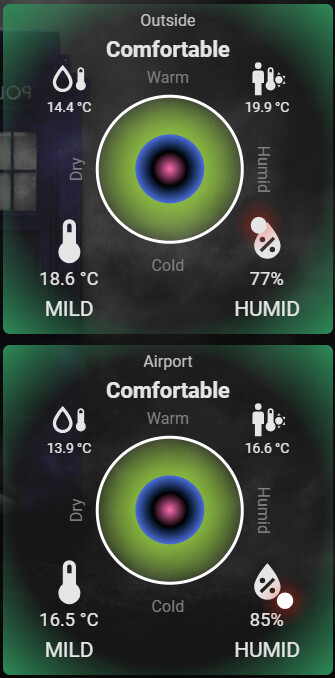
Outdoor below shows what my Netatmo is reading.
Airport below shows what BOM Australia is reading.
Both accurate sensors in the location they are, separated by 8.5km distance
Open-Meteo is the most central place for weather information there is. It gathers data from official sources and combines it into a consistant data set. Most weather services depend on open-meteo, using this as a source of information is generally good idea, also because it is very reliable.
Only local weather services might provide more up to date information, but I doubt you will notice the difference.