Thanks for the new update! It (the release notes, at least  ) looks great!
Hi, today i’ve updated to 0.4.0, and while everything was perfect with previous versions, this one seems to not recognize the end of a cycle. Using it with a washing machine, and as you suggested, cleared all previous wash cycles, and started fresh. I turned off the washing machine completelly, still says its “unknown” and “detecting”.
Tried restarting the integration, didn’t help
Hi everyone,
First of all, thank you for this integration! It’s a game-changer for making older appliances feel “smart.”
I would love to request a feature: the ability to trigger voice notifications (TTS) directly within the integration settings. While smartphone notifications are great, I find it much more useful to have a voice announcement in the house so I don’t need to check my phone to know the cycle is finished.
For context, I currently use a custom script for my dishwasher to achieve this on my Sonos speakers. It looks like this:
actions:
  - data:
      entity_id: media_player.living_room
      message: Attention: Cycle lave vaisselle terminé.
      volume_level: 0.55
      min_wait: 3
    action: script.tts_on_sonos_talvish
It would be amazing if we could configure a “TTS Action” or “Voice Message” field directly in the HA Washdata setup so that the announcement happens automatically when the state changes to Finished.
Is this something you would consider adding?
Thanks for the great work!
1 Like
I think you already have what you need.
The integration (which I love!) requires a power monitor. Even before this integration, I taught HA how to monitor the washer & dryer and notify when they were done.
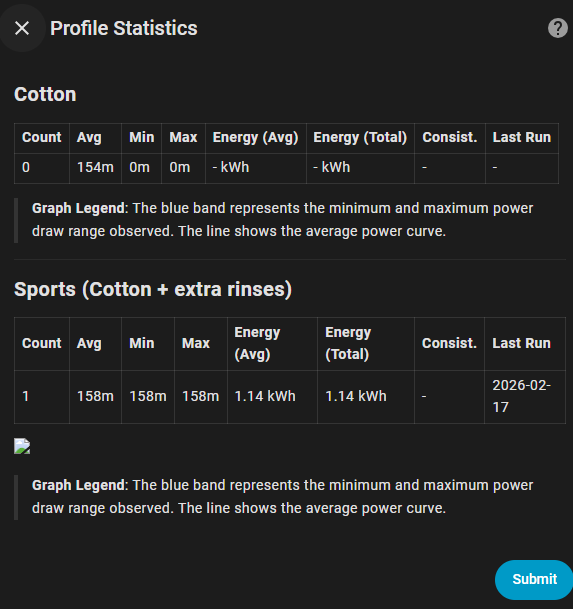
I installed ha_washdata today on my Home Assistant (running HAOS on a VM on Unraid). I added two profiles manually and after that I recorded a manual cycle.
However, no image was displayed for after the cycle was marked as completed. The popup showed a broken image icon and when I opened the image URL, it displays 404 Not Found.


Going to profile statistics, I see the same issue:
Hi! Excellent integration, I’m testing it now.
I noticed that there isn’t any entity (at least I couldn’t find one) that shows the total energy consumption in ‘kWh’.
It would be useful to track costs over the machine’s lifetime and also to monitor prices per wash cycle.
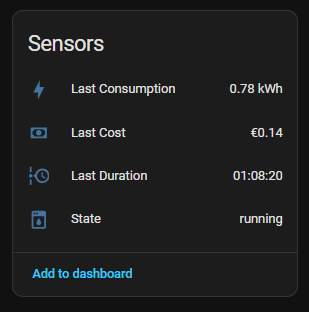
I have a flow that I created in Node-RED that returns the cost based on the total consumption per cycle.
It would be enough to have that sensor to then do the rest.
I’ve had this installed for a few weeks but only really just starting to try using it.
I put a wash on and left the cycle program as ‘auto-detect’.
I now have:
sensor.washing_machine_program state = detecting
binary_sensor.washing_machine_running state = on
sensor.washing_machine_state state = running
In Diagnostics I have “Suggested Settings: 4 Pending” with the following attributes:
suggestions:
watchdog_interval:
  value: 338
  reason: Based on observed update cadence (p95=33.8s) * 10 (min 30s buffer).
  updated: '2026-02-22T15:56:19.954646+00:00'
no_update_active_timeout:
  value: 676
  reason: Based on observed update cadence (p95=33.8s) * 20 (min 60s).
  updated: '2026-02-22T15:56:19.954666+00:00'
off_delay:
  value: 169
  reason: Based on observed update cadence (p95=33.8s) * 5 (min 60s).
  updated: '2026-02-22T15:56:19.954676+00:00'
profile_match_interval:
  value: 330
  reason: Based on observed update cadence (median=33.0s) * 10.
  updated: '2026-02-22T15:56:19.954685+00:00'
How do I turn these into wash profiles?
EDIT
Okay, after a bit more reading of the docs and this thread I think I’ve figured this out now. The game changer for us is discovering that I can automate a manual recording of a cycle, because at this time of year we do all our washing overnight when the electricity is cheapest.
What cards do you suggest for usage?
Can you please explain a bit more? I am also confused about this “Suggested settings”.