Should I have a total for consumption?
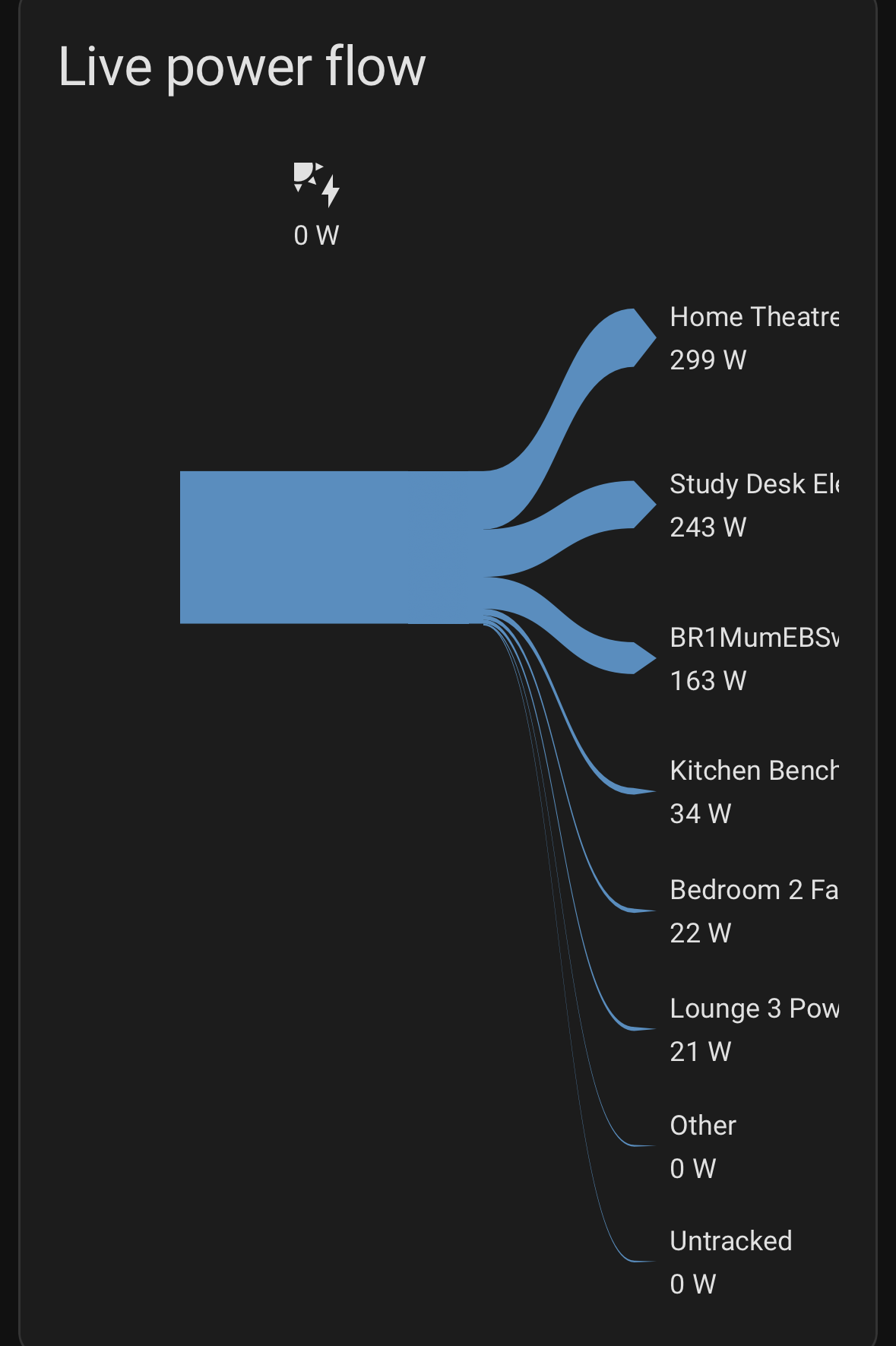
@rekenaar Please could you retry this on v0.0.24+? This is now available from HACS as pre-release.
Some fixes have been made to this area which may eliminate the problem you described.
Version 0.0.27 is now available! See top post for new features 
Thanks very much for this work.
Regarding the Power Flow card
- took a few minutes to load in the card selection view. In addition to a spinning circle, user would benefit from a message such as “please wait while the auto configuration is complete”. Not knowing this, I had been trying to re-install and checking to see if conflicts with other integrations, etc. One of the messages in this thread mentioned this and so I decided to wait.
- The auto configuration did not do the sensor pick correctly for all the sensors probably because the code used the sensor name to guess, e.g., “load” means it is power to/from the grid. But, in my case, the grid is referred to as ‘’site” and, home is referred to as “load”. I had to manually correct. Might be best to have the auto configuration as a toggle switch within the card’s gui. This would avoid the spinning circle in the first place, and, the user can toggle to check if auto configuration works or not.
- While the energy flow card displays the user given names for the sensors, the power flow card shows the actual sensor name. The energy configuration setup for individual devices has user given names.
- Allow for text wrap if (sensor) name is too long. The text gets cutoff. I use this card in a section view with other cards and sections as opposed to this one card in a panel view or spanning multiple sections, etc…
- Allow for the option to select a timeframe per the energy-date-selection card. Note that this energy-date-selection card would be present in the user’s dashboard (separate from the date selection available in the energy dashboard)
Thanks.
You’re welcome! I’ll reply inline below, but please add new issues and any further information or comments to the issue tracker if you can.
This is a known issue, tracked here, although I have not yet been able to reproduce it personally.
The autoconfiguration is based on the energy dashboard. It finds an energy sensor, works out which parent device that comes from, then starts looking for power sensors within that device. If it finds more than one power sensor, it guesses. It does not look at the name. ~From memory it might just use the first one it finds.~ Correction: it uses the power entity with the largest value.
That’s correct - but what would the preferred behaviour to be? We don’t have a ‘display name’ for power sensors, like we do for energy sensors, so we can either do what we do now, or allow another edit box to configure them, i.e. here. Please continue any suggestions there if that is the preferred behaviour.
Yes, that’s already been requested here.
Yes, that’s already on the future feature list here.
1 Like
The energy-date-selection card seems to work. I included the date selection card in the same dashboard (same view…but, doesn’t matter which view within a dashboard). Selecting a different date or time period like week or month does change the Sankey graph and values consistent with what I see in the energy configuration page.
The date selection card will impact all cards in the dashboard that use this property.
1 Like
Dave
Nice work, Given i dont use the gui editor for my dashboards and rely on Yaml (long story, ui-lovelace has nots / # comments all through and i lose these if i convert to the gui editor)
Any chance you could supply an example of yaml configuration for the power-flow-card
I have it partially working with the following, however i think the battery portion is incorrect as it does not show
- type: custom:hui-power-flow-card
  title: Sankey Power Flow
  power_from_grid_entity: sensor.example_purchased_electricity
  power_to_grid_entity: sensor.example_grid_feed_in
  generation_entity: sensor.examplepvproduction
  battery_entity: sensor.examplebattery
My solar during the day should split between load and battery in but everything from the solar value goes to load then untracked - it’s been a while since I added this card and I’ve made quite a few changes to the energy dashboard (including adding the battery). Not sure if this is a bug or misconfiguration
@peterho Thanks! Here’s some sample yaml to get you started.
type: custom:energy-sankey-power-flow-card
title: Live power flow
consumer_entities:
  - entity: sensor.aaaa
  - entity: sensor.bbbb
  - entity: sensor.ccccc
  - entity: sensor.dddddd
  - entity: sensor.eeeee
  - entity: sensor.ffffff
  - entity: sensor.ggggg
battery_entities:
  - entity: sensor.hhhhh
config_version: 3
power_from_grid_entity: sensor.jjjjjj
generation_entity: sensor.kkkkkkk
hide_small_consumers: true
max_consumer_branches: 5
invert_battery_flows: false
independent_grid_in_out: true
battery_charge_only_from_generation: true
Hi @AJErazzor I’m not sure whether you are talking about an energy or power card, but either way there is an option in the config UI that forces the visual if you know that there’s something in place to ensure that batteries won’t be charged from the grid.
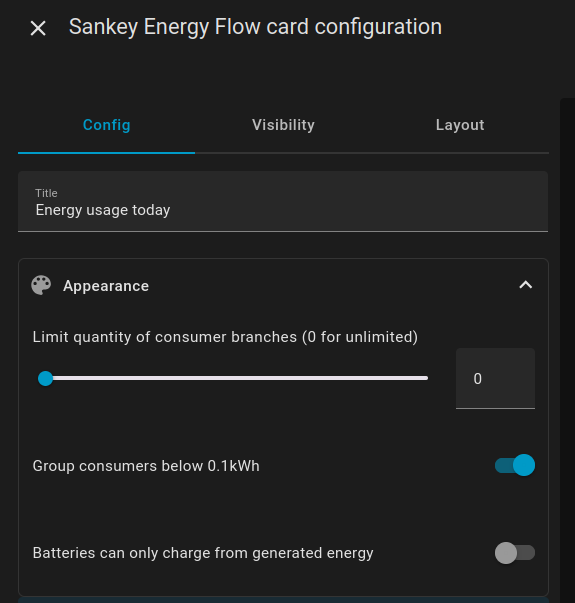
Ultimately, the card can’t ever fully know which electrons go where, so if you have both grid and solar sources active at the same time, this is only a preference for how you’d like it to appear.
In case anyone hadn’t spotted, 1.0.1 is now available!
https://github.com/davet2001/energy-sankey
This includes several new languages and other improvements, enjoy!

One day ill get around to making a feature request to be able to define battery charge as a % value and have the battery icon display its soc. Currently its shows as battery icon as if its fully charged.
Currently it shows when charging with lightning bolt, or discharging as battery full mdi icon
After a quick check, looks like someone has already submitted as a feature request through github
1 Like
Hey Dave,
really liked this card. exactly something I was looking for. Thx a lot!
Would it be possible to add the current SoC level(s) of the battery/ies also?
Greets, dripphone
Hi @dripphone thanks for the feedback!
Yes this has been requested already and is on the issue tracker (see previous comment).
Please add any further information about this request to the github issue ticket.
Thanks!
1.0.2 is now available!
More new languages, and some minor fixes, thanks for the contributions!