For anyone else coming here that’s still using the HACS Enphase DEV integration, you don’t need to multiply your sensor values by 1000 in step 1a and 1b as this integration already supplies outputs in W. Everything will be increased by 1000x if you leave these multipliers in.
That or scrap the HACS integration now that proper Enphase support is back in HA.
Is it? I have 2024.8, native enphase integration and net sensors are not there. I have CT clamps on solar production and house consumption. Envoy-s-metered-eu 7.6.358
Thank you for this write-up. I am new to Home Assistant (installed it last night). I will dig through this post a bit more tonight. I am needing some input on an automation I would like to create between my Enphase system and a new Hybrid Inverter and DYI 16s Battery pack.
Background I have an IQ8 system that works great. It was setup as whole home back-up about 1.5 years ago. This year I installed 2-3T batteries. I have found I needed a lot more batteries. I found Enphase too expensive and the new batteries are not compatible.
My goal is to store and use the solar I produce and reduce to export to the grid (which is a loose-loose deal 50% of retail). So I purchased a 10Kw Hybrid inverter and built the 1st of 2 DYI batteries.
I have the whole Enphase System, Combiner, System Controller 2 (the full 200a home power runs through this).
My new inverter has Solar Assistant running it. I just set-up MQTT on it and connected it to Home Assistant.
I can see both systems now in HA. I would like some automation that sees when I have excess power. Then charges the new batteries. Then when I need power and I don’t have solar discharge the battery to meet the loads.
Both systems have CT’s but I am open to adding 3rd party CT’s too.
If anyone has already done this please let me know. I could use some help. I am a newbie to HA so any programing lines I will likely just follow instructions and copy and paste. Here is a basic diagram of my system (don’t be too impress lol 1st stab at this).
I am running 2024.10.3. The native integration is not providing any net anything for me. I have CT on house consumption and CTs on Solar production. I see the entities for balanced net stuff that was to be addressed are not enabled. Do I just need to enable them? Why would the integration disable them?
As described in the enpase envoy integration manual, multiple sensors are disabled by default to avoid always creating a whole bunch of sensors that may not be of interest. The net balanced sensor is one of these. Simply enable it if you would like to use it.
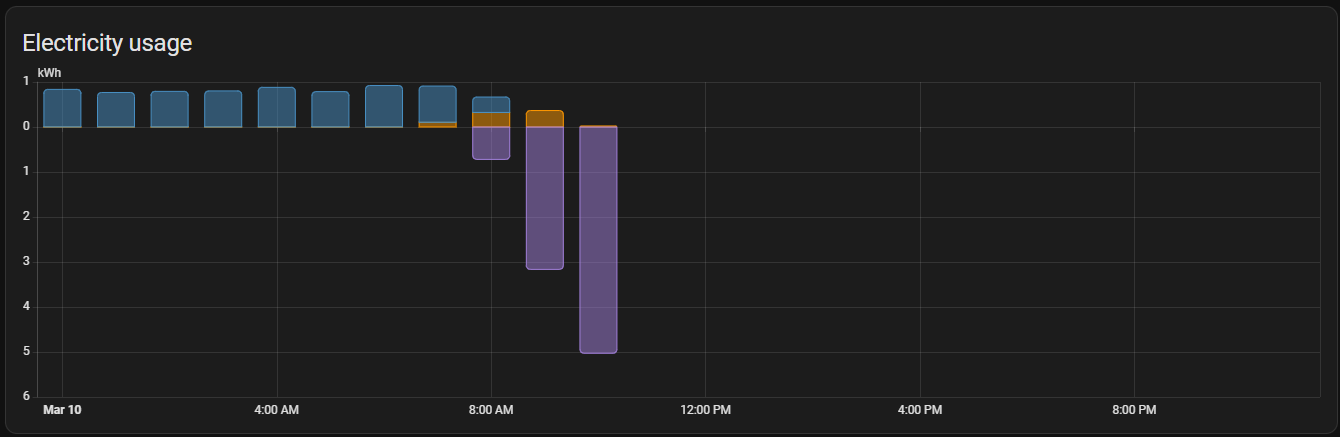
I think I’ve done something wrong. As far as I know, I’ve followed your instructions to the letter. I’m not sure how much this screenshot will help figure out what’s gone wrong, but this doesn’t seem right!
give it another hour or so.
I assume the first collection of data is from the lifetime sensor which went from 0 to a big number, hence the large jump.
The next hour after that will show correctly as it compares the lifetime reading at the start of the hour and again at the start of the next hour and just charts the difference between the readings.
I’m new to Enphase having just had my system installed Monday and now I’m deep in reading about all the past topics for getting the data locally from the envoy. Much thanks to @del13r, @vk2him , and @catsmanac.
I’m currently using the native integration and it works great! I’d like more real time updates though (for power mostly), so I’m wondering if I should just setup the faster polling method described in the native integration docs, or if I need to go with the local API streaming approach like via @vk2him script pushing to MQTT. What is suggested by the experts here?
I’m concerned about pushing the envoy too hard with requests and causing it to lock up. Does the native integration have a risk here if I poll it too fast? If so I guess that suggests the streaming method might be better.
What is the difference in how the script from @vk2him gets the data vs how the native integration gets it?
Thanks for the mention, my script has been running for a few years without causing any impact, load or issues with the Envoy.
I’m not sure how the native integration does it, however my addon is a simple python script that attaches to the Envoys 1 second streaming output. The script runs on HA or standalone, and converts the json stream to mqtt, then publishes it to your mqtt broker.
Cheers
The core integration connects to the same local api on the Envoy as where the streaming output is available but uses different endpoints in 1 minute data collection intervals.
Shortening the collection interval is possible, but is certainly limited by Envoy capacity. I’ve heard of successful 15 sec intervals and even 5 in one case. But also of failing 20 second intervals. In many cases as shortened interval starts of well, but then after some period things start to bind and fail up to the Envoy cycling. So, it’ll be trial and error to see what will work.
I am assuming you have an Envoy metered with Current Transformers installed. If not, shortening the 1 minute cycle does not make much sense as the micro-inverters update in the Envoy only every 5 minutes. Although they report with some spread over the 5 minutes, there’s little to gain with the live stream. Nor does the stream yield any data (my envoy is like that).
Thanks for the information guys. I do have consumption CTs installed. I did setup a 30s polling with the native core integration and it seems to work fine but not sure long term. I would like a faster output for some things so I think I’ll try the streaming endpoint @vk2him uses.
Is this streaming end point always active, and this just listens to it? Or does it need to be “activated”? I’d really like to figure out how to confirm it isn’t taxing the envoy CPU.
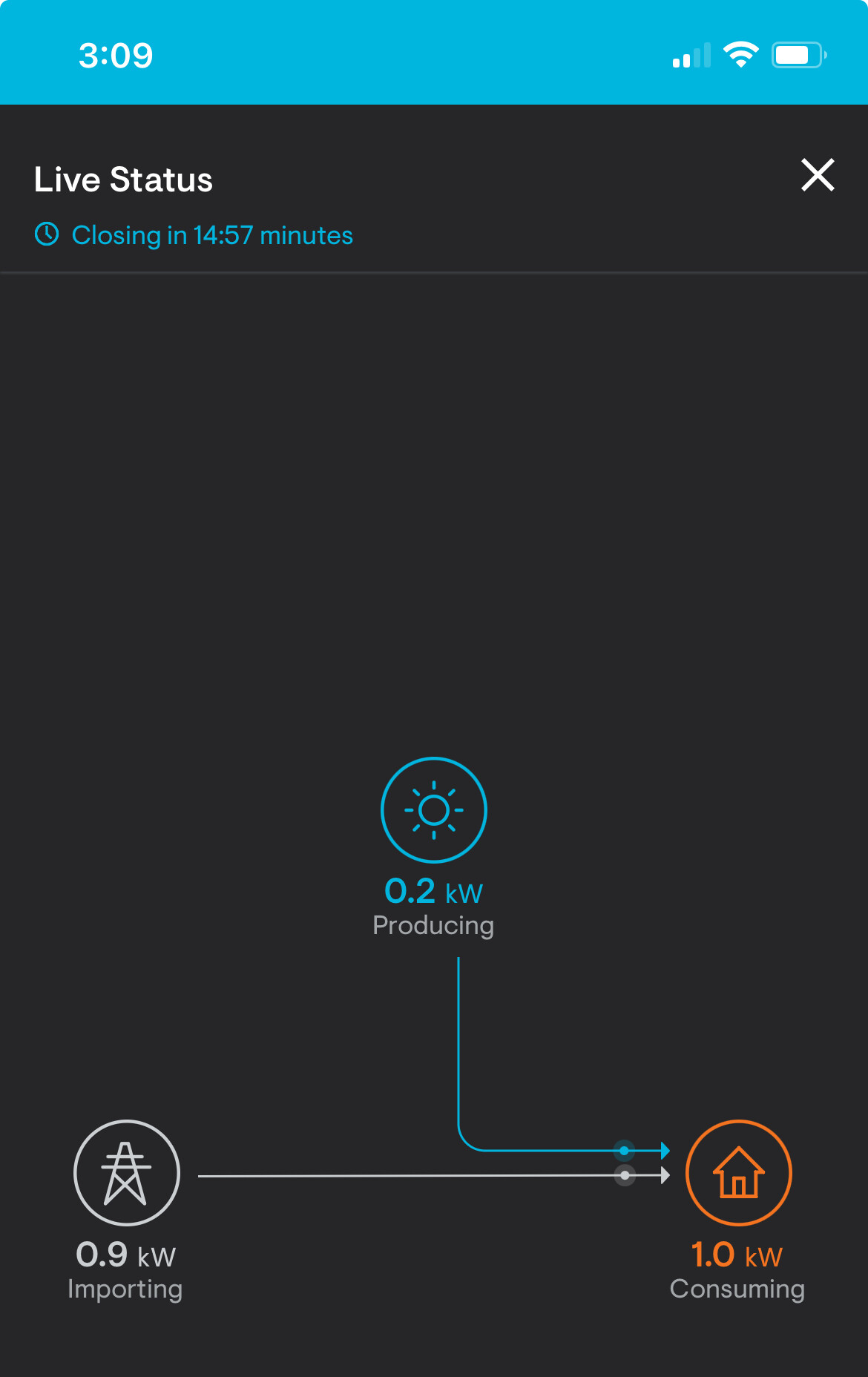
My enlighten app has a “live status” button that seems to capture the same streaming output (it’s definitely updating real time). It also only works when I’m locally connected and doesn’t work if I’m away from home. Is it this button in the app that essentially activates the same streaming output? If so, the button only allows streaming output of 15 mins then closes. Might this be protection to avoid over taxing the envoy?
@jwaters23 - I’m not sure how many other ways I can confirm that the streaming output puts negligible load on the Envoy. I’ve been connected to that streaming output for multiple years 24x7 and it has never missed a beat or caused any issues whatsoever. The stream is an output, it’s always there regardless of if you connect to it or not., and the Envoy doesn’t even know you’re connected so there’s no need to worry.
Other endpoints or connection methods may cause extra load or issues, hence why others report various responses with different intervals on those endpoints.
I run Home Assistant Core in a docker (on unraid) so I can’t use your add-on as-is. I think I see on your github a pull request to suppor docker installation method so that I could run another docker on unraid for your script. Is that the case once the PR is merged?
I’m still considering the merits of merging the docker pull request as it adds un-needed additional complexity when the majority of users don’t need it. In the interim, it’s very simple to use the information in the pull request and clone my addon and make your own docker version
One thing I need to disable. I accidentally said one day. “Hey, Google, Turn everything off”. Boom. The whole house went offline and dark. What did the Enphase integration add that allowed me to turn the power on the whole home off?
Thanks for all the amazing work everyone has put in on this project. I’m trying to install, but in the log I keep seeing this error when it’s trying to start. I’ve searched the forums, but haven’t seen that anyone else has had this issue. My system is running D8.2.4378 (33247f) firmware.
Error: Start error: Error: Update inventory error: TypeError: inventory.map is not a function, trying again.
@jwaters23 I just made my own docker container running this add-on using a self made image. I can confirm it’s really simple, just use the information in the pull-request.
I managed to do this with a little knowledge of dockercompose and looking up some info how to build your own docker image.
It might have to do with how your CT clamps are installed in relation to your interconnect. On my system, Envoy reports production correctly but mistakenly reports Grid Consumption as a combination of what my actual consumption is PLUS my solar production. I ended up getting an Emporia Vue 3 and track my consumption that way. Then I created two sensors, Emporia less Solar = Grid Consumption, and Solar less Emporia = Return to Grid. This still gave me all kinds of wacky numbers in the Energy dashboard, so I made a custom dashboard and use Energy flow card plus. Now everything matches my electric bill perfectly.