ESB Smart Meter Power Usage Integration

Shelly EM has a CT clamp that can be put on the main tails from the ESB meter to the fuse board this can be done in side the fuse board and the Shelly EM also needs to be wired to the mains. I have mine wired to the MCB/RCD/RCCB that feeds one of the lighting circuits in my house

For ESB, after trying to get data from ESB itself and process it in HA via InfluxDB+Python I turned to Frient device which works great for the Smart Meter used in Ireland by ESB Networks, it worked out of the box and super easy to install, uses ZigBee (so needs Zigbe2MQTT) and battery last 2 years

Device: Electricity Meter Interface 2, LED - smart Zigbee meter interface for home electricity monitoring - frient

In situ:

This looks to be exactly what I want, have you had any issues with accuracy? the device reading missing usage?

Its seems extremely accurate over 2 weeks in now - I turn a 1800Kw oven and its reflected within seconds (it checks every 5sec) - Highly recommend - about 50e on Amazon UK

Think I will go grab one. I current have my zigbee network using ZHA though. I don’t particularly want to change that but I do see others have used it with ZHA. Did you have to configure the pulse rate?

As I was looking into how to get the grid energy usage data and I stumbled into another way:
If you have an EV charger with a HA integration you might have an entity that shows the power you received from the grid.

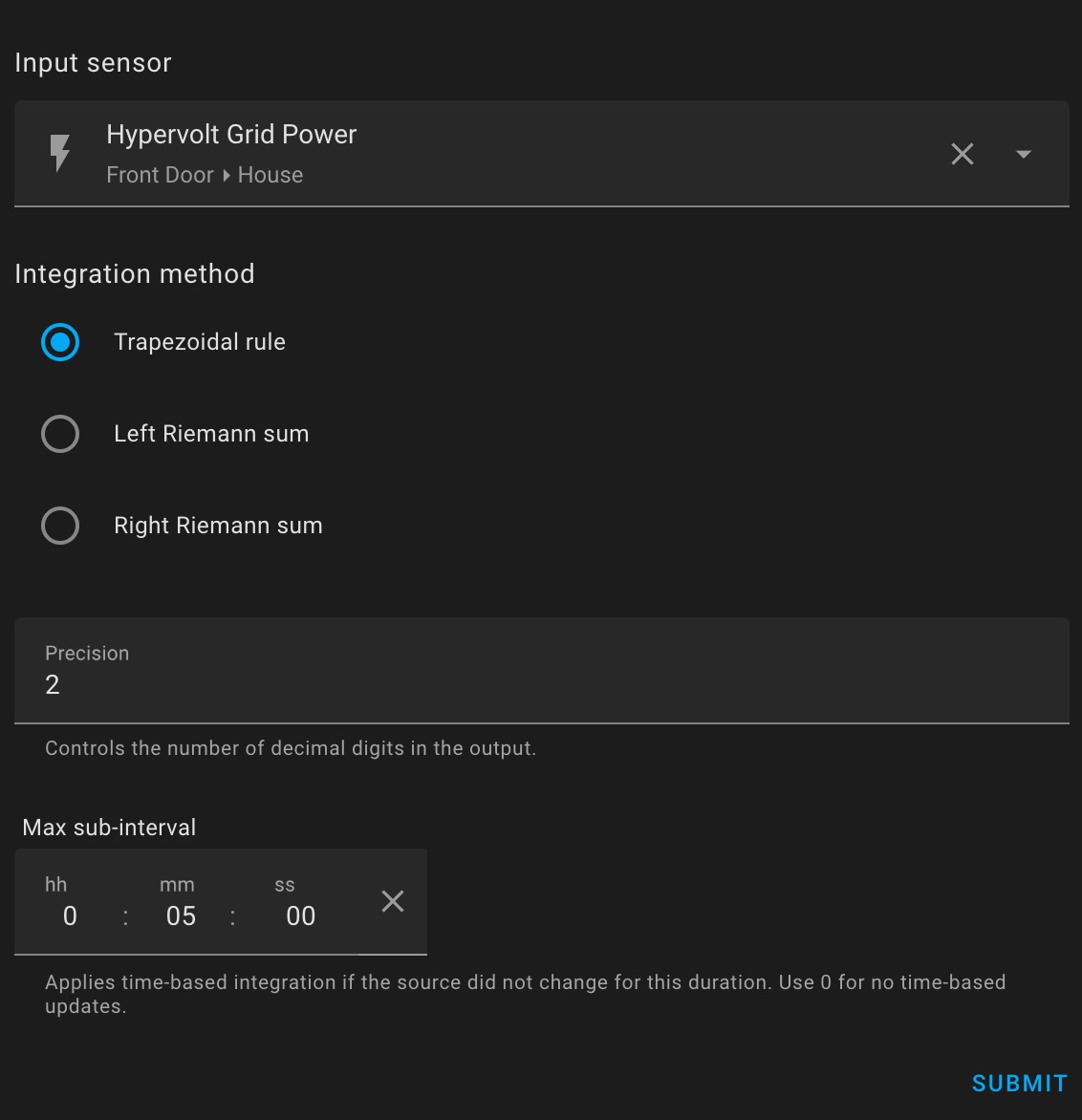
I have a Hypervolt EV charger and it comes with a lot of power entities (in W) (Grid, Home, EV, generation). I used the “Grid Power” entity and the Integral sensor integration (see docs) to convert from W to kWh so it can be added to the Energy dashboard.

This is my configuration:
This looks brilliant and exactly whats needed. You didnt have to get ESB to enable anything did you?
Out of intererest. How are you using the information, are you able to add it to the HA inbuilt energy integration. Im going to be soon going down the route of Solar PV and a few months of info / data like this collected would be amazing…EDIT(UPDATE): Got it, installed it, very easy and now getting loads of data and playing around with it in HA. Very cool. I have to wait a day or two for some data to get data points and info, but its coming together nicely.


Sorry for delay in replying! Yes I have it as my total consumption in the HA Energy monitor!

I’m in Ireland and although we’ve had a Smart Meter for about 7 years just got notification that they want to come a replace it (next week) claiming its not reliably reporting. Seems strange as when I check the ESB site I can see all the readings there!

I currently use the Frient monitor mentioned above and it works great, but I’m going to ask the engineer when they’re here about the P1 port as we’re past the proposed Q4 2025 rollout for enabling that now. I’ll report back if I hear anything.

How did you get the day/night/peak split?

Excerpt taken from the following ESB Networks link regarding the replacement of Cyclical meters this year (2026):

Cyclical meter replacement | ESB Networks

What additional features are on the upgraded meter?

The upgrade uses LTE-M or NB-IOT networks which are based on 4G and provided by Three Ireland. You will continue to have access to more detailed information about your electricity usage through the ESB Networks Online Account, access to time-of-use tariffs from suppliers and receive payment for any electricity exported onto the grid from solar panels.

The upgrade also includes a new P1 Port, which will allow you to access near real-time information. The P1 Port will be available in late 2026.

The phone network providers are shutting down the 3G network in Ireland. The older smart meters use the 3G network to report so all the older smart meters need to be replaced with ones using 4G

I got my upgraded smart meter installed a few weeks ago (P1 port is in the bottom-left blue compartment, looks like an RJ12).

I currently have the badger707/esb-smart-meter-reading-automation running in Home Assistant via Claude Code. It works, but it’s finicky during the daily ESB Networks update, is there a set time each day for the update? I was a day behind, yesterday, but it hasn’t updated yet today. (On the website too.)
I also got 2captcha working but it was a bit of a headache to get it to work. Only by the power of Gemini and Claude Code connected to GitHub where my HA is backed up to.

I’m looking to move away from scraping and use the P1 port once ESB finally enables it. This will give the real time accaracy. I have a Sigenergy system but the imports and export are well off, maybe 10% or more.

Does anyone know if the Home Wizard P1 Meter is compatible with the ESB Networks spec?

I purchased the HomeWizard P1 Meter and connected it to my XS211, but it does not power the P1 Meter as ESB has not enabled the P1 port. I powered the P1 Meter separately using a power bank and connected it to Home Assistant, but no data is coming through.

I’m with Pinergy as my electricity supplier. They only provide an Android/iPhone app, with no web portal for usage or billing data. I came across this project:

Using Claude Code, I converted it into a Home Assistant script that pulls the data directly into HA. Interestingly, Pinergy can provide yesterday’s usage data even when it is not yet available from the ESB Networks 30-minute readings in kW. I had assumed the ESB Networks readings were the source of truth, but apparently not.

At the moment, I now have three different import readings:

  • Sigenergy
  • ESB Networks
  • Pinergy

All three are broadly similar reading, but there are slight differences between them.

I still want access to the P1 port, mainly because of the delays with ESB Networks data, and because Pinergy only provides data up to yesterday.

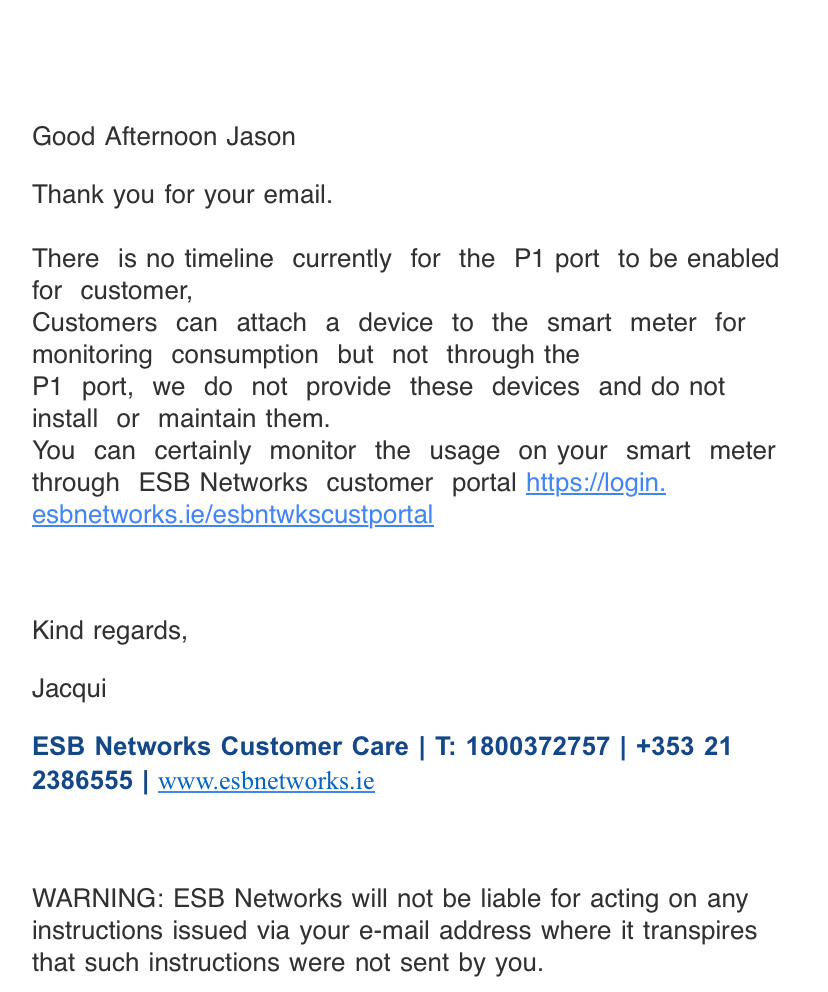
I also contacted ESB Networks about the HomeWizard and asked a few technical questions. Their response was:

In 2017 the Commission for Regulation of Utilities (CRU) agreed a phased approach to the smart metering roll out and ESB Networks. Currently the P1 port on all the smart meters is disabled however, customers can now access near real time information on their electricity consumption by means of a third party LED Pulse Reader mounted on the smart meter. The P1Port is not required for the LED Pulse Reader.

Initially, an LED Pulse Monitor will be available, which can connect to third party apps and devices. Please note, ESB Networks does not supply these devices or provide any product support. The ESBN website has been updated with this information FAQ Smart Meter Near Real Time Data

You can also create an ESB Networks Online Account, link your MPRN and be able to view your usage up to the previous 48 hours via the My Energy Consumption option.

Unfortunately, we currently don't have the the detailed information you are requesting about the P1 port. Further information will be available closer to the rollout time which is aimed to be the end of this year.

intersting thread, what wasnt mentioned was the difficulty in signing up with ESB networks i seem to remember it taking about 2 weeks of trying to get to my data they insist your details match the details your provider has for you and in theory that should match your bill , mine didnt so i ended up having to be on the phone with customer support figuring out the spaces what letters ect...

i'm using an old current cost meter with a wireless ct clamp it goes to the indoor monitor and that has a serial to usb cable (looks like ethernet to USB A) to my pi and it sends data every 6 seconds.

In case anyone finds it useful, here’s an App + MQTT approach since I dislike HACS & ESBN lack of a proper API doesn’t warrant an official integration. GitHub - omgapuppy/esbn-to-mqtt: Home Assistant app that publishes ESB Networks smart meter data to MQTT · GitHub

Fairly easy to get going, and optionally handles Captchas.

Perfect, worked first time without Captcha. Thank you kindly

Here's another one: GitHub - omgapuppy/home-assistant-yuno: Home Assistant custom integration for Yuno Energy Ireland · GitHub

This one is a bit trickier to set up, but works well for those using Yuno Energy as their provider. Unfortunately they don't expose gas stats, and at the end of the day recording with a device is more accurate either way. Only created this out of boredom as I fancied trying to reverse engineer their mobile app API (no web portal). Lag is less than ESBN HDF exports as providers seem to be getting more up to date data than end users. Unfortunately the client side creds are encrypted, so the session token (seems to last pretty long) needs to be obtained using a man in the middle proxy. If I get my hands on the .ipa for their iOS app, the public key material could be extractable. Not going to do HACS or proper integration as it's a bit niche, but if anyone feels like tinkering the docs are in the repo. What it has over the esbn-to-mqtt app approach is hooking into the statistics api of HA and backfilling hourly usage & more accurate pricing data.

Didn't last long I started getting Captchas