Hi, @krulbel Thanks. It looks like you used the master version. And I need answers from the experimental branch: GitHub - paveldn/haier-esphome at experimental . Can you, please use it and repeat the same test? Thanks.
It is just the second time when I see a situation like yours. I will change readme. And that is also why I need these logs from smartAir2. With them, I would be able (potentially) to detect wrong settings and print in logs warning like: “You are using the wrong settings, please use hon instead of smartair2 in your yaml config”
Yes, boost should work. Or you can set fan speed to High.
It is already there. You should check device options in your Home Assistant:
Now after reading this I remembered I have at least one AC that had both SmartAir2 and hON capability depending on the usb adapter used. Well probably all ACs with hON capable MCUs can also do smartAir2.
Question for the exercise now is why it does work with original smartAir2 stick
so what I got originally was
AC capable of hON delivered with KZW-002 (and I was directed to use smartAir2 with that one)
AC capable of hON delivered with esp32 for haier
AC capable of smartAir2 only delivered with KZW-002
all ACs do have same HW components in the mainboard, only difference seems to be MCU programming - also mcu program is different for ACs with one and two vertical flaps
@paveldn did you tried KZW-002 and SmartAir2 app in your unit?
Sorry, I mistyped the Github source external_component. Retry with new logs Reset button experimental branch ~ pixeldrain
I performed it on both smartAir2 ACs, both show the same code after pressing the button. Which makes total sense: they’re both the same Haier Flair unit connected to the same outdoor unit.
Not yet. Didn’t even think it will work. But I will
Thanks. That is what I was looking for. Not things that I expected though. I was hoping there will be some info about AC. But instead, AC answers unsupported commands and that is all. It looks like they made those KZW-002 in a way to detect protocol and to be able to work with any of them.
It’s a very weird type of AC, because in the smartAir2 app I can set the horizontal swing, but with ESPHome implementation it looks like it’s not possible. When I set horizontal airflow to swing left-right via IR, I don’t see anything different in the received signal in ESPHome.
With the IR remote I can even set a position for the horizontal air flow: left, middle, right. So technically the AC should be able to do it, but it looks like the protocol is not supporting much
Great, almost everything is working. The only thing not working is the “steri-clean”, but that might not be supported for the unit. (Ahh, checked it, that is introduced in 2021, mine is installed in 2020 and might be introducen even earlier) Self-cleaning is working, ran it for the first time now in almost 3 years, but from now on it will run automatically every 1st of the month . Boost mode is also working.
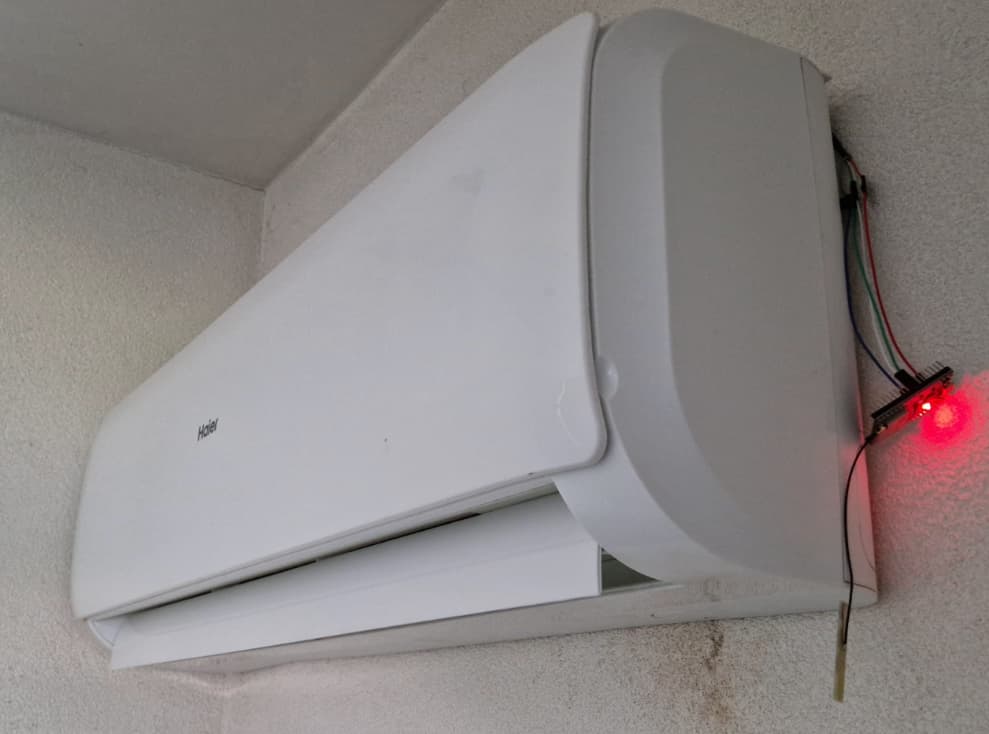
The thing this is not working, but I want to use it the fully/straight down. I’ve tried all vertical modes, but it doesn’t go fully down.
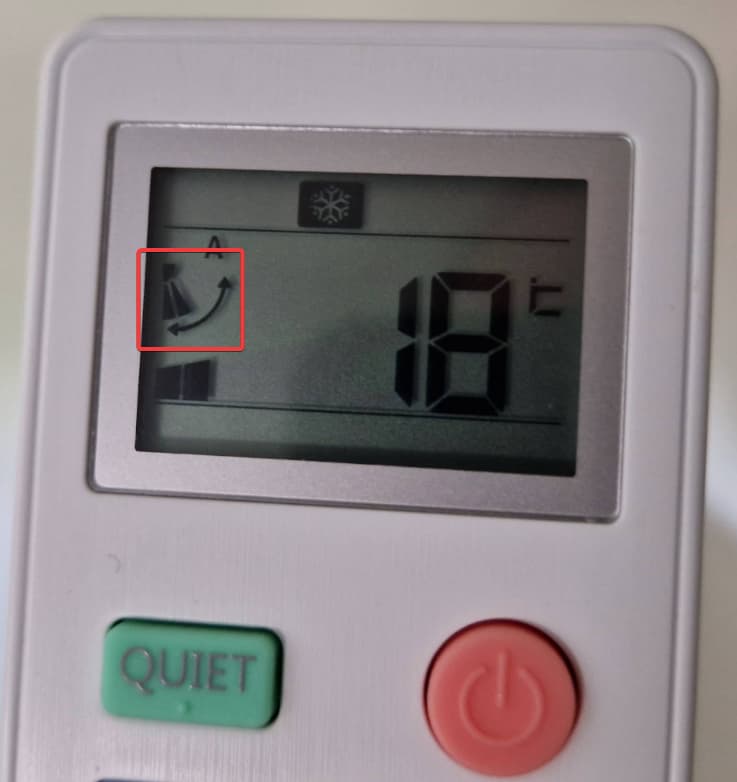
This is the icon, which can be activated with the “EXTRA FUNCTION” button on the remote:
I’ve made a log by activated/deactivating it around 3 times. It looks like it is the 8th bit of the actual data of the type 02 message. I also see the 14th bit changing, but that is only a single time and might be the temperature or so.
Hi @KoalaBear,
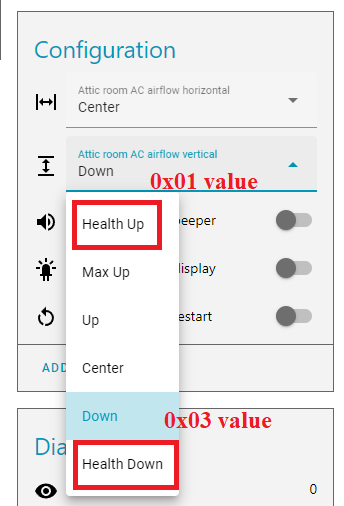
Byte 2 of the message is vertical swing indeed (and byte 14 is room temperature you are right). But values 01 and 03 are already available in the component:
But in my case Down position for this setting is lower than Health Down. Anyway, you should try to play with these settings. It works only if the vertical swing is not enabled.
To be able to support this I need to see what smartAir2 app is doing. So I need AC that is working with the dongle correctly. Let me see maybe I can trick this dongle… It will take some time I will let you know when I will have something to test.
Hi all!
I have a JAX 14HE (01/2022) air conditioner (assembled on the basis of the Haier Tundra line). I want to connect it to HA, help me figure out the integration.
I couldn’t figure out what HAER model it is, but my board is like this
There is no UART-USB wire, but there is a connector on the board and a place under the cover
3.1 I want to buy such a module, will it work?
3.2 Or, connect the wire to the board and configure the ESP32
How do I know if I should follow the smartAir2 or hOn path?
It’s not that easy, as I found out. Always tought that I had SmartAir2, because of KZW-002 USB stick, but turned out my model has hOn, maybe because of a firmware update.
So I would suggest checking them both, only takes a couple of minutes to flash a variant.
other side is jst 2.0 i thing it is jst ph 2.0, but if you are connecting esp32 just the molex jr 2.54 is enough, I guess you could force even the dupont 2.54 connector in.
You can try hOn first, have uart debug set up in esphome and if there is communication, but you can’t read even get/set temperature then try smartAir2 protocol (you can update using OTA)
Good morning
I’m new to home assistant and I have 2 Haier air conditioners, one of which works with smartair2 and one on Hon (but with the card)
I want to try your integration but I don’t know how to flash my D1 mini?
I have to use EspHome or arduino or other?
You say that you have to put the 2 files in the same directory but I don’t understand where?
If anyone can help me that would be great, I’ve been struggling for hours…
I manage to install esphaier from esphome but it does not control my air conditioner
Hi @gregoo31,
I want to help but the algorithm really depends on what you have on your hands. So first of all you will need ESPHome installed. It can be installed with pip for Python, or docker container, or home assistant addon. Here is some links with guides (you need only one of them depending on path you chose):
Thanks paveldn for your response.
I worked on it again tonight.
I am with esphome in Home Assistant.
I know create a d1mini with esphome that connects to my network.
(I do ESPhaiers, connects to the network but does not work my air conditioning.)
But I don’t know how to build with your files, I always have problems compiling and when flashing…
Another question:
My air conditioning was working with smartair2 (I have the “big USB key”) but I had a lot of problem with the application being cut off. Should I take smartair2 in your files or can I switch to Hon or it will have no impact?
Thank you again for taking the time to explain to me.
OK. If you are working in the Home Assistant addon you should have an ESPHome dashboard. Try these simplest configurations that should work without any additional things to be copied or installed:
SmartAir2 config:
substitutions:
  device_name: Haier AC
  device_id: haier_climate
  uart_id: ac_port
  send_wifi: "true"

esphome:
  name: haier
  name_add_mac_suffix: true

esp8266:
  board: d1_mini

wifi:
  ssid: !secret wifi_ssid
  password: !secret wifi_password

uart:
  - id: ${uart_id}
    baud_rate: 9600
    # You can also use pins 15 (TX) and 13 (RX)
    tx_pin: 1
    rx_pin: 3

logger:
  level: DEBUG
  baud_rate: 0

web_server:

external_components:
  - source: github://paveldn/haier-esphome

api:
  services:
    - service: turn_on
      then:
      - climate.haier.power_on: ${device_id}
    - service: turn_off
      then:
      - climate.haier.power_off: ${device_id}

ota:

climate:
  - platform: haier
    id: ${device_id}
    protocol: smartAir2
    name: ${device_name}
    uart_id: ${uart_id}
    visual:                     # Optional, you can use it to limit min and max temperatures in UI (not working for remote!)
      min_temperature: 16 °C
      max_temperature: 30 °C
      temperature_step: 1 °C
    supported_modes:            # Optional, can be used to disable some modes if you don't need them
      - 'OFF'                   # always available
      - AUTO                    # always available
      - COOL
      - HEAT
      - DRY
      - FAN_ONLY
    supported_swing_modes:      # Optional, can be used to disable some swing modes if your AC does not support it
      - 'OFF'                   # always available
      - VERTICAL                # always available
      - HORIZONTAL
      - BOTH

switch:
  - platform: template
    id: ${device_id}_display_switch
    name: ${device_name} display
    icon: mdi:led-on
    entity_category: config
    restore_state: yes
    lambda: |-
      return id(${device_id}).get_display_state();
    turn_on_action:
      climate.haier.display_on: ${device_id}
    turn_off_action:
      climate.haier.display_off: ${device_id}
  - platform: template
    id: ${device_id}_health_mode
    name: ${device_name} health mode
    icon: mdi:leaf
    restore_state: yes
    lambda: |-
      return id(${device_id}).get_health_mode();
    turn_on_action:
      climate.haier.health_on: ${device_id}
    turn_off_action:
      climate.haier.health_off: ${device_id}
  - platform: restart
    name: ${device_name} restart
hOn config:
substitutions:
  device_name: Haier AC
  device_id: haier_climate
  uart_id: ac_port
  send_wifi: "true"

esphome:
  name: haier
  name_add_mac_suffix: true

esp8266:
  board: d1_mini

wifi:
  ssid: !secret wifi_ssid
  password: !secret wifi_password

uart:
  - id: ${uart_id}
    baud_rate: 9600
    # You can also use pins 15 (TX) and 13 (RX)
    tx_pin: 1
    rx_pin: 3

logger:
  level: DEBUG
  baud_rate: 0

web_server:

external_components:
  - source: github://paveldn/haier-esphome

api:
  services:
    - service: turn_on
      then:
      - climate.haier.power_on: ${device_id}
    - service: turn_off
      then:
      - climate.haier.power_off: ${device_id}

ota:

climate:
  - platform: haier
    id: ${device_id}
    protocol: hOn
    name: ${device_name}
    uart_id: ${uart_id}
    wifi_signal: ${send_wifi}   # Optional, default true, enables WiFI signal transmission from ESP to AC
    beeper: true                # Optional, default true, disables beep on commands from ESP
    outdoor_temperature:        # Optional, outdoor temperature sensor
      name: ${device_name} outdoor temperature
    visual:                     # Optional, you can use it to limit min and max temperatures in UI (not working for remote!)
      min_temperature: 16 °C
      max_temperature: 30 °C
      temperature_step: 1 °C
    supported_modes:            # Optional, can be used to disable some modes if you don't need them
      - 'OFF'                     # always available
      - AUTO                      # always available
      - COOL
      - HEAT
      - DRY
      - FAN_ONLY
    supported_swing_modes:      # Optional, can be used to disable some swing modes if your AC does not support it
      - 'OFF'                     # always available
      - VERTICAL                  # always available
      - HORIZONTAL
      - BOTH

select:
  # Vertical airflow direction setting. Works only if the vertical swing is
  # off. You can remove this control if you don't need it
  - platform: template
    id: ${device_id}_vertical_direction
    name: ${device_name} airflow vertical
    entity_category: config
    icon: mdi:arrow-expand-vertical
    optimistic: true
    restore_value: true
    initial_option: Center
    options:
      - Health Up
      - Max Up
      - Up
      - Center
      - Down
      - Health Down
    on_value:
      then:
        - climate.haier.set_vertical_airflow:
           id: ${device_id}
           vertical_airflow: !lambda |-
             return esphome::haier::AirflowVerticalDirection(i);
  # Horizontal airflow direction setting. Works only if the horizontal swing
  # is off. You can remove this control if you don't need it
  - platform: template
    id: ${device_id}_horizontal_direction
    name: ${device_name} airflow horizontal
    entity_category: config
    icon: mdi:arrow-expand-horizontal
    optimistic: true
    restore_value: true
    initial_option: Center
    options:
      - Max Left
      - Left
      - Center
      - Right
      - Max Right
    on_value:
      then:
        - climate.haier.set_horizontal_airflow:
           id: ${device_id}
           horizontal_airflow: !lambda |-
             return esphome::haier::AirflowHorizontalDirection(i);

switch:
  - platform: template
    id: ${device_id}_beeper_switch
    entity_category: config
    name: ${device_name} beeper
    icon: mdi:volume-high
    restore_state: yes
    lambda: |-
      return id(${device_id}).get_beeper_state();
    turn_on_action:
      climate.haier.beeper_on: ${device_id}
    turn_off_action:
      climate.haier.beeper_off: ${device_id}
  - platform: template
    id: ${device_id}_display_switch
    name: ${device_name} display
    icon: mdi:led-on
    entity_category: config
    restore_state: yes
    lambda: |-
      return id(${device_id}).get_display_state();
    turn_on_action:
      climate.haier.display_on: ${device_id}
    turn_off_action:
      climate.haier.display_off: ${device_id}
  - platform: template
    id: ${device_id}_health_mode
    name: ${device_name} health mode
    icon: mdi:leaf
    restore_state: yes
    lambda: |-
      return id(${device_id}).get_health_mode();
    turn_on_action:
      climate.haier.health_on: ${device_id}
    turn_off_action:
      climate.haier.health_off: ${device_id}
  - platform: restart
    name: ${device_name} restart

text_sensor:
  - platform: template
    name: ${device_name} cleaning status
    icon: mdi:spray-bottle
    lambda: return id(${device_id}).get_cleaning_status_text();

button:
  - platform: template
    name: ${device_name} start self cleaning
    icon: mdi:spray-bottle
    on_press:
      - climate.haier.start_self_cleaning: ${device_id}
  - platform: template
    name: ${device_name} start 56°C steri-cleaning
    icon: mdi:spray-bottle
    on_press:
      - climate.haier.start_steri_cleaning: ${device_id}
Previously I would say you should go with smartAir2 but recently I have seen that also those “bug” modules are used for hOn ACs. I would say try it with hOn and if it will not work let’s check logs.
yes I can only improve!
I didn’t know that ESpHome could fetch files from github!
Thank you for your answers and your help, I try all that today if I can
The compilation is going well now. But my d1_mini is no longer connected afterwards!
I think I have a problem with that, otherwise I have the console to control the air conditioner which is created by HA.
The compilation is going well now. But my d1_mini is no longer connected afterwards!
I think I have a problem with that, otherwise I have the console to control the air conditioner which is created by HA.
I modified your file a little, I put it for you below.
Should I copy your entire file without modification or should I put the api and ota keys?
esphome:
  name: haier
  friendly_name: Haier AC
  name_add_mac_suffix: true

substitutions:
  device_name: Haier AC
  device_id: haier_climate
  uart_id: ac_port
  send_wifi: "true"

esp8266:
  board: d1_mini

# Enable logging
logger:
  level: DEBUG
  baud_rate: 0

# Enable Home Assistant API
api:
  encryption:
    key: "qedxfYlSVP+5vNiZAysZrgO/4OS1tPYu71SU4zydENo="

  services:
    - service: turn_on
      then:
      - climate.haier.power_on: ${device_id}
    - service: turn_off
      then:
      - climate.haier.power_off: ${device_id}

ota:
  password: "08e1c929e2c9d7788b0f0e831b52dc41"

wifi:
  ssid: !secret wifi_ssid
  password: !secret wifi_password

  # Enable fallback hotspot (captive portal) in case wifi connection fails
  ap:
    ssid: "Haier-Ac Fallback Hotspot"
    password: "3nC6sXb3DfE4"

uart:
  - id: ${uart_id}
    baud_rate: 9600
    # You can also use pins 15 (TX) and 13 (RX)
    tx_pin: 1
    rx_pin: 3

web_server:

external_components:
  - source: github://paveldn/haier-esphome


climate:
  - platform: haier
    id: ${device_id}
    protocol: smartAir2
    name: ${device_name}
    uart_id: ${uart_id}
    visual:                     # Optional, you can use it to limit min and max temperatures in UI (not working for remote!)
      min_temperature: 16 °C
      max_temperature: 30 °C
      temperature_step: 1 °C
    supported_modes:            # Optional, can be used to disable some modes if you don't need them
      - 'OFF'                   # always available
      - AUTO                    # always available
      - COOL
      - HEAT
      - DRY
      - FAN_ONLY
    supported_swing_modes:      # Optional, can be used to disable some swing modes if your AC does not support it
      - 'OFF'                   # always available
      - VERTICAL                # always available
      - HORIZONTAL
      - BOTH

switch:
  - platform: template
    id: ${device_id}_display_switch
    name: ${device_name} display
    icon: mdi:led-on
    entity_category: config
    restore_state: yes
    lambda: |-
      return id(${device_id}).get_display_state();
    turn_on_action:
      climate.haier.display_on: ${device_id}
    turn_off_action:
      climate.haier.display_off: ${device_id}
  - platform: template
    id: ${device_id}_health_mode
    name: ${device_name} health mode
    icon: mdi:leaf
    restore_state: yes
    lambda: |-
      return id(${device_id}).get_health_mode();
    turn_on_action:
      climate.haier.health_on: ${device_id}
    turn_off_action:
      climate.haier.health_off: ${device_id}
  - platform: restart
    name: ${device_name} restart
Of course, you can change anything you need, I just gave you a base file but I know nothing about GPIO you are using or API keys, etc. So you should modify configs to your needs.
Hello good afternoon from Spain, it is my first message in this forum, although I have been reading it for a few days.
I’ve been using Home Assistant for about a month and I came to this forum looking for how I could integrate my Haier Air Conditioner.
I find everything you do and know incredible, I’m just a novice.
My Haier uses a MK-QTWIFI-05 with JST 2.0 connector. If I have not misunderstood, @Evlo, you have a Haier but with the MK-QTWIFI-08 device, it is not clear to me that you have been able to connect it.
My device connects to SmartAir2. A female JST will arrive at my house tomorrow to be able to make the connection and be able to test my ESP32 with @Paveldn’s experimental build. Will I be able to get it to work or hasn’t been able to get it to work yet?
If you need any log or something, tell me what I should do to help the community and be able to make HAIER work in Home Assistant with ESP32. Thank you very much everyone for the great help that is this forum.
I have a PDF manual in Chinese, but translated from google translator with the specifications of the WIFI module, I don’t know if that can be helpful, I got it from this page: MK-QTWIFI-04 带壳不带线-HaierWiFi及蓝牙模块[现货 价格 数据手册 代理商]-华秋商城, but I don’t know attach PDF files, you can download it from the WEB and translate from “google translator”.


 . Boost mode is also working.