ESP32 S3 DevKitC-1 N16R8 - using PSRAM - howto

I’ve been struggling with a similar Aliexpress purchase: S3 Expansion Board N16R8 KIT . I got the same error trying to flash the board with ESPHome Web about “Web serial”. Other times I got errors about the ESP32 not recognised, this may have been when attempting to upload a previously built binary.

What worked for me was to use the Home Assistant ESPHome integration and connect to the ESP32 via “usb port running Home Assistant server”. In my case I’m running Home Assistant Supervised on a raspberry pi4.

Interesting that you suggested that. I set up a separate ESPHome on my Windows 11 machine and it updates OTA just fine with the occasional error popups I just click OK on and they just go away. Weird, but it is definitely working. Maybe in that new environment I can get the PSRAM options to work. I thought I had it with HA on the Yellow when I saw PSRAM ENABLED and the actual size show in the install logs. But subsequent flashes include one RIGHT AFTER my success since then do not show ANYTHING about PSRAM. Like what… it was just based on some border-line analog condition to only work that one time? Very frustrating!!
Anyway, one issue I noticed is I can either edit the code for the device on my Windows install OR the HA Yellow, but not on both. But the compiling is MUCH faster on my Windows 11 so I do my coding there, then try to implement the features on the discovered device on the HA Yellow.
Both my ESP32-S3 dual USB port development kits are Espressif but the caveat is there are versions 1.0 and 1.1. Both versions claim 8mb flash and 8mb PSRAM.

Thanks! That helped me out with the exact same problem.

1 Like

Does anyone have experience on boards that have less than 8 MB of PSRAM? I have an N8R2 board which has only 2 MB of PSRAM and using the code from this thread I managed to get ESPHome to detect PSRAM but it says the board has 8 MB of it. The module has N8R2 etched on it so I tend to believe it unless thery’re mislabeled. Usually it’s the other way around though.

There’s an open issue on github where at some point ESPHome always reported PSRAM as 8 MB but it wasn’t resolved.

I can’t get a proper serial boot log to confirm what amount is detected. The board seems to be a YD-ESP32-S3 v1.3 which apparently is made by VCC-GND or it’s a copy since there is no manufacturer printed on it. There’s some information on the modules here: GitHub - vcc-gnd/YD-ESP32-S3: YD-ESP32-S3 Micropython VCC-GND Studio

I have no idea how much PSRAM is needed but if ESPHome always detects it as too much, at some point there will be trouble.

Completely unrelated question - is the LED strip powered 100% through the ESP32 or is it just providing a control input?

I am also on arduino, same board, same config. But my log does not show any PSRAM entry. Any idea why? Is it possible that it happens because I am getting to log via wifi? Maybe the log entry is only displayed at boot?

I have added the debug component and it seems to show free PSRAM correctly (8MB), but I am not sure it is being used.

thanks!!! this works for me.

  framework:
    type: arduino

great so OTA updates work

I am experimenting to get this working as well for the ESP32-S3 Zero - will report, so far that only works for me with

  framework:
    type: esp-idf

You shouldn’t power an LED strip using the on-board power of a devkit. 1 LED (usually an onboard one) is fine, but the voltage regulator is not meant for powering much more. You can always off course check the datasheet of the voltage regulator and check how much current it can provide. Usually for an LED strip you have an external power source that powers both your ESP32 and the strip. Make sure to connect the GND’s of both components. The 3.3V of the ESP32 usually works fine for data IN on WS2812 and similars.

1 Like

Thank you!

A friend gave me a board labeled ESP32-S3-DevKitC-1 and on the PCB was printed rev1.1
It took me a number of hours to try options, including some on this page.
My intent was to flash the LED to indicate it was working, collect pulses from a water meter and characterize how well it worked. Its been running for a couple of days
Initially it was resetting - the first ESPhome build that did that., but thanks for some posts here and elsewhere I found the right set that has got it working.

This iis what has worked note for this rev1.1 it appears the serial LED is on BPIO38

# 250511 esp32s3kitc1-pulse-monitor
#
# Status: web server running, serial RGBW LEDs
#
# ESP32-S3DEVKitC-1 V1.1 – 
# ESP32-S3-Wroom-2  MON32R8V
# • 512 KB SRAM
# • 16 KB SRAM in RTC
# Flash at least 16MB maybe 32MB
# PSRAM at least 8MB myabe 16MB
# LED SK6812 serial addressable on GPIO38 for rev1.1, other versions on different pin
# https://docs.espressif.com/projects/esp-dev-kits/en/latest/esp32s3/esp32-s3-devkitc-1/user_guide.html

substitutions:
  friendly_name: "esp32s3kitc1-pulse-monitor-AB"
  device_internal_name: esp32s3kitc1-pulse-monitor
  id: esp32s3_kitc1
  logger_dbg: "DEBUG"
  led_serial_pin: GPIO38 # rev1.1

 # for pulse testing Ext J2 with 3.3
  input_pulse1 : GPIO1  # Pin ?
  input_pulse2 : GPIO2  # Pin ?

esphome:
  name: $device_internal_name
  friendly_name: $friendly_name
  comment: EPS32-S3 Testboard with RGB

  # https://community.home-assistant.io/t/esp32-s3-devkitc-1-n16r8-using-psram-howto/652601/13?u=neilh20
  # https://community.platformio.org/t/help-needed-esp32-s3-wroom-2-configuration-on-platformio/41188
  platformio_options:
    build_flags: 
      -DARDUINO_ESP32S3_DEV
      -DARDUINO_RUNNING_CORE=1 
      -DARDUINO_EVENT_RUNNING_CORE=1 
      -DBOARD_HAS_PSRAM
      -mfix-esp32-psram-cache-issue
    board_build.f_cpu: 240000000L
    board_build.f_flash": 80000000L
    board_build.arduino.memory_type: qio_opi
    board_build.flash_mode: dio
    board_upload.maximum_ram_size: 524288

esp32:
  board: esp32-s3-devkitc-1
  variant: esp32s3
  flash_size: 16MB  #try 32MB if this works
  framework:
    type: esp-idf
    version: recommended

psram:
  mode: octal
  speed: 80MHz

# Enable logging
logger:
  level: $logger_dbg
  logs:
    component: ERROR

# Enable Home Assistant API
api:
  encryption:
    key: "wOudp+oXLEOQ6O0kQch5dQXqJMQeQswM9kliQhom2dQ="

ota:
  - platform: esphome
    password: "c362514085a3fdf2880c052cebb314ec"

wifi:
  ssid: !secret wifi_ssid
  password: !secret wifi_password

  # Enable fallback hotspot (captive portal) in case wifi connection fails
  ap:
    ssid: "Esp32S3Kitc1-Pulse-Monitor"
    password: "ZMss47QWluS2"

captive_portal:
    
# GRBW RGB@GPIO48  SK68XXMINI-HS (SK6812)
# https://esphome.io/components/light/
# https://esphome.io/components/light/#config-light
# https://esphome.io/components/light/esp32_rmt_led_strip
# https://www.superlightingled.com/PDF/SPEC/SK6812-White-LED-Datasheet-PDF.pdf
# F DIN Typical 800KHZ 
# a unipolar zeroing code that must have a low level for every code element. 
# Each code element of this protocol starts high, and the time width of the
# high level determines whether the code is a "0" or a "1".
# https://community.home-assistant.io/t/how-to-blink-a-single-led-at-random-intervals/408291/6
# https://www.reddit.com/r/Esphome/comments/1iysi6p/multiple_led_strips_uing_esp32_rmt_led_strip/
light:
  - platform: esp32_rmt_led_strip
    id: status_led
    name: "Status LED"
    chipset: SK6812
    pin: $led_serial_pin
    num_leds: 1
    rgb_order: GRB
    is_rgbw: true  # 4 LEDS GRBW

interval:
  - interval: 5s
    then:
      - logger.log: "LED toggling"
      - light.turn_on:
          id: status_led
          brightness: 50%
          red: 0%
          green: 100%
          blue: 0%    
      - delay: 1s
      - light.turn_on:
          id: status_led
          brightness: 50%
          red: 0%
          green: 0%
          blue: 100%        
# action based on time, two colours

button:
  # Remotely reboot your node into Safe Mode.
  # https://esphome.io/components/switch/safe_mode.html
  - platform: safe_mode
    name: "(Safe Mode)"
    icon: mdi:restart-alert
    id: "${id}_safe_mode"
    entity_category: config
    disabled_by_default: True
  # Restart
  - platform: restart
    name: "Restart"
    icon: mdi:restart
    id: "${id}_restart"
    # entity_category: diagnostic
    disabled_by_default: True
  # Shutdown
  - platform: shutdown
    name: "Shutdown"
    id: "${id}_shutdown"
    # entity_category: diagnostic
    disabled_by_default: True

# Sync time with Home Assistant.
time:
  - platform: homeassistant
    id: esptime
    #on_time:
    #  - seconds: "*"
    #    then:
    #      - script.execute: clock_update

text_sensor:  #shows on web page
  - platform: template
    name: "Current Time"
    id: current_time

################################################################################
# Sensors
################################################################################
sensor:
  - platform: uptime
    name: Uptime
    id: uptime_secs
    type: seconds
    update_interval: 60s
    entity_category: diagnostic

  - platform: wifi_signal
    name: WiFi Signal
    id: wifi_signal_db
    icon: mdi:wifi-strength-outline
    entity_category: diagnostic
    update_interval: 30s
    disabled_by_default: True

#https://esphome.io/components/sensor/pulse_meter.html
  - platform: pulse_meter
    pin: # with pullup
      number: $input_pulse1
      inverted: true
      mode:
        input: true
        pullup: true
    name: "Pulse Rate Count1"
    unit_of_measurement: "gal/min"
    #update_interval: 60s
    #count_mode:
    #  rising_edge: INCREMENT
    #  falling_edge: DISABLE
    id: pulse_count1
    #internal: true
    internal_filter: 13us #max for EPS32 13us
    accuracy_decimals: 0
    filters:
      - multiply: 1.0  # If your sensor is 1 pulse per gallon
    total:
      name: "Pulse Total Count1"
      id: pulse_tot_count1
      accuracy_decimals: 0
      unit_of_measurement: "gal"
      filters:
        - multiply: 1.0         # Same multiplier as above for pulses to gallons

I see this post wasn’t updated for long, but I am searching related topic and this one is the most related.
I am trying with exactly this N16R8 board. After digging, I see that there must be some configurations defined additionally to overwrite the default esp32-s3-devkitc-1 board because this board is by default for no psram.
I also found many suggested configuration. there were also some suggested by Gemini.

But my question now is, I do see some same configuration parameters which are possible to be defined in both esphome/platformio_optiona and esp32/sdkconfig_options.
So which option is the better place to use?

Example:

esphome:
  name: music-cube
  friendly_name: Music Cube
  platformio_options:
    board_build.f_flash: 80000000L
    board_build.f_cpu: 240000000L
    board_build.flash_mode: qio
    board_build.psram_type: opi
    board_build.arduino.memory_type: qio_opi
    board_upload.maximum_size: '16777216'
    board_upload.speed: '921600'
    build_flags:
      - -DARDUINO_USB_MODE=1
      - -DARDUINO_USB_CDC_ON_BOOT=1
      - -DBOARD_HAS_PSRAM
      - -DCONFIG_SPIRAM_CACHE_WORKAROUND

and

esp32:
  variant: ESP32S3
  board: esp32-s3-devkitc-1
  cpu_frequency: 240MHZ
  flash_size: 16MB
  framework:
    type: esp-idf
    sdkconfig_options:
      CONFIG_BT_ENABLED: n
      CONFIG_BT_RELEASE_IRAM: y
      CONFIG_ESP_WIFI_IRAM_OPT: n
      CONFIG_ESP_WIFI_EXTRA_IRAM_OPT: n
      CONFIG_ESP_WIFI_RX_IRAM_OPT: n
      CONFIG_ESP_WIFI_SLP_IRAM_OPT: n

This parameter CONFIG_SPIRAM_CACHE_WORKAROUND can be defined in both, which place should have higher priority?

With this configuration you have all the memory available for the ESP32 S3 N16R8:

esp32:
  variant: ESP32S3
  flash_size: 16MB
  framework:
    type: esp-idf
psram:
  mode: octal
  speed: 80MHz

Also with this one:

esp32:
  variant: ESP32S3
  board: esp32-s3-devkitc1-n16r8
  flash_size: 16MB
  framework:
    type: esp-idf
psram:
  mode: octal
  speed: 80MHz

It’s the one I’m currently using.

As far as I am aware there is no need for the platformio_options or sdkconfig_options any longer.

As JVRMTS suggests his config will work fine.

I wasn’t aware that there is already an existing board: esp32-s3-devkitc1-n16r8.
Because in this link: PlatformIO Registry
from the ESPHome documentation, there isn’t such board.

By the way, according to the documentation

  • board (Optional, string): The PlatformIO board ID that should be used. Choose the appropriate board from this list (the icon next to the name can be used to copy the board ID). This only affects pin aliases and some internal settings; This setting is no longer recommended, variant should be used instead.

NOTE

At least one of board or variant must be specified. If variant alone is specified (the recommended practice), the board configuration will be automatically filled using a standard Espressif devkit board suitable for that variant. Both may be specified (for backwards compatibility) but they must define the same variant.

The board configuration is no longer recommended. If we follow the suggestion and only use variant: esp32s3, I wonder what we will get.
To prevent later something changed in the documentation without knowing, I would still prefer to define some important parameter in my yaml

I will try, thank you to you two!

Thank you for you information! May I ask do you know where can I find the json behind this board: esp32-s3-devkitc1-n16r8. I really want to have a look that parameters are differently define in it.

I don’t know that, I’m sorry.

No problem! Thank you!

I am glad to provide some updates on what I found so far.

On this page: ESP32 Platform - ESPHome - Smart Home Made Simple
There is a link provided for board configuration, but the board list in this link are not up-to-date. That was the reason I could’t find a proper board name before.

According to @JVRMTS, esp32-s3-devkitc1-n16r8 works, I tried and confirmed. Afterward I was trying to look for what is the json behind board: esp32-s3-devkitc1-n16r8. Now I found it.

Still on the same ESP32 Platform page, there is a link in platform_version configuration, which points to a github address: Releases · pioarduino/platform-espressif32 · GitHub

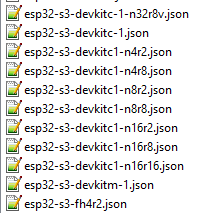
In the platform-espressif32.zip\boards we can see all the available boards, including esp32-s3-devkitc1-n16r8. Below is the json out of it:

{
  "build": {
    "arduino": {
      "partitions": "default_16MB.csv",
      "memory_type": "qio_opi"
    },
    "core": "esp32",
    "extra_flags": [
      "-DARDUINO_ESP32S3_DEV",
      "-DARDUINO_RUNNING_CORE=1",
      "-DARDUINO_EVENT_RUNNING_CORE=1",
      "-DBOARD_HAS_PSRAM"
    ],
    "f_cpu": "240000000L",
    "f_flash": "80000000L",
    "flash_mode": "qio",
    "psram_type": "opi",
    "hwids": [
      [
        "0x303A",
        "0x1001"
      ]
    ],
    "mcu": "esp32s3",
    "variant": "esp32s3"
  },
  "connectivity": [
    "wifi",
    "bluetooth"
  ],
  "debug": {
    "default_tool": "esp-builtin",
    "onboard_tools": [
      "esp-builtin"
    ],
    "openocd_target": "esp32s3.cfg"
  },
  "frameworks": [
    "arduino",
    "espidf"
  ],
  "platforms": [
    "espressif32"
  ],
  "name": "Espressif ESP32-S3-DevKitC-1-N16R8V (16 MB Flash Quad, 8 MB PSRAM Octal)",
  "upload": {
    "flash_size": "16MB",
    "maximum_ram_size": 327680,
    "maximum_size": 16777216,
    "require_upload_port": true,
    "speed": 921600
  },
  "url": "https://docs.espressif.com/projects/esp-idf/en/latest/esp32s3/hw-reference/esp32s3/user-guide-devkitc-1.html",
  "vendor": "Espressif"
}

There are also some other types available:

Another hint:
The compiler options link in the sdkconfig_options configuration is pointing to the specification of chip “ESP32”:

For ESP32-S3, we need to change it in the dropdown list, not all sdkconfig_options are the same. For example, these two configurations are only for ESP32 chip (revision 1), they are not for ESP32-S3 at all.

-mfix-esp32-psram-cache-issue
-CONFIG_SPIRAM_CACHE_WORKAROUND

I hope this information can help others who are looking for similar solution.
1 Like