First link doesn’t mention how much RAM, only 1GB?
Second link talks are about RPI3 with only 1GB RAM… 
First post even includes RAM stats 
First link doesn’t mention how much RAM, only 1GB?
Second link talks are about RPI3 with only 1GB RAM…
First post even includes RAM stats
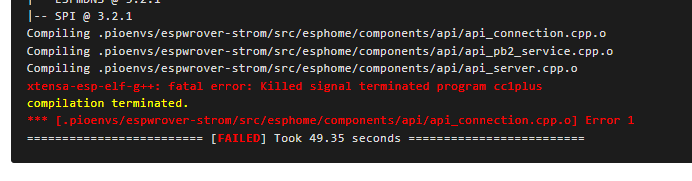
Indeed it does and it is only using one core to compile. Imagine if it was trying to use all 4 how much more it would need (that it doesn’t have).
I use a rpi zero 2w and no about how to add swap to make it able to do more. I only use that for a photo frame so it isn’t really tasking it with too much. A 2GB rpi is limited in what it can do. If it is the only machine you have, it will have to do. If you have a laptop that is reasonably current (last decade or so) it likely has the ability to do the task in 1/10 the time. Why wouldn’t you want to take advantage of that?
Good morning 
I have read all, what you guys wrote, but didnt understand all…
I think, the time-problem is made by myself. I had an other error and searched in the web for it and the solution was, adding the
compile_process_limit: 1
I am an " try and error" and “copy and paste” guy… sorry for that…
Ok, when i change the value to 4 or delete the code, the compiling is faster… the CPU goes up to 99% and the memory goes up to 1,6GB… but:
And that is why you added the line to limit the compile to one core. As the sign for the big roller coaster says, “you must be this tall to ride”.
You have three choices:
I have a repurposed mini desktop PC that uses a little more power at normal operation than a rpi, but can use several times that when it needs to compile something.
Now you compile on all cores 
So it works? 
You could try freeing up memory by temporary stopping some (heavy) add-ons before compiling 
Increase the swap size and you get more virtual memory. It might keep the compile process from crashing. It will probably wear out your SD card faster, so make sure you have a tested backup AND recovery plan for when the inevitable happens and your SD card is toast.
The B&R process is good for the unusual things that can happen.