ESPHome-gea — GE Appliances on the local bus (dishwasher, washer, dryer, oven)

Hey Michaël! It looks like we are working on almost the same thing! I have GEA2/3 working and it also handles GEA3 devices that don't have a free subscription. I'm also trying to get MQTT Autodiscovery working so that users don't have to mess with any configuration--that's a bit tricky.

I haven't posted yet because I am still getting a few stability related issues where the adapter resets occasionally, but I have it working with a variety of appliances (Dishwasher, Washer, Combo Washer/Dryer, Mini Split, PTAC, HPWH, Refrigerator). Let me know what you think!

Thanks for sharing! Interesting to see another implementation tackling GEA2/3.

I had a look at your repo — quick question on the GEA3 subscription thing: are there specific appliances where subscribe just doesn't work, or is it more of a timing issue? I've been using subscribe on GEA3 without hitting that problem yet, so I'm curious which ones you've seen it on.

Also on the MQTT side — looks like the architecture comes straight from the official GE bridge, so I'm guessing that wasn't really a deliberate choice. Have you thought about dropping it in favor of the native ESPHome API? Would remove the broker dependency entirely and HA picks up entities automatically. Just wondering if there's a reason to keep it.

Yes! There are some appliances that are configured to have a single subscription available--with those, the wifi module may grab that subscription prior to the Home Assistant adapter does (or vice versa--the Home Assistant adapter would block wifi from working). It's kind of a case by case basis depending on the vintage of appliance.

Keeping MQTT is kind of one of those things I started out just trying to keep the same functionality as the existing code, but more easily maintainable. I've kept it so far because I haven't found another way of generating a device config at runtime. The adapter detects the appliance, figures out polling/subscription based on the latest public erd definition (and can parse feature bits), and then at the end once it knows what Erds are present, pulls the erd definitions for those values and auto generates a MQTT auto generation payload for each Erd that creates a device with entities (sensors, controls, etc) within Home Assistant.

That piece is kind of tricky, I've ended up forking the public Erd documentation repo to add in some more fields to Erds to help the parser create a better first guess sensor, but to be really robust I'd want to review each Erd individually.

The big thing I wanted is for someone to be able to plug in the adapter without any yaml configuration required. While I can figure it out, it does get a bit tricky.

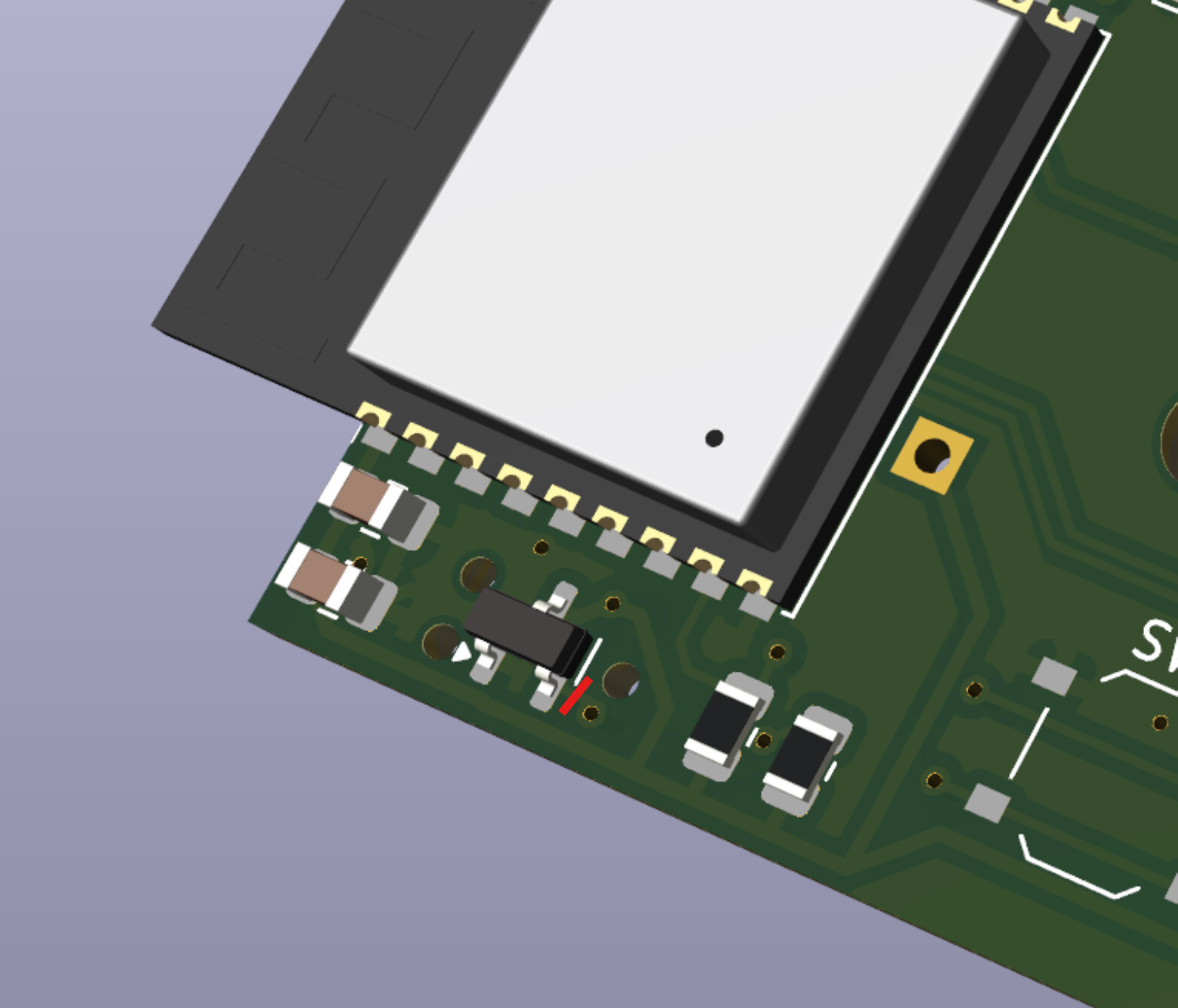
I've run into boot loops on a few of my boards. The U1 IC that was intended to hold chip reset until power was good seems to be triggering a reset during power surges. YAML on_boot code to turn off the red led seem to help but still glitches. Removing the U1 IC seems to have resolved any connection issues.

Also @mguaylam pointed out that the silk screen marking RX/TX is backwards. He had to connect RX to RX and TX to TX with his programmer and use the SW2 push button to activate boot loader.

Finally the GEA2 uart config needs to have the pin states inverted for my hardware design. Here was uart config tested and working with the current esphome-gea external component.

uart:
  id: uart_gea
  tx_pin: 
    number: GPIO5
    inverted: true
  rx_pin: 
    number: GPIO10
    inverted: true
  baud_rate: 19200

So I should just cut the 3 legs of the IC?

I think best way would be to use a craft knife to cut the copper trace from pin 2 to the via, being careful not to cut the trace by the edge of the pcb. Otherwise just cutting leg 2 off or lifting it up with a soldering iron should work.

Thanks for the help, and also for your board schematics & files!

I'm still trying to get the paulgoodjohn GEA2 fork running, and made the changes to the pins, but I'm still not getting it to communicate with my appliance. (I can confirm the Rx/Tx flip and holding SW2 is required.)

Essentially I'm just changing this line from:
Serial1.begin(HomeAssistantGea2Bridge::baud, SERIAL_8N1, 10, 9, false);
to:
Serial1.begin(HomeAssistantGea2Bridge::baud, SERIAL_8N1, 10, 5, true);

When I use the first line and flash the "official" adapter then it works as expected, and the ERDs are published to my mqtt server.

When I use the second line and flash the mulcmu board then it publishes the uptime to my mqtt server but never finds an ERD.

I don't think the U1 IC is causing trouble because the code publishes an uptime which I have not yet seen reset to zero unless I unplug the adapter from the appliance and plug it back in.

I will test out the ESPHome external component next to see if I have better luck.

If you have issues with the GEA2 portion, can you let me know here so we can follow it?

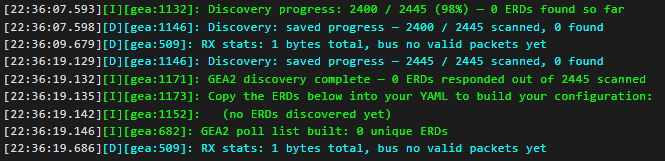
I'm not getting the hardware to play nice yet. It seems like the GEA2 scanning is working, but I still have a hardware problem.

Using the following config:

# 1. Pull in the component
external_components:
  - source: github://mguaylam/esphome-gea
    components: [gea]

# 2. Set up the UART (pin numbers depend on your board)
uart:
  id: uart_gea
  tx_pin: 
    number: GPIO5
    inverted: true
  rx_pin: 
    number: GPIO10
    inverted: true
  baud_rate: 19200

# 3. Define the GEA hub
gea:
  id: gea_hub
  uart_id: uart_gea
  protocol: gea2
  dest_address: 0xC0
  gea2_discovery: true

Finally got the esphome component working. The issue was the wrong dest_address; I had to use my "official" adapter flashed with the gea2 fork to determine what the correct address was.

It would be ideal if this component could replicate that same process of determining the correct destination address automatically. I made that comment at the github field report link.

This esphome component is really great once it is all configured. Thanks so much for creating it!

There are a couple of forks for GEA2 and the FirstBuild adapter - this one is probably the most advanced:

The address 0x6F is the CTA2045 module - try plugging directly into the water heater control, or make the destination address 0xC0

GEA addresses are a peculiar thing - back in the dim mists of time (GEA1 and GEA2), they were unique to products, and they were also used to set the bus retry time in case of a contention. There are useful wildcard addresses as well that are still valid now - the most useful being 0xFF, "everything on the bus"
There are also some common commands - so a command of 0x01 will ask for the software version of a particular board, which will give you a list of the boards in the appliance that are accessible...this does NOT work if the board is in bootloader mode....
GEA3 standardized on the "pyramid point" board always being address 0xC0....
Hope this helps....

I’ll look at improving the GEA2 discovery. People are giving me hints, it’s really cool and sorry for the initial headache, I really want this component to be as painless as possible. Thanks for testing it out.

@Enid : do you know where we can have more information on all it works? I’m also curious if GEA1 is pin compatible. I’m guessing not but i never taught of it.

You might want to check here for ERD definitions - this is the latest and greatest GEA definitions:

As far as GEA2 etc - I'm not really sure there's anything all that helpful...this was the repo for the original GEA2 green bean back in the day:

The people working on the gea adapter code and the gea2 fork (actual GE employees) are super helpful, though I have been hesitant to interrogate them too much. Here are two discussions I had that gave me enough info to get a basic understanding. If you have questions perhaps they'd be willing to help you as well?

Actually after looking at the discussions I see you've already been asking over there...

Edit: Also note in one of paugoodjohn's response:

mine uses the 0x0008 response to work out the gea address ...only one board should respond to that...

This would be really quite awesome if you reach that goal. I hope to have all my appliances up and running on Michael's esphome component soon, but having an option for plug-and-play really lowers the barrier to entry for a large portion of the community. I had the idea of creating an integration for GEA2 appliances that would take the ERDs published by an adapter running paulgoodjohn's GEA2 fork and it would create all the entities via autodiscovery using the public ERD documentation. But even that has a relatively high bar just for flashing the adapter via vs code / platformio. I never even got far enough to realize there would be an issue with not having enough info in the documentation to create the sensors easily. If you can bring the code into ESPhome and additionally solve the auto-creation entity puzzle, you'll have a real winner.

If you get to a point where you need some testing with GEA2 on 10-15 year old appliances let me know!

I don’t know if zero config is attainable. The biggest issue we can’t overcome easily is the ESP32 flash space.

It is certainly what I want but there is just so many issues with that.
We’ll need to plan everything to reach that.

For example : all my appliances are in french. Building the config from the GE reference would make everything in english.

What we would need on top of my head :

  • Fork and translate the GEA ERD doc.
  • Maintain and implement a language selector.
  • Implement auto generation of entities from declared types.
  • Implement exclusion of unwanted auto-discovered entities.
  • Compile only the machine type to have enough space. (I’m not even sure that would still work)

The GEA ERD doc is a couple of mega-bytes. We just don’t have this kind of space on the ESP32.
Implementing external storage and having a SD card would be absurd.

What do you think @joshua.longenecker ? Did you have an idea on how to handle the size of the doc?

Even in my project, I do heavy optimisation when compiling the doc and it’s taking like 1/3 of the space.

I agree it’s unlikely to be possible only with ESPHome, but a custom integration could easily do the value conversions, entity autodiscovery, language translations, etc. I think the adapter just needs to publish the ERD’s to MQTT (which the GEA2 fork already does, but it would be better if it were ported to ESPHome). Once they are there, a custom integration could pick them up and do all the heavy lifting.

You're right that a custom integration could centralize conversions, autodiscovery and translations — and with the GEA2 fork already publishing ERDs to MQTT, it's a
workable design. I went the other way on purpose, and it comes down to a few principles I built the project around.

Fewer parts, fewer failures. The MQTT route is three long-lived components you have to keep alive and in sync: the adapter firmware, a broker, and a custom
integration. The ESPHome route is one: the firmware. The conversion from raw ERD to a Home Assistant entity happens on the device, and HA reads it over the native
ESPHome API — no broker, no second integration, nothing between the appliance and HA. Every part you don't add is a part that can't break, can't drift out of date, and
doesn't need maintaining.

Native means it's already solved. When an ERD becomes a sensor, binary_sensor, select or climate in ESPHome, it arrives in HA as a first-class entity —
with device classes, units, history, automations and dashboards, for free. A custom integration has to teach HA what each value means; here I map it to a native type
once in the YAML and HA already knows what to do with it.

Local-first, the way HA intends it. The native API is a local, encrypted, push connection: state changes land in HA the moment they happen, with no cloud and no
message bus in the middle. That's the most direct path a device can take into Home Assistant.

One source of truth. Everything for a given appliance — the bus decoding, the ERD-to-entity mapping, the names — lives in one YAML file. In the MQTT design that
logic is split across three repos with three release cycles; when something misbehaves you're debugging across firmware, broker and integration. Here there's one log
stream.

Boring on purpose. A custom integration is an open-ended commitment against a moving HA core — HACS packaging, breaking changes, ongoing upkeep. YAML against
ESPHome is a stable substrate I don't have to chase.

On the entry barrier, which is the fair criticism: I keep a folder of ready-made configs per appliance to copy/paste, the docs are structured so an LLM can generate a
working config from them, and flashing goes through the ESPHome web installer — a lighter path than the PlatformIO/VS Code flow the fork needs. Translations, the point
I raised earlier about my French appliances, also get simpler rather than harder: entity names live in the YAML, so you localize by editing them in your own language
— there's no central translation layer to fork or maintain.

Both designs are valid; this one optimizes for the shortest path between the appliance and Home Assistant, with the fewest things to own. Happy to keep comparing notes
— and I'll take you up on that GEA2 testing offer when I get there.