Are the ZigBee solutions using the current crop of ESP processors? I strongly suspect not.
The ones I linked/have seen use zigbee door sensors or similar. They are not esp based.
I just found this on AliExpress:
AU$13.69 | Aqara Door Window Sensor Zigbee MCCGQ11LM Wireless APP Remote Control for Smart Home Work With Xiaomi Mijia Apple HomeKit APP
https://a.aliexpress.com/_mNYlhHX
You’ll see in the link I added here people repurpose them for a wide range of applications.
I’m not saying they are for sure a good solution for your use case but I’ve done similar things with them and it’s straight forward.
Check the thread for the latest and greatest sensor to use if you go down that path.
I removed the pulse_counter component and replaced it with a simple template and a global that increases each time the board wakes up.
I have it running for a couple hours and it seems this may be the final configuration.
esphome:
  name: gas-meter
  friendly_name: Gas Meter
  on_boot:  # This executes on boot and deep sleep wakes up
    priority: -100.0
    then:
      - if:
          # https://esphome.io/components/deep_sleep/#esp32-wakeup-cause
          condition:
            lambda: 'return 7 == esp_sleep_get_wakeup_cause();' # 7 = ESP_SLEEP_WAKEUP_GPIO
          then:
            - lambda: 'id(total_pulses) += 1;'

preferences:
  flash_write_interval: 60s

globals:
  - id: total_pulses
    type: int
    restore_value: yes
    initial_value: "0"

esp32:
  variant: esp32c6
  board: esp32-c6-devkitc-1
  framework:
    type: esp-idf

# Enable logging
logger:

ota:
  - platform: esphome
    password: "SECRET"

# wifi:
#   ssid: !secret wifi_ssid
#   password: !secret wifi_password

network:
  enable_ipv6: true

openthread:
  tlv: !secret openthread_tvl
  device_type: MTD
  poll_period: 600s # 10 minutes

deep_sleep:
  wakeup_pin:
    number: 4
    allow_other_uses: true
    mode:
      input: true
      pullup: true
    inverted: true
  wakeup_pin_mode: KEEP_AWAKE # To avoid counting double if the board wakes up again because the reed sensor is making contact
  run_duration: 1min
  sleep_duration: 60min

sensor:
  - platform: template
    name: "Total consumption"
    id: total_gas_consumption
    unit_of_measurement: "m³"
    icon: "mdi:meter-gas"
    accuracy_decimals: 2
    device_class: "gas"
    state_class: "total_increasing"
    lambda: 'return id(total_pulses) * 0.01;'
    update_interval: 10s
  - platform: adc
    name: "Battery voltage"
    pin: GPIO0
    accuracy_decimals: 2
    update_interval: 1h
    attenuation: 12dB
    samples: 10
    filters:
      - multiply: 2.0  # The voltage divider requires us to multiply by 2
  - platform: template
    name: "Wakeup Cause"
    accuracy_decimals: 0
    lambda: return esp_sleep_get_wakeup_cause();

binary_sensor:
  - platform: gpio
    name: "Gas Pulse"
    pin:
      number: 4
      allow_other_uses: true
      mode:
        input: true
        pullup: true
      inverted: true
    filters:
      - delayed_on: 50ms  # Debounce
    on_press:
      then: # This increases the count when the meter makes another loop before the board goes to sleep
        - lambda: 'id(total_pulses) += 1;'

# Enable Home Assistant API
api:
  encryption:
    key: "SECRET"
  actions:
    # Allow update the total count from HASS
    - action: set_pulse_total
      variables:
        new_pulse_total: int
      then:
        - globals.set:
            id: total_pulses
            value: !lambda 'return new_pulse_total;'
Much better. But why you keep it awake for 1min, I would expect that with openthread it takes just few sec to boot and connect. Remember that at wake esp draws 1000x more than in deep sleep.
Considered as well ESP32 solution, but finally implemented as described in this topic
Since the last post, I noticed no improvement in the battery usage so, at looking at the build logs, I spotted an entry that say something about falling back to pooling mode to detect changes in pins due to the same pin was used by a sensor as well.
So, I had to try new configurations.
After a few tries, I ended with this one that only increases the count when the board wakes up due to a change of voltage in a pin. It stays awake for 10 seconds and then backs to sleep.
My gas meter makes a pulse for every 0.01 m3. On my tests I saw my gas boiler burning that in around 15 seconds. It could do more, but I think it tends to not burn at full power to be efficient.
The battery
4.14v on Feb 17th 11am
3.97 on Feb 22th 11am (measured using a multimeter)
That’s a 0.17v drop in 5 days (120 hours) using Thread. That’s a rate of 0.00141v/hour. That’s almost a 4x improvement from the 0.0054v/hour i was getting in my first attempt using Wifi without deep sleep.
Somehow, I was hoping better results. The thuth is that the board wakes up too many times. In average my home consumes 7m3 of gas. That’s 700 wakes.
In theory this means I should charge the battery every 22 days. Not great, not terrible.
Something that bothers me thought is the battery level measurement now.
The ADC sensor is configured to run once an hour and use 10 samples. That works great when the board doesn’t deep sleep. But now it does, I get this:
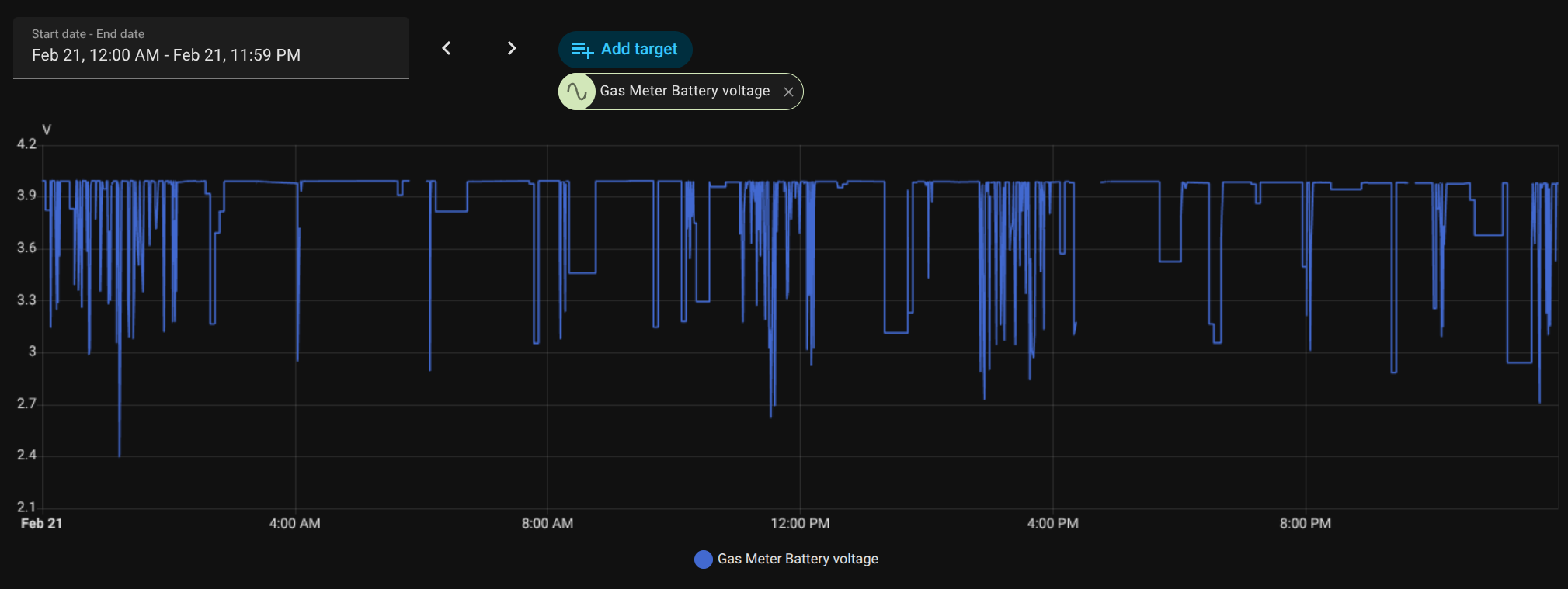
Over time (days) you can see it goes down, but there’s no much outliners in the reports.
The current configuration:
esphome:
  name: gas-meter
  friendly_name: Gas Meter
  on_boot: # This executes on boot and deep sleep wakes up
    priority: -100.0
    then:
      - if:
          # https://esphome.io/components/deep_sleep/#esp32-wakeup-cause
          condition:
            lambda: 'return 7 == esp_sleep_get_wakeup_cause();' # 7 = ESP_SLEEP_WAKEUP_GPIO
          then:
            - lambda: 'id(total_pulses) += 1;'

preferences:
  flash_write_interval: 2s

globals:
  - id: total_pulses
    type: int
    restore_value: yes
    initial_value: "0"

esp32:
  variant: esp32c6
  board: esp32-c6-devkitc-1
  framework:
    type: esp-idf

# Enable logging
logger:

ota:
  - platform: esphome
    password: "SECRET"

network:
  enable_ipv6: true

openthread:
  tlv: !secret openthread_tvl
  device_type: MTD
  poll_period: 600s # 10 minutes

deep_sleep:
  wakeup_pin:
    number: 6
    mode:
      input: true
      pullup: true
    inverted: true
  wakeup_pin_mode: KEEP_AWAKE  # To avoid counting double if the board wakes up again because the reed sensor is making contact
  run_duration:
    default: 1min
    gpio_wakeup_reason: 10s
  sleep_duration: 1h


sensor:
  - platform: template
    name: "Total consumption"
    id: total_gas_consumption
    unit_of_measurement: "m³"
    icon: "mdi:meter-gas"
    accuracy_decimals: 2
    device_class: "gas"
    state_class: "total_increasing"
    lambda: 'return id(total_pulses) * 0.01;'
    update_interval: 2s
  - platform: adc
    name: "Battery voltage"
    pin: GPIO0
    accuracy_decimals: 2
    update_interval: 1h
    attenuation: 12dB
    samples: 10
    filters:
      - multiply: 2.0  # The voltage divider requires us to multiply by 2
  - platform: template
    name: "Wakeup Cause"
    accuracy_decimals: 0
    update_interval: 2s
    lambda: return esp_sleep_get_wakeup_cause();

# Enable Home Assistant API
api:
  encryption:
    key: "SECRET"
  actions:
    # Allow update the total count from HASS
    - action: set_pulse_total
      variables:
        new_pulse_total: int
      then:
        - globals.set:
            id: total_pulses
            value: !lambda 'return new_pulse_total;'
This was my initial approach. It worked well, but the problem was that it requires HomeAssistant to be running to count the pulses.
I wanted a solution does the count and remembers the total usage so, even if the network fails or the server is down, the sensor could keep counting and report the current usage once HASS pulls the data.
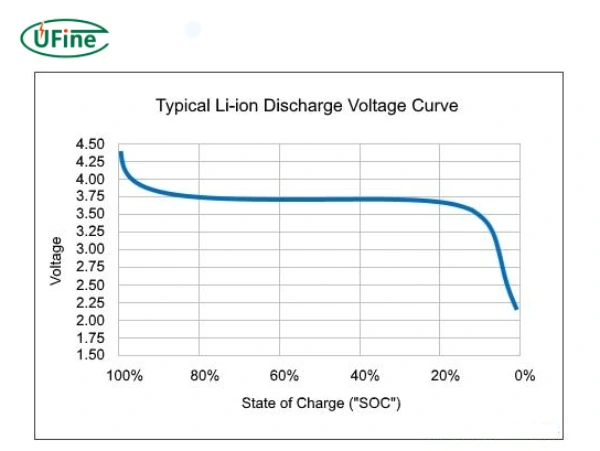

The total wake time will be driving a lot of your battery usage.
You can probably shave it down a lot by using a “push approach” to your sensor updates and sleeping once done.
You can trace through that kind of approach here.
From what I recall wifi is a major power consumer. I think there’s more control over turning wifi on/off these days, so you might even be able to restrict connecting to wifi and transmitting data to a few times a day (and just store data updates on the esp between this).
I read your post. Nice project.
In my case, I cannot avoid waking up the device since I need it to be awake to count the pulses.
Maybe, what would help would be to keep the antena off between these wakes, and turn it on to send the total collected pulses count every X pulses.
But, I couldn’t find nothing that would allow me that level of control over the antena in the ESPHome docs.
This is your unsolvable conundrum, cause by incorrect component selection. You shouldn’t be using that version of the ESP32 for low power operations. Like putting lipstick on a pig, it looks pretty, but at the end of the day, you still have a flat battery far too early, and everything still stinks
Rather than continue to try and eke a few milliamps less out of your ESP chip, reconsider your design. Separate the counting, maybe to another chip, and the transmission to something more power friendly. Maybe use a network protocol that has faster setup time than Wifi, such as BLE (the LE stands for Low Energy) instead, that uses far less energy for transmission. Your battery up time can then be measured in years instead of days. Your vocabulary will change from milliamps to nanoamps.
My suggestion: Check out the nRF52840 which is a similar price point as a ESP32 H2 series and absolutely sips the battery power instead of gulping it.
Bonus: ESPHome supports both chips, making your yaml code efforts reusable with very minor changes.
Don’t be disenchanted. Thousands of hobbyists and electronic engineers over the last few years since the low cost ESP chips were released have attempted to go down the path of trying to force their ESP chips to run on batteries, and have eventually admitted defeat. Accept the inevitable conclusion - you are wasting your time. Even the chip designers at Espressif have acknowledged it, refining their chip design to release lower power versions eventually, as the rest of the world moved to other chip vendors and alternate designs to solve their battery operational requirements.
I agree that real low power setups are not done with esp, neither with esphome.
But since this forum topic is for esphome and nrf52 doesn’t have any power/sleep control here at the moment, the choices are limited.
That board OP uses is likely one of the bests you can get for consumption with esphome.
700 wakeups per day should give reasonable battery life. Only thing that matters is the time esp is awake. 2s vs 10s is ~5x battery life. 20uA deep sleep current is irrelevant.
I was contemplating if it matters much if it connects to WiFi / API or not when it wakes. From what I recall that takes time and power.
Maybe you could have a counter for wakes and only connect to WiFi every nth time, else just sleep immediately after pulse counter update / store ?
That might get most wakes to just a few seconds.
Data updates to HA every pulse is probably beyond needed for monitoring.
Sorry reread this. See my comments above. I think it’s worth exploring further.
Even if you can’t turn antenna off (I’m not sure), I think sleep immediately after counter update except every nth time has some promise as a strategy.
Edit: There’s this too. Not sure what that gets you.
See wifi.enable, wifi.disable and enable_on_boot
Edit 2: Sorry all reading along, my messages above are repetitive. Multi-tasking today and clearly I’m not great at that  .
.
Yes, esphome wakeup is long process in any case. With wifi/api it’s painfully long.
As a rule, lower power consumption comes with lower transmission range. If your device is located far from the base transmitter, this ESP32-H2 may not be a suitable choice.
P.S. I’m just awaiting mine H2 and RF52840 boards from AliExpress to play around with it. By the way for RF52840 is possible to use Arduino IDE 
I’m looking forward to seeing your project and wish you great success!
I’ve created the project Esp32H2GasCounter, which is an adaptation of Ignacio’s Zigbee Gas Counter for the ESP32-H2 board. Thanks to Ignacio for the original work.
Hi there!
Thanks awesome! Hope you enjoy the project as I’m doing. The code should “just work” with very small modifications in an Esp32H2 board!
Best regards
Ignacio