Geo Solo III / Emlite EMC1.w — Working local 868 MHz SDR decoder
I’ve successfully recovered live electricity readings from my legacy Geo Solo III installation, without using the discontinued EnergyNote cloud, Geo hub or in-home display.
Using a Nooelec NESDR Mini 2 RTL-SDR and a Python decoder, I can now receive the meter’s 868 MHz FSK transmissions and extract:
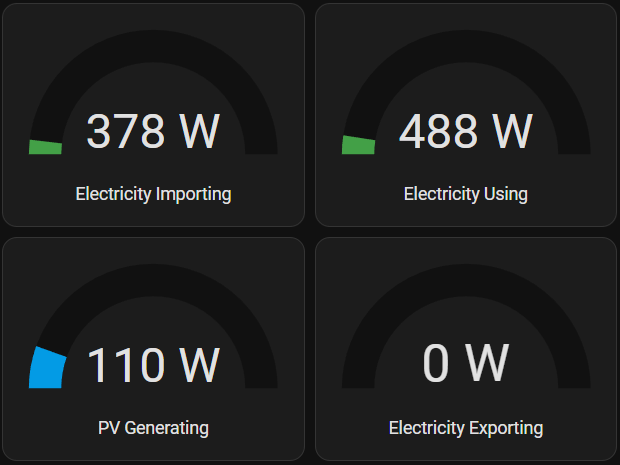
Live household consumption (W)
Live solar generation (W)
Calculated grid import/export (W)
Four apparent cumulative energy counters (Wh)
The protocol uses approximately 38,400 bit/s FSK, sync 7B B9, and CRC-16 polynomial 0x8005 (initial value 0, non-reflected).
In the first capture, all 91 recovered packets passed CRC verification. I also confirmed the live readings against the Geo IHD during a controlled appliance test.
Importantly, the radio transmissions continued when both the Geo hub and IHD were completely powered off.
I’ve integrated the decoder into a local home energy dashboard, and it is working successfully.
The decoder has been validated on my own Geo Solo III / Emlite EMC1.w installation. Other hardware and firmware variants may need adjustments, and some cumulative-counter mappings remain provisional.
I’m documenting the findings and decoder so other owners of these obsolete systems can potentially restore local monitoring without replacing their meters.
am building a dashboard too.. Ping me and i can share more details.
This is great, I’m going to try this. I had RTL-SDR working on my raspberry pi before (tar1900 or something), so maybe this will work without much trouble.
I wish there was a way to get rid of “Cloud error” message that keeps coming back on my remote Solo display, which otherwise still shows all the useful details including costs (it must have cached my tariffs costs, probably impossible to update them now). Otherwise I might just replace it with some raspberry pi + small screen and HA dashboard or something.
if you pair the IHD directly to the meter and that will get rid of the cloud message, thats how i set it up, i started getting the cloud error since a few weeks and disconnected the hub.
Press the 3 buttons the ihd and power on will ask you to pair with the meter.
press the meter grey button for 5 seconds enters pairing mode.
(.venv) schriss@raspberrypi4b:~/geo-solo-iii-emc1w-rtl-sdr-decoder $ python cli.py \
  --library /usr/lib/aarch64-linux-gnu/librtlsdr.so \
  --seconds 600 \
  --include-frame
Detached kernel driver
Found Rafael Micro R828D tuner
Disabled direct sampling mode
[R82XX] PLL not locked!
[R82XX] PLL not locked!
INFO:geo_decoder:Geo radio receiver started at 2026-11-16T22:08:15.837731+00:00
WARNING:geo_decoder:Geo radio has no validated packet for 5.1 seconds
WARNING:geo_decoder:Geo radio has no validated packet for 10.2 seconds
WARNING:geo_decoder:Geo radio has no validated packet for 15.3 seconds
WARNING:geo_decoder:Geo radio has no validated packet for 20.5 seconds
WARNING:geo_decoder:Geo radio has no validated packet for 25.6 seconds
(.venv) schriss@raspberrypi4b:~/geo-solo-iii-emc1w-rtl-sdr-decoder $ rtl_433 -f 868M
rtl_433 version 25.02 (2025-02-19) inputs file rtl_tcp RTL-SDR SoapySDR

New defaults active, use "-Y classic -s 250k" if you need the old defaults

Detached kernel driver
Found Rafael Micro R828D tuner
[SDR] Using device 0: Realtek, RTL2838UHIDIR, SN: 00000001, "Generic RTL2832U OEM"
Exact sample rate is: 1000000.026491 Hz
[R82XX] PLL not locked!
Allocating 15 zero-copy buffers
WARNING: Undeclared field "temperature (zone 0)" in [185] "Honeywell CM921 Wireless Programmable Room Thermostat"
_ _ _ _ _ _ _ _ _ _ _ _ _ _ _ _ _ _ _ _ _ _ _ _ _ _ _ _ _ _ _ _ _ _ _ _ _ _ _ _ _ _ _ _ _
time      : 2026-11-16 22:09:31
model     : Honeywell-CM921                        Device IDs: 107216 107216
temperature (zone 0): 19.440                       Integrity : CHECKSUM
_ _ _ _ _ _ _ _ _ _ _ _ _ _ _ _ _ _ _ _ _ _ _ _ _ _ _ _ _ _ _ _ _ _ _ _ _ _ _ _ _ _ _ _ _
time      : 2026-11-16 22:09:41
model     : GEO-minimCT  id        : B3C0EB
Power     : 16005 VA     Flags     : 0             Uptime    : 35653640
Integrity : CRC
_ _ _ _ _ _ _ _ _ _ _ _ _ _ _ _ _ _ _ _ _ _ _ _ _ _ _ _ _ _ _ _ _ _ _ _ _ _ _ _ _ _ _ _ _
time      : 2026-11-16 22:09:51
model     : GEO-minimCT  id        : B3C0EB
Power     : 16005 VA     Flags     : 0             Uptime    : 35653640
Integrity : CRC
Thanks for testing and sharing the output. the decoder currently filters for the exact packet header seen on my installation as i still cant find the pairing code data yet, so it may be rejecting a different header from your meter.
Could you stop the reader, run this for about two minutes, and send the output?
The CRC-valid Geo packets are a useful lead. Their raw contents should help us determine whether they’re from the Solo III or another Geo device. No pairing changes are needed.
can you mail me the details to - mailme[at]kannanv[dot]com
Keep your existing --library argument if needed. This reports CRC-valid Geo packets without restricting them to my meter’s header. Please share the output—it should help identify your packet layout.
The Pi captured 28 CRC-valid Solo III–format frames in 30 seconds. The decoder returned zero because it hard-codes 1d40861d, while your 35-byte frames start with b3c0eb1d. The first three bytes, B3C0EB, also match the ID that rtl_433 reported.
I replayed the capture with b3c0eb1d substituted in memory. The first reading was 307 W usage, 0 W generation, and 7,870.195 kWh cumulative generation. The frame counter advanced about once per second. You can compare the cumulative value against the physical meter to confirm the field mapping.
Find meter ID:
rtl_433 -f 868M -T 120
and it seems to work:
(.venv) ~/geo-solo-iii-emc1w-rtl-sdr-decoder $ python cli.py --meter-id B3C0EB --seconds 60
WARNING:root:Experimental layout assumption: verify values against your meter/IHD
Detached kernel driver
Found Rafael Micro R828D tuner
Disabled direct sampling mode
[R82XX] PLL not locked!
[R82XX] PLL not locked!
INFO:geo_decoder:Geo radio receiver started at 2026-11-17T08:12:57.554144+00:00
{"time_utc": "2026-11-17T08:12:57.942687+00:00", "received_utc": "2026-11-17T08:12:58.121505+00:00", "estimated_delay_s": 0.178818, "fresh": true, "type": "measurement", "header": "b3c0eb1d", "gen_W": 0, "use_W": 384, "import_W": 384, "export_W": 0, "counter": 3129, "generation_kWh": 7870.195, "inferred_usage_kWh": 84632.614, "inferred_import_kWh": 77613.745, "inferred_export_kWh": 851.326, "crc_ok": true}
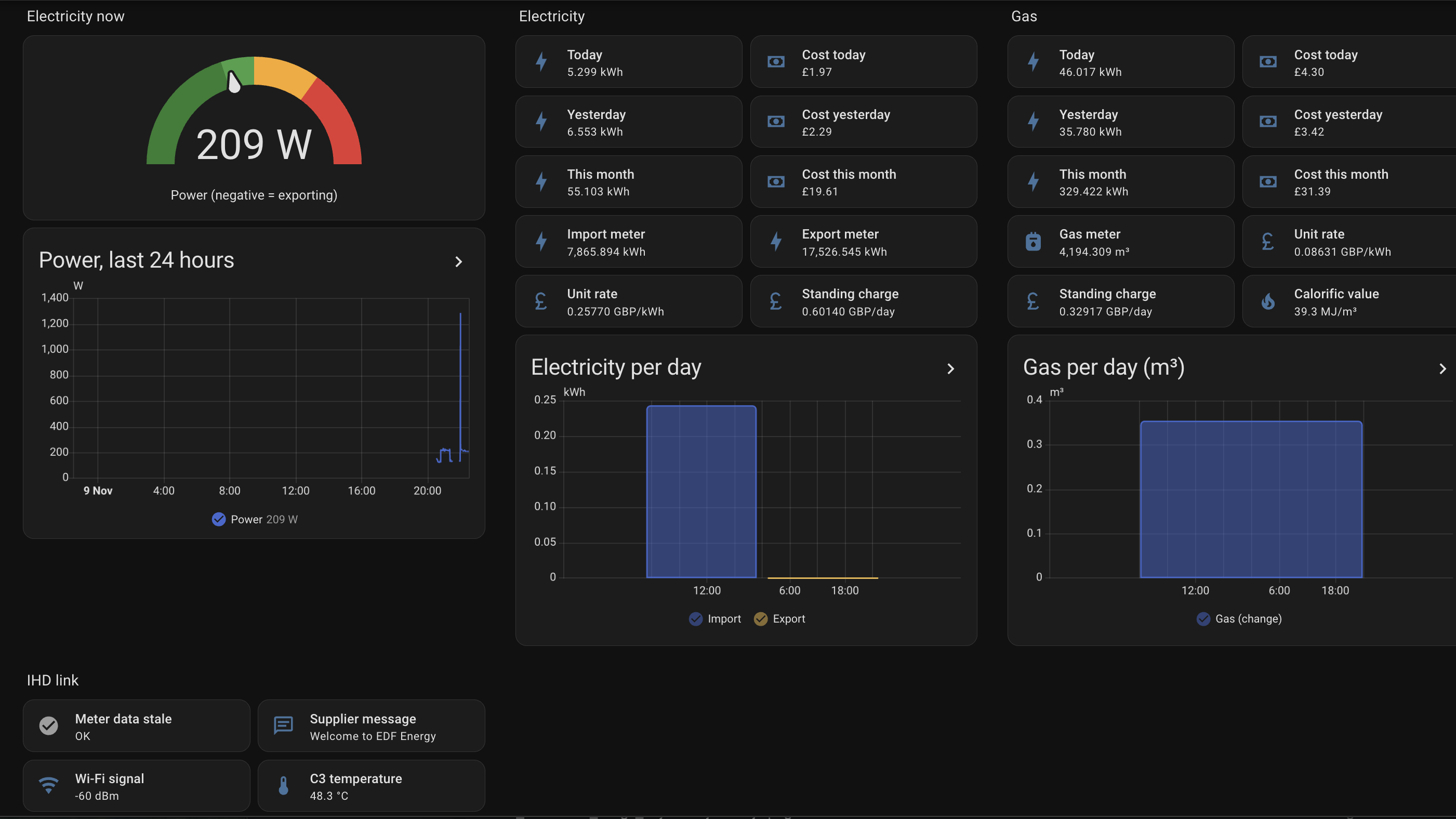
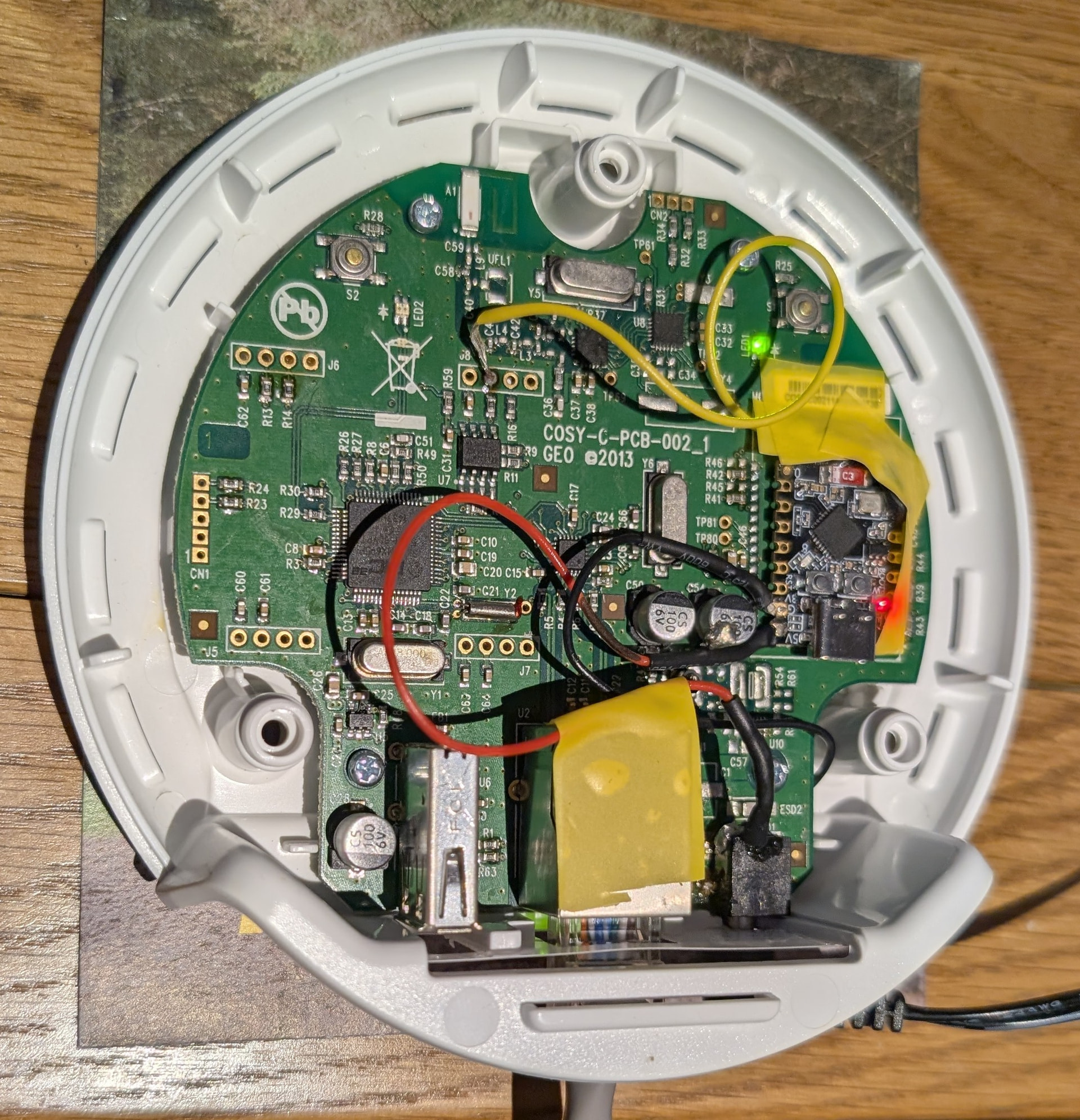
Before the radio interception method became available I went different route, adding a esp32-3c unit to the hub that is a 2013 Cosy hub utilising a ground from the usb board connection, 5 volt supply from the power plug and a receive connection from pin 2 of J8 group of pins. Then programming the esp32-3c which is connected by 2.4 GHz WiFi.
are you getting any actual variation in the Calorific Value from the meter? Mine seems to return a fixed 39.5. (From my REST query to the nationalgas API - the CV does vary from day to day, even if small amounts).
No, I don’t believe it is fast moving. It varies from region to region but not so much from day to day. Interesting that it doesn’t track the national published stats though
This is a very interesting thread - love the innovation!
It all for the older smart meter using 868 MHz whereas a lot of the newest smart meters are using 2.4 GHz HAN and Zigbee Smart Energy protocol. This is much tougher. Anyone got any work going on that? Yes I would love to buy a Hildebrand Glow CAD if only they had stock!!