Help getting idotmatrix working in HA

Hi

I came to this thread as I’ve recently got this display and was wanting to get it working in HA, so thanks for the tips here so far.

To give back - I notice that others were struggling to get text working. I’ve managed it.

My service entry is as follows: -

@service
async def text( address=None, text="Hello World", font_size=16, font_path="./pyscript/fonts/Rain-DRM3.otf", text_mode=1, speed=95, text_color_mode=1,text_color=(255,0,0),text_bg_mode=0,text_bg_color=(0,255,255) ):

    conn = ConnectionManager()
    await conn.connectByAddress(address)
    Text().setMode(text=text,font_size=font_size,font_path=font_path,text_mode=text_mode,speed=speed,text_color_mode=text_color_mode,text_color=text_color,text_bg_mode=text_bg_mode,text_bg_color=text_bg_color)

This works and I can tweak all the settings. The fun bit was finding where to put the font, and how to reference it. In the font_path above you see that the runtime path is in the config directory, so referencing a font in ./pyscript/fonts does the trick - I’ve copied the default font in there.

You also need to have text=“text” as a parameter in the setMode - I see that @jonaseymour you put just the string itself in the setMode.

My service has all applicable parameters so for example I can call it with yaml like this:

action: pyscript.text
data:
  address: 17:40:12:80:7D:C9
  text: "It's GREEN Bin Day"
  font_size: 22
  speed: 100
  text_mode: 1
  text_bg_mode: 1
  text_bg_color: [0,128,0]
  text_color_mode: 2

I don’t really like the scaling/spacing of the text compared to what comes out of the Android app, but I think that will need customising the library so that’s for another day.

Hope this helps someone.
Thanks for sharing @padiddlyboing but unfortunately doesn’t work for my sign which was purchased from Kmart in Australia. Perhaps there’s something different about the setup? What’s the specs of your sign?

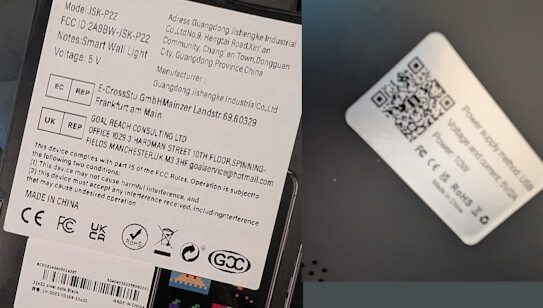
@JJW.AU this is the spec of my display: -

Rather strangely, whilst mine was working, I’m now seeing the same sleep(0.01) error! Will have another play.

Thanks for this. But for some reason thais doesn’t work for me either. Mine just beeps, shows a colourful screen reading “DM” or something, and then goes white…
That or it just freezes the whole display and needs a restart. Not sure what’s going on with it…

Hi @MiguelAngelLV. Were you able to work on the HA integration for the idotmatrix devices?

I have the 32x32 one collecting dust that would be great to use with HA

I opened a feature request: Action to create tags (NFC and QR) · home-assistant · Discussion #245 · GitHub

Hi all, I just wondered if anyone had made any headway with getting this to work in Home Assistant at all? Thanks

I’m trying to use this solution to display F1 flag colors (GitHub - Nicxe/f1_sensor at v2.1.0).

I managed to connect to the dotmatrix and run a script to, for example, change the clock or show the yellow color. But right after that the problem with disconnecting (I think) starts. Every time I try to run the script again, I get an error message in the logs:

2025-10-03 21:13:46.320 WARNING (MainThread) [habluetooth.wrappers] BC:6F:9B:EB:30:BE: BleakClient.connect() called without bleak-retry-connector. For reliable connection establishment, use bleak_retry_connector.establish_connection(). See https://github.com/Bluetooth-Devices/bleak-retry-connector
2025-10-03 21:13:56.324 ERROR (MainThread) [custom_components.pyscript.file.idot_ha.fullscreencolour] Exception in <file.idot_ha.fullscreencolour> line 75:
        await conn.connectByAddress(address)
                                    ^
TimeoutError:

When I run the script on the iDot, the Bluetooth connection symbol appears on the display, but then I get an error in the Home Assistant logs, and the pattern on the iDot doesn’t change.

Have you also experienced this issue, or is it still happening for you?

Try this, help develop

@suchy_cow This is BRILLIANT! THANK YOU!
Works well on my Kmart display with some very basic testing. Will try more tomorrow as I have three displays and was having issues controlling all three with the other code. Would love to be able to extract the animated pictures from the idotmatrix app and load them via Home Assistant

Thanks! I’m currently trying to get it to work.

How do you get it to pair with HA? I’m not seeing it show up anywhere and can’t find any way for the device to enter pairing mode? Or is there a different way to get the MAC address of the device?

Thanks!!

@evorgevol - From memory I think I used a bluetooth sniffer tool on my mobile phone to scan for MAC addresses. There’s no need for pairing mode using this new integration. I am finding that I think if the other integration has connected with the device then it locks the communication. You then need to power cycle the device to release it. Same happens if you use the idotmatrix app.

So I’m trying to get the time to display and Copilot has suggested triggering an automation every minute. It kind of works but my 16x16 display isn’t wide enough to display the numbers unless I scroll.

Here’s the Yaml automation code:

alias: "Matrix Display: Update Time"
description: Updates the pixel matrix display with the current time every minute.
triggers:
  - minutes: "*"
    trigger: time_pattern
actions:
  - action: ump.draw_visuals
    metadata: {}
    target:
      entity_id: light.meals_pixel_display
    data:
      elements:
        - type: icon
          name: mdi:clock
          x: 2
          "y": 2
          size: 12
          color:
            - 255
            - 0
            - 0
        - type: textscroll
          content: "{{ now().strftime('%H:%M') }}"
          font: 3x5
          color:
            - 0
            - 0
            - 0
          fps: 5
      background:
        - 0
        - 255
        - 255
mode: single

This was perfect, thank you! I used nRF Connect app on my phone to find the device and just entered the MAC address from it. I’ve currently only tried text and icons, but both appear to be working promptly for me! Thanks @JJW.AU and a massive thanks to @suchy_cow

Thank you @suchy_cow for sharing this
I too have tested it on my K-mart 16x16 iDotMatrix display and it works.
I followed your example code to have an automation that flips through different panels. I found text scrolling caused infrequent crashes even at low fps.

I also use chatGPT to make a simple pixel art editor for drawing pixel art

The UMP integration started out working well but perhaps I’ve overloaded it. My devices frequently freeze (I…E. stop updating) and/or reboot. At one point I think it got stuck because Home Assistant or perhaps the Bluetooth proxy keep spamming updates. I ended up doing a complete reboot of Home Assistant which seemed to fix it from getting spammed. But unfortunately today still not working well. I even added an automation to periodically reload the integration but still hasn’t helped. Any ideas?
Currently my use cases are:

  1. Update once a minute with the current time
  2. Turn display off when no further motion in the room
  3. Turn display on when motion is detected
  4. Display scrolling text with an icon when one of my door sensors is opened

I got AI to help write a wrapper to throttle calls. This has fixed my crashing issues. Also instead of calling the off command I send a black square to my screen.

alias: "Safe Matrix: Meals Room"
description: Safe update wrapper for the Meals Room display.
mode: single
max_exceeded: silent
fields:
  elements:
    description: The elements to draw (list of objects)
    required: true
    selector:
      object: null
sequence:
  - target:
      entity_id: light.meals_pixel_display
    data:
      elements: "{{ elements }}"
    action: ump.draw_visuals
  - delay: "00:00:05"