Well, you shouldn’t need to replace stuff in the name.
What are the other templates you are using (for state and available options)
Well, you shouldn’t need to replace stuff in the name.
What are the other templates you are using (for state and available options)
I’m using the the state and option templates from your screenshot
Hello friends!
I’m new to HA and I’m STRUGGLING.
I’m trying to setup my philips hue dimmer switch v2 to do the scene cycling, but it isnt working. I also want the cycling to always start at the first scene on the first press, like the dimmer switch does natively. This is what I have so far, please help! 
description: ""
triggers:
  - device_id: 61e54cd09696d046098013be955a69df
    domain: zha
    type: remote_button_short_press
    subtype: turn_off
    trigger: device
    id: button_press
conditions: []
actions:
  - action: input_select.select_next
    metadata: {}
    data:
      cycle: true
    target:
      entity_id: input_select.scene_entities
  - action: scene.turn_on
    target:
      entity_id: "{{ states('input_select.scene_entities')}}"
mode: single
description: ""
triggers:
  - device_id: 61e54cd09696d046098013be955a69df
    domain: zha
    type: remote_button_short_press
    subtype: turn_off
    trigger: device
    id: button_press
conditions: []
actions:
  - if:
      - alias: Check if automation was triggered more than 20 seconds ago
        condition: template
        value_template: |
          {{ now() >= this.attributes.last_triggered | default(as_datetime(0),1) + timedelta(seconds = 20) }}
    then:
      - action: input_select.select_first
        target:
          entity_id: input_select.scene_entities
    else:
      - action: input_select.select_next
        metadata: {}
        data:
          cycle: true
        target:
          entity_id: input_select.scene_entities
  - action: scene.turn_on
    target:
      entity_id: "{{ states('input_select.scene_entities')}}"
mode: queued
Personally, I would probably split out the scene.turn_on action to it’s own automation triggered off the state change of the Input Select. That would make the select more useful as a target for other automations or dashboard card actions.
Just been noodling around the same problem - and just to update the thread here, the template state needs to use last_changed time not the scene state (as that date time is something completely different):
template:
  - select:
    - name: "Living Room Scenes"
      unique_id: living_room_scenes
      state: >
        {%- set area = "Living Room" -%}
        {%- set scene =
          expand(area_entities(area))
            | selectattr('domain', 'eq', 'scene')
            | sort(attribute='state', reverse=true)
            | map(attribute='name')
            | list
            | first
            -%}
        {{ scene | replace(area + ' ', '') }}
      options: >
        {%- set area = "Living Room" -%}
        {{
          expand(area_entities(area))
            | selectattr('domain', 'eq', 'scene')
            | map(attribute='name')
            | map('replace', area + " ", "")
            | list
            | sort
        }}
      select_option:
        - action: hue.activate_scene
          target:
            entity_id: >
              {%- set area = "Living Room" -%}
              {%- set full_option = area + " " + option -%}
              {{ states.scene
                | selectattr('name', 'eq', full_option)
                | map(attribute='entity_id')
                | first
              }}
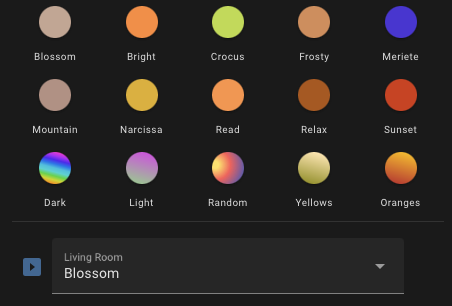
I made some tweaks to the list of scenes presented (as it looks a bit silly with ‘Living Room Relax’ - much better as ‘Relax’ - but easy enough to reverse those out depending on how you use it.
The only downside with this approach is that if the lights change outside of a scene selection, the select doesn’t see that change so (obviously) you can’t re-select the same scene and have that recognised as a select_option.
Personally I’m going to use a helper input_select, populate that with the scenes available, then present that in the UI with a ‘play’ button to activate the selected scene - just think that’s a better user experience - but I didn’t want this thread sitting here without at least updating it
Why does the State template need to use last_changed? During normal operation both state and last_changed should represent the same time… but the property last_changed will also be updated at restart, so it won’t necessarily represent the last scene activated.
Yup - agree - my bad !
Ok I ended up doing it this way:
Using RGB Light Card to show some simple buttons to activate scenes, example here:
      - type: custom:rgb-light-card
        justify: around
        label_size: 10
        colors:
          - type: call-service
            service: hue.activate_scene
            service_data:
              transition: 3
              entity_id: scene.living_room_mountain_breeze
            label: Mountain
            icon_color: "#BD9A8E"
Then the input select in the UI like this:
      - type: divider
      - entity: input_select.scene_living_room
        name: Living Room
        icon: mdi:play-box
        tap_action:
          action: call-service
          service: script.activate_scene
          service_data:
            room_id: living_room
            transition: 3
With a script to do the actual activation of the scene:
alias: Activate Scene
description: >-
  Apply the appropriate light scene action from an input select choice given a
  room_id.
fields:
  room_id:
    name: Room ID
    description: The area name or area_name for the room to apply the scene to.
    selector:
      area:
        multiple: false
    default: living_room
    example: living_room
    required: true
  brightness:
    name: (OPTIONAL) Brightness
    description: >-
      Brightness percentage to use when applying the scene. Defaults to scene
      default.
    selector:
      number:
        min: 1
        max: 100
        unit_of_measurement: "%"
    example: 50
    required: false
  transition:
    name: (OPTIONAL) Transition
    description: Time in seconds for scene to fade in. Defaults to 0 seconds.
    selector:
      number:
        min: 0
        max: 100
        step: 0.1
        unit_of_measurement: sec
    example: 2
    required: false
  speed:
    name: (OPTIONAL) Speed
    description: Dynamic scene rotation speed to apply. Defaults to 50%.
    selector:
      number:
        min: 0
        max: 100
    example: 50
    required: false
  dynamic:
    name: (OPTIONAL) Dynamic
    description: Run the scene if it is dynamic. Defaults to false.
    selector:
      boolean: null
    example: true
    required: false
sequence:
  - variables:
      scene_select: "{{ 'input_select.scene_' + room_id }}"
      scene_entity: |-
        {%- set possible_scenes = expand(area_entities(room_id))
                  | selectattr('domain', 'eq', 'scene')
                  | rejectattr('attributes.name', 'undefined')
                  | selectattr('attributes.group_type', 'defined')
                  | map(attribute='entity_id')
                  | list
                -%}
        {%- set selection = states(scene_select) | lower -%}
        {%- set area_friendly =area_name(room_id) -%}
        {%- for i in possible_scenes -%}
          {%- if state_attr(i,'group_type') == "room" and (state_attr(i,"name") | lower) == selection -%}
            {{ i }}
            {%- break -%}
          {%- elif state_attr(i,'group_type') == "zone" and (state_attr(i,"friendly_name") | regex_replace('^' + area_friendly + '\s+','','i') | lower) == selection -%}
            {{ i }}
            {%- break -%}
          {%- endif -%}
        {%- endfor -%}
  - choose:
      - conditions:
          - condition: template
            value_template: "{{ scene_entity != '' }}"
        sequence:
          - target:
              entity_id: "{{ scene_entity }}"
            data: |-
              {
                  {%- if brightness is defined -%}
                    "brightness": {{ brightness }},
                  {%- endif -%}
                  {%- if speed is defined -%}
                    "speed": {{ speed }},
                  {%- endif -%}
                  {%- if transition is defined -%}
                    "transition": {{ transition }},
                  {%- endif -%}
                    "dynamic": {{ dynamic if dynamic is defined else false }}
              }
            action: hue.activate_scene
    default:
      - target:
          entity_id: |-
            {{ expand(area_entities(room_id))
                | selectattr('domain', 'eq', 'scene')
                | selectattr('attributes.id', 'defined')
                | selectattr('attributes.friendly_name', 'eq', states(scene_select))
                | map(attribute='entity_id')
                | list
            }}
        data: |-
          {
              {%- if transition is defined -%}
                "transition": {{ transition }}
              {%- endif -%}
          }
        action: scene.turn_on
mode: parallel
icon: mdi:palette-swatch-variant
max: 20
max_exceeded: silent
And a script that’s gets run every hour to build up the input select’s from whatever people have setup scene wise (handling zones and rooms to get friendly names):
alias: Set Scenes
sequence:
  - variables:
      scenes: |-
        {%- set scenes = namespace(area=[]) -%}

        {%- for area in areas() -%}

          {%- set area_friendly = area_name(area) -%}

          {%- set hue_room =
              expand(area_entities(area))
              | selectattr('domain', 'eq', 'scene')
              | rejectattr('attributes.name', 'undefined')
              | selectattr('attributes.group_type', 'eq', 'room')
              | map(attribute='attributes.name')
              | list | sort
          -%}
          {%- set hue_zone =
              expand(area_entities(area))
              | selectattr('domain', 'eq', 'scene')
              | rejectattr('attributes.name', 'undefined')
              | selectattr('attributes.group_type', 'eq', 'zone')
              | map(attribute='attributes.friendly_name')
              | map('regex_replace', '^' + area_friendly + '\s+', '', 'i')
              | list | sort
          -%}

          {%- set hue = (hue_zone + hue_room) | sort -%}

          {%- set manual =
              expand(area_entities(area))
              | selectattr('domain', 'eq', 'scene')
              | selectattr('attributes.id', 'defined')
              | map(attribute='attributes.friendly_name')
              | list | sort
          -%}

          {%- set room =  hue + manual -%}
          {% set scenes.area = scenes.area + [{"room":area, "scenes":room}] -%}

        {%- endfor -%}

        {{ scenes.area }}
  - repeat:
      sequence:
        - if:
            - condition: template
              value_template: >-
                {{ states('input_select.scene_' + repeat.item.room) != "unknown"
                }}
          then:
            - if:
                - condition: template
                  value_template: "{{ repeat.item.scenes | count > 0 }}"
              then:
                - target:
                    entity_id: "{{ 'input_select.scene_' + repeat.item.room }}"
                  data:
                    options: "{{ repeat.item.scenes }}"
                  action: input_select.set_options
              else:
                - target:
                    entity_id: "{{ 'input_select.scene_' + repeat.item.room }}"
                  data:
                    options:
                      - No scenes have been created
                  action: input_select.set_options
            - target:
                entity_id: "{{ 'input_select.scene_' + repeat.item.room }}"
              data:
                option: >-
                  {{ state_attr('input_select.scene_' +
                  repeat.item.room,'options') | first }}
              action: input_select.select_option
      for_each: "{{ scenes }}"
mode: single
description: >-
  Updates any input_select.scene_area_id helper with all available scenes for
  that area. Run once an hour.
max_exceeded: silent
I am using this brilliant blueprint for all my Hue Dimmer Switches https://community.home-assistant.io/t/very-easy-custom-philips-hue-dimmer-switch-for-z2m-zigbee2mqtt/521205
For my Tap Dial Switches I use this blueprint https://smarthomegeeks.io/hue-tap-dial-switch/
What I have done is create a dropdown helper where I list the scenes that is used by the dimmer switch.
Create the scenes as you normally would.
Create a Scenes Helper in /config/helpers, in my case i named it “Walkin Scenes Helper”. Just use friendly names as options since the room prefix will be added in the scene.turn_on action later.
When the button is pressed (released) ad this IF/ELSE action to always start at the first scene when the lights are off, else next scene is choosen.
if:
  - condition: device
    type: is_off
    device_id: <DEVICE_ID>
    entity_id: <ENTITY_ID>
    domain: light
then:
  - action: input_select.select_first
    metadata: {}
    data: {}
    target:
      entity_id: input_select.walkin_scenes_helper
else:
  - action: input_select.select_next
    metadata: {}
    data:
      cycle: true
    target:
      entity_id: input_select.walkin_scenes_helper
followed by a Scene Activate action
action: scene.turn_on
target:
  entity_id: "{{ 'scene.walkin_' ~ states('input_select.walkin_scenes_helper')}}"
Best regards
Hi everyone. I had a similar issue that I fixed creating a custom component.
My situation is that I have momentary push wall switches that I want to use a single button to cycle between my room scenes. I wanted something that I could call and cycle between the scenes but also jump to the last scene(That in my case is ALL OFF) if a timeout has elapsed. So I create the Scene Sequencer(GitHub - 0x3333/scene_sequencer: Home Assistant custom component that cycles through a series of scenes sequentially).
It also check if the timeout has elapsed and the lights already match the state in the last scene so it goes directly to the first one, this avoid issues with external devices managing lights(like HomeKit), so the user doesn’t need to double press the switch in case the lights have been turned off outside my component.
Hope it helps someone.
Example of automation with it:
alias: TV Room - Switch 1
triggers:
  - trigger: state
    entity_id:
      - binary_sensor.social_tv_switch_1
    from: "off"
    to: "on"
conditions: []
actions:
  - action: scene_sequencer.cycle
    metadata: {}
    data:
      scenes:
        entity_id:
          - scene.tv_all_on
          - scene.tv_afternoon
          - scene.tv_movies
          - scene.tv_all_off
      go_to_last_timeout: 5
mode: single
Every switch activation will cycle to the next scene, unless that the timeout(go_to_last_timeout) has elapsed, in this case, it will go to the last one(scene.tv_all_off).
I usually use 5 seconds so it will allow user to change scenes but allow turning off everything with another push to the switch.
Best,
Ps.: You can install it using HACS.
I’m 40 years out on scripting/programming at this point.
What value did you set for
data:
value: “{{ option }}”
???
option is the value, it’s a variable that holds the value from what is selected from the frontend or from a script action.