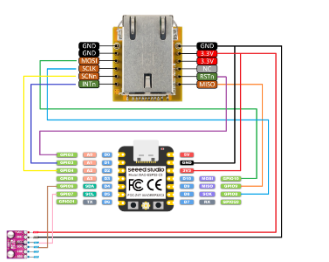
Any particular reason using an external component for the w5500 and not the one provided directly in esphome?
You can tune this settings when using a ethernet connected device for continuous scanning
Improving reception performance
Use a board with an Ethernet connection to the network, to offload ESP32’s radio module from WiFi traffic, this gains performance on Bluetooth side. To maximize the chances of catching advertisements of the sensors, you can set interval equal to window in ESP32 Bluetooth Low Energy Tracker Hub scan parameter settings
turns out that since I was using rs485 to some sensors that I had to define rx/tx pins for the board and separate rx/tx pins that are only used with rs485. I don’t know why because I do not see anything that the w5500 is associated with rx/tx pins, but once I did that everything is working in the supported component from ESPhome.
Friends, I´ve a Question…
If I connect the W5500 is it still possible to connect other interfaces to the same Mosi / Miso interface of the ESP32 in parrallel?
I got this working on an m5stack S3 and breakout board. Wires should be very short, or not use wires at all per the documenteation and there are some gotcha’s like not being able to use wifi and ethernet at the same time. I would just connect the interrupt pin to be safe. I was told the reset and interrupt pin weren’t needed but I was told wrong although only needed for older frameworks.
Just start out with ehternet and nothing else if your having issues and try to avoid dupont cables, especially long runs. Causes clock issues.