Hello All,
I am a new comer from Jeedom and even if I am pulling out hairs from my head to configure my new instance of home assistant I realy like it.
My first goal was to create an automation to switch off or on a light regarding the status of it.
To do it I am using the belowing automation :
id: test
alias: test
trigger:
  - platform: state
    entity_id: light.Cuisine_RX
action:
  - choose:
      - conditions:
          - condition: state
            entity_id: light.Cuisine_DIO
            state: 'off'
        sequence:
          - service: light.Cuisine_DIO
            target:
              entity_id: remote.rfpro_remote
            data:
              command: 'on'
              hold_secs: 1
              device: rm_cuisine
      - conditions:
          - condition: state
            entity_id: light.Cuisine_DIO
            state: 'on'
        sequence:
          - service: remote.send_command
            target:
              entity_id: remote.rfpro_remote
            data:
              command: 'off'
              hold_secs: 1
              device: rm_cuisine
The automation script works well but I have an huge latency (Min: 6 seconds, Max: 10 seconds)
Of course, from the frontend I don’t have any latency.
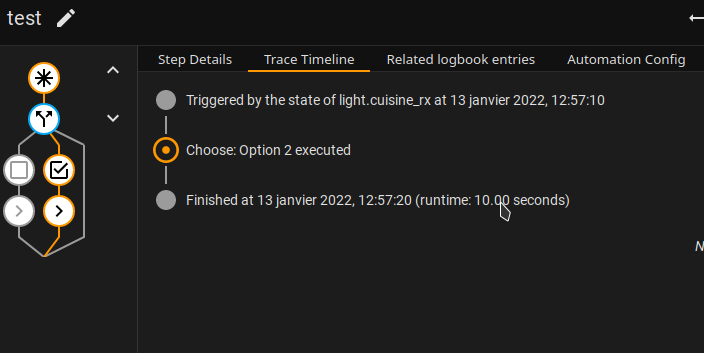
My first hypothesis was an bottlneck on the RFLink,so, I mixed two equipments :
- Rflink for receiving the data
- Broadlink RMPro for sending
If I am using the RFLink for the transactions, latency is better butI have to set a delay time in the automation script.
I checked the Rflink parameters, try almost everything but without effects
I checked the load of the server (Docker host) and all is ok.
I also checked the RFLink logs, one thing is strange :
2022-01-13 23:23:12 DEBUG (MainThread) [homeassistant.components.rflink] entity_ids: ['light.cuisine_rx']
2022-01-13 23:23:12 DEBUG (MainThread) [homeassistant.components.rflink] passing event to light.cuisine_rx
2022-01-13 23:23:12 DEBUG (MainThread) [homeassistant.components.rflink] Sending command: 15 to Rflink device: newkaku_018272fe_1
2022-01-13 23:23:12 DEBUG (MainThread) [rflink.protocol] sending command: {'protocol': 'newkaku', 'id': '018272fe', 'switch': '1', 'command': '15'}
2022-01-13 23:23:12 DEBUG (MainThread) [rflink.protocol] writing data: '10;newkaku;018272fe;1;15;\r\n'
2022-01-13 23:23:12 DEBUG (MainThread) [homeassistant.components.rflink] Sending command: on to Rflink device: newkaku_018272fe_1
2022-01-13 23:23:12 DEBUG (MainThread) [rflink.protocol] sending command: {'protocol': 'newkaku', 'id': '018272fe', 'switch': '1', 'command': 'on'}
2022-01-13 23:23:12 DEBUG (MainThread) [rflink.protocol] writing data: '10;newkaku;018272fe;1;on;\r\n'
Homeassistant is passing two orders for power on the light,
the first one with a command 15 and an second one with the right command ( ‘on’), I don’t knwo how I can remove the first one…
Do you have any idea ?
Thanks.