Thanks. My interest tanked completely due to the mandatory provisioning step via their app.
Just got my Droplet set up yesterday. Seems to be working well. I haven’t compared it to the water company’s meter yet, although that’s not my main interest.
When I first set it up I thought the “gal” here was total gallons:
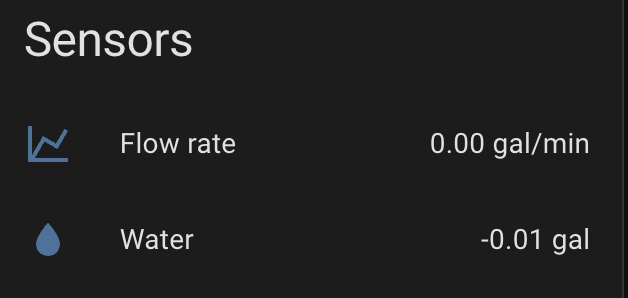
But, I assume that is the number of gallons used since the last update. Is that correct? It’s essentially also a flow rate?
I guess I’m wondering why the integration doesn’t provide a total_increasing gallons sensor.
I added this template sensor to add up all the new values.
- sensor:
    - name: Total House Gallons
      unique_id: droplet_total_house_gallons
      unit_of_measurement: "gal"
      device_class: water
      state_class: total_increasing
      state: >
        {{ states('sensor.droplet_e67c_water')|float(0) + this.state|float(0) }}
How would that compare to @peterd2’s integration sensor?
sensor:
  - platform: integration
    source: sensor.droplet_flow_rate
    name: "Total Water Usage"
    round: 2
    unit_time: min
    method: left
Hello. The problem is the following, I bought a sensor, but the application is not installed, because there are restrictions in my country Ukraine. I installed the apk from a third-party store, but that saved me, because it does not allow me to register. It is not clear what to do  it is a pity, especially $ 189
Droplet states that the app is only available in the USA.
Have you reached out to Droplet support? (You will probably get an AI response, although I’ve had both AI and humans respond.) They do mention contacting them if you are outside of the USA.
Have you tried using a USA-based VPN?
I wonder if you were able to use a VPN to set up the app if you could then use the local Droplet API if the VPN was off. That is, would the Droplet device stop working locally.
Were you able to use the Droplet fully local, without the unit having internet access? Will the app stop working completely or can you still access the Droplet via Bluetooth?
I’m more than a little concerned about data privacy here.
I do not like the fact that I need to create an account with them in order to set up the app. I really don’t like that there even asking for an exact address.
From what I can tell, the core functionality of measuring water flow should remain working even if the company goes out of business and stop supporting these devices.
Definitely if you set up the API locally to home assistant before that happens.
But with such reliance on the connectivity of the app, I’m worried that users who did not set up the API beforehand might have trouble.
Specifically for your setup and testing, were you able to set it up while having the device on an isolated LAN with no internet? Or did you need to enable internet access at least during setup?
Once fully set up and integration enabled with home Assistant, during an internet outage, are you still able to get water flow data into HA?
And lastly, without internet, do you lose the ability for the machine learning algorithm to detect and alert on possible leaks? As in, should we create our own algorithms in home assistant for offline use?
Hi,
Sorry for my delay here. I will do a test where I switch to a LAN-only network and see what continues to work. It’s noteworthy that I’ve already setup an account etc so I can’t really test it from a factory reset setting, but I can at least test if you set it up “normally” (with internet access), if at least the HA integration continues to work when you cut off internet.
I will report back this weekend at the latest.
Matt
Thank you for looking into this! The Droplet sensor is currently on sale but that won’t last until the weekend. I was hoping to get some feedback before then and still be able to make a purchase at a discount  Would that be possible?
Side note: I block internet access in my router for all my IoT devices (also ESP32s) once I have them set up, reducing attack surface where possible.
Sorry for my delay here. Okay so I created multiple. VLANs and associated WiFi networks. And blocked the “local” one from the internet.
I can confirm in the Droplet app it stays Offline and won’t show any data. But the unit does correctly publish to home assistant locally successfully.
Matt
I just ordered mine but curious about data accuracy, how accurate is it? I have Flo by Moen for remote shutoff, it does give water usage data as well but I found that it underreported 3000 gallons less than the city’s own meter data.
I ordered one as well and would like to do some accuracy testing. Any proposals how to best pull that off?
Was thinking about using a bucket and filling it to a certain level several times at different flow rates, verifying volume via a scale. Starting at minimal flow (per Hydrific it measures ‘flows as low as 0.026 gallons per minute’) all the way to fully available flow, including at alternating flow rates during a fill.
Mine seems quite accurate. The Droplet app has a feature where you can fine tune the volume it measures by filling a container of a known volume.
The device reports (very small) volumes frequently. I excluded it from recorder and have a template that sums up and then updates another total less frequently to reduce DB writes.
It’s a great device for the money and ease of installation.
Anyone figured out how to get the leak detection notifications through Home Assistant instead of the droplet app? I’d like to automate my Zooz Titan shutoff when a leak is detected.
I just have an automation that if the water flow is > 0 for 30 min or more straight it turns it off. I also use the zooz titan.
I have water leak sensors under all the fixtures that turn it off instantly. So I just use both automations.
Matt
In the app you can tag and have learn which faucet or shower is running for isolation of leak. Is there anyway to get that data into HA?
Curious to know this as well. Required set up thru their app is kind of off putting especially if their AI features aren’t available in HA
I asked Droplet support about this back in November as I wanted to use HA’s notification system. Their response was essentially no, you would have to replicate the feature in HA.
Their response:
Unusual usage alerts are a feature of Droplet, but direct alert integration with Home Assistant is not explicitly documented. You may be able to replicate alert functionality in Home Assistant by creating automations that monitor the sensor data provided by the Droplet integration.
We have an example of this in our MQTT article (🤖 API setup - MQTT with Home Assistant | Droplet Resource Center) under the heading Customizing in Home Assistant > Setting up Notifications. While the article is about MQTT, this section also applies to Home Assistant.
(The “not explicitly documented” comment is curious.)
I think I’ve had two of those alerts so far from the Droplet app, and both times were not something I would have acted on (i.e. turn off the water).
The reason I didn’t go with a Moen Flow (besides cost) were the stories of guests taking showers and the Moen deciding to shut the water off due to unusual usage.
I use automations that alert of excessive flow or any flow when nobody is home, and have quite a few water detection sensors around the house.
Does adding the integration to HA require being on-site?
I’ve got a droplet added to a vacation home. I configured it in the app, but not HA. I’m not on-site now and the HA integration wants a pairing code.
I’m assuming you have to be on-site to get that code?
Good question. I just turned my wifi off and the Droplet app no longer will generate the key. Any chance you have a VPN at that site?
I do have an active VPN to the site. I am connecting to the IP of the HA server that’s on-site there. But when I use the app on my phone here (at another site) it gives me an Error 13, and says to make sure Bluetooth is enabled (which it already is).
I have another Droplet here (but do not yet have a HA install set up at this site). When I try the same thing and get the same error 13 if I’m not close enough to the Droplet unit. If I get within a few meters of the unit it’ll move forward.
It would help if the Droplet app gave more info. It wasn’t a Bluetooth enabling problem, it was one of not being in range and requiring a local Bluetooth connection between the app and the Droplet unit.
It’s not a huge problem, I can get to the site in a few days to do the Droplet/HA pairing.