Carbon copy of the reply I got months ago.
If I roll back the HA part, will the HyperCube app continue to work as well or does that then break?
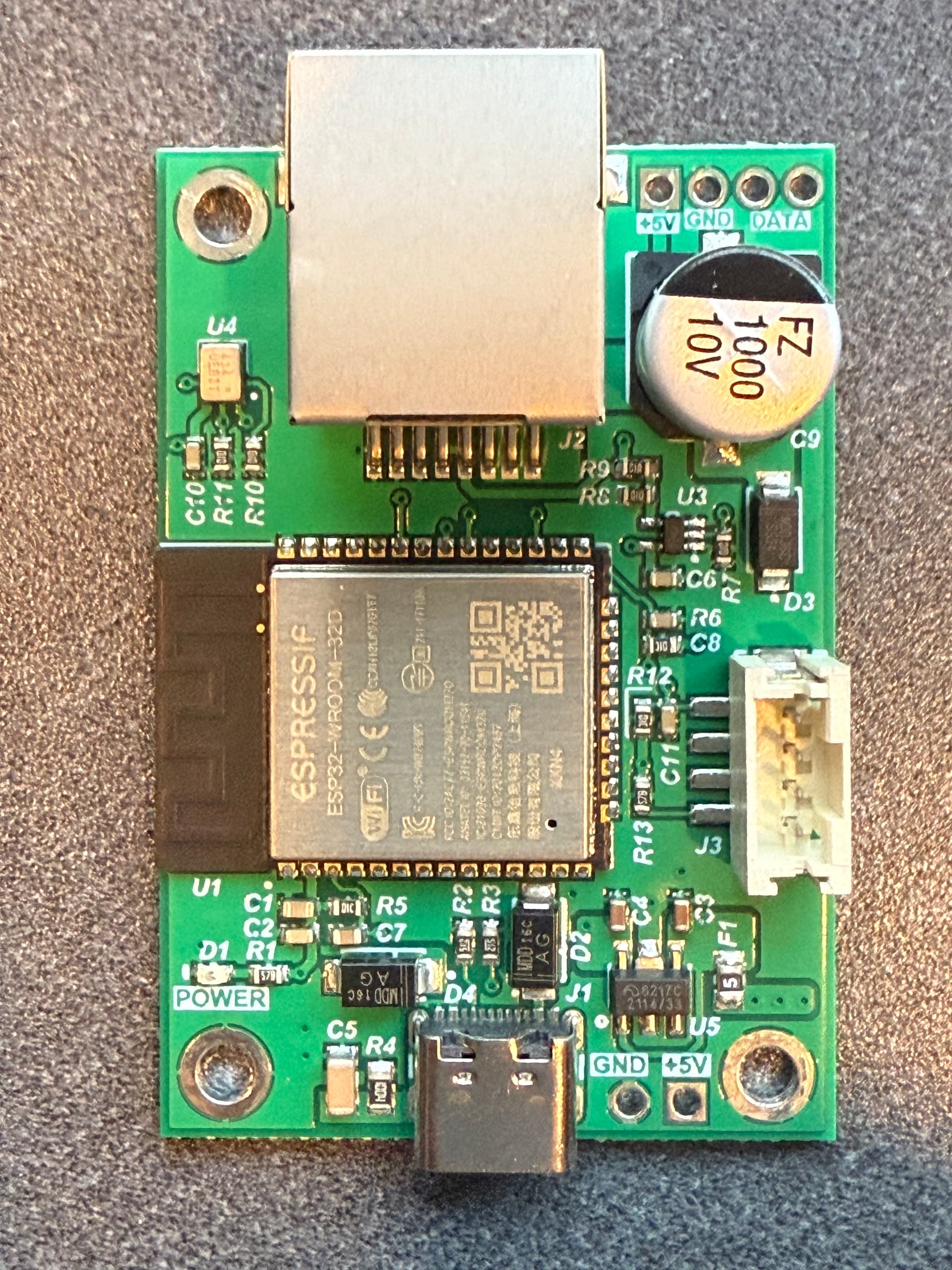
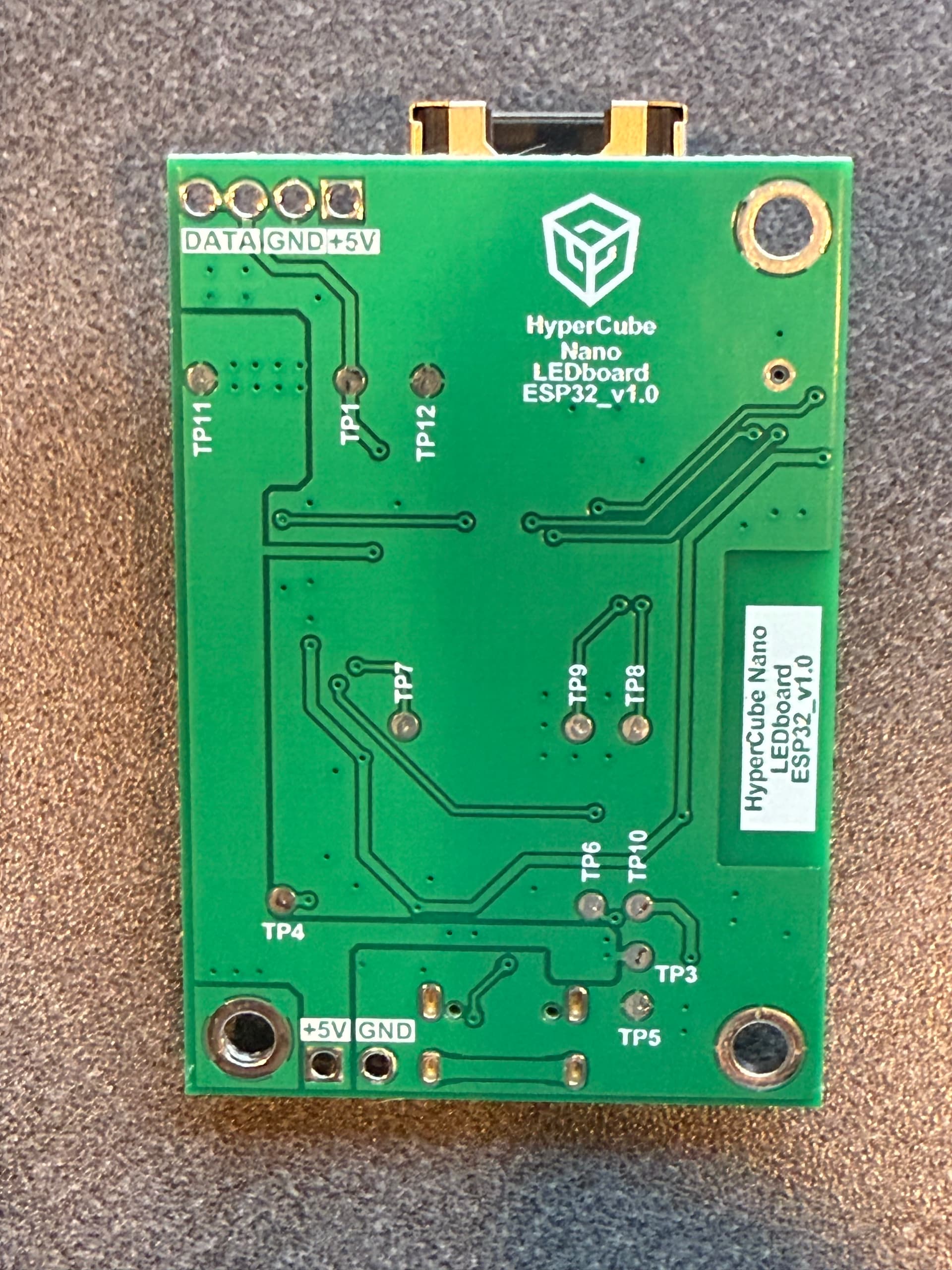

Nice easy connection to the data pins, I think I’ll just flash mine with standard WLED when I get home. It seems that the HyperCube people aren’t going to do anything soon.
Hey everyone 
If you’re stuck with a HyperCube (or any WLED-based device) that no longer works with the official WLED integration in HA 2024.8+, here’s something that might help:
The WLED Live View Proxy is a custom integration for Home Assistant that communicates with your WLED device using WebSocket + JSON API, not the standard HTTP polling method.
Since WLED 0.10.2, a WebSocket server is enabled by default — and many rebranded forks (like the HyperCube) still include it.
This means that if your firmware version is ≥ 0.10.2, the Live View Proxy can often still control the device and retrieve live color/effect state, even if the stock HA integration no longer works.
You can test if it works by calling this simple service:
service: wled_liveviewproxy.send_command
data:
  targets:
    entity_id: light.wlvp_your_hypercube
  command:
    v: true
If the firmware supports it, you’ll receive a full state response — including the active segment, brightness, effect ID, palette, and colors.
I’ve tested this successfully with WLED versions 0.14.4 and 0.15.0, and it may work with older HyperCube firmware if the WebSocket JSON API is still present.
No need to flash anything or downgrade HA — just install the custom integration via HACS.
 Live preview
Native WebSocket control
Real-time updates
 More info and discussion:
 WLED Live View Proxy for Home Assistant – Forum Thread
 Project on GitHub
Unfortunately the wled preview integration @danishru created doesn’t work for hypercubes. They don’t have ws support.
I actually spent the last month working with the guys over at Hyperspace Lighting to see if I could help them get their devices working with the latest home assistant WLED integration. We got pretty close, got around a few minor hurdles that was preventing them from being picked up, but in the end there were too many differences that we couldn’t band-aid them all.
So, I went ahead and created a HACS custom repository of the 2024.7.4 WLED integration and modified it for better support than just copy and pasting the 2024.7.4 WLED folder it into custom_components. It doesn’t override the native WLED integration, and it won’t detect standard WLED devices. Let me know if you have any issues or ideas on how it can be improved.
As an FYI, attempted to integrate your fork but it seems to be throwing an exception with the version of Python being used in modern HAOS.
Logger: aiohttp.server
Source: /usr/local/lib/python3.13/site-packages/aiohttp/web_protocol.py:481
First occurred: 5:08:35 PM (11 occurrences)
Last logged: 5:15:47 PM

Error handling request from 192.168.7.16
Traceback (most recent call last):
  File "/usr/local/lib/python3.13/site-packages/aiohttp/web_protocol.py", line 510, in _handle_request
    resp = await request_handler(request)
           ^^^^^^^^^^^^^^^^^^^^^^^^^^^^^^
  File "/usr/local/lib/python3.13/site-packages/aiohttp/web_app.py", line 569, in _handle
    return await handler(request)
           ^^^^^^^^^^^^^^^^^^^^^^
  File "/usr/local/lib/python3.13/site-packages/aiohttp/web_middlewares.py", line 117, in impl
    return await handler(request)
           ^^^^^^^^^^^^^^^^^^^^^^
  File "/usr/src/homeassistant/homeassistant/components/http/security_filter.py", line 92, in security_filter_middleware
    return await handler(request)
           ^^^^^^^^^^^^^^^^^^^^^^
  File "/usr/src/homeassistant/homeassistant/components/http/forwarded.py", line 210, in forwarded_middleware
    return await handler(request)
           ^^^^^^^^^^^^^^^^^^^^^^
  File "/usr/src/homeassistant/homeassistant/components/http/request_context.py", line 26, in request_context_middleware
    return await handler(request)
           ^^^^^^^^^^^^^^^^^^^^^^
  File "/usr/src/homeassistant/homeassistant/components/http/ban.py", line 86, in ban_middleware
    return await handler(request)
           ^^^^^^^^^^^^^^^^^^^^^^
  File "/usr/src/homeassistant/homeassistant/components/http/auth.py", line 242, in auth_middleware
    return await handler(request)
           ^^^^^^^^^^^^^^^^^^^^^^
  File "/usr/src/homeassistant/homeassistant/components/http/headers.py", line 41, in headers_middleware
    response = await handler(request)
               ^^^^^^^^^^^^^^^^^^^^^^
  File "/usr/src/homeassistant/homeassistant/helpers/http.py", line 73, in handle
    result = await handler(request, **request.match_info)
             ^^^^^^^^^^^^^^^^^^^^^^^^^^^^^^^^^^^^^^^^^^^^
  File "/usr/src/homeassistant/homeassistant/components/http/decorators.py", line 83, in with_admin
    return await func(self, request, *args, **kwargs)
           ^^^^^^^^^^^^^^^^^^^^^^^^^^^^^^^^^^^^^^^^^^
  File "/usr/src/homeassistant/homeassistant/components/config/config_entries.py", line 227, in post
    return await super().post(request, flow_id)
           ^^^^^^^^^^^^^^^^^^^^^^^^^^^^^^^^^^^^
  File "/usr/src/homeassistant/homeassistant/components/http/data_validator.py", line 74, in wrapper
    return await method(view, request, data, *args, **kwargs)
           ^^^^^^^^^^^^^^^^^^^^^^^^^^^^^^^^^^^^^^^^^^^^^^^^^^
  File "/usr/src/homeassistant/homeassistant/helpers/data_entry_flow.py", line 121, in post
    result = await self._flow_mgr.async_configure(flow_id, data)
             ^^^^^^^^^^^^^^^^^^^^^^^^^^^^^^^^^^^^^^^^^^^^^^^^^^^
  File "/usr/src/homeassistant/homeassistant/data_entry_flow.py", line 336, in async_configure
    result = await self._async_configure(flow_id, user_input)
             ^^^^^^^^^^^^^^^^^^^^^^^^^^^^^^^^^^^^^^^^^^^^^^^^
  File "/usr/src/homeassistant/homeassistant/data_entry_flow.py", line 383, in _async_configure
    result = await self._async_handle_step(
             ^^^^^^^^^^^^^^^^^^^^^^^^^^^^^^
        flow, cur_step["step_id"], user_input
        ^^^^^^^^^^^^^^^^^^^^^^^^^^^^^^^^^^^^^
    )
    ^
  File "/usr/src/homeassistant/homeassistant/data_entry_flow.py", line 487, in _async_handle_step
    result: _FlowResultT = await getattr(flow, method)(user_input)
                           ^^^^^^^^^^^^^^^^^^^^^^^^^^^^^^^^^^^^^^^
  File "/config/custom_components/hyperspace_lighting/config_flow.py", line 45, in async_step_user
    device = await self._async_get_device(user_input[CONF_HOST])
             ^^^^^^^^^^^^^^^^^^^^^^^^^^^^^^^^^^^^^^^^^^^^^^^^^^^
  File "/config/custom_components/hyperspace_lighting/config_flow.py", line 129, in _async_get_device
    return await wled.update()
           ^^^^^^^^^^^^^^^^^^^
  File "/usr/local/lib/python3.13/site-packages/backoff/_async.py", line 151, in retry
    ret = await target(*args, **kwargs)
          ^^^^^^^^^^^^^^^^^^^^^^^^^^^^^
  File "/usr/local/lib/python3.13/site-packages/wled/wled.py", line 259, in update
    """

  File "/usr/local/lib/python3.13/site-packages/backoff/_async.py", line 151, in retry
    ret = await target(*args, **kwargs)
          ^^^^^^^^^^^^^^^^^^^^^^^^^^^^^
  File "/usr/local/lib/python3.13/site-packages/wled/wled.py", line 205, in request
    raise WLEDError(
    ^^^^^^^^^^^^^^^^
    ...<2 lines>...
    )

wled.exceptions.WLEDError: (404, {'message': 'Not Found'})
The IP address in question is reachable in the separate VLAN via HAOS
ping 192.168.5.97
PING 192.168.5.97 (192.168.5.97): 56 data bytes
64 bytes from 192.168.5.97: seq=0 ttl=254 time=110.587 ms
64 bytes from 192.168.5.97: seq=1 ttl=254 time=35.983 ms
64 bytes from 192.168.5.97: seq=2 ttl=254 time=58.381 ms
I recently swapped out the proprietary HyperCube firmware on their ESP32 controller and replaced it with stock WLED. It took me a little experimenting to figure out the quirks of this board, so I wanted to share the process in plain language for anyone else trying it.
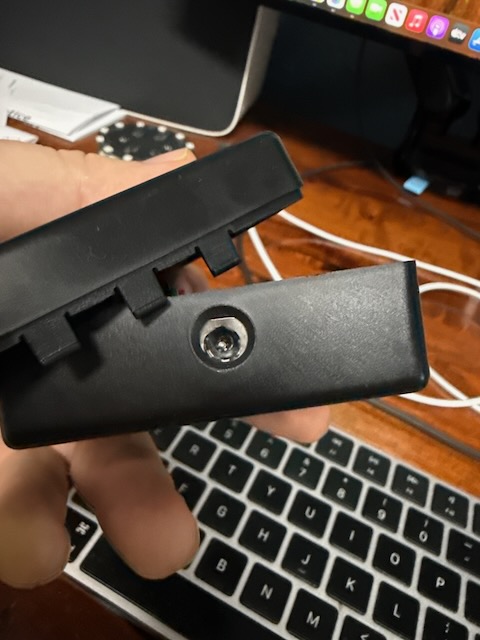
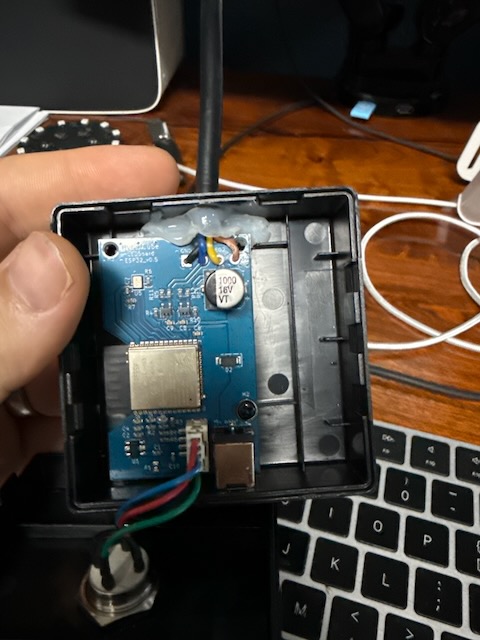
When I first cracked it open, I found that HyperCube ships their own locked-down fork of WLED. That meant no easy updates, no OTA, and limited integration with Home Assistant. The good news is the hardware underneath is just an ESP32, so it can run stock WLED once you know how to flash it.
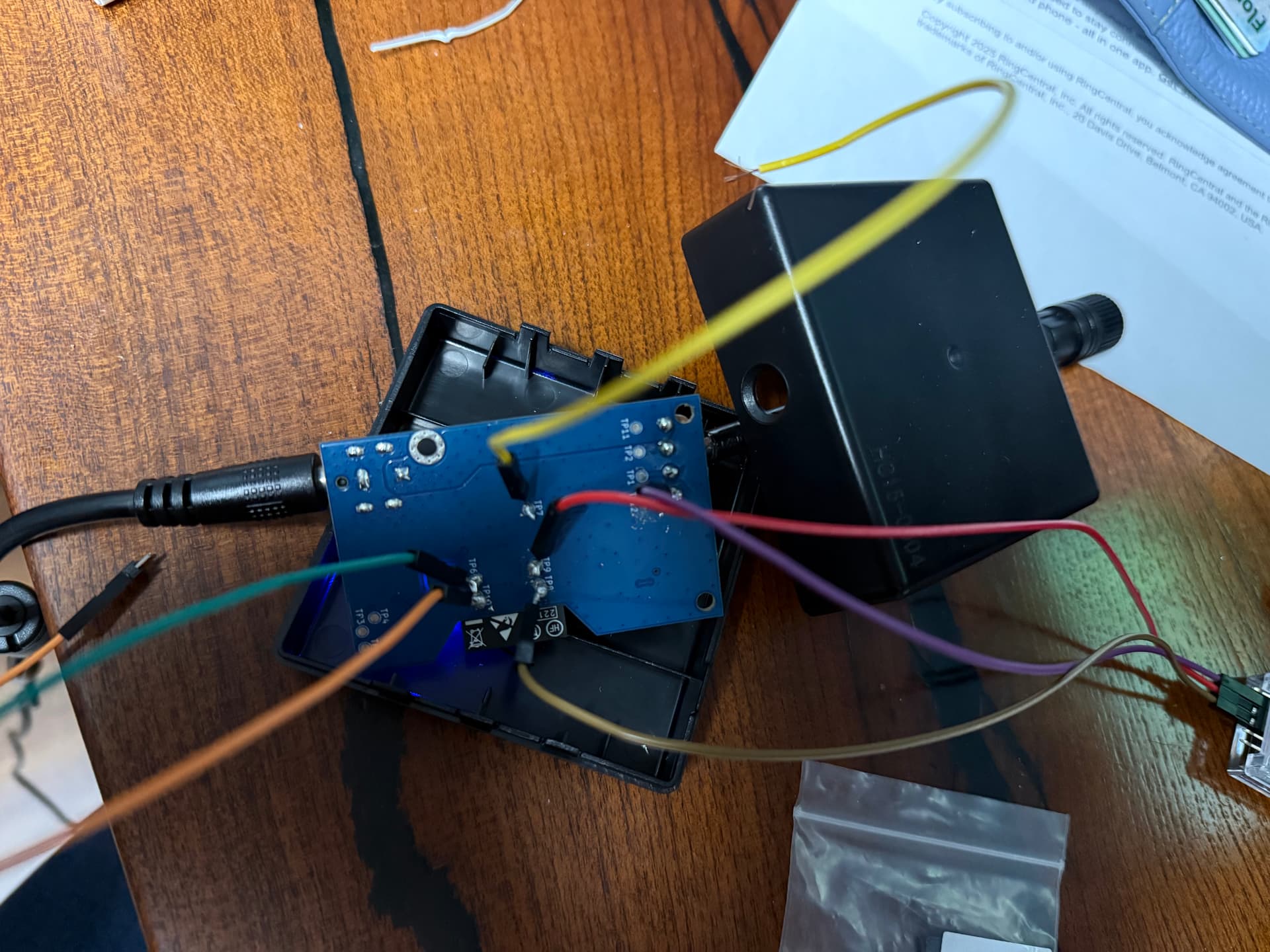
The board has a set of test pads on the PCB that act as the programming pins. On my version of the board the mapping was: TP7 is the BOOT pin (IO0), TP8 is RXD, TP9 is TXD, and TP10/TP12 are ground. I used a USB-to-UART adapter (set for 3.3V logic) and connected TX from the adapter to TP8, RX to TP9, and GND to TP12. You don’t connect the adapter’s 3V3 or VCC line, since the board already powers itself through the 15V barrel jack. It also helps to unplug the LED strips while flashing so the ESP32 doesn’t brown out.
To get the board into flash mode, I held TP7 to ground while plugging the barrel jack back in. After a couple of seconds I released it, and at that point the ESP32 was waiting for new firmware. Rather than fight with esptool and single .bin files, the easiest solution was to use the official WLED Web Installer. In Chrome or Edge you just click “Install,” select the USB serial device, pick ESP32, check “Full install,” and let it run. This writes the bootloader, partitions, and the WLED app all at once. When it finished I disconnected the jumper and power-cycled the board.
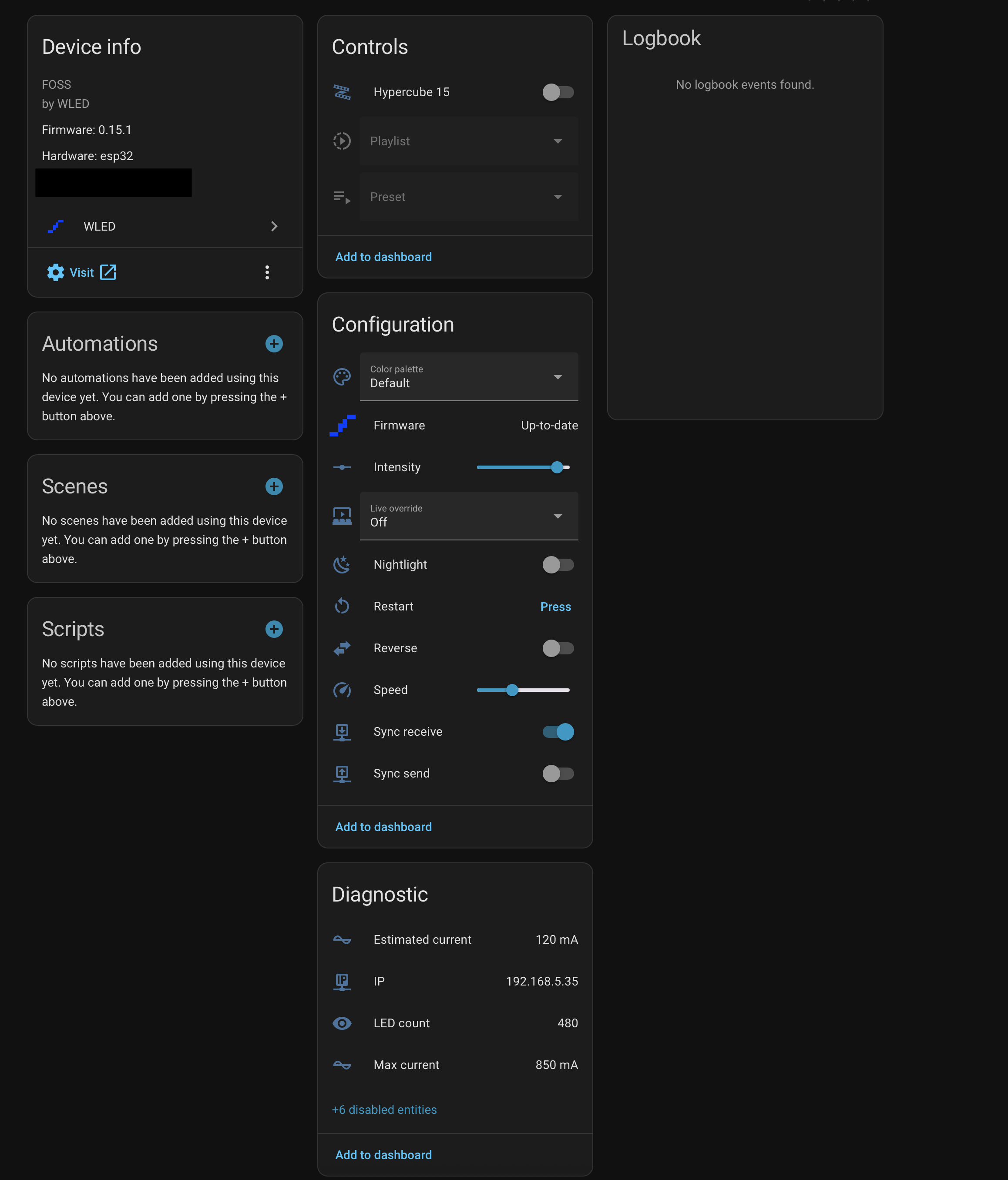
On the next boot the board broadcast a Wi-Fi network called WLED-AP (password is wled1234). I joined it, the captive portal came up at 4.3.2.1, and I was able to enter my home Wi-Fi details. After saving, WLED connected to my network and I could reach it at wled.local. From there it’s just the normal setup: set an OTA password under Config → Security, reconnect the LED power lines, and choose the correct GPIOs for your strips in LED Preferences. Home Assistant picked it up automatically with the WLED integration.
So that’s all there is to it. The hard part was figuring out which pads were which, but once that was sorted the Web Installer made the flash painless. Now the HyperCube controller runs stock WLED, can be updated OTA, and integrates cleanly with HA. No more dealing with the proprietary fork or opening the case again.
I’m still working on getting the sound reactivity side figured out, but the basics are up and running. For reference, this is on the Hypercube 15, which uses 480 LEDs total split evenly across two outputs. In WLED that means setting GPIO16 for the first 240 LEDs and GPIO4 for the second 240 LEDs.
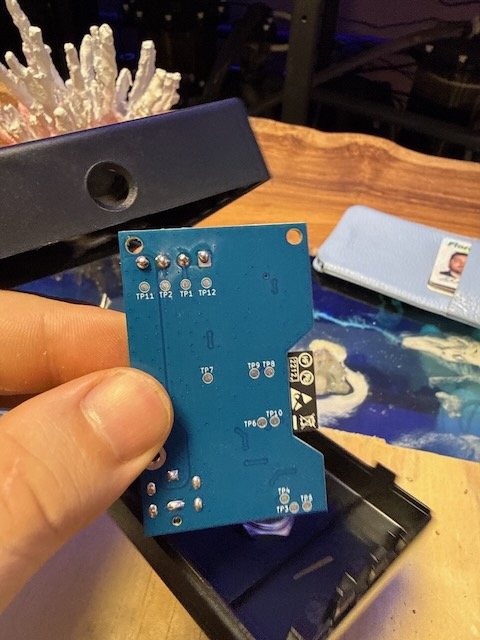
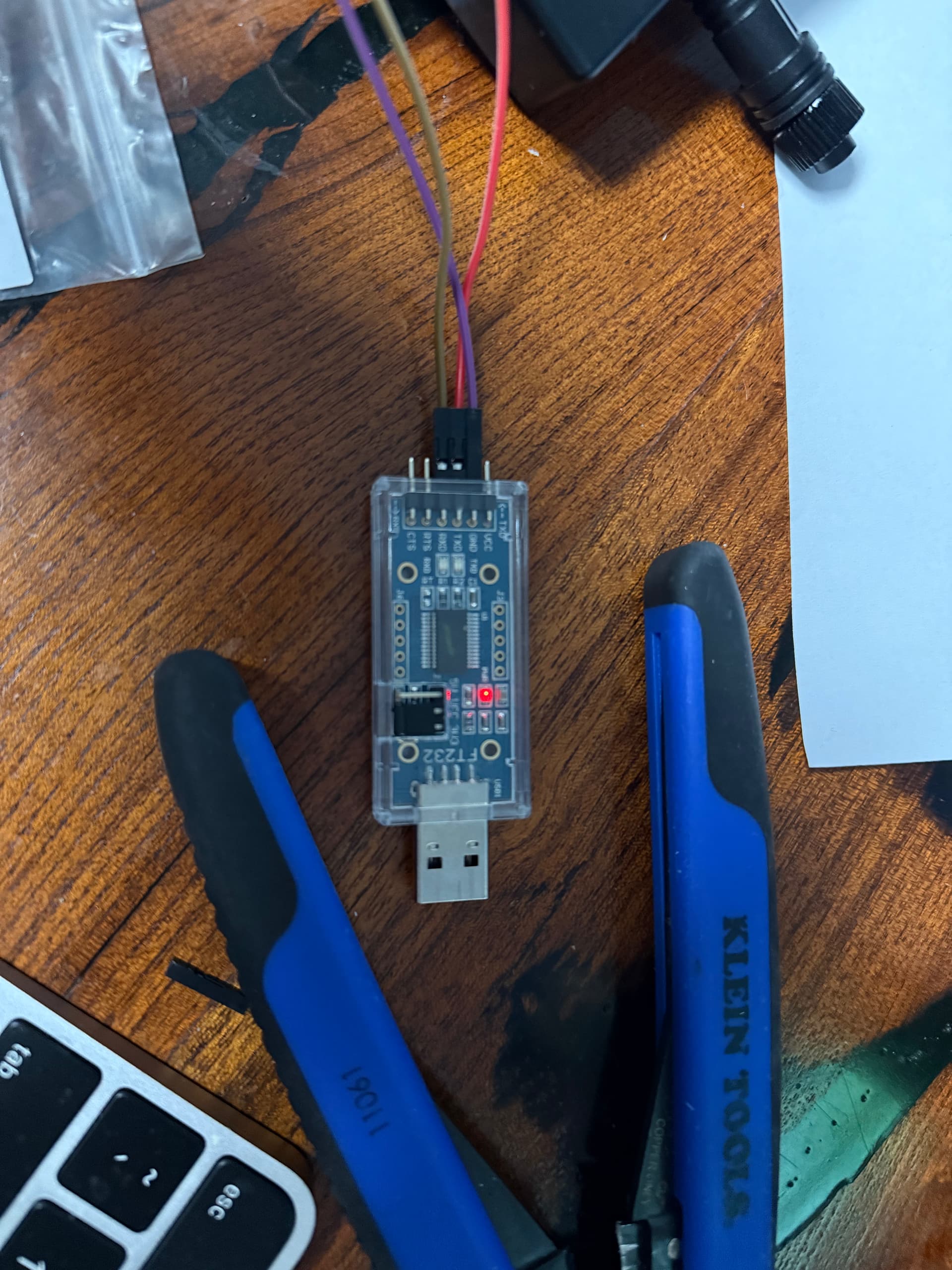
1 Like