I have made a working motion detector with ffmpeg motion. But it use 20% of raspi3 processor.
That’s why I am saying about Node-red solution…
I finally managed to add a motion alarm entity to GitHub - dbuezas/icsee-ptz
It seems to be reliable.
Warning: breaking changes (device added via ui, not configuration.yaml)


3 Likes
mateine Thank you so much ! All is okay for me. I can start to make automation !!! Good job
1 Like
https://fr.aliexpress.com/item/1005004847328762.html?spm=a2g0o.cart.0.0.cbb0378d9DfwTG&mp=1&gatewayAdapt=glo2fra
Do you thinks it could be work with this 2 lens cam ?
I don’t see why it wouldn’t work
integration doesnt work any more, i hace this error in log :
Traceback (most recent call last):
  File "/config/custom_components/icsee_ptz/camera.py", line 62, in async_ensure_alive
    await dvrip_alarm.alarmStart(self.hass.loop)
  File "/config/custom_components/icsee_ptz/asyncio_dvrip.py", line 412, in alarmStart
    return await self.get_command("", self.QCODES["AlarmSet"])
  File "/config/custom_components/icsee_ptz/asyncio_dvrip.py", line 535, in get_command
    if data["Ret"] in self.OK_CODES and command in data:
TypeError: 'NoneType' object is not subscriptable
i don’t know after what it is broken,…
perahps i have disable something in my camera, i have try to disconnect cloud,…
And i have update firmware
I have other error :
Error doing job: Task exception was never retrieved
Traceback (most recent call last):
  File "/usr/local/lib/python3.10/asyncio/streams.py", line 48, in open_connection
    transport, _ = await loop.create_connection(
  File "/usr/local/lib/python3.10/asyncio/base_events.py", line 1060, in create_connection
    sock = await self._connect_sock(
  File "/usr/local/lib/python3.10/asyncio/base_events.py", line 969, in _connect_sock
    await self.sock_connect(sock, address)
  File "/usr/local/lib/python3.10/asyncio/selector_events.py", line 501, in sock_connect
    return await fut
asyncio.exceptions.CancelledError

During handling of the above exception, another exception occurred:

Traceback (most recent call last):
  File "/usr/local/lib/python3.10/asyncio/tasks.py", line 456, in wait_for
    return fut.result()
asyncio.exceptions.CancelledError

The above exception was the direct cause of the following exception:

Traceback (most recent call last):
  File "/config/custom_components/icsee_ptz/camera.py", line 59, in async_ensure_alive
    await dvrip.login(self.hass.loop)
  File "/config/custom_components/icsee_ptz/asyncio_dvrip.py", line 215, in login
    await self.connect()
  File "/config/custom_components/icsee_ptz/asyncio_dvrip.py", line 109, in connect
    self.socket_reader, self.socket_writer = await asyncio.wait_for(asyncio.open_connection(self.ip, self.port), timeout=timeout)
  File "/usr/local/lib/python3.10/asyncio/tasks.py", line 458, in wait_for
    raise exceptions.TimeoutError() from exc
asyncio.exceptions.TimeoutError
Error while setting up icsee_ptz platform for binary_sensor
Traceback (most recent call last):
  File "/usr/src/homeassistant/homeassistant/helpers/entity_platform.py", line 304, in _async_setup_platform
    await asyncio.shield(task)
  File "/config/custom_components/icsee_ptz/binary_sensor.py", line 49, in async_setup_entry
    [
  File "/config/custom_components/icsee_ptz/binary_sensor.py", line 50, in <listcomp>
    Alarm(hass, entry, channel)
  File "/config/custom_components/icsee_ptz/binary_sensor.py", line 62, in __init__
    assert self._attr_unique_id  # set by ICSeeEntity
AssertionError

i have reset my camera but nothing change.
Hi. It would be possible that ICSee monitor the “human detect” envents of a “NVR alarm server messages”? I capture them with a docker image with toxuin/alarmserver … but i woud like to do that directly from home assistant. Any idea?
Thanks!
Edited:
I have just noticed that i can do that with Node-Red. I am newcomer with it, but has been very easy to do importing the flow code. The only cuestion for me now is if HA is able to manage incoming TCP traffic on a specific port as a event trigger… for avoid Node-Red (I only use it for that), and by this way release resources.
Thanks in any case.
It is working - however - I do have challenge with fetching independently stream for each of lens (it always come together as splitted screen )
I have the same problem, always double image. Did you find a way to manage each stream independently?
Thanks in advance.
- download GitHub - 10der/homeassistant-addons-dvr-alarm-server
- create folder in hass add-ons folder dvr-alarm-server
- add addons
- configure mqtt
so, now you can handle isee cam event


Hello. Could you please explain how to do this? I’m trying to use your alarm server, but I can’t make it appear at the “Add-Ons” page nor install it manually. I’m afraid I’m missing something very simple, but I can’t find it. I even tried to read through the add-on documentation, but it’s too technical for me…
you should have access to HASS file system.

as u can see we have a folder “addons”
inside this folder you should create another one folder - “dvr-alarm-server” and put sources from github
after restarting
addons should be here
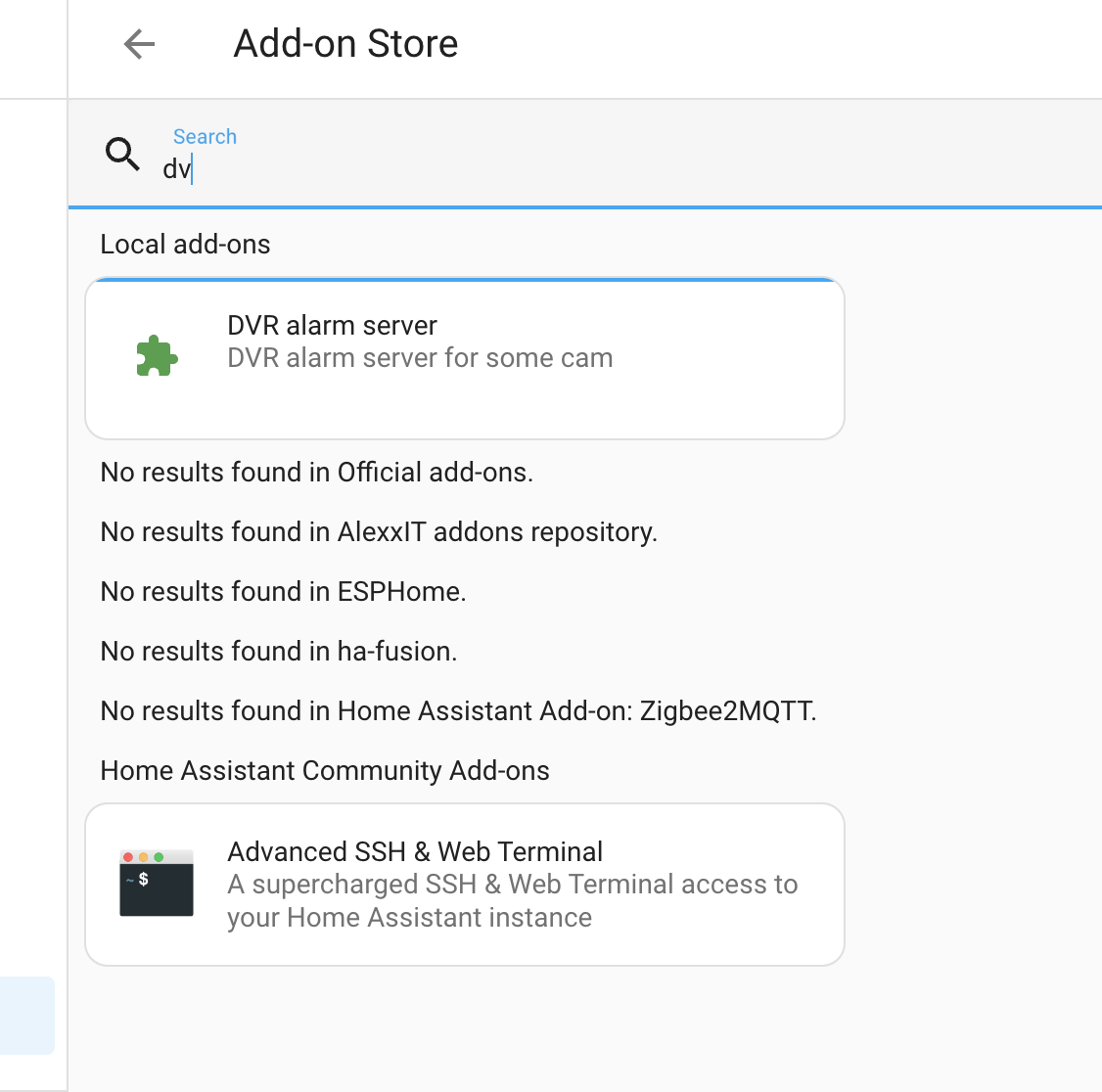

That’s what I did, and the add-on doesn’t appear in my “add-on shop”:

Tried to move the folder to “local” folder, but it didn’t work either.
Your folder structure inside “addons” is different than mine, by the way…
Regards.


Stumbled over this thread - as I just got an iCSee camera (dual lens with person tracking - https://www.aliexpress.com/item/1005006079966569.html), as I wanted to test it out… Trying to connect to the web interface prompts me to install a file, which already triggers my “alarms”, so I sent the file for online malware analysis: Free Automated Malware Analysis Service - powered by Falcon Sandbox - Viewing online file analysis results for 'VideoPlayToolSetup.exe'
So - currently trying to figure out how to add it - and if anything can be done without installing the software on Windows…
Hi ! I am a rookie in this world of HA. Can you please try to detail more the way you add ICSEE camera to HA?
I try to follow your steps but i do not win…
Thank you in advance to all.