Is it me or is the UI useless?

So I have a duff device/entity. I want to delete it, but nowhere can I do that. I just get presented with the useless “… Disabled by config…”. Wouldn’t be as bad if you could edit the config via the UI!

Please tell me there is a secret hidden “Override” or “Edit hidden config settings” button!

Depending on your set up you may be able to edit the UI via the yaml. You can also go to the settings> Devices and Services and see a list of everything you have. From there you can go into devices and modify/edit/delete entries.

YMMV depending on your actual set up.

hth

Most of my devices are MQTT and in the past I have been able to delete them in Z2M and they correspondingly delete in HA.

However, recently this did not work (it was gone in Z2M but not gone in HA).

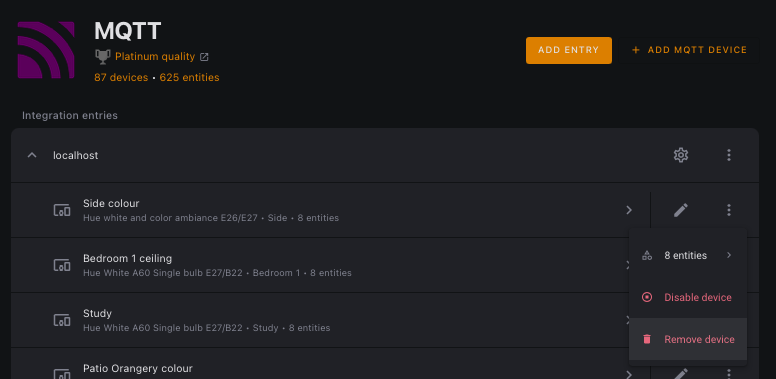
I had to find it in integrationsMQTT, right click on the 3 vertical dots to the right of the device in question and delete from menu that pops up.

…it should work for any device in any integration.

Just understand that if it was discovered on your network and you delete it, it will be discovered again after you remove it. That’s why there is a disable button, because it removes the entities from the system and it won’t be auto-discovered again.

Or you can delete it and ignore the discovery with the ignore button.

if it’s an entity created by Z2M, it uses MQTT discovery.

Using MQTT Explorer (there is desktop as well as addon version), find entry of this entity within homeasistant topic. then delete it.
Simple deletion will remove it from HA (and will never back again).
to remove device, you need to delete all entities.

I assume Z2M should do that on its own. Maybe Z2M issue?

This always means that the entity is used in a YAML file somewhere. An automation or script is the first place to look.

1 Like

how do you re enable something that is disabled by config, if the selector is inactive?

Maybe “Disabled by config” is the wrong verbiage. Everything is configured in config.yaml in YAML code. (And some Python scripts).

Look for the entity in automations.yaml (a subconfig from config.yaml). DO NOT edit automations.yaml. Instead look around where you find the entity. You are looking for a line like: -id: AutomationName. Then go to Settings → Automations and edit, disable or delete the automation that is referencing the entity. You should, then be able to delete the entity.

Pro tip:
Install the Samba Share add-on and you can use any text processor on your PC to edit or view files. I prefer Notepad++.

1 Like

l33t tip: just use NFS shares or ssh plugins.

Editing YAML?! Doesn’t that seem to suggest there is a lot of UI work needed?

That’s how I ended up doing it - direct edits to the yaml config. My point is that a user shouldn’t have to do that. If the UI can disable a device, then there should be a way to re-enable it via the UI.

@Didgeridrew That reply is about as useless as the UI.

Hello Gary. Welcome!

That response was necessary because most folks who come in screaming mad then proced to talk about how horrible the experience is without any concern to the huge work that has already happened usually needs some help understanding what we need to help them…

This is a user community not a help desk and it’s also not the place to vent at users… Because we’re like you… That’s what that said.

So. Yes the UI needs work let’s start there. But what you’re not accounting for is - - it’s getting it quite a bit of work in fact… and things don’t happen overnight. (you also popped in and basically called it all ugly - and the users community knows some of the ugly is righteous were already complaining about those items, hop in the pool the waters fine…)

Take a look at the UI even two years ago and you’ll see a HUGE push towards moving things out of yaml and into UI.

That push (continually) causes backlash from those who prefer yaml and have historically been HA power users… (yes they exist) Add in the tiny paid staff and mostly volunteer coders and yeah stuff takes time. A lot of time. Like all year to build an automatic dashboard kind of time…

So yes not every single integration is fully UI everything. So sometimes you’ll find things like:

When an integration decides to disable something (disabled by the integration that means the code decided for some reason. Take that up with the integration. When It happens the answer is you don’t turn it on in the UI… You figure out why the integration disabled it. Yes the error message sucks Back to your original ask.)

For instance
I have an entire defunct device in flume that’s been there for a year because when they (Flume) replaced the device for me they didn’t pull the old one out of my account. It’s there. And disabled… The old disabled one shows up the minute I connect a flume integration. Even though it’s a ghost on thier side in my account and there’s not a darn thing I can do about it. That’s a flume issue. Not HA. It’s responding to what Flume tells it. So that also means a disabled useless device in my system that’s exactly as you describe. And I can’t delete it.

But it’s also not hurting anything.

I have integrations that don’t support unique_id (a construct which allows the UI to customize entties) and because so also don’t support labels - huge issue in my install. Recourse - replace the integration…

You’ll find plenty more of these idiosyncratic issues. There is no one UI team driving all decisions for all products like MS. you have hundreds of volunteers and a foundation trying to hold the rudder of an open source product

The answer is - report issues when found and if you have the skills pickup visual studio and get to writing, there’s plenty to work on.
3 Likes

You’re a new forum member who posted a “question” that was very low on details, providing a link to the forum’s questions guidelines is a reasonable response.

It wasn’t so much a question as an observation, but I accept it could have been seen as such.

I would help, but I’m not a front-end developer, so I’m no good with JS/TS and I hate Python (nasty, outdated, hacky scripting language :rofl: ). If the backend were in a nice modern language like GoLang… :grinning:

1 Like

Thanks for the promotion from pest to power user… :laughing:

1 Like

I didn’t say you weren’t a pest Steve :rofl:

Yeh Gary I feel ya. My JS sucks too. So I find other ways to contribute.

Can I be both?

1 Like