Hello, thank you very much for such a great addon. Would it be possible to add the update interval into global settings?
I’d like to plot the graphs for Cell voltages. But values are updated every 1-2 sec. In case they are included into the recorder, HA database becomes large in short term.
1 Like
Just to be sure about the question.
Are you talking about the two-way synchronization module with the cloud?
If so, I will look into implementing this possibility.
How much could the interval vary? actually the setup is 5 second.
I will add a field in the module configuration.
Not a cloud. It impacts HA database size and CPU load (as it needs to frequently write a lot of data to SD card).
See some examples attached. I added few entities to recorder
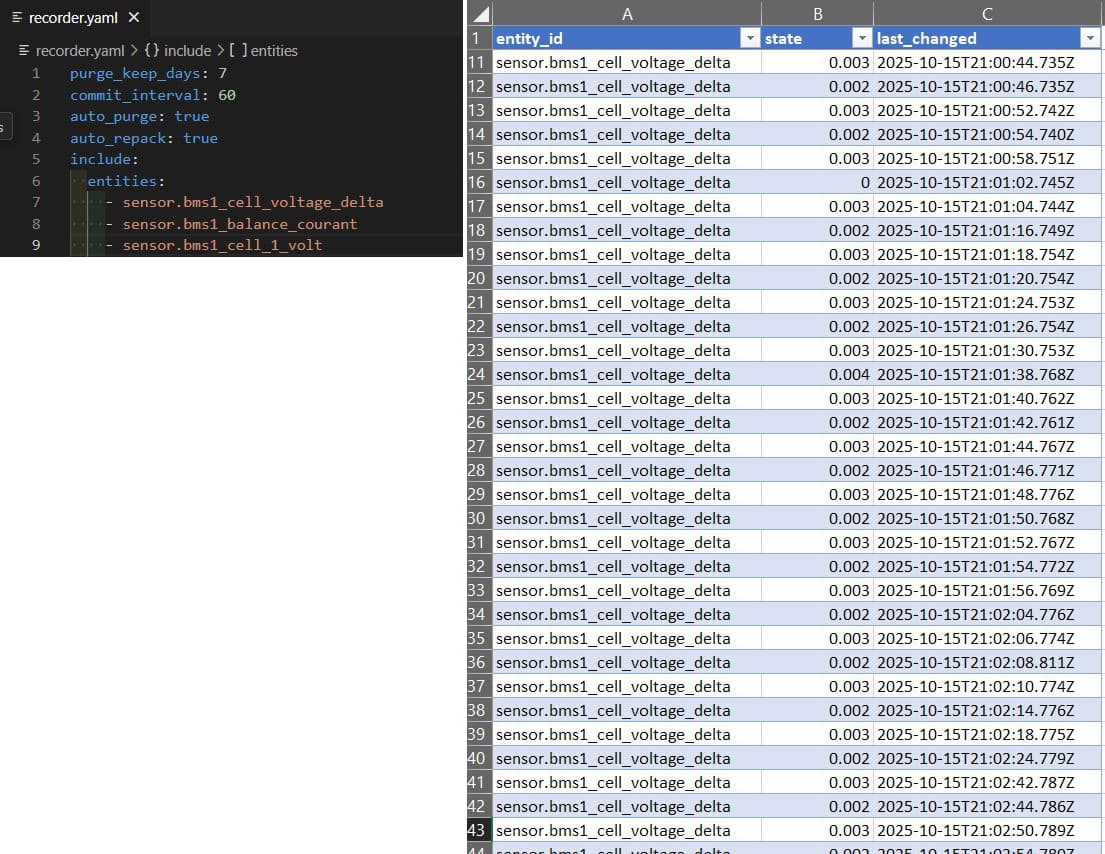
updates are approximately every 2-4s. Sometimes it’s helpful. But not when I want to store all this data. Also system becomes very unresponsive if all Cell values are included into Recorder. I had CPU load up to 50% on RPI5.
I will add a field in the module configuration.
This will be super helpfull.
Timeout of 60s (even up to 5min) between readouts should be completely fine to create precise graphs for Cell Voltages.
After restart HA didn’t work what I expect 6 BMS in parallel.
Master ADDR is 00000, the rest slaves 1…5.
On PC with Jk-monitor work perfectly.
Connection is via RS485 - USB.
Last JK-BMS not have same entities like others.
configuration is:
jkbms_path: /dev/ttyUSB0
jkbms_count: 5
use_gateway: false
gateway_ip_port: 192.168.1.52:5000
communication_debug: true
bms_broadcasting: true
CAN_bus_usage: false
mqttadresse_port: core-mosquitto.local.hass.io:1883
mqttuser: serghei
mqttpass: xxxxxxx.
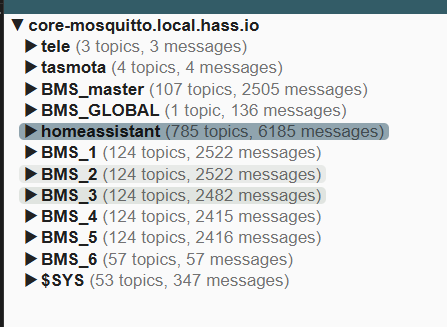
I tried also with jkbms_count: 6 7 and 8.
Can someone help with indentify problem? thx
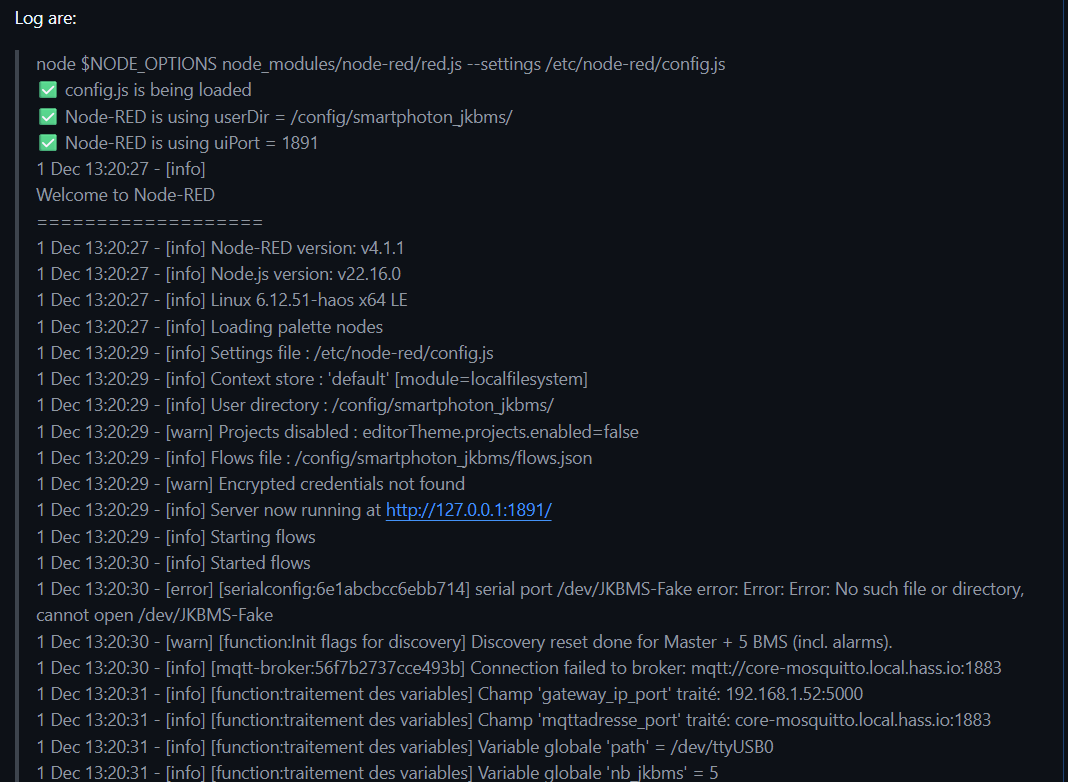
1 Dec 13:20:31 - [info] [function:traitement des variables] Variable globale ‘use_gateway’ = false
1 Dec 13:20:31 - [info] [function:traitement des variables] Variable globale ‘gateway_ip’ = 192.168.1.52
1 Dec 13:20:31 - [info] [function:traitement des variables] Variable globale ‘gateway_port’ = 5000
1 Dec 13:20:31 - [info] [function:traitement des variables] Variable globale ‘communication_debug’ = true
1 Dec 13:20:31 - [info] [function:traitement des variables] Variable globale ‘bms_broadcasting’ = true
1 Dec 13:20:31 - [info] [function:traitement des variables] Variable globale ‘CAN_bus_usage’ = false
1 Dec 13:20:31 - [info] [function:traitement des variables] Variable globale ‘mqttadresse’ = core-mosquitto.local.hass.io
1 Dec 13:20:31 - [info] [function:traitement des variables] Variable globale ‘mqttport’ = 1883
1 Dec 13:20:31 - [info] [function:traitement des variables] Variable globale ‘mqttuser’ = serghei
1 Dec 13:20:31 - [info] [function:traitement des variables] Variable globale ‘mqttpass’ = •••••••••
1 Dec 13:20:31 - [info] serial port /dev/JKBMS-Fake closed
1 Dec 13:20:31 - [info] [serialconfig:6e1abcbcc6ebb714] serial port /dev/ttyUSB0 opened at 115800 baud 8N1
1 Dec 13:20:31 - [info] [debug:port used] /dev/ttyUSB0
1 Dec 13:20:31 - [info] [debug:host used] undefined
1 Dec 13:20:31 - [info] [debug:JK-BMS response: ]
<Buffer 55 aa eb 90 02 00 a3 0c a3 0c a5 0c a5 0c a5 0c a6 0c a5 0c a3 0c a5 0c a5 0c a5 0c a5 0c a5 0c a6 0c a5 0c a5 0c 00 00 00 00 00 00 00 00 00 00 00 00 … 14 more bytes>
1 Dec 13:20:31 - [error] [buffer-parser:Trame 3] RangeError [ERR_OUT_OF_RANGE]: The value of “offset” is out of range. It must be >= 0 and <= 62. Received 80
Do i need to change parameter in JK bms?
It looks like everything is installed but i don’t get any entities. It’s online in mqtt explorer.
3 Dec 12:27:13 - [info] Starting flows
3 Dec 12:27:13 - [info] Started flows
3 Dec 12:27:13 - [error] [serialconfig:6e1abcbcc6ebb714] serial port /dev/JKBMS-Fake error: Error: Error: No such file or directory, cannot open /dev/JKBMS-Fake
3 Dec 12:27:13 - [info] [mqtt-broker:56f7b2737cce493b] Connection failed to broker: mqtt://core-mosquitto.local.hass.io:1883
3 Dec 12:27:13 - [warn] [function:Init flags for discovery] Discovery reset done for Master + 1 BMS (incl. alarms).
3 Dec 12:27:14 - [info] [function:traitement des variables] Champ 'gateway_ip_port' traité: 192.168.1.100:5000
3 Dec 12:27:14 - [info] [function:traitement des variables] Champ 'mqttadresse_port' traité: 192.168.178.50:1883
3 Dec 12:27:14 - [info] [function:traitement des variables] Variable globale 'path' = /dev/ttyUSB0
3 Dec 12:27:14 - [info] [function:traitement des variables] Variable globale 'nb_jkbms' = 1
3 Dec 12:27:14 - [info] [function:traitement des variables] Variable globale 'use_gateway' = false
3 Dec 12:27:14 - [info] [function:traitement des variables] Variable globale 'gateway_ip' = 192.168.1.100
3 Dec 12:27:14 - [info] [function:traitement des variables] Variable globale 'gateway_port' = 5000
3 Dec 12:27:14 - [info] [function:traitement des variables] Variable globale 'communication_debug' = true
3 Dec 12:27:14 - [info] [function:traitement des variables] Variable globale 'bms_broadcasting' = true
3 Dec 12:27:14 - [info] [function:traitement des variables] Variable globale 'CAN_bus_usage' = false
3 Dec 12:27:14 - [info] [function:traitement des variables] Variable globale 'mqttadresse' = 192.168.178.50
3 Dec 12:27:14 - [info] [function:traitement des variables] Variable globale 'mqttport' = 1883
3 Dec 12:27:14 - [info] [function:traitement des variables] Variable globale 'mqttuser' = Mqtt
3 Dec 12:27:14 - [info] [function:traitement des variables] Variable globale 'mqttpass' = •••••••••
3 Dec 12:27:15 - [info] serial port /dev/JKBMS-Fake closed
3 Dec 12:27:15 - [info] [serialconfig:6e1abcbcc6ebb714] serial port /dev/ttyUSB0 opened at 115800 baud 8N1
3 Dec 12:27:18 - [info] [mqtt-broker:56f7b2737cce493b] Connected to broker: mqtt://192.168.178.50:1883
I’m using a raspberry pi to connect to a 2 JK-BMS’es on 1 bus. My HA runs on my server. How can I only run this script and publish this to MQTT? So not run it as home assistant addon.
1 Like
I think you’ll be happy 
Sergey has made it possible to create a Docker container with the add-on module and thus run it autonomously.
You still need an MQTT broker to receive the data.
You can find it here: https://github.com/jean-luc1203/jkbms-rs485-addon/tree/main/standalone
I would appreciate it if you could come and give feedback on your tests on Github, as this will make it easier for me to maintain. Thank you in advance.
This may be a problem related to the new JK with FW19.
There are some very serious issues with the RS485 connection.
Kkong regularly releases updates to fix these problems.
I invite you to take a look at this thread.
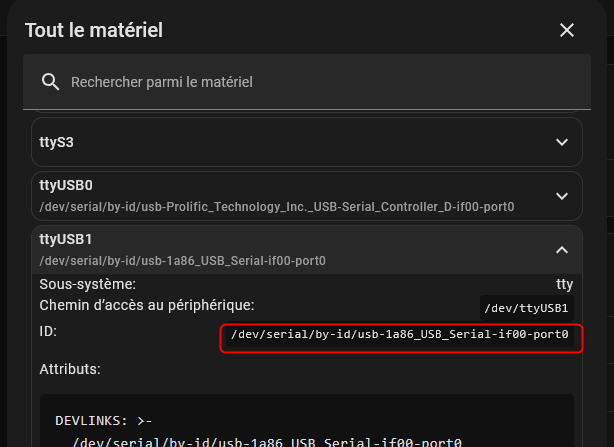
Yes, I think you need to go to the hardware under HAOS and look for the USB port that is actually being used. It should look something like this. You should not use ttyUSB0 or 1,2 or 3 directly, but rather this notation, because Linux tends to change the port name in real time if there is a change on one of the USB ports.
hi last today update 3.4.1 stop working log
Add-on: JK-BMS wired management
 JK-BMS Management via RS485 & CAN bus or TCP/IP Gateway
-----------------------------------------------------------
 Add-on version: 3.4.1
 You are running the latest version of this add-on.
 System: Home Assistant OS 16.3  (amd64 / generic-x86-64)
 Home Assistant Core: 2025.12.4
 Home Assistant Supervisor: 2025.12.3
-----------------------------------------------------------
 Please, share the above information when looking for help
 or support in, e.g., GitHub, forums or the Discord chat.
-----------------------------------------------------------
s6-rc: info: service base-addon-banner successfully started
s6-rc: info: service fix-attrs: starting
s6-rc: info: service base-addon-log-level: starting
s6-rc: info: service fix-attrs successfully started
s6-rc: info: service base-addon-log-level successfully started
s6-rc: info: service legacy-cont-init: starting
s6-rc: info: service legacy-cont-init successfully started
s6-rc: info: service init-customizations: starting
s6-rc: info: service init-customizations successfully started
s6-rc: info: service init-nodered: starting
[14:21:34] INFO: Mise a jour de la nouvelle version
[14:21:34] INFO: Module Addon Version number: 3.4.1
s6-rc: info: service init-nodered successfully started
s6-rc: info: service nodered: starting
s6-rc: info: service nodered successfully started
s6-rc: info: service legacy-services: starting
[14:21:34] INFO: Starting Node-RED...
s6-rc: info: service legacy-services successfully started
> start
> node $NODE_OPTIONS node_modules/node-red/red.js --settings /etc/node-red/config.js
✅ config.js is being loaded
✅ Node-RED is using userDir = /config/smartphoton_jkbms/
✅ Node-RED is using uiPort = 1891
25 Dec 14:21:34 - [info]
Welcome to Node-RED
===================
25 Dec 14:21:34 - [info] Node-RED version: v4.1.2
25 Dec 14:21:34 - [info] Node.js  version: v22.16.0
25 Dec 14:21:34 - [info] Linux 6.12.51-haos x64 LE
25 Dec 14:21:35 - [info] Loading palette nodes
25 Dec 14:21:35 - [info] Settings file  : /etc/node-red/config.js
25 Dec 14:21:35 - [info] Context store  : 'default' [module=localfilesystem]
25 Dec 14:21:35 - [info] User directory : /config/smartphoton_jkbms/
25 Dec 14:21:35 - [warn] Projects disabled : editorTheme.projects.enabled=false
25 Dec 14:21:35 - [info] Flows file     : /config/smartphoton_jkbms/flows.json
25 Dec 14:21:35 - [info] Server now running at http://127.0.0.1:1891/
25 Dec 14:21:35 - [warn] Encrypted credentials not found
25 Dec 14:21:35 - [info] Waiting for missing types to be registered:
25 Dec 14:21:35 - [info]  - ui-base
25 Dec 14:21:35 - [info]  - ui-theme
25 Dec 14:21:35 - [info]  - ui-page
25 Dec 14:21:35 - [info]  - ui-group
25 Dec 14:21:35 - [info]  - NetworkIntf
25 Dec 14:21:35 - [info]  - ui-template
Oops, indeed, it’s a mistake. I’ll remove it immediately and check my errors.
Thanks for the information.
It’s OK now, I had indeed forgotten a piece of code.
It’s working now.
Please let me know if you need any further assistance.
Very excited to try this addon. Just quick question on connecting through RS485 (my preferred approach given my RPi with HA is right beside the BMS). The CAN port (second RJ11 from left) is already used to connect to my Deye inverter. Is it possible to connect to any other port or would I have to use some kind of splitter?
My add-on module is designed to be connected to one of the two RJ45 ports on the right. They are labeled RS485-2.

1 Like
After a lot of hard work (several days),
I have just released the latest version 
Which now perfectly manages TCP/IP rs485 gateways.
Finally, according to beta testers 
1 Like
Hi all, i’m trying to connect a ee11a module of elfin, I see the module working but on the application is not showing, and I see only this.
I have V19 hardware and V19.07 software. Do i need to update it?
Here is pasted my log on homeassistant.
3 Jan 21:07:25 - [warn] [function:Init flags for discovery] Discovery reset done for Master + 1 BMS (incl. alarms).
13 Jan 21:07:26 - [info] [function:traitement des variables] Champ ‘gateway_ip_port’ traité: 10.172.30.227:502
13 Jan 21:07:26 - [info] [function:traitement des variables] Champ ‘mqttadresse_port’ traité: homeassistant.local:1883
13 Jan 21:07:26 - [info] [function:traitement des variables] Variable globale ‘path’ = /dev/serial/by-id/usb-xxxx_USB_Serial-abcdefghij
13 Jan 21:07:26 - [info] [function:traitement des variables] Variable globale ‘nb_jkbms’ = 1
13 Jan 21:07:26 - [info] [function:traitement des variables] Variable globale ‘use_gateway’ = true
13 Jan 21:07:26 - [info] [function:traitement des variables] Variable globale ‘gateway_ip’ = 10.172.30.227
13 Jan 21:07:26 - [info] [function:traitement des variables] Variable globale ‘gateway_port’ = 502
13 Jan 21:07:26 - [info] [function:traitement des variables] Variable globale ‘communication_debug’ = true
13 Jan 21:07:26 - [info] [function:traitement des variables] Variable globale ‘bms_broadcasting’ = true
13 Jan 21:07:26 - [info] [function:traitement des variables] Variable globale ‘CAN_bus_usage’ = false
13 Jan 21:07:26 - [info] [function:traitement des variables] Variable globale ‘mqttadresse’ = homeassistant.local
13 Jan 21:07:26 - [info] [function:traitement des variables] Variable globale ‘mqttport’ = 1883
13 Jan 21:07:26 - [info] [function:traitement des variables] Variable globale ‘mqttuser’ = jkbms
13 Jan 21:07:26 - [info] [function:traitement des variables] Variable globale ‘mqttpass’ = •••••••••
13 Jan 21:07:26 - [info] [function:traitement des variables] Variable globale ‘Send_bip’ = true
13 Jan 21:07:30 - [info] [mqtt-broker:56f7b2737cce493b] Connected to broker: mqtt://homeassistant.local:1883
13 Jan 21:07:32 - [error] [function:URL standalone] TypeError: Cannot read properties of undefined (reading ‘0’)
I just updated to firmware V15.41 (JK_PB2A16S20P) and am getting the same error:
[error] [function:URL standalone] TypeError: Cannot read properties of undefined (reading ‘0’)
I haven’t successfully managed to get recognition on MQTT after a few days of trying. I am however getting successful amperage readings in the detailed debug logs so the data is definitely coming in.
Any help would be appreciated.
Edit: Issue seemed to resolve itself for me and my MQTT now sees all the entities.
Just a quick question - the (seperate) module that reads sensors from my Deye inverter has a tendancy to edit the settings without my permission for some reason. Is there a chance that this one could do the same? Any way of restricting the software from writing settings to the BMS?
Thanks for the great module.
After using the addon for a week, it is really good, great job. Saves me having to go out to my cabinet and connect my phone through bluetooth everytime… Just one feature request (linked to what I mentioned above) and that would be to add a button or means of locking-out the user from adjusting settings by mistake.
It’s quick to do, especially from a phone.
I’ll have to think about it. We’d need some kind of confirmation pop-up or a confirm button. Do you have any ideas?