 Quick Update & Thanks!
I really appreciate all the interest, questions, and feedback on the KidsChores Dashboard—it’s been great seeing so many people excited about it! Based on your feedback, I’ve made a few key improvements:
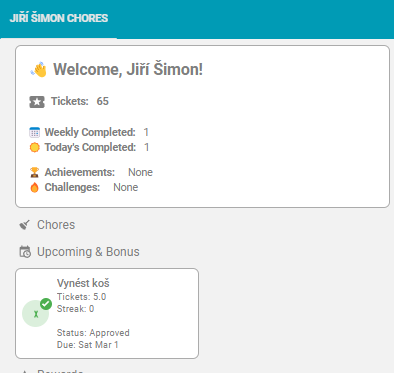
 Support for names with spaces & accented characters as well as chores with accented characters – Example: Jiří Šimon now works seamlessly. (Requires updating to the latest version of the dashboard from the repository..)
Improved documentation on adding UI Helpers – Check out the updated guide here:
 kc-dashboard-uihelpers.yaml
 Other Items for Awareness
 Kids Cannot Approve Their Own Chores – Even though kids can see the approval buttons, if they are logged into Home Assistant with their own account, the integration will prevent them from approving their own chores. The system ensures that only parents or system administrators can approve or disapprove tasks and rewards.
- Although it isn’t required, @AJErazzor had a good suggestion for those that would like to hide that parent panel, you can edit that section and change the “Visibility” conditions.

 Upcoming Integration Update – A new release of the KidsChores Integration is expected in the coming days, fixing multiple small issues and a few feature improvements.
- If you’re getting started now, use the default
"Points"as the label for points during your initial configuration. - After setup, you can reconfigure the label to anything you like.
 Be sure to give @VaReTaS some appreciation! The KidsChores integration was his idea from the start, and he has already put in a ton of effort to bring it to life. Now, with all the interest and feedback, he’s doubling down and putting in even more work behind the scenes to refine and expand it further! Show your support by giving him a
 ,
 , or
 in his integration thread, github, and HACS. Or, better yet, buy him a coffee!
 Dashboard Customization for Performance & Space – If the full dashboard (Parent + Kid views) takes more space than you want or is slow to render on your system due to all the dynamic calculations, it is designed to be modular:
- Easily rearrange or copy cards to different views so you only see what you want.
- Fewer cards per view = Improved load times if performance is an issue for you.
Thanks again for all the input—keep the feedback coming! 