Not in the foreseeable future, no.
hi, what about the the LilyGo T-Display Amoled S3 1.64 with touch:
is this supported in any way? I tried playing around with the pinout according to their doc but wasn’t able to display anything.
The qspi_dbi driver should work, but you will need to set up the init sequence which you can get by looking at the demo code.
Hi,
I have discovered this thread as I am in a same boat. Ihave purchased an AMOLED version without touch but screen stays black no matter I do.
Here is my YAML, do I do something wrong?
esphome:
  name: aqm-office-amoled
  platformio_options:
    build_unflags: -Werror=all
    board_build.flash_mode: dio

esp32:
  board: esp32-s3-devkitc-1
  variant: esp32s3
  framework:
    type: esp-idf

logger:

# Enable Home Assistant API
api:
  encryption:
    key: "twv3D2MlKLeL1giE2DC5Aqjn1Eck/+16NXBzB809/9s="

ota:
  - platform: esphome
    password: "f9929fc9c0b1a52de36bc424f85941ff"

wifi:
  ssid: !secret wifi_ssid
  password: !secret wifi_password

  # Enable fallback hotspot (captive portal) in case wifi connection fails
  ap:
    ssid: "Aqm-Office-Amoled"
    password: "LkBeH8NprXMZ"

captive_portal:

spi:
  id: quad_spi
  type: quad
  clk_pin: 47
  data_pins:
    - 18
    - 7
    - 48
    - 5

i2c:
  sda: 3
  scl: 2

display:
  - platform: qspi_dbi
    model: RM67162
    id: main_lcd
    dimensions:
      height: 240
      width: 536
    transform:
      mirror_x: true
      swap_xy: true
    color_order: rgb
    brightness: 255
    cs_pin: 6
    reset_pin: 17
    enable_pin: 38
    lambda: |-
      it.filled_circle(it.get_width() / 2, it.get_height() / 2, 120, Color(255, 0, 0));

Fixed by addding PSRAM parameters:
esp32:
  board: esp32-s3-devkitc-1
  flash_size: 16MB
  framework:
    type: esp-idf

psram:
  mode: octal
  speed: 120MHz
Is there any way to get or set the brightness of this screen?
Look like there is code to do it but not sure if it’s accessible from ESPHome.
void LilyGo_AMOLED::setBrightness(uint8_t level)
Was it you asking in Discord? Discord
It’s in the API docs. ESPHome: esphome::qspi_dbi::QspiDbi Class Reference
Nice thanks! For anybody searching it’s
id(display_amoled).set_brightness(brightness);
1 Like
Hello guys, I have been hitting my head in a wall for quite some time now…I cant seem to make the LILYGO T-Display-S3 work via ESPHomeBuilder in HASS so that I can eventually edit the yaml. I guess I am doing something wrong because cant seem to initialize the LILYGO-T Display in ESPHOME. First I visit https://web.esphome.io/ and prepare the device for first use. I can access it at the ip assigned, but it doesn’t appear in my ESPhome in HASS in order to edit the yaml with the suggested code and carry on further with a tutorial I am trying to do. I have done this I don’t know how many times and no succes… Is the problem with the ESPHome in HASS or am I doing something generally wrong ? Still learning my way through ESP’s and their use so apologies for the silly question. The aim I am trying to achieve is the following tutorial to be able to display a temperature from a sensor in HASS. https://smarthomescene.com/diy/diy-info-display-with-lilygo-t-display-s3-in-esphome/#comment-67075
Thank you in advance.
Trying to get mine working from a battery connected to the JST header, the docs say IO15 has to be pulled high, but nothing I do seems to make it work (This is for a soil moisture monitor btw)
EDIT actually this seems to work!
esphome:
  name: s3
  friendly_name: ESP32-S3 T-Display
  platformio_options:
    board_build.f_flash: 80000000L
    board_build.partitions: default_16MB.csv

external_components:
  - source: github://landonr/lilygo-tdisplays3-esphome
    components: [tdisplays3]

globals:
  - id: moisture_dry
    type: float
    restore_value: yes
    initial_value: "2.50"

  - id: moisture_wet
    type: float
    restore_value: yes
    initial_value: "0.92"

esp32:
  board: esp32-s3-devkitc-1
  variant: esp32s3
  framework:
    type: arduino
  flash_size: 16MB

logger:

api:

ota:
  platform: esphome

wifi:
  ssid: !secret wifi_ssid
  password: !secret wifi_password

number:
  - platform: template
    name: "Moisture Dry Calibration"
    id: moisture_dry_number
    min_value: 0.5
    max_value: 3.0
    step: 0.01
    optimistic: true
    restore_value: yes
    set_action:
      then:
        - lambda: |-
            id(moisture_dry) = x;
            ESP_LOGD("Calibration", "Updated Dry Calibration: %.3f", x);
            id(moisture_dry_number).publish_state(x);

  - platform: template
    name: "Moisture Wet Calibration"
    id: moisture_wet_number
    min_value: 0.2
    max_value: 3.0
    step: 0.01
    optimistic: true
    restore_value: yes
    set_action:
      then:
        - lambda: |-
            id(moisture_wet) = x;
            ESP_LOGD("Calibration", "Updated Wet Calibration: %.3f", x);
            id(moisture_wet_number).publish_state(x);

binary_sensor:
  - platform: gpio
    pin:
      number: GPIO0
      inverted: true
    name: "Button 1"
  - platform: gpio
    pin:
      number: GPIO14
      inverted: true
    name: "Button 2"
    on_click:
      then:
       - light.toggle: back_light

output:
  - platform: ledc
    pin: GPIO38
    id: gpio38
    frequency: 2000
#  - platform: gpio
#    pin: GPIO15
#    id: output_high

light:
  - platform: monochromatic
    output: gpio38
    name: "Backlight"
    id: back_light
    restore_mode: RESTORE_DEFAULT_ON

power_supply:
#  - id: backlight
#    enable_on_boot: true
#    pin: GPIO38
  - id: lcd_pwr
    enable_on_boot: true
    pin: GPIO15

sensor:
  - platform: adc
    id: battery_voltage
    name: "Battery Voltage"
    pin: 4
    update_interval: 30s
    unit_of_measurement: "V"
    accuracy_decimals: 2
    attenuation: 12db
    filters:
      - lambda: |-
          float corrected_voltage = x * 2.02; // Apply correction factor
          ESP_LOGD("Battery", "Raw ADC: %.3f V, Corrected Voltage: %.3f V", x, corrected_voltage);
          return corrected_voltage;

  - platform: template
    id: battery_level
    name: "Battery Level"
    unit_of_measurement: "%"
    accuracy_decimals: 0
    device_class: battery
    update_interval: 30sec
    lambda: |-
      float voltage = id(battery_voltage).state;
      ESP_LOGD("Battery", "Battery Level Calculation: Voltage = %.3f V", voltage);
      float percentage = (voltage - 1.5) / (2.1 - 1.5) * 100.0;
      if (percentage < 0) return 0;
      if (percentage > 100) return 100;
      return percentage;


  - platform: adc
    pin: GPIO1
    id: moisture1
    name: "Soil Moisture"
    unit_of_measurement: "%"
    attenuation: auto
    update_interval: 1s
    filters:
      - median:
          window_size: 7
          send_every: 4
          send_first_at: 1
      - lambda: |-
          ESP_LOGD("Moisture Sensor", "Raw ADC Value: %.3f V", x);
          float dry = id(moisture_dry);
          float wet = id(moisture_wet);
          float percentage = 100.0 * (dry - x) / (dry - wet);
          if (percentage < 0) return 0;
          if (percentage > 100) return 100;
          return percentage;

display:
  - platform: tdisplays3
    rotation: 270
    id: page2
    lambda: |-
      int screen_height = it.get_height();
      it.image(10, 30, id(plant));
      it.printf(110, 50, id(audiowide_font), Color(255, 255, 255), "%.1f%%", id(moisture1).state);

interval:
  - interval: 10sec
    then:
      - component.update: moisture1
      - component.update: page2

font:
  - file: "gfonts://Audiowide"
    id: audiowide_font
    size: 40

image:
  - file: water-percent.png
    id: water_percent
    resize: 60x60
    type: RGB
    transparency: alpha_channel

  - file: plant.png
    id: plant
    resize: 200x88
    type: RGB
    transparency: alpha_channel

time:
  - platform: homeassistant
    id: ha_time
Try this:
esphome:
  name: t-display-s3
  platformio_options:
    board_build.flash_mode: dio

esp32:
  board: esp32-s3-devkitc-1
  framework:
    type: esp-idf

logger:

output:
  - platform: ledc
    frequency: 9765Hz
    pin: GPIO38
    id: backlight_output

light:
  - platform: monochromatic
    output: backlight_output
    name: LCD Backlight
    id: led
    restore_mode: ALWAYS_ON
    default_transition_length: 0s

external_components:
  - source: github://pr#8383
    components: [spi, mipi_spi]
    refresh: 1h

spi:
  type: octal
  clk_pin: 8
  data_pins:
    - 39
    - 40
    - 41
    - 42
    - ignore_strapping_warning: true
      number: 45
    - ignore_strapping_warning: true
      number: 46
    - 47
    - 48

psram:
  speed: 80MHz
  mode: octal

display:
  - platform: mipi_spi
    model: t-display-s3

lvgl:
2 Likes
Hi,
want to display “booting…” as early as possible on my ESP.
I have
  on_boot:
    - priority: -100
      then:
        - component.update: wifisignal
        - component.update: battery_voltage
    - priority: -800  # run as early as possible (must be <1000)
      then:
        - component.update: t5_display  # show "Booting..." immediately
this is “better than nothing”, but still displays “Booting…” about 10 seconds after the blue LED turns on that is “immediately” on if the ESP is waken up thru button press.
What happens
1.) pysical button press to wake up from deep_sleep
2.) About half a second/Second “Pause”
3.) blue LED turns on
4.) about 8-10 sec “Pause” (during I see Wifi connect in the log)
5.) my message “Booting…” shows up
6.) again about 10sec where I see WIFI messages and API Connect
7.) The "real display comes up.
How can I display things “ASAP” on the ePaper display?
many thanks
Juergen
This thread is about the T-Display S3 which is not e-paper. Best start a new topic.
Hi @clydebarrow ,
I am so desperate, I hoped I have an S3 problem only  Here my new opened issue:
many thanks
Juergen
Hi @clydebarrow , i have used your external component for a long time with joy in my thermostate build in an WT32-SC01-PLUS. But since some time i am unable to update my device in esphome because of an incompetiblity. Do you maybe how to solve this ? when i update to the fimware 5.4.2 you component does not support it
Error:
WARNING The selected ESP-IDF framework version is not the recommended one. If there are connectivity or build issues please remove the manual version.
WARNING The selected ESP-IDF framework version is not the recommended one. If there are connectivity or build issues please remove the manual version.
Failed config
i2c: [source /config/esphome/sc01.yaml:65]

  This feature requires at least framework version 5.4.2.
  - sda: GPIO6
    scl: GPIO5
    id: touch_i2c
ESPhome Config:
esphome:
  name: wt32-sc01-plus
  friendly_name: WT32-SC01-PLUS
  platformio_options:
    board_build.flash_mode: dio

esp32:
  board: esp32-s3-devkitc-1
  variant: ESP32S3
  flash_size: 16MB
  framework:
    type: esp-idf
    platform_version: 6.9.0
    version: 5.3.0
    sdkconfig_options:
      CONFIG_ESP32S3_DEFAULT_CPU_FREQ_240: y
      CONFIG_ESP32S3_DATA_CACHE_64KB: y
      CONFIG_SPIRAM_FETCH_INSTRUCTIONS: y
      CONFIG_ESP_TASK_WDT_TIMEOUT_S: "10"

psram:
  mode: quad
  speed: 80MHZ

external_components:
  - source: github://clydebarrow/esphome@i8080
    components: [ io_bus, i80 ]
    refresh: 1h
  - source: github://pr#6537
    components: [ spi, ili9xxx ]
    refresh: 1h

logger:
  hardware_uart: USB_SERIAL_JTAG

api:
  encryption:
    key: "ty4MReX18jaDf189Aq6O1Z3hPA1sgZ6Xbva0x6/URUI="
  on_client_connected:
    - if:
        condition:
          lambda: 'return (0 == client_info.find("Home Assistant "));'
        then:
          - lvgl.widget.show: lbl_hastatus
  on_client_disconnected:
    - if:
        condition:
          lambda: 'return (0 == client_info.find("Home Assistant "));'
        then:
          - lvgl.widget.hide: lbl_hastatus
ota:
  platform: esphome
  password: "abcde"

wifi:
  ssid: !secret wifi_ssid
  password: !secret wifi_password

  # Enable fallback hotspot (captive portal) in case wifi connection fails
  ap:
    ssid: "Sc01 Fallback Hotspot"
    password: "abcd"


i2c:
  sda: GPIO6
  scl: GPIO5
  id: touch_i2c

uart:
  tx_pin: GPIO12
  rx_pin: GPIO13
  baud_rate: 256000
  parity: NONE
  stop_bits: 1

time:
  - platform: sntp
    id: time_comp
    on_time_sync:
      then:
        - script.execute: time_update

            # return id(time_comp).now().minute;
            # auto now = id(time_comp).now();
            # return std::fmod(now.hour, 12) * 60 + now.minute;


script:
  - id: time_update
    then:
      - lvgl.label.update:
          id: txtTime
          text:
            time_format: "%d-%m-%Y %H:%M" # Updated to Amsterdam time format
            time: !lambda return id(time_comp).now();

ld2410:


touchscreen:
  - platform: ft63x6
    id: device_touchscreen
    interrupt_pin: GPIO7
    transform:
      swap_xy: true
      mirror_x: true
    on_release:
      - if:
          condition: lvgl.is_paused
          then:
            - logger.log: "LVGL resuming"
            - lvgl.resume:
            - lvgl.widget.redraw:
            - light.turn_on: display_backlight

i80:
  - id: i80bus
    dc_pin:
      number: GPIO0
      ignore_strapping_warning: true
    wr_pin: GPIO47
    data_pins:
      - GPIO9
      - number: GPIO46
        ignore_strapping_warning: true
      - number: GPIO3
        ignore_strapping_warning: true
      - GPIO8
      - GPIO18
      - GPIO17
      - GPIO16
      - GPIO15

display:
  - platform: ili9xxx
    id: device_display
    model: ST7796
    bus_type: i80
    reset_pin: GPIO4
    pixel_mode: 16bit
    color_order: bgr
    invert_colors: true
    dimensions:
      width: 480
      height: 320
    transform:
      swap_xy: true
    auto_clear_enabled: false

output:
  - platform: ledc
    id: backlight_pwm
    pin:
      number: GPIO45
      ignore_strapping_warning: true

light:
  - platform: monochromatic
    id: display_backlight
    output: backlight_pwm
    restore_mode: ALWAYS_ON

number:
  - platform: template
    name: LVGL Screen timeout
    optimistic: true
    id: display_timeout
    unit_of_measurement: "s"
    initial_value: 45
    restore_value: true
    min_value: 10
    max_value: 180
    step: 5
    mode: box
  - platform: ld2410
    timeout:
      name: timeout
    light_threshold:
      name: light threshold
    max_move_distance_gate:
      name: max move distance gate
    max_still_distance_gate:
      name: max still distance gate

binary_sensor:
  - platform: ld2410
    has_target:
      name: Presence
    has_moving_target:
      name: Moving Target
    has_still_target:
      name: Still Target


sensor:
  - platform: ld2410
    moving_distance:
      name : Moving Distance
      id: distance
      on_value_range:
        - below: 100
          then:
          - if:
              condition: lvgl.is_paused
              then:
                - logger.log: "LVGL resuming"
                - lvgl.resume:
                - lvgl.widget.redraw:
                - light.turn_on: display_backlight
    still_distance:
      name: Still Distance
      on_value_range:
        - below: 100
          then:
          - if:
              condition: lvgl.is_paused
              then:
                - logger.log: "LVGL resuming"
                - lvgl.resume:
                - lvgl.widget.redraw:
                - light.turn_on: display_backlight
    moving_energy:
      name: Move Energy
    still_energy:
      name: Still Energy
    detection_distance:
      name: Detection Distance

  - platform: homeassistant
    id: target_temperature
    entity_id: climate.mosquitto_broker_diyless_thermostat
    attribute: temperature
    accuracy_decimals: 1
    on_value:
      - lvgl.arc.update:
          id: arc_id
          value: !lambda 'return (float)x;'

  - platform: homeassistant
    id: current_temperature
    entity_id: climate.mosquitto_broker_diyless_thermostat
    attribute: current_temperature
    accuracy_decimals: 1
    on_value:
      - lvgl.label.update:
          id: txt_temp_current
          text:
            format: "%.1f°"
            args: [x]

  - platform: homeassistant
    id: status_temperature
    entity_id: climate.mosquitto_broker_diyless_thermostat
    attribute: hvac_action

font:
  - file: "gfonts://Roboto"
    id: roboto16
    size: 20
    bpp: 4
color:
  - id: orange
    hex: FF6F22
  - id: gray
    hex: 464646
  - id: bg
    hex: 1c1c1c

lvgl:
  style_definitions:
    - id: temperature
      text_font: roboto16
      align: center
      text_color: 0x000000
      bg_opa: cover
      radius: 4
      pad_all: 2
    - id: obj
      bg_color: 0x383636
      radius: 4
      pad_all: 2
      border_width: 0
      border_opa: TRANSP
    - id: knob
      bg_color: orange
  displays:
    - device_display
  touchscreens:
    - device_touchscreen
  on_idle:
    timeout: !lambda 'return (uint32_t)(id(display_timeout).state * 1000);' # Corrected to return a valid time period in milliseconds
    then:
      - logger.log: "LVGL is idle"
      - light.turn_off: display_backlight
      - lvgl.pause:
  pages:
    - id: main_page
      bg_color: 0x383636
      widgets:
        - label:
            align: TOP_Left
            id: txtTime
            text_color: 0xFFFFFF
        - label:
            text: "\uF1EB"
            id: lbl_hastatus
            hidden: true
            align: TOP_RIGHT
            # x: -2
            # y: 7
            text_align: right
            text_color: 0xFFFFFF
        - label:
              y: 25
              x: 165
              text_color: 0xFFFFFF
              # align: center

              text: "Huidige Temperatuur:"
        - label:
              y: 45
              x: 225
              # align: center

              text_color: 0xFFFFFF

              # align: center
              id: txt_temp_current
              # styles: temperature
              text: " "
        - obj: # Climate container
            height: 200
            width: 200
            align: center
            outline_opa: TRANSP
            shadow_opa: TRANSP
            styles: obj
            pad_all: 4
            widgets:
              - arc:
                  height: 170
                  width: 170
                  x: 10
                  y: 10
                  id: arc_id
                  value: 75
                  min_value: 5
                  max_value: 30
                  adjustable: true
                  knob:
                    bg_color: 0xFFFFFF
                    border_width: 2
                    border_color: 0xFF6F22
                  arc_color: 0x464646
                  arc_width: 26
                  indicator:
                    arc_width: 25
                    arc_color: 0x464646
                    pressed:
                      arc_color: 0xFF6F22
                    focused:
                      arc_color: 0xFF6F22
                  on_value:
                    - delay: 500 ms
                    - lvgl.label.update:
                        id: txt_temp_target
                        text:
                          format: "%.1f°"
                          args: [x]
                    # - homeassistant.service:
                    #     service: climate.set_temperature
                    #     data:
                    #       entity_id: climate.mosquitto_broker_diyless_thermostat
                    #       temperature: !lambda 'return x;'
                    - logger.log:
                        format: "Arc value is: %.1f"
                        args: [ 'x' ]
              - label:
                  y: 0
                  x: 0
                  id: txt_temp_target
                  styles: temperature
                  text: " "
              # - label:
              #     y: 0
              #     x: -5
              #     id: txt_temp_spacer
              #     styles: temperature
              #     text: "/"


bluetooth_proxy:
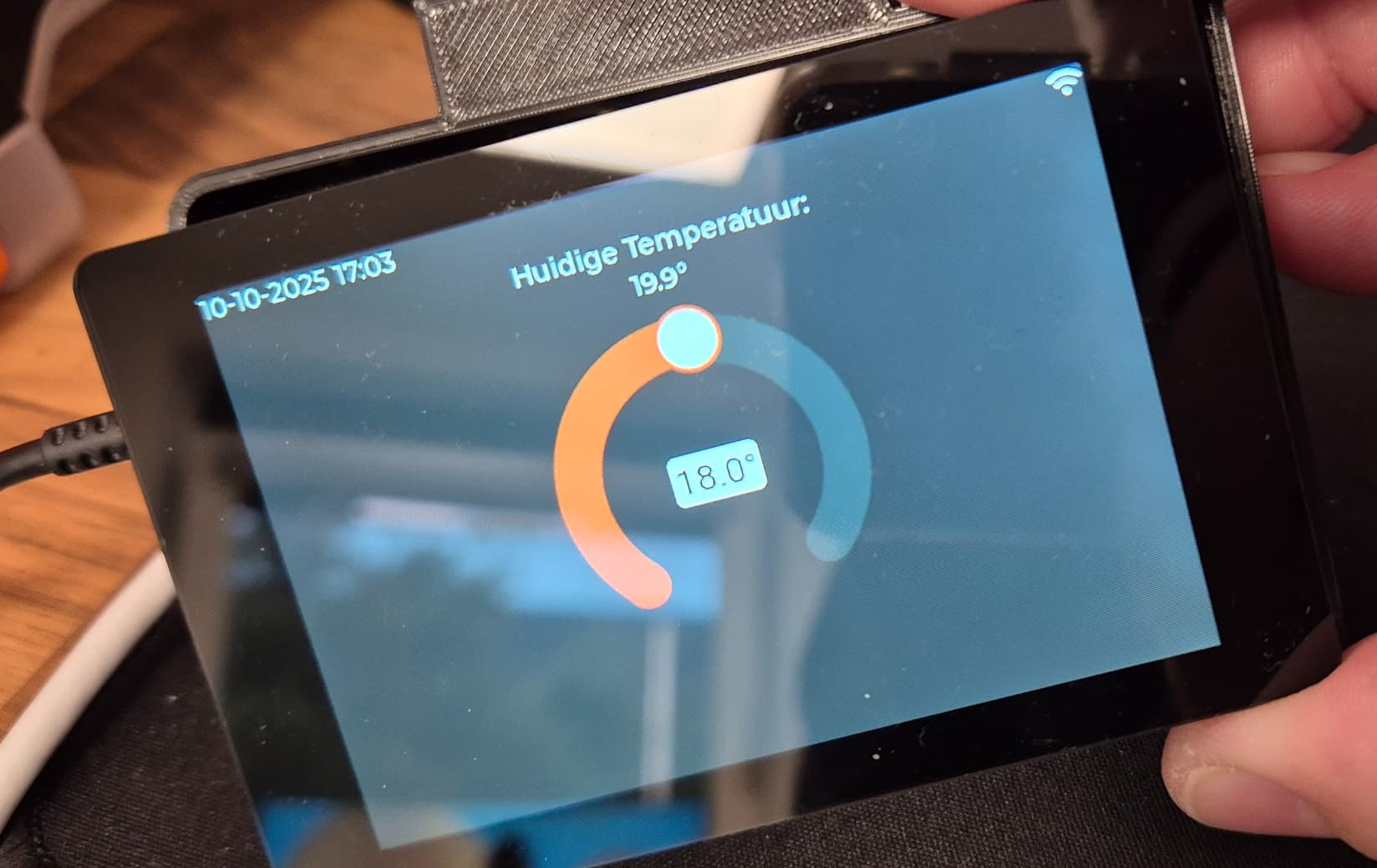
To make it complete, when i change to the latest firmware i get below error:
config update:
esp32:
  board: esp32-s3-devkitc-1
  variant: ESP32S3
  flash_size: 16MB
  framework:
    type: esp-idf
    sdkconfig_options:
      CONFIG_ESP32S3_DEFAULT_CPU_FREQ_240: y
      CONFIG_ESP32S3_DATA_CACHE_64KB: y
      CONFIG_SPIRAM_FETCH_INSTRUCTIONS: y
      CONFIG_ESP_TASK_WDT_TIMEOUT_S: "10"
compile error:
Processing wt32-sc01-plus (board: esp32-s3-devkitc-1; framework: espidf; platform: https://github.com/pioarduino/platform-espressif32/releases/download/54.03.21-2/platform-espressif32.zip)
--------------------------------------------------------------------------------
INFO Package configuration completed successfully
INFO Package configuration completed successfully
HARDWARE: ESP32S3 240MHz, 320KB RAM, 8MB Flash
 - framework-espidf @ 3.50402.0 (5.4.2)
 - tool-cmake @ 3.30.2
 - tool-esp-rom-elfs @ 2024.10.11
 - tool-esptoolpy @ 5.0.2
 - tool-mklittlefs @ 3.2.0
 - tool-ninja @ 1.13.1
 - tool-scons @ 4.40801.0 (4.8.1)
 - toolchain-xtensa-esp-elf @ 14.2.0+20241119
Reading CMake configuration...
Dependency Graph
|-- lvgl @ 8.4.0
|-- noise-c @ 0.1.10
Compiling .pioenvs/wt32-sc01-plus/src/esphome/components/i80/i80_esp_idf.cpp.o
Compiling .pioenvs/wt32-sc01-plus/src/esphome/components/light/light_output.cpp.o
Compiling .pioenvs/wt32-sc01-plus/src/esphome/components/light/light_state.cpp.o
Compiling .pioenvs/wt32-sc01-plus/src/esphome/components/logger/logger.cpp.o
src/esphome/components/i80/i80_esp_idf.cpp: In member function 'virtual void esphome::i80::I80DelegateIdf::write_cmd_data(int, const uint8_t*, size_t)':
src/esphome/components/i80/i80_esp_idf.cpp:51:19: error: 'CONFIG_LCD_PANEL_IO_FORMAT_BUF_SIZE' was not declared in this scope
   51 |     if (length <= CONFIG_LCD_PANEL_IO_FORMAT_BUF_SIZE) {
      |                   ^~~~~~~~~~~~~~~~~~~~~~~~~~~~~~~~~~~
*** [.pioenvs/wt32-sc01-plus/src/esphome/components/i80/i80_esp_idf.cpp.o] Error 1
========================= [FAILED] Took 19.71 seconds =========================
It is supported in ESPHome now
Sample config: sample-configs/display-lvgl/wt32-sc01-plus.yaml at main · clydebarrow/sample-configs · GitHub
1 Like