This fixed my issue!
I deleted the saved password in my Android Firefox, and everything worked.
Odd.
Thanks martin!
This fixed my issue!
I deleted the saved password in my Android Firefox, and everything worked.
Odd.
Thanks martin!
Thanks man! Worked like a charm!
I was facing the same issue on my Synology NAS
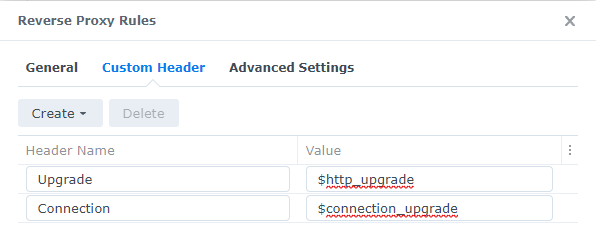
Here’s my (similar) working setup in reverse proxy configuration:
[quote=“martin_h, post:21, topic:373848”]
Can you please tell me where this file exists?
Had the same issue of continual login attempts - every 30 seconds or so from an IP I couldn’t figure out what it was. I deleted all but the current authentication tokens and then logged out of everything I could think of that I had HA open (web browsers and app). The logins persisted but no longer from the mystery IP but from my phone and desktop. I logged back in on both using the app and the notifications stopped.
Hi everyone, I had a similar issue. Instead the ban.py was complaining on “Requested URL: ‘/auth/token’.” I have a proxy set up on my server with apache2. And as everyone is pointing out it is because of the http 1.1 upgrade headers not being passed on. I fixed this by following this apache - Apache2 WebSockets reverse proxy on same URL - Stack Overflow
Karel’s answer fixed it for me!
Thank you everyone!
Thanks, it works in my case!
Thank you dude! I’ve been trying to get this to work all day. SWAG template didn’t include this…
I faced the same problem, tested a few of the responses here.
Key was:
Websocker Support ON
But it was not working on my Mobile App and I just managed to work by:
Disabling the security setting
Multi-factor authentication modules
Hello,
I need your support. I have the same issue with my Android App creating these error logs all days and meanwhile my mobile was pushed to the blocking list so i had to delete this again. The issue is only showing up with my LAN IP adress.
My problem is, i’m using “NGINX Home Assistant SSL proxy” to configure NGINUX as i was following below guide to setup remote access:
But here i do not have any location configuration to setup. Can you help me, what i have to add exactly where to get the issue been resolved?
Thanks for your help.
Worked on my end. Was getting a failure when attempting to enter 2fa, this resolved the issue.
Thank you! 3 days getting crazy!
So you have to let down all of your safety features and guards to make some of these things run?
I wouldn’t delete the safety protection. I just threw away 4 blind motors two smart plugs because something was accessing the binary sensors using it for other things. pretty smart too because I couldn’t Locate them…
Worked for me, thanks.
It worked for me, too, thanks a lot!