@AixRmz Did you get the “entity not available” error figure out?
Have not been able to make it work : (
I’m not sure what problem people are having, but here’s my HA config info
  - platform: snmp
    host: 192.168.130.14
    baseoid: .1.3.6.1.4.1.3808.1.1.1.4.1.1.0
    community: xx
    port: 1161
    name: OfficeUPS Status
    scan_interval: 120
    value_template: >
      {% set vals = {'1': 'unknown', '2':'onLine', '3':'onBattery', '4':'onBoost', '5':'sleep', '6':'off', '7':'rebooting'} %}
      {{vals[value]}}

  - platform: snmp
    host: 192.168.130.14
    baseoid: .1.3.6.1.2.1.33.1.2.3.0
    community: xx
    port: 1161
    name: OfficeUPS Battery Runtime
    value_template: '{{ (value | int) * 60 }}'
    unit_of_measurement: s
    scan_interval: 120

  - platform: snmp
    host: 192.168.130.14
    baseoid: .1.3.6.1.2.1.33.1.2.4.0
    community: xx
    port: 1161
    scan_interval: 300
    name: OfficeUPS Battery Charge
    unit_of_measurement: "%"

  - platform: snmp
    host: 192.168.130.14
    baseoid:  .1.3.6.1.4.1.3808.1.1.1.2.2.2.0
    community: xx
    port: 1161
    scan_interval: 300
    name: OfficeUPS Battery Voltage
    value_template: '{{ (value | int / 10 ) }}'
    unit_of_measurement: "V"

  - platform: snmp
    host: 192.168.130.14
    baseoid: 1.3.6.1.4.1.3808.1.1.1.4.2.3.0
    community: xx
    port: 1161
    scan_interval: 300
    name: OfficeUPS Load
    unit_of_measurement: "%"
I set the Power Panel to use port 1161 instead of 161 because I use real SNMP on that same computer at port 161, you can adjust as needed. The IP address is the address of the desktop running power panel.
I have found that snmpv3 support is super buggy. YMMV of course, but I recommend that anyone using v3 and struggling switch to v2. To be honest, the security is likely “good enough”. Just don’t allow writes. There’s no sensitive data in your ups.
I also recommend using secrets and/or yaml anchors to reduce some of the config duplication overhead. I’ve had some silly mistakes due to poor copy and paste.
Finally, I recommend using snmpwalk on your Hass host to help troubleshoot. This is not perfect, because I have had issues where this tool works fine, but using the same configuration parameters in the home system giving me problems
please can you tell me where the pic file is (only bit not working)
Is that to my image? It’s in the posting. If it’s not appearing try refresh, different browser, something. I see it in the posting 2nd above.
(ups5.jpg) sorry not very good with web forums I dont understand where i should be looking for this file to download and not sure where i put it in my HA either?
not sure my even asking the right peason it might be simon bunn!!
thanks Simon, that writeup was brilliant.
I found once I had the Cyberpower software installed and set up an the SNMP gateway, it was extremely simple to just add it to NUT, and not worry about manually creating sensors or cards in Home Assistant.
fyi, NUT add-on config for the Cyberpower SNMP device:
  - name: CyberPower_VP1600ELCD
    driver: snmp-ups
    port: 192.168.0.x
    config:
      - desc = CyberPower 1600
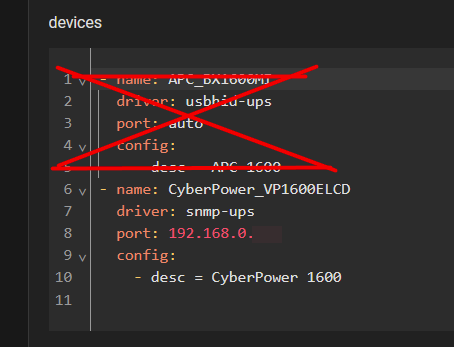
Then just add it as a new device in the NUT Integration:
Good Job @Simon_Bunn
Here what I have added to your idea:
inside **/homeassistant/ **
file: configuration.yaml
(...)
##
recorder:
  purge_keep_days: 60
  auto_purge: true
  auto_repack: true
  #  include:
  #    domains:
  #      - sensor
  #      - switch
  #      - media_player
  exclude:
    entities:
      - sensor.date
    entity_globs:
      - sensor.weather_*
      - sensor.ups*_time
      - sensor.ups*_date
      - sensor.ups*_date_n_time*
      - sensor.ups*_selftest_date_temp*
      - sensor.ups*_run_time*
      - sensor.ups*_uptime*
      - sensor.system_monitor_network_throughput_*
      - sensor.system_monitor_memory_*
      - sensor.ups*_serial_number
      - sensor.ups*_serial_number
      - sensor.ups*_firmware*

(...)
sensor: !include_dir_merge_list ./entities/sensors
switch: !include_dir_merge_list ./entities/switches
inside **/homeassistant/entities/sensors/ **
file: cyberpower_ups01.yaml
###################################
# CyberPower UPS
#
# UPS on 192.168.5.10 - MyServer
#
# version 2026-08-26 08:58:18.281
# --> Round some values, and remove 'UPS01 Output Power' which seems to be buggy.
#     Recomendantion: is to use a 'Helper' calculation where
#           power = output_current * output_voltage
# version 2025-08-22 00:24:11.616
# --> Change some int to int(0) and float to float(0) for default value at startup
#
####################################
# Inpired by:
#   https://community.home-assistant.io/t/cyberpower-ups-powerpanel-cloud/509968/7
#
# Confirmed working for model:
#    CP1500AVRLCD3 - PowerPanel Business v4.12.2 on Windows 11 (10.0.26100 64-bit)
#    CP1350AVRLCDa - PowerPanel Business v4.12.0 on Ubuntu 22.04.1 (Linux 6.8.0-136-generic 64-bit)
#
# Download location: https://www.cyberpower.com/global/en/download
#    Windows: CyberPower_PPB_Windows_v4.12.2        - PowerPanel Business Local/Remote for Windows
#    Linux:   CyberPower_PPB_Linux+64bit_v4.12.0.sh - PowerPanel Business Local/Remote for Linux 64bit
#
# unique_id: generated on: Version 1 of https://generateuuid.online/
#
#sensor:
- platform: snmp
  baseoid: .1.3.6.1.2.1.1.3.0
  name: UPS01 Uptime
  unique_id: 94840230-f0b9-11ef-0001-bdf054715aa8
  #  value_template: >
  #    {% set uptime = (value | string()) %}
  #    {% set seconds = (((uptime|string)[-2:])|int(0) % 60) %}
  #    {% set minutes = ((uptime|int(0) % 360000) // 6000)  %}
  #    {% set hours = ((uptime|int(0) % 8640000) // 360000)+0.1 %}
  #    {% set days = (uptime|int(0) // 8640000)  %}
  #    {%- if (days >= 2) %}{% set txtDay='days' %}{%- else -%}{% set txtDay='day' %}{%- endif %}
  #    {%- if (days < 1) %}{% set txtDay='' %}{% set days=0 %}{%- else -%}{% set txtDay=(txtDay+", ") %}{%- endif %}
  #    {% set seconds = '%ds ' % seconds %}
  #    {% set minutes = '%dm ' % minutes %}
  #    {% set hours = '%dh ' % hours if hours else '' %}
  #    {% set days = '%d ' % days if days else '' %}
  #    {{ days }}{{ txtDay }}{{ hours }}{{ minutes }}{{ seconds }}
  value_template: "{{ ((value | int(0) - (8640000) | int(0))/100) | int(0) | timestamp_custom('%dd %H:%M:%S', false,0) }}"
  scan_interval: 2
  host: 192.168.5.10
  port: 161
  community: public
  accept_errors: "false"
- platform: snmp
  baseoid: .1.3.6.1.4.1.3808.1.1.1.1.1.1.0
  name: UPS01 Model
  unique_id: 94840231-f0b9-11ef-0001-bdf054715aa8
  scan_interval: 60
  host: 192.168.5.10
  port: 161
  community: public
  accept_errors: "false"
- platform: snmp
  baseoid: .1.3.6.1.4.1.3808.1.1.1.1.1.2.0
  name: UPS01 Hostname
  unique_id: 94840232-f0b9-11ef-0001-bdf054715aa8
  value_template: >-
    {% set tmpData = (value | string) | upper %}
    {{ tmpData }}
  scan_interval: 60
  host: 192.168.5.10
  port: 161
  community: public
  accept_errors: "false"
- platform: snmp
  baseoid: .1.3.6.1.4.1.3808.1.1.1.1.2.1.0
  name: UPS01 FirmwareA
  unique_id: 94840233-f0b9-11ef-0001-bdf054715aa8
  scan_interval: 60
  host: 192.168.5.10
  port: 161
  community: public
  accept_errors: "false"
- platform: snmp
  baseoid: .1.3.6.1.4.1.3808.1.1.1.1.2.4.0
  name: UPS01 FirmwareB
  unique_id: 94840234-f0b9-11ef-0001-bdf054715aa8
  scan_interval: 60
  host: 192.168.5.10
  port: 161
  community: public
  accept_errors: "false"
#- platform: template
#  sensors:
#    ups01_firmware:
#      friendly_name: "UPS01 Firmware"
#      unique_id: 94840235-f0b9-11ef-0001-bdf054715aa8
#      value_template: "{{ states('sensor.ups01_firmwarea') }}_{{ states('sensor.ups01_firmwareb') }}"
- platform: snmp
  baseoid: .1.3.6.1.4.1.3808.1.1.1.1.2.7.0
  name: UPS01 Power Rating
  unique_id: 94840236-f0b9-11ef-0001-bdf054715aa8
  device_class: power
  unit_of_measurement: "W"
  scan_interval: 60
  host: 192.168.5.10
  port: 161
  community: public
  accept_errors: "false"
- platform: snmp
  baseoid: .1.3.6.1.4.1.3808.1.1.1.1.2.3.0
  name: UPS01 Serial Number
  unique_id: 94840237-f0b9-11ef-0001-bdf054715aa8
  scan_interval: 60
  host: 192.168.5.10
  port: 161
  community: public
  accept_errors: "false"
- platform: snmp
  baseoid: .1.3.6.1.4.1.3808.1.1.1.2.1.1.0
  name: UPS01 Battery Status
  unique_id: 94840238-f0b9-11ef-0001-bdf054715aa8
  value_template: >
    {% set vals = {'0': 'Unknown', '1':'Unknown', '2':'Normal', '3':'Low', '4':'NotPresent'} %}
    {{vals[value]}}
  scan_interval: 10
  host: 192.168.5.10
  port: 161
  community: public
  accept_errors: "false"
- platform: snmp
  baseoid: .1.3.6.1.4.1.3808.1.1.1.2.1.3.0
  name: UPS01 Battery Installed Date temp
  unique_id: 94840239-f0b9-11ef-0001-bdf054715aa8
  value_template: >-
    {% set tmpData = strptime(value, '%m/%d/%Y', now()) | as_datetime %}
    {%- if (tmpData is defined) and (tmpData != none) -%}
      {{ (tmpData.isoformat() | string)[0:10] }}
    {%- else -%}
      {{ '2000-01-01' }}
    {%- endif -%}
  scan_interval: 60
  host: 192.168.5.10
  port: 161
  community: public
  accept_errors: "false"
#- platform: template
#  sensors:
#    ups01_battery_installed_date:
#      friendly_name: "UPS01 Battery Installed Date"
#      unique_id: 9484023a-f0b9-11ef-0001-bdf054715aa8
#      device_class: date
#      value_template: "{{ states('sensor.ups01_battery_installed_date_temp') }}"
- platform: snmp
  baseoid: .1.3.6.1.4.1.3808.1.1.1.2.2.1.0
  name: UPS01 Battery Capacity
  unique_id: 9484023b-f0b9-11ef-0001-bdf054715aa8
  value_template: "{{ (value | float(0)) }}"
  device_class: BATTERY
  unit_of_measurement: "%"
  scan_interval: 30
  host: 192.168.5.10
  port: 161
  community: public
  accept_errors: "false"
- platform: snmp
  baseoid: .1.3.6.1.4.1.3808.1.1.1.2.2.2.0
  name: UPS01 Battery Voltage
  unique_id: 9484023c-f0b9-11ef-0001-bdf054715aa8
  value_template: "{{ (value | int(0) / 10) | round(1) }}"
  device_class: voltage
  unit_of_measurement: "V"
  scan_interval: 20
  host: 192.168.5.10
  port: 161
  community: public
  accept_errors: "false"
- platform: snmp
  baseoid: .1.3.6.1.4.1.3808.1.1.1.2.2.4.0
  name: UPS01 Run Time Remaining
  unique_id: 9484023d-f0b9-11ef-0001-bdf054715aa8
  value_template: "{{ ( (value | int(0)) / (100 * 60) ) | round(1) }}"
  unit_of_measurement: minutes
  scan_interval: 5
  host: 192.168.5.10
  port: 161
  community: public
  accept_errors: "false"
- platform: snmp
  baseoid: .1.3.6.1.4.1.3808.1.1.1.3.2.2.0
  name: UPS01 Input Voltage
  unique_id: 9484023e-f0b9-11ef-0001-bdf054715aa8
  value_template: "{{ (value | int(0) / 10 ) | round(1) }}"
  device_class: voltage
  unit_of_measurement: "V"
  scan_interval: 30
  host: 192.168.5.10
  port: 161
  community: public
  accept_errors: "false"
- platform: snmp
  baseoid: .1.3.6.1.4.1.3808.1.1.1.3.2.6.0
  name: UPS01 Advanced Status
  unique_id: 9484023f-f0b9-11ef-0001-bdf054715aa8
  value_template: >
    {% set vals = {'1': 'Normal', '2':'Over Voltage', '3':'Under Voltage', '4':'Frequency Failure', '5':'Blackout'} %}
    {{vals[value]}}
  scan_interval: 15
  host: 192.168.5.10
  port: 161
  community: public
  accept_errors: "false"
- platform: snmp
  baseoid: .1.3.6.1.4.1.3808.1.1.1.4.1.1.0
  name: UPS01 Status
  unique_id: 94840240-f0b9-11ef-0001-bdf054715aa8
  value_template: >
    {% set vals = {'1': 'Unknown', '2':'OnLine', '3':'OnBattery', '4':'OnBoost', '5':'OnSleep', '6':'Off', '7':'Rebooting', '8':'OnECO', '9':'OnBypass', '10':'OnBuck', '11':'OnOverload'} %}
    {{vals[value]}}
  scan_interval: 5
  host: 192.168.5.10
  port: 161
  community: public
  accept_errors: "false"
- platform: snmp
  baseoid: .1.3.6.1.4.1.3808.1.1.1.4.2.1.0
  name: UPS01 Output Voltage
  unique_id: 94840241-f0b9-11ef-0001-bdf054715aa8
  value_template: "{{ (value | int(0) / 10 ) | round(1) }}"
  device_class: voltage
  unit_of_measurement: "V"
  scan_interval: 5
  host: 192.168.5.10
  port: 161
  community: public
  accept_errors: "false"
##
## note: the Output current isn't supported on model CP1350AVRLCDa
##
## use this calculation for model CP1350AVRLCDa , .1.3.6.1.4.1.3808.1.1.1.4.2.4.0 is not supported
##- platform: template
##  sensors:
##    ups01_output_current:
##      friendly_name: "UPS01 Output Current"
##      unique_id: 94840242-f0b9-11ef-0001-bdf054715aa8
##      device_class: current
##      unit_of_measurement: "A"
##      value_template: "{{ ((states('sensor.ups01_load') | float(0) * states('sensor.ups01_power_rating') | float(0) / states('sensor.ups01_output_voltage') | int(0) ) / 100) | round(2) }} "
##
- platform: snmp
  baseoid: .1.3.6.1.4.1.3808.1.1.1.4.2.4.0
  name: UPS01 Output Current
  unique_id: 94840242-f0b9-11ef-0001-bdf054715aa8
  value_template: "{{ (value | int(0) / 10 ) | round(1) }}"
  unit_of_measurement: "A"
  scan_interval: 5
  host: 192.168.5.10
  port: 161
  community: public
  accept_errors: "false"
# version: 2026-08-26 08:58:18.281
#- platform: template
#  sensors:
#    ups01_output_power:
#      friendly_name: "UPS01 Output Power"
#      unique_id: 94840243-f0b9-11ef-0001-bdf054715aa8
#      device_class: power
#      unit_of_measurement: "W"
#      value_template: "{{ (states('sensor.ups01_output_current') | float(0) * states('sensor.ups01_output_voltage') | int(0) ) | round(1) }} "
- platform: snmp
  baseoid: .1.3.6.1.4.1.3808.1.1.1.4.2.3.0
  name: UPS01 Load
  unique_id: 94840244-f0b9-11ef-0001-bdf054715aa8
  value_template: "{{ (value | float(0)) }}"
  device_class: BATTERY
  unit_of_measurement: "%"
  scan_interval: 5
  host: 192.168.5.10
  port: 161
  community: public
  accept_errors: "false"
- platform: snmp
  baseoid: .1.3.6.1.4.1.3808.1.1.1.7.2.3.0
  name: UPS01 Selftest Result
  unique_id: 94840245-f0b9-11ef-0001-bdf054715aa8
  value_template: >
    {% set vals = {'0': 'Unknown', '1':'Ok', '2':'Failed', '3':'InvalidTest', '4':'TestInProgress'} %}
    {{vals[value]}}
  scan_interval: 5
  host: 192.168.5.10
  port: 161
  community: public
  accept_errors: "false"
- platform: snmp
  baseoid: .1.3.6.1.4.1.3808.1.1.1.7.2.4.0
  name: UPS01 Selftest Date temp
  unique_id: 94840246-f0b9-11ef-0001-bdf054715aa8
  value_template: >-
    {% set tmpData = strptime(value, '%m/%d/%Y', now()) | as_datetime %}
    {%- if (tmpData is defined) and (tmpData != none) -%}
      {{ (tmpData.isoformat() | string)[0:10] }}
    {%- else -%}
      {{ '2000-01-01' }}
    {%- endif -%}
  scan_interval: 60
  host: 192.168.5.10
  port: 161
  community: public
  accept_errors: "false"
#- platform: template
#  sensors:
#    ups01_selftest_date:
#      friendly_name: "UPS01 Selftest Date"
#      unique_id: 94840247-f0b9-11ef-0001-bdf054715aa8
#      device_class: date
#      value_template: "{{ states('sensor.ups01_selftest_date_temp') }}"
- platform: snmp
  baseoid: .1.3.6.1.4.1.3808.1.1.1.7.2.7.0
  name: UPS01 Advance Test Estimation Results
  unique_id: 94840248-f0b9-11ef-0001-bdf054715aa8
  value_template: >
    {% set vals = {'0': 'Unknown', '1':'Ok', '2':'InvalidEstimation', '3':'EstimationInProgress'} %}
    {{vals[value]}}
  scan_interval: 15
  host: 192.168.5.10
  port: 161
  community: public
  accept_errors: "false"
- platform: snmp
  baseoid: .1.3.6.1.4.1.3808.1.1.1.7.2.8.0
  name: UPS01 Advance Test Estimation Date temp
  unique_id: 94840249-f0b9-11ef-0001-bdf054715aa8
  value_template: >-
    {%- if (states('sensor.ups01_advance_test_estimation_results') == 'Ok') -%}
      {{ as_datetime(strptime(value, '%m/%d/%Y', 0)).strftime('%Y-%m-%d') }}
    {%- else -%}
      {{ '2000-01-01' }}
    {%- endif -%}
  scan_interval: 60
  host: 192.168.5.10
  port: 161
  community: public
  accept_errors: "false"
#- platform: template
#  sensors:
#    ups01_advance_test_estimation_date:
#      friendly_name: "UPS01 Advance Test Estimation Date"
#      unique_id: 9484024a-f0b9-11ef-0001-bdf054715aa8
#      device_class: date
#      value_template: "{{ states('sensor.ups01_advance_test_estimation_date_temp') }}"
- platform: snmp
  baseoid: .1.3.6.1.4.1.3808.2.1.4.0
  name: UPS01 IP Address
  unique_id: 9484024b-f0b9-11ef-0001-bdf054715aa8
  value_template: >
    {% set x = value %}
    {% set x = x[0] | ord | string + '.' +  x[1] | ord | string + '.' + x[2] | ord | string + '.' + x[3] | ord | string %}
    {{ x }}
  scan_interval: 60
  host: 192.168.5.10
  port: 161
  community: public
  accept_errors: "false"
- platform: snmp
  baseoid: .1.3.6.1.4.1.3808.2.1.5.1.0
  name: UPS01 Date
  unique_id: 9484024c-f0b9-11ef-0001-bdf054715aa8
  value_template: "{{ (strptime(value, '%m/%d/%Y', '2000-01-01') | string)[0:10] }} "
  scan_interval: 2
  host: 192.168.5.10
  port: 161
  community: public
  accept_errors: "false"
- platform: snmp
  baseoid: .1.3.6.1.4.1.3808.2.1.5.2.0
  name: UPS01 Time
  unique_id: 9484024d-f0b9-11ef-0001-bdf054715aa8
  value_template: "{{ value }}"
  scan_interval: 5
  host: 192.168.5.10
  port: 161
  community: public
  accept_errors: "false"
#- platform: template
#  sensors:
#    ups01_clock:
#      friendly_name: "UPS01 Clock"
#      unique_id: 9484024e-f0b9-11ef-0001-bdf054715aa8
#####      device_class: date
#####       {% set tempData = (states('sensor.ups01_date')) + " " + ####(states('sensor.ups01_time'))  %}
#####       {% set tempData = ( (states('sensor.ups01_date'))|string + "T" + ####(states('sensor.ups01_time')|string)|string ) |as_datetime(0) %}
#      value_template: >
#        {% set tempData = (states('sensor.ups01_date')) + " " + (states('sensor.ups01_time'))  %}
#        {{ tempData }}
#      attribute_templates:
#        varTime: "{{ states('sensor.ups01_time') }}"
#        varDate: "{{ states('sensor.ups01_date') }}"
#
#
#
#
# .1.3.6.1.4.1.3808.1.1.1.2.1.2.0
#     The UPS wasted battery time since the UPS has transfered to backup mode
#     TIMETICKS
#
# .1.3.6.1.4.1.3808.1.1.1.5.2.10.0
#     The delay time the UPS will remain on after receiving a turn off command. The possible values are between 60 to 5940 seconds
#     TIMETICKS
#
## .1.3.6.1.4.1.3808.1.1.1.5.2.11.0
#    The delay time the UPS will enter sleep mode after receiving a sleep command. WThe possible values are between 60 to 5940 seconds.
#     TIMETICKS
#
# This one is buggy
# .1.3.6.1.4.1.3808.1.1.1.5.2.4.0
#     This value is set to handle audible alarms when power failure.
#     INTEGER {timed(1), enable(2), disable(3), mute(4)}
#
# This one is buggy
# .1.3.6.1.4.1.3808.1.1.1.6.2.5.0
#    UPS will beep and simultaneously turn on the panel lights when the variable is set to flashAndBeep(2)
#    INTEGER {noFlashAndBeep(1), flashAndBeep(2)}

# This one is buggy
# .1.3.6.1.4.1.3808.1.1.1.7.2.1.0
#   The schedule of the UPS automatic selftest.
#   INTEGER {unknown(1), biweekly(2), weekly(3), atTurnOn(4), never(5) }
#
# This one is buggy
# .1.3.6.1.4.1.3808.1.1.1.7.2.5.0
#    UPS will perform a panel indicator test when the variable
#    INTEGER {noTestIndicators(1), testIndicators(2)}
#
# .1.3.6.1.4.1.3808.1.1.1.7.2.6.0
#    UPS will discharge to calibrate the UPS runtime when the variable is set to performEstimation(2).
#    INTEGER {noPerformEstimation(1), performEstimation(2), cancelCurrentEstimation(3)}
#
# .1.3.6.1.4.1.3808.1.1.1.3.2.5
#    The reason of UPS power failure. This value is set to:
#      -noTransfer(1), if UPS is in utility mode.
#      -highLineVoltage(2), if UPS switch to battery mode by reason of input voltage over the high transfer vloltage.
#      -brownout(3), if UPS switch to battery mode by reason of input voltage under the low transfer voltage.
#      -selfTest(4), if the UPS was commanded to do a self test.
#
# .1.3.6.1.4.1.3808.1.1.1.2.2.5.0
#   This value indicates if UPS batteries need to be replaced.
#    INTEGER {noBatteryNeedsReplacing(1),batteryNeedsReplacing(2)}
#
# .1.3.6.1.4.1.3808.1.1.1.2.1.3.0
#  Write to this value: to set the Battery Date
#     The UPS batteries last replaced date in mm/dd/yyyy format.
#     This value is originally set when manufactured. If batteries replaced, administrator should reset this value.
inside **/homeassistant/entities/switches/ **
file: cyberpower_ups01.yaml
###################################
# CyberPower UPS
#
# UPS on 192.168.5.10 - PC
#
# version 2025-02-12 09:23:14.524
###################################
# Inpired by:
#   https://community.home-assistant.io/t/cyberpower-ups-powerpanel-cloud/509968/7
#
# Confirmed working for model:
#    CP1500AVRLCD3 - PowerPanel Business v4.11.3 on Windows 11 (10.0.26100 64-bit)
#    CP1350AVRLCDa - PowerPanel Business v4.11.3 on Ubuntu 22.04.1 (Linux 6.8.0-52-generic 64-bit)
#
# Download location: https://www.cyberpower.com/global/en/download
#    Linux:   CyberPower_PPB_Linux+64bit_v4.11.3.sh - PowerPanel Business Local/Remote for Linux 64bit
#    Windows: CyberPower_PPB_Windows_v4.11.3        - PowerPanel Business Local/Remote for Windows
#switch:
- platform: snmp
  baseoid: .1.3.6.1.4.1.3808.1.1.1.7.2.2.0
  name: UPS01 Test Battery
  scan_interval: 60
  host: 192.168.5.10
  port: 161
  community: private
  payload_on: 2
  payload_off: 1

- platform: snmp
  baseoid: .1.3.6.1.4.1.3808.1.1.1.7.2.6.0
  name: UPS01 Calibrate Battery
  scan_interval: 60
  host: 192.168.5.10
  port: 161
  community: private
  payload_on: 2
  payload_off: 1
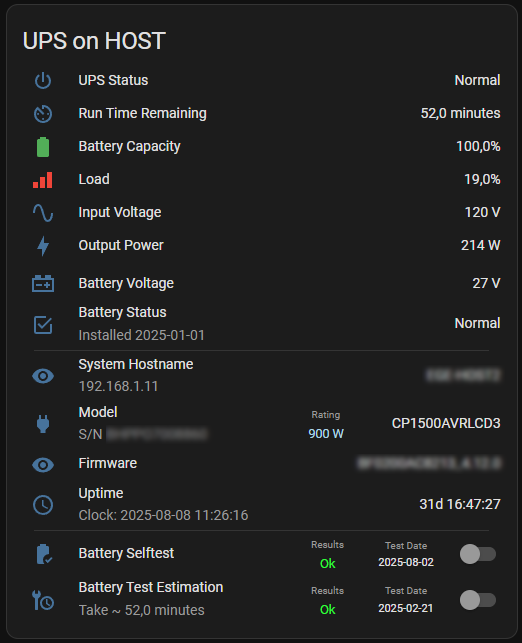
Here is my “graphical” modifications:
title: UPS on Host
type: entities
entities:
  - type: divider
    style:
      height: 0px
      margin-top: "-20px;"
  - entity: sensor.ups01_advanced_status
    name: UPS Status
    icon: mdi:power
  - type: divider
    style:
      height: 0px
      margin-top: "-15px;"
  - entity: sensor.ups01_run_time_remaining
    name: Run Time Remaining
    icon: mdi:av-timer
  - type: divider
    style:
      height: 0px
      margin-top: "-15px;"
  - entity: sensor.ups01_battery_capacity
    name: Battery Capacity
  - type: divider
    style:
      height: 0px
      margin-top: "-15px;"
  - entity: sensor.ups01_load
    icon: mdi:signal-cellular-3
    name: Load
  - type: divider
    style:
      height: 0px
      margin-top: "-15px;"
  - entity: sensor.ups01_input_voltage
    name: Input Voltage
  - type: divider
    style:
      height: 0px
      margin-top: "-15px;"
  - entity: sensor.ups01_output_power
    name: Output Power
    icon: mdi:lightning-bolt
  - type: divider
    style:
      height: 0px
      margin-top: "-10px;"
  - entity: sensor.ups01_battery_voltage
    name: Battery Voltage
    icon: mdi:car-battery
  - type: divider
    style:
      height: 0px
      margin-top: "-10px;"
  - entity: sensor.ups01_battery_status
    name: Battery Status
    icon: mdi:checkbox-marked-outline
    type: custom:secondaryinfo-entity-row
    secondary_info: Installed [[ sensor.ups01_battery_installed_date ]]
  - type: divider
    style:
      background-color: none
      height: 1px
      margin-top: "-5px;"
      width: 95%
      margin-left: auto
      margin-right: auto
  - type: divider
    style:
      background-color: none
      height: 0px
      margin-top: "-5px;"
      width: 95%
      margin-left: auto
      margin-right: auto
  - entity: sensor.ups01_hostname
    name: System Hostname
    type: custom:secondaryinfo-entity-row
    secondary_info: "[[ sensor.ups01_ip_address ]]"
  - type: divider
    style:
      height: 0px
      margin-top: "-5px;"
  - entity: sensor.ups01_model
    type: custom:multiple-entity-row
    name: Model
    icon: mdi:power-plug
    secondary_info:
      name: S/N
      entity: sensor.ups01_serial_number
      type: custom:multiple-entity-row
      secondary_info: sensor.ups01_serial_number
    entities:
      - entity: sensor.ups01_power_rating
        name: Rating
        styles:
          width: 100px
          text-align: center
          color: lightblue
          font-size: 12.5px
  - type: divider
    style:
      height: 0px
      margin-top: "-10px;"
  - entity: sensor.ups01_firmware
    name: Firmware
  - type: divider
    style:
      height: 0px
      margin-top: "-10px;"
  - entity: sensor.ups01_uptime
    icon: mdi:clock-outline
    name: Uptime
    type: custom:secondaryinfo-entity-row
    secondary_info: "Clock: [[ sensor.ups01_date_n_time ]]"
  - type: divider
    style:
      background-color: none
      height: 1px
      margin-top: "-5px;"
      width: 95%
      margin-left: auto
      margin-right: auto
  - type: divider
    style:
      background-color: none
      height: 0px
      margin-top: "-5px;"
      width: 95%
      margin-left: auto
      margin-right: auto
  - entity: switch.ups01_test_battery
    type: custom:multiple-entity-row
    name: Battery Selftest
    icon: mdi:battery-check
    toggle: true
    secondary_info: null
    entities:
      - entity: sensor.ups01_selftest_result
        name: Results
        styles:
          width: 60px
          text-align: center
          color: lime
          font-size: 12.5px
      - entity: sensor.ups01_selftest_date
        name: Test Date
        styles:
          width: 65px
          text-align: center
          font-size: 11px
  - type: divider
    style:
      height: 0px
      margin-top: "-5px;"
  - entity: switch.ups01_calibrate_battery
    type: custom:multiple-entity-row
    name: Battery Test Estimation
    icon: mdi:wrench-clock
    toggle: true
    secondary_info:
      name: Take ~
      entity: sensor.ups01_run_time_remaining
      type: custom:multiple-entity-row
      secondary_info: sensor.ups01_run_time_remaining
    entities:
      - entity: sensor.ups01_advance_test_estimation_results
        name: Results
        styles:
          width: 60px
          text-align: center
          color: lime
          font-size: 12.5px
      - entity: sensor.ups01_advance_test_estimation_date_temp
        name: Test Date
        styles:
          width: 65px
          text-align: center
          font-size: 11px
show_header_toggle: false
state_color: true
grid_options:
  columns: 12
  rows: auto
This is the way! Thank you!!!
@dancwilliams or @peter-mc can you elaborate further on “setup an SNMP gateway and add to NUT”? Were you using a Windows machine? Was HA running on the same machine as the UPS was connected?
I have 2 UPSes, one connected to a Linux machine and one to a Windows machine. The Linux connected one was super simple to connect to NUT and HA. However, I’ve done a fair bit of research on a Windows version of a NUT server, and although 1 or 2 options exists, they are not the easiest to setup. However, I like the idea of using the NUT integration vs manually creating sensors and cards.
It’s fairly cheap and very easy to do with a Raspberry Pi (I use a Pi 4 but I think Pi zero can do it, even cheaper).
I’m wondering if anyone managed to get the linux subsystem on windows to do it though, somehow.
In Nut you can have it output SNMP by listing all the OID’s it should respond to. I do that so I can monitor my NUT devices with Zabbix. But that is sort of the inverse of what you are looking for I think.
Hello!
On the Windows box that is connected to the CyberPower GX1500U UPS via USB I am running POwerPanel Business 4.12.0. I have PowerPanel Business configured to allow SNMP polling.
I am running Home Assistant on a different machine with the Network UPS Tools (NUT) add-on. I have the Add-On itself configured as below:

And the individual desktop configured like this:
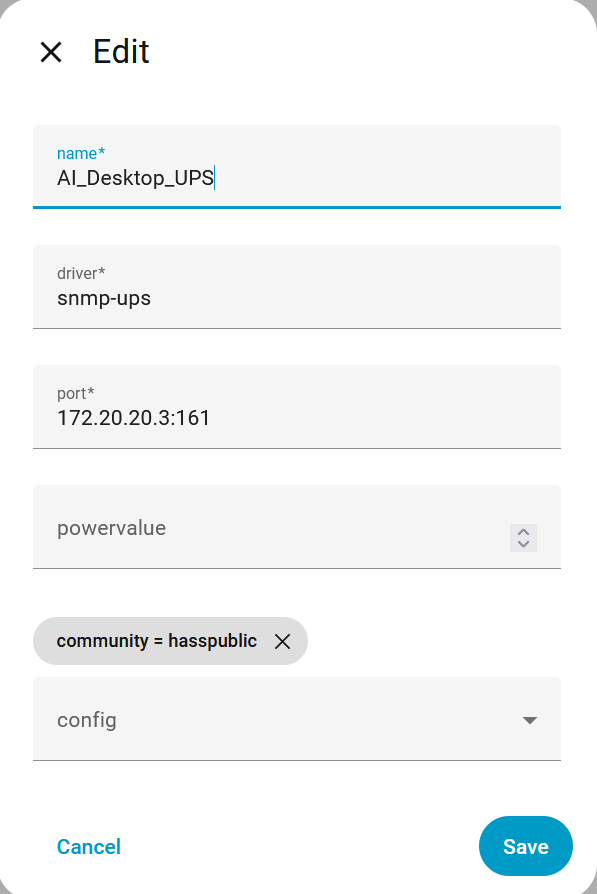
Then, back within Home Assistant Devices I added the NUT integration and then added the NUT Addon as a device using the “user” I created within the addon:
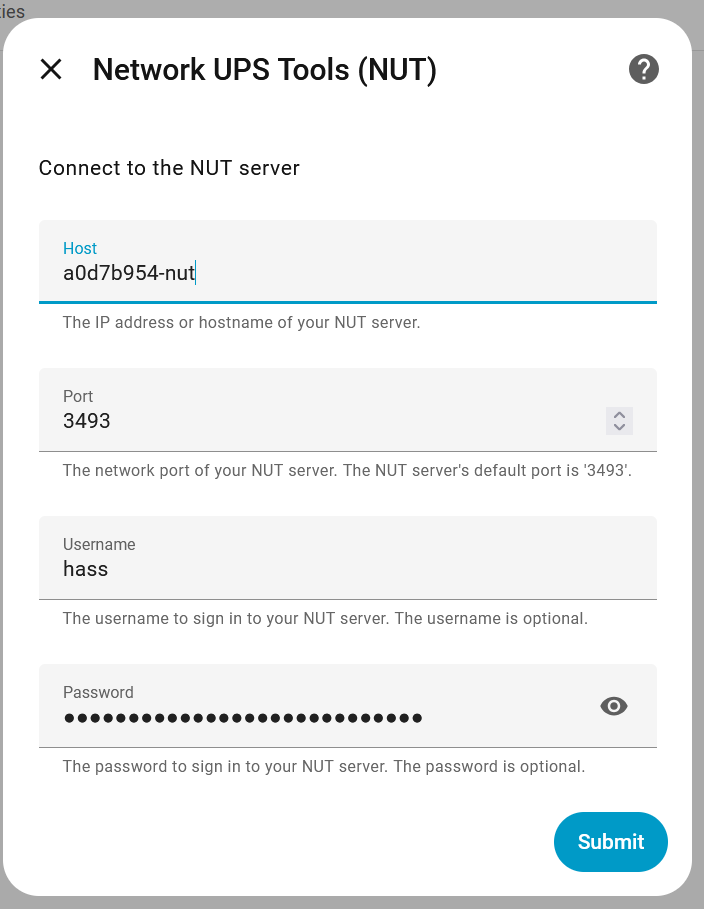
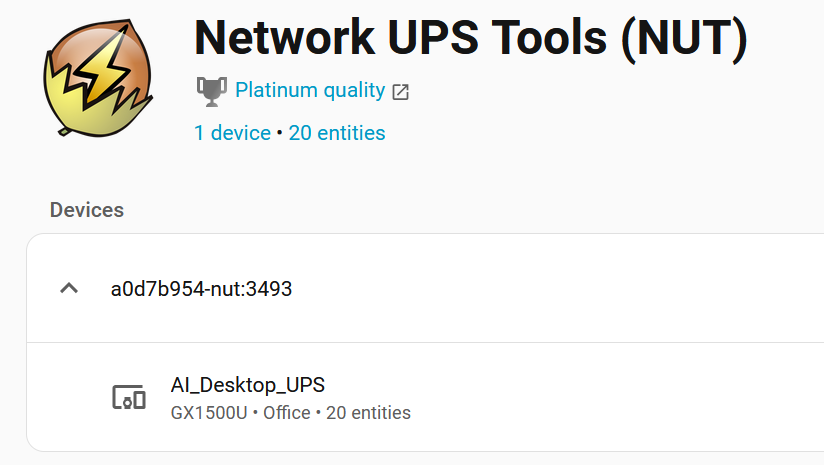
This dropped the UPS into Home assistant as a device:
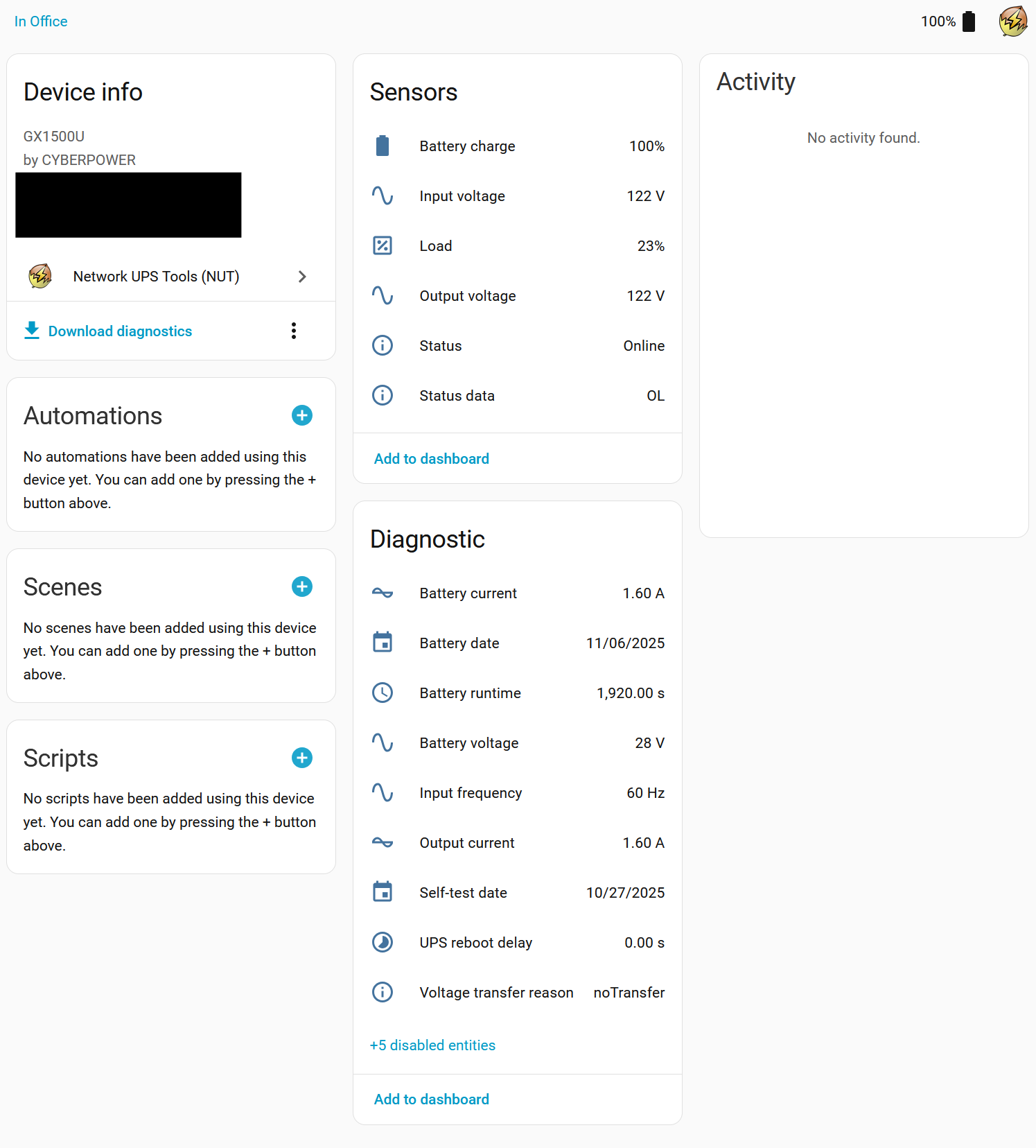
Hope this helps!
I hope CyberPower is reading this on how to NUT out a solution. (Sorry couldn’t resist!)
This should have been a SNMP’l exercise. (Groans)
These extensive discussions are a sad reflection on the industry: Documentation improvements or software updates, or both required?
Thank you for the explanation. I had the PowerPanel Business up and running, but I was not tracking that there was both a NUT Addon and NUT integration within HA. I had the NUT integration already working with a Linux-attached UPS, but previously I did not know that you were talking about a separate NUT Addon.
Here for other’s reference:
That seems to be the missing piece. However, unfortunately for me, I use the Docker version of HA (not HA OS or Supervised) so I cannot add the Addon as-is. I’m currently looking to see if I can get it running in a Docker container.
I haven’t specifically gotten the NUT Addon to work (on my Docker installation of HA), but I came across another solution that will work for me for now plus maybe an alternate solution I might try another time. I’ll list both for others.
On my network, I also have a Synology NAS. DSM (the Synology OS) has built in support for both a NUT Server and an SNMP driver with several UPS MIBs available. I was able to follow this guide, using the SNMP type instead of USB. (Essentially creating an SNMP gateway on my Synology NAS to connect to HA)
That solution didn’t offer a lot of UPS attributes in HA. I’m not sure if it is DSM’s version of the CyberPower MIB or DSM’s NUT Server implementation. So an alternate solution, which I have not tried, would be to run an Docker NUT Server, like this. The piece I’m not sure about, is if you can change the driver to snmp-ups instead of USB. The example listed is for a USB connected UPS.
Check this out: GitHub - tigattack/nut-docker: Docker image for Network UPS Tools
I just set it up running in docker desktop on my windows box where powerpanel is running (and the UPS connected) so it’s still using snmp. It works well though is pretty slow to update the values in HA but that may just be some tweaking I need to do.
I am using haos but prefer standalone dockers and the Nut addon (via snmp) wasn’t staying connected for me.
Do also note that you can pull the data in directly with snmp templates on the config if you don’t want to use any NUT at all. I had it that way for a couple years and no complaints besides it taking a long time to start the snmp integration on restart of HA.
Very simple setup:
docker-compose.yaml
services:
  nut:
    image: ghcr.io/tigattack/nut-upsd:latest
    container_name: nut
    restart: unless-stopped
    volumes:
      - ./config:/etc/nut
    ports:
      - 3493:3493
Inside the config folder is ups.conf, upsd.conf, and upsd.users
ups.conf
[ups]
  driver =snmp-ups
  port = 192.168.1.178
  desc = "CyberPower 1500"
  pollinterval = 10
upsd.conf
# =======================================================================
STATEPATH /var/run/nut

# Tell upsd where to look for the driver state sockets
# for the docker image, this must be /var/run/nut

# =======================================================================
LISTEN 0.0.0.0 3493
LISTEN :: 3493
upsd.users
[haUser]
    password = Bg4sUesLt2sJk1
    actions = SET
    instcmds = ALL
You will need to use wsl (on windows) to run chmod and chown for these
chmod 0440 ups.conf upsd.conf upsd.users
chown 100:101 ups.conf upsd.conf upsd.users
Great suggestion! This was easy to setup and seems to work well (shows more information than my prior DSM method)!
UPS connected to Windows machine and docker container running on a separate Linux NAS.
Hi,
I created a CyberPower CyberPower BR1200ELCD integration using the USB->TCP(ETH) port as I wanted to be able clustering my ProxmoxHA… just in case you are looking for something like that: GitHub - ESDN83/esp-cyberpower-ups: ESP32-S3 CyberPower UPS Monitor via USB HID · Native ESPHome component · Reads voltage, load, battery, runtime, status · No NUT/MQTT needed · Direct Home Assistant integration · Shutdown automation ready · GitHub