I currently have the exact same question with a similar code. And I can’t see why it’s not working.
Mushroom card can set up the colour permanently if it’s a button, not the script or anything else.
For that you need:
- Create “Button” helper (Devices & Services → Helpers → Create Helper
- Create automation to trigger script by the press of the button (above) - (Automations & Scenes - Automations - Create automation)
Below is the example of the automation:
alias: Diffuser - Button - OFF
description: “”
trigger:
- platform: state
entity_id:- input_button.input_button_diffuser_off
condition:
action:
- input_button.input_button_diffuser_off
- service: script.diffuser_off
metadata: {}
data: {}
mode: single
Hello!
I understand that the last post is several months ago, but my question is closely related to the topic and to a specific code snipped (shared even years ago, quoted below). Therefore, I felt it is ok that I did not start a new topic but added my question below.
Can somebody please help me to add code for a threshold for “yellow”? I face difficulties with the nested logic:
It should be:
- <80: red
- 80-100: yellow
- >100: green
Do I have to repeat the part with the sensor entity, or can it be piped (|) just once and for all following (and nested) “if-then-else” statements?
By the way, is there some online tool available you could recommend that helps less savvy users (like me) to build such formulas?
Thank you so much! 
I just understand something with mushroom template. While this is working:

{% if is_state(entity, 'on') %}
  red
{% else %}
  green
{% endif %}
This isn’t:

{{ is_state(entity, 'on') ? 'red' : 'green' }}
Cause it not use javascript ternary operator but pyhon like this :
{{ 'red' if is_state(entity, 'on') else 'green' }}
@Tidjy I used you example, but it deson’t work. What am I doing wrong?
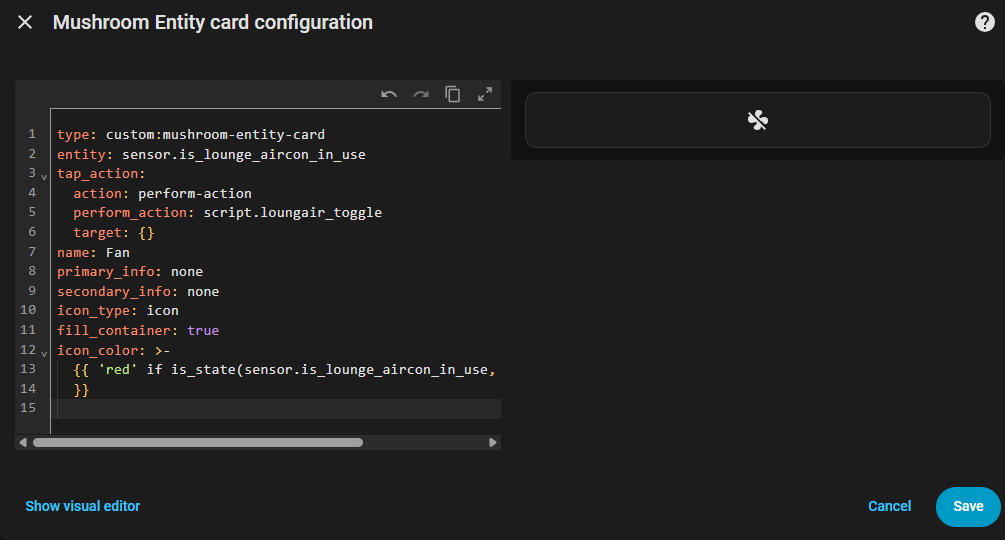
Hi!
I don’t think this will work with an entity card! For me, this code only works in a template card. Here’s a link if you want to do it with Card Mod.
type: custom:mushroom-legacy-template-card
entity: switch.all_switch
primary: Test
secondary: etc
icon: mdi:light-switch
icon_color: |2-
    {% if is_state('switch.all_switch', 'on') %}
      red
    {% else %}
      green
    {% endif %}
layout: horizontal
This is my yaml for a custom:config-template-card
type: custom:config-template-card
variables:
  CURRENT_RATE: states['sensor.octopus_agile_current_rate'].state
  CHEAPEST_RATE: states['sensor.octopus_agile_cheapest_future_rate'].state
entities:
  - sensor.octopus_agile_current_rate
  - sensor.octopus_agile_cheapest_future_rate
card:
  type: vertical-stack
  cards:
    - type: custom:mushroom-entity-card
      entity: sensor.octopus_agile_current_rate
      name: Current Rate
      icon: mdi:flash
      icon_color: >-
        ${CURRENT_RATE < 10 ? "#00a0ff" : CURRENT_RATE < 20 ? "#42a011" :
        CURRENT_RATE < 30 ? "#ffa600" : "#ff7100"}
    - type: custom:mushroom-entity-card
      entity: sensor.octopus_agile_cheapest_future_rate
      name: Cheapest Rate
      icon: mdi:currency-gbp
      icon_color: >-
        ${CHEAPEST_RATE < 10 ? "#00a0ff" : CHEAPEST_RATE < 20 ? "#42a011" :
        CHEAPEST_RATE < 30 ? "#ffa600" : "#ff7100"}
    - type: custom:mushroom-entity-card
      entity: sensor.octopus_agile_cheapest_future_time
      name: Cheapest Time
      icon: mdi:clock
      icon_color: blue
It works well and may help future visitors to this page. I would really like the 3 sensors to appear as a single block with header text like an entities card. Any suggestions?