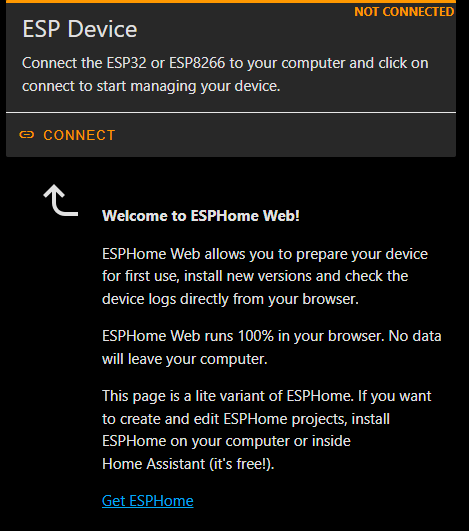
Build some demo code and load it to your screen using https://web.esphome.io/
This is a good start
Build some demo code and load it to your screen using https://web.esphome.io/
This is a good start
Sorry if I don’t understand, but mmy problem in on first configuration…
I click on connect, select serial port and go on
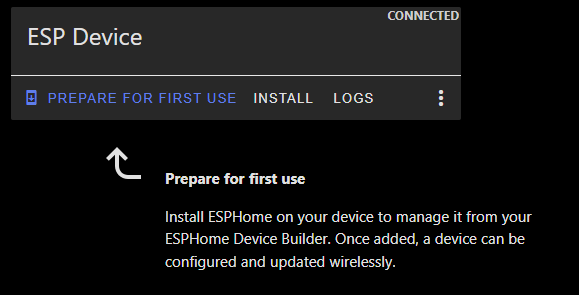
click on PREPARE FOR FIRST USE
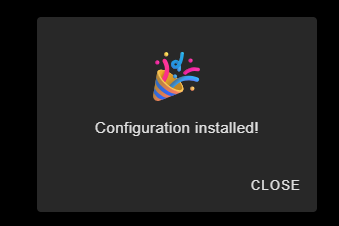
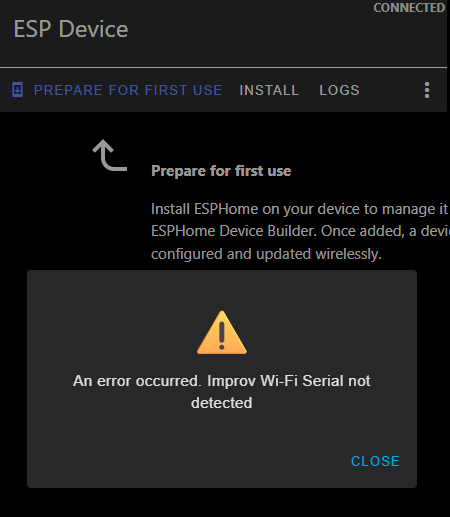
when I click to CLOSE the device seems disconnected
I try USB port and UART1 port, with boot pressed on plug or not… always the same problem
I’m getting a esp32display in a couple of days…
I’m having this idea about it being a keypad for Alarmo (beside regular homeassistant stuff)… And if alarmo is armed i would like to only show a keypad used to disarm alarmo. Nothing else… But in standard mode other “normal” stuff…
Would it be possible to set that type of rulebased page displays on this?
Anyone can help?
Are you sure usb cable has data+power?
Some cables do not work to flash esp.
It seem like you have other device you flash with esp builder so I think you know process well enough.
As a test I would flash basic yaml to get WiFi connection and enable web page so you can verify function. After that you can flash completed yaml over WiFi.
Yes, I have other ESP devices, I have several, so I don’t understand the problem. I’m only having problems with Waveshare. The cable is correct, it works with other devices. Which port do you connect it to to upload the firmware? And when you connect the USB, do you hold down the boot button?
INFO ESPHome 2025.7.2
INFO Reading configuration /config/esphome/pulsantieraingresso.yaml...
INFO Starting log output from 192.168.76.223 using esphome API
INFO Successfully resolved waveshare7 @ 192.168.76.223 in 0.000s
INFO Successfully connected to waveshare7 @ 192.168.76.223 in 0.108s
INFO Successful handshake with waveshare7 @ 192.168.76.223 in 0.054s
[18:37:17][I][app:164]: ESPHome version 2025.7.2 compiled on Aug  1 2025, 18:32:34
[18:37:17][C][wifi:613]: WiFi:
[18:37:17][C][wifi:434]:   Local MAC: D8:3B:DA:A6:83:94
[18:37:17][C][wifi:439]:   SSID: [redacted]
[18:37:17][C][wifi:442]:   IP Address: 192.168.76.223
[18:37:17][C][wifi:446]:   BSSID: [redacted]
[18:37:17][C][wifi:446]:   Hostname: 'waveshare7'
[18:37:17][C][wifi:446]:   Signal strength: -57 dB ▂▄▆█
[18:37:17][C][wifi:455]:   Channel: 11
[18:37:17][C][wifi:455]:   Subnet: 255.255.255.0
[18:37:17][C][wifi:455]:   Gateway: 192.168.76.254
[18:37:17][C][wifi:455]:   DNS1: 192.168.76.254
[18:37:17][C][wifi:455]:   DNS2: 0.0.0.0
[18:37:17][C][ch422g:037]: CH422G:
[18:37:17][C][ch422g:038]:   Address: 0x00
[18:37:17][C][logger:246]: Logger:
[18:37:17][C][logger:246]:   Max Level: DEBUG
[18:37:17][C][logger:246]:   Initial Level: DEBUG
[18:37:17][C][logger:252]:   Log Baud Rate: 0
[18:37:17][C][logger:252]:   Hardware UART: USB_SERIAL_JTAG
[18:37:17][C][logger:259]:   Task Log Buffer Size: 768
[18:37:17][C][i2c.idf:083]: I2C Bus:
[18:37:17][C][i2c.idf:084]:   SDA Pin: GPIO8
[18:37:17][C][i2c.idf:084]:   SCL Pin: GPIO9
[18:37:17][C][i2c.idf:084]:   Frequency: 50000 Hz
[18:37:17][C][i2c.idf:094]:   Recovery: bus successfully recovered
[18:37:17][I][i2c.idf:104]: Results from bus scan:
[18:37:17][I][i2c.idf:110]: Found device at address 0x20
[18:37:17][I][i2c.idf:110]: Found device at address 0x21
[18:37:17][I][i2c.idf:110]: Found device at address 0x22
[18:37:17][I][i2c.idf:110]: Found device at address 0x23
[18:37:17][I][i2c.idf:110]: Found device at address 0x24
[18:37:17][I][i2c.idf:110]: Found device at address 0x25
[18:37:17][I][i2c.idf:110]: Found device at address 0x26
[18:37:17][I][i2c.idf:110]: Found device at address 0x27
[18:37:17][I][i2c.idf:110]: Found device at address 0x30
[18:37:17][I][i2c.idf:110]: Found device at address 0x31
[18:37:17][I][i2c.idf:110]: Found device at address 0x32
[18:37:17][I][i2c.idf:110]: Found device at address 0x33
[18:37:17][I][i2c.idf:110]: Found device at address 0x34
[18:37:17][I][i2c.idf:110]: Found device at address 0x35
[18:37:17][I][i2c.idf:110]: Found device at address 0x36
[18:37:17][I][i2c.idf:110]: Found device at address 0x37
[18:37:17][I][i2c.idf:110]: Found device at address 0x38
[18:37:17][I][i2c.idf:110]: Found device at address 0x39
[18:37:17][I][i2c.idf:110]: Found device at address 0x3A
[18:37:17][I][i2c.idf:110]: Found device at address 0x3B
[18:37:17][I][i2c.idf:110]: Found device at address 0x3C
[18:37:17][I][i2c.idf:110]: Found device at address 0x3D
[18:37:17][I][i2c.idf:110]: Found device at address 0x3E
[18:37:17][I][i2c.idf:110]: Found device at address 0x3F
[18:37:17][I][i2c.idf:110]: Found device at address 0x5D
[18:37:17][C][:131]: RPI_DPI_RGB LCD
[18:37:17][C][rpi_dpi_rgb:132]:   Height: 480
[18:37:17][C][rpi_dpi_rgb:133]:   Width: 800
[18:37:17][C][rpi_dpi_rgb:134]:   DE Pin: GPIO5
[18:37:17][C][rpi_dpi_rgb:136]:   Reset Pin: EXIO3 via CH422G
[18:37:17][C][rpi_dpi_rgb:139]:   Data pin 0: GPIO48
[18:37:17][C][rpi_dpi_rgb:139]:   Data pin 1: GPIO47
[18:37:17][C][rpi_dpi_rgb:139]:   Data pin 2: GPIO21
[18:37:17][C][rpi_dpi_rgb:139]:   Data pin 3: GPIO1
[18:37:17][C][rpi_dpi_rgb:139]:   Data pin 4: GPIO2
[18:37:17][C][rpi_dpi_rgb:139]:   Data pin 5: GPIO42
[18:37:17][C][rpi_dpi_rgb:139]:   Data pin 6: GPIO41
[18:37:17][C][rpi_dpi_rgb:139]:   Data pin 7: GPIO40
[18:37:17][C][rpi_dpi_rgb:139]:   Data pin 8: GPIO14
[18:37:17][C][rpi_dpi_rgb:139]:   Data pin 9: GPIO38
[18:37:17][C][rpi_dpi_rgb:139]:   Data pin 10: GPIO18
[18:37:17][C][rpi_dpi_rgb:139]:   Data pin 11: GPIO17
[18:37:17][C][rpi_dpi_rgb:139]:   Data pin 12: GPIO10
[18:37:17][C][rpi_dpi_rgb:139]:   Data pin 13: GPIO39
[18:37:17][C][rpi_dpi_rgb:139]:   Data pin 14: GPIO0
[18:37:17][C][rpi_dpi_rgb:139]:   Data pin 15: GPIO45
[18:37:17][E][component:141]:   display is marked FAILED: unspecified
[18:37:17][C][gt911.touchscreen:132]: GT911 Touchscreen:
[18:37:17][C][gt911.touchscreen:133]:   Address: 0x5D
[18:37:17][C][gt911.touchscreen:134]:   Interrupt Pin: GPIO4
[18:37:17][C][lvgl:088]: LVGL:
[18:37:17][C][lvgl:088]:   Display width/height: 800 x 480
[18:37:17][C][lvgl:088]:   Buffer size: 12%
[18:37:17][C][lvgl:088]:   Rotation: 0
[18:37:17][C][lvgl:088]:   Draw rounding: 2
[18:37:17][C][esphome.ota:073]: Over-The-Air updates:
[18:37:17][C][esphome.ota:073]:   Address: waveshare7.local:3232
[18:37:17][C][esphome.ota:073]:   Version: 2
[18:37:17][C][safe_mode:018]: Safe Mode:
[18:37:17][C][safe_mode:019]:   Boot considered successful after 60 seconds
[18:37:17][C][safe_mode:019]:   Invoke after 10 boot attempts
[18:37:17][C][safe_mode:019]:   Remain for 300 seconds
[18:37:17][C][api:207]: API Server:
[18:37:17][C][api:207]:   Address: waveshare7.local:6053
[18:37:17][C][api:212]:   Using noise encryption: YES
[18:37:17][C][mdns:122]: mDNS:
[18:37:17][C][mdns:122]:   Hostname: waveshare7
[18:37:31][D][esp-idf:000][wifi]: I (40943) wifi:
[18:37:31][D][esp-idf:000][wifi]: [ADDBA]RX DELBA, reason:39, delete tid:0, initiator:0(recipient)
[18:37:31][D][esp-idf:000][wifi]:
[18:37:46][D][esp-idf:000][wifi]: I (55986) wifi:
[18:37:46][D][esp-idf:000][wifi]: [ADDBA]RX DELBA, reason:39, delete tid:0, initiator:0(recipient)
[18:37:46][D][esp-idf:000][wifi]:
[18:37:50][I][safe_mode:042]: Boot seems successful; resetting boot loop counter
[18:37:50][D][esp32.preferences:142]: Writing 1 items: 0 cached, 1 written, 0 failed
ok I managed to get the ESP to show to home assistant… now I get this error
OK I RESOLVED thanks all
Make sure to pull my latest code.
There was some issues with the default ESP-IDF version used with ESPHome 2025.6.x and 2025.7.x with this device that made it bootloop.
what was the issue?