Ok, why is this config causing 53% fragmentation and slowly increasing

I have stripped as much as I can out of this config. It seems like every time I take something else out, I get at least a .1% increase in fragmentation. It is not crashing, might eventually if I left it up and stopped screwing with it. I took a shot on working with a couple of AI engines to attempt to optimize the code, but nothing seems to help. I have numerous esp’s with the same basic base config and one of them is running a CC1101 and never sees fragmentation above 43% and has a much more complex config. I also have one other with the same display section that behaves perfectly…

Graph:
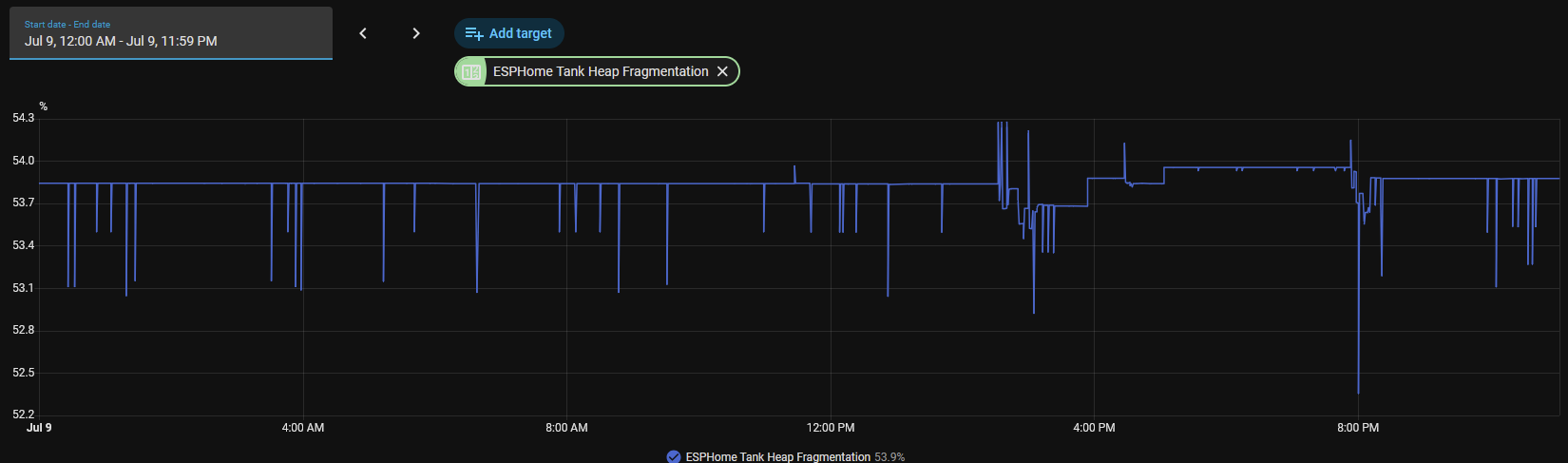
Config:

substitutions:
  name: "home-tank"
  friendly_name: ESPHome Tank
  devicename: esphome_tank_test
  esphome_board: esp32dev
  esphome_project_name: "Matt.Ward Aquarium Monitor"
  esphome_project_version: "aquarium-monitor-v.2"

esphome:
  name: ${name}
  friendly_name: ${friendly_name}
  name_add_mac_suffix: false
  project:
    name: $esphome_project_name
    version: $esphome_project_version
  on_boot:
    if:
      condition:
        api.connected: null
      then:
        - logger.log: API is connected! Now we can trigger what we want!

esp32:
  board: esp32dev
  framework:
    type: esp-idf
    sdkconfig_options:
      CONFIG_COMPILER_OPTIMIZATION_SIZE: y
      CONFIG_COMPOSITE_HEAP_FREELIST: y  # Better management of fragmented blocks
    advanced:
      minimum_chip_revision: "3.1"
      sram1_as_iram: true

network:
#    enable_ipv6: true
#    min_ipv6_addr_count: 2
#    enable_high_performance: true

status_led:
  pin:
    number: 02
    inverted: false

# Enable logging
logger:
  level: debug
  initial_level: INFO
  baud_rate: 0        # disable UART logging to save IRAM/heap
  hardware_uart: UART0

select:
  - platform: logger
    name: "Logger select"
  
debug:
  update_interval: 60s

# Enable Home Assistant API
api:
  on_client_connected:
    then:
      - logger.log: "API connected!"
        
# Allow Over-The-Air updates
ota:
  platform: esphome

# Allow provisioning Wi-Fi via serial
#improv_serial:

wifi:
  domain: .home
  ssid: !secret wifi_ssid
  password: !secret wifi_password
# Set up a wifi access point
  ap:  
    ssid: "${friendly_name}"
    password: !secret wifi_ap_password

# In combination with the `ap` this allows the user
# to provision wifi credentials to the device via WiFi AP.
captive_portal:

# To have a "next url" for improv serial
web_server:
  version: 3
  include_internal: true
  sorting_groups:
    - id: sorting_group_ip_settings
      name: "IP Settings"
      sorting_weight: 10
    - id: sorting_group_wifi
      name: "Wifi"
      sorting_weight: 15

one_wire:
  - platform: gpio
    pin: GPIO4

i2c:
  sda: GPIO21
  scl: GPIO22
  frequency: 200kHz

display:
  - platform: lcd_pcf8574
    id: mydisplay
    dimensions: 16x2
    address: 0x27
    update_interval: 10s
    lambda: |-
      //Print tank temperature and heater state on row 0
      it.printf(0,0,"T=%.1fF", id(esphome_tank_temp).state);
      it.printf(10, 0, "H=%s", id(tank_heat).state.c_str());
      // Print the current time on row 1
      // it.strftime(1,1,"%I:%M%p  %m/%d", id(my_time).now());
      //it.strftime(0,1,"%I:%M%p", id(my_time).now());
      it.printf(0,1, "home-tank.home");
      if (id(tank_backlight).state) {
      // Binary sensor is on
      // Control backlight on mydisplay
      // Binary sensor is on in HA
      id(mydisplay).backlight();
      } else {
      // Binary sensor is off in HA
      id(mydisplay).no_backlight(); 
      }

time:
  - platform: homeassistant
    id: my_time

text_sensor:
  - platform: homeassistant
    id: tank_heat
    name: "Tank Heater"
    icon: mdi:heat-wave
    entity_id: binary_sensor.tank_heating
    web_server:
      sorting_weight: 10
  
    # Expose WiFi information as sensors.
  - platform: wifi_info
    ip_address:  
      name: IP
      id: IP
      web_server:
        sorting_group_id: sorting_group_ip_settings
        sorting_weight: 5

    ssid:
      name: SSID
      web_server:
        sorting_group_id: sorting_group_ip_settings
        sorting_weight: 25
 
sensor:
    # Uptime sensor.
  - platform: uptime
    name: $friendly_name Raw Uptime
    id: uptime_sensor
    update_interval: 60s
    internal: false

  - platform: dallas_temp
    address:  0x5a00000074ec5128  # Replace with your sensor's unique 64-bit address (omit this line if you only have 1 sensor)
    name: "ESPHome Tank Temperature"
    id: esphome_tank_temp
    update_interval: 30s
    unit_of_measurement: "°F"
    accuracy_decimals: 2
    web_server:
      sorting_weight: 5
    filters:
      - lambda: return x * (9.0f/5.0f) + 32.0f + 1.98f;  # combine conversion + offset
#      - offset: 2.04
      - sliding_window_moving_average:
          window_size: 3
          send_every: 1

  - platform: debug
#    free:
#      name: "Free Memory"
#      unit_of_measurement: "Bytes"
#      icon: "mdi:memory"
    fragmentation:
      name: "Heap Fragmentation"
#    block:
#      name: "Largest Free RAM Block"
    
binary_sensor:
  - platform: homeassistant
    id: tank_backlight
    name: "Backlight"
    entity_id: input_boolean.esphome_backlight
    internal: false
    web_server:
      sorting_weight: 15
  
  - platform: status
    name: "API Connected"
   
switch:
  - platform: template
    name: "Backlight"
    id: backlight_switch
    icon: "mdi:lightbulb"
    web_server:
      sorting_weight: 20
    lambda: |-
      return id(tank_backlight).state;
    turn_on_action:
      - homeassistant.service:
          service: input_boolean.turn_on
          data:
            entity_id: input_boolean.esphome_backlight
    turn_off_action:
      - homeassistant.service:
          service: input_boolean.turn_off
          data:
            entity_id: input_boolean.esphome_backlight

button:
  - platform: restart
    name: "Restart"

Are you experiencing crashes / reboots? If so and you believe fragmentation is the cause, log a ticket on Github.

Otherwise - is there another issue you are trying to resolve?

I will quote Sesame Street here “which one of these is not like the others?”.

What was the version of esphome that was working correctly?

You might read this:

That is a different problem, since you don’t seem to be downloading images.

I looked and none of my esphome devices are reporting heap size it appears. All of my Tasmota ones do. I generally don’t look at that. I do care about uptime.

So, is this a new problem?
Do you know if it actually is a problem?

A fragmented heap is a sign of many allocations and frees in a not so good order. It might be a problem for your device, or it might be just fine. In the post I linked above, the OP chose to just go back to an older version and didn’t raise a GitHub issue, so it is likely any potential issue never got resolved. In non-trivial systems heap problems can be difficult to solve.

I would leave the device operating for days/weeks/months to see when it fails. I would add the additional debug sensors for heap free space and max size (which are the ones that determine how much allocation can happen and of what sizes) those are the ones that will tell you if something is leaking memory (which is frequently the cause of fragmentation).

No, no crashes or reboots so far. However slowly increasing fragmentation will likely be an issue and I wanted to get ahead of it. It may come down to making a ticket, right now I am mainly looking for advise from other experienced users. I am not sure where this number becomes a problem even. And, this device really is not doing much and it kind of caught me off guard.

Not a new problem, but the device has only be built for about 6 months and I just pushed it into service to replace a Tasmota unit. You have to turn on a sensor for all of the memory stuff.

I run the newest ESPHome within a day or two. I also strive to run the newest version of HA, except I will not install a .0 version. I had all the senors for memory loaded and took them out incase that was part of the issue. Once compiled, this config is about 47% of flash and about 15% of ram according to the compile process. I am planning to stick with a version and let the unit run for awhile to see what happens. Compared to other units this is really doing very minimal work, other than running a display. My other unit running a display is much more complex, larger config, used ADC and PWM controls and so on. The odd thing in this config is the use of a one-wire sensor, this is the only unit that I have with that config.

Maybe this is a nothing burger, maybe I am concerned about nothing at all. I do not have a good feel for how hard you can run them and how memory really reacts, but this one is odd compared to all of my other units. I am aware of the implication of fragmentation, maybe I do not need to worry as long as I stick with running the latest ESPHome since that alone provides reboots on a regular basis.

More than anything… I guess I am trying to figure out if I am doing something stupid. I do intend to slowly convert this unit more toward stand alone aquarium control to reduce the depenence on HA of the automation part of the process. This is likely why I am concerned about it now, the unit really only feeds data to HA and HA is making all of the control decisions.

Doing that, you are unlikely to have a device running long enough to cause a problem.

So far, that seems to be the case. Have any of your devices run out of memory yet? Have any rebooting unexpectedly?

It depends on your definition of “stupid”.

Ignorant: Simply not knowing the facts. Everyone is ignorant of certain subjects (e.g., you might be “ignorant” of how a car engine works unless you study it). It’s a state of being uninformed, not a lack of brainpower.

Stupid: Making poor choices or struggling to understand concepts even when the facts are presented. Often used to describe decision-making that defies logic or reasoning.

I think you are reading too much into the numbers. It doesn’t appear there is a real problem. You need to let it run for days if not weeks to see if there is a leak. If there is, it might be in one of the long list of dependencies that your config is using (and nothing to do with your particular settings).

So, add back the total free space and max size debug settings on multiple configs and capture data for at least a week. If there is an issue, it will show up in the data (over the long term).

Assuming there is an issue, you will need to decide what to do about it. If the issue takes days to present itself, debugging it will be hard. Perhaps a nightly reboot is a good enough solution. If the problem takes weeks to show up, it will probably take even longer to figure out (if the change fixed it or not).

One thing to do is get some clarity on your requirements. How long does it need to stay up? Why?

It sounds like you are using this to control temperature in an aquarium. Think of the failure modes and what additional control you can put in place to reduce failure (know that additional things also give you additional failure paths).

My longest running automations are for freeze protection. This is a special case of temperature control. Over the decade and a half I have been doing this, I have experienced a few failure modes. The DS18B20 has a checksum, but it doesn’t “work” for 0°C (since that is all zeros, so if the data line is held low, this is the temperature you get and it passes the check). Most implementations don’t handle this error. For many things it probably doesn’t matter. But I once found the heaters running when they shouldn’t have been, because the sensors were shorted. This is a rare-ish problem and there are different ways to “solve” it.

I also have had issues with the heater not working and also not being able to keep up with the heat loss during an extended very cold period.

I typically handle this, by looking at the data more closely when it is likely to matter so I can address the issue quickly. I also set my setpoints higher, so I can be sure the system is operating normally before it becomes a problem. I could automate these things, but so far it hasn’t been worth it to me.

I have been running HA since 0.19 and have seen my share of odd things. I have already enabled all the memory sensors and am planning to hold off on upgrades to this unit to maximize uptime and look for any related issues. More than anything, it just bugs me. As a network engineer, not a programmer, I am running v6 on most devices. I have it disabled on this device as it was hard on memory consumption. I have also disabled a lambda that converts raw uptime to human readable uptime and presents that to HA. Both of these changes have helped. How ever on my other ESPs I still run both.

I feel your pain regarding you freeze sensors. I have a corner of my basement that has caused me issues for 40 years now. HA has been managing a heater and fan and associated sensors for about 10 of those years and has now relegated the situation to a lower level of concern… now it just notifies me when things look wonky and I may need to step in.

As I said… This may be stable or stable enough and may just get ignored until it is a problem. I do like to jump to new major versions as things are fixed and optimized, may be over kill. Being able to update HA and being reasonably confident that it will just boot up and may only need a bit of yaml tweaking due to system changes is a God send at this point. In the early days, that was never the case, but if you do not upgrade you do not gain from progress. Not having to worry about complete restores due to an upgrade has been awesome the last few years.

I will report back if this becomes and issue and will try to open an intelligent ticket on github to resolve the issue. I really suspect if there is and issue it will be deeply inside the one-wire code. This is the only one-wire device I run.

Sorry if you mentioned this & I missed it, but have you tried the Clean build files option on this device recently (or ever)?

I have not, I am not completely sure what that does. Just read about the process and doing it now, along with a reinstall of the project on the device.