Optimizing HVAC Energy Savings with Nordpool 15-min Pricing *Part 1-3: Theory, Implementation and Examples*

If you do not have historical data, I highly suggest you read thoroughly:

As you’re willing to change the script to suit your needs, I think you have techincal knowledge to analyze your own system. I would love to know your thoughts on the part 3, if there is anything that needs to be clarified or changed.

To create the raw_today and raw_tomorrow attributes , using the Nordpool Core Integration, this is my template:

# ------- NORDPOOL --------
  - trigger:
      - platform: time_pattern
        minutes: "/15"
      - platform: homeassistant
        event: start
      - platform: event
        event_type: nordpool_refresh
    action:
      - action: nordpool.get_price_indices_for_date
        data:
          config_entry: 01KCK8TE6SH55VJJTA6GXRHGBM
          date: "{{ now().date() }}"
          resolution: "15"
          currency: EUR
          areas: BE
        response_variable: today_price
      - action: nordpool.get_price_indices_for_date
        data:
          config_entry: 01KCK8TE6SH55VJJTA6GXRHGBM
          date: "{{ now().date() + timedelta(days=1) }}"
          resolution: "15"
          currency: EUR
          areas: BE
        response_variable: tomorrow_price
    sensor:
      - name: "Nordpool Price Data"
        unique_id: nordpool_price_data
        state: "{{ now().isoformat() }}"
        attributes:
          raw_today: >
            {% set ns = namespace(prices=[]) %}
            {% if today_price is mapping and 'BE' in today_price %}
              {% for p in today_price['BE'] %}
                {% set ns.prices = ns.prices + [
                  {
                    'start': (p.start | as_datetime | as_local).isoformat(),
                    'end':   (p.end   | as_datetime | as_local).isoformat(),
                    'value': p.price / 10
                  }
                ] %}
              {% endfor %}
            {% endif %}
            {{ ns.prices }}

          raw_tomorrow: >
            {% set ns = namespace(prices=[]) %}
            {% if tomorrow_price is mapping and 'BE' in tomorrow_price %}
              {% for p in tomorrow_price['BE'] %}
                {% set ns.prices = ns.prices + [
                  {
                    'start': (p.start | as_datetime | as_local).isoformat(),
                    'end':   (p.end   | as_datetime | as_local).isoformat(),
                    'value': p.price / 10
                  }
                ] %}
              {% endfor %}
            {% endif %}
            {{ ns.prices }}

As for part 3; I am going to look into heating (electric radiators) and water heating (bathroom boiler). My first priority was finding out how I can maximize the use of my plugin batteries (Home Wizard) if i would change my contract to dynamic 15min pricing.

I now added some dirty code to find the 10 cheapest 15min blocks where I would set the batteries to charging (or my car battery charger). Doing the same for the most expensive blocks would allow me to set the batteries to discharge. I would have to optimize to take into account charge levels and also my peak usage which is between 06:00 and 06:30 (bathroom heating which could become pre_heating) and between 17:00 and 18:30 (cooking/dinner).

Lowest 10 blocks for today:

# Cheapest 10
        M = min(10, len(today15))
        cheapest_10 = sorted(
            sorted(today15, key=lambda x: x['value'])[:M],
            key=lambda x: x['start']
        )
        hass.states.set(
            'sensor.nordpool_cheapest_15min_today',
            cheapest_10[0]['value'] if cheapest_10 else None,
            {
                'periods': cheapest_10,
                'count': len(cheapest_10),
                'friendly_name': 'Cheapest 15-min Nordpool Periods (Today)'
            }
        )

I just put this before Step 1 - generate candidate shutdown windows in the else clause. Ofcourse this should become a function and maybe an option…? Just testing at the moment.

Result:
sensor.nordpool_cheapest_15min_today

periods:
  - start: "2025-12-17T03:15:00+01:00"
    end: "2025-12-17T03:30:00+01:00"
    value: 8.217
    dur_min: 15
  - start: "2025-12-17T03:45:00+01:00"
    end: "2025-12-17T04:00:00+01:00"
    value: 8.174
    dur_min: 15
  - start: "2025-12-17T04:00:00+01:00"
    end: "2025-12-17T04:15:00+01:00"
    value: 8.132
    dur_min: 15
  - start: "2025-12-17T04:15:00+01:00"
    end: "2025-12-17T04:30:00+01:00"
    value: 8
    dur_min: 15
  - start: "2025-12-17T04:30:00+01:00"
    end: "2025-12-17T04:45:00+01:00"
    value: 8.184999999999999
    dur_min: 15
  - start: "2025-12-17T06:00:00+01:00"
    end: "2025-12-17T06:15:00+01:00"
    value: 7.676
    dur_min: 15
  - start: "2025-12-17T21:45:00+01:00"
    end: "2025-12-17T22:00:00+01:00"
    value: 7.94
    dur_min: 15
  - start: "2025-12-17T22:45:00+01:00"
    end: "2025-12-17T23:00:00+01:00"
    value: 8.03
    dur_min: 15
  - start: "2025-12-17T23:30:00+01:00"
    end: "2025-12-17T23:45:00+01:00"
    value: 7.329000000000001
    dur_min: 15
  - start: "2025-12-17T23:45:00+01:00"
    end: "2025-12-18T00:00:00+01:00"
    value: 6.45
    dur_min: 15
count: 10
friendly_name: Cheapest 15-min Nordpool Periods (Today)

If I can put this in a schedule this would be a perfect trigger for an automation to charge the batteries. I need to experiment with loads to see how many blocks I need.

Hi,
Could it be that the desription in step 3, input_numbers are for the old version? The new script seems to have new names…

Please share code for visualizing

Hi, I really like the script you created for its simplicity! It’s way less complicated than some of the other dynamic price optimization tools out there.
I have been wrestling with getting it to work. One tip for those out there using e.g. euro as currency is to set the cutoff base price diff significantly lower to make sure you get cutoff periods.
I feel I am really close but I am stuck as the periods don’t have any date/time associated to them. An example:

  • preheat_start: ‘’
    shutdown_start: ‘’
    recovery_start: ‘’
    recovery_end: ‘’
    cost_saving: 0.536
    cost_saving_percent: 29.9
    shutdown_duration_hours: 2
    shutdown_duration_text: 2h
    details:
    total_cost_with_shutdown: 1.256
    total_cost_without_shutdown: 1.793
    price_difference: 0.009
    adjusted_min_price_diff: 0.005
    idx: 171
    len: 8
    Any suggestions how to resolve that issue?

Hi @wolter1 — thanks a lot for the kind words, and for the detailed debug info!

About the empty timestamps (preheat_start, shutdown_start, recovery_start, recovery_end): those fields should normally be populated when the optimizer can read proper time-ranged slots from your Nordpool sensor (each slot should have start and end).

To narrow this down quickly, could you share a bit more info?

  1. Which exact version are you running?
  • Is your /config/python_scripts/nordpool_cutoff_optimizer.py copied from the GitHub repo v2.0.0 release? (Not a v1.x script.)
  • And are you using the v2.0 template sensors (not the older ones that referenced shutdown_end)?
  1. Which Nordpool entity are you using, and how is it passed to the script?
  • In your automation, do you call:
    service: python_script.nordpool_cutoff_optimizer with data: { np_entity: <your_nordpool_sensor> } ?
    (v2.0 supports selecting the Nordpool sensor this way.)
  1. Telemetry from sensor.nordpool_cutoff_periods_python
    Could you paste the telemetry attributes (these help a lot in v2.0):
  • nordpool_entity
  • data_resolution
  • today_slot_minutes / tomorrow_slot_minutes
  1. Does your Nordpool raw_today actually contain timestamps?
    In Developer Tools → States, open your Nordpool sensor and check one item, e.g. raw_today[0].
    Does it include start and end? If you can paste one single element (with value + start/end), that would confirm whether the source data has the needed timestamps.

On the currency note: yes — if your prices are in EUR/kWh (or a different unit than “c/kWh”), you may need to tune cutoff_base_price_diff lower to see cutoffs. That affects whether periods are chosen, but it shouldn’t be the reason why timestamps are empty — empty timestamps typically point to a data/slot parsing issue instead of threshold tuning.

If you post the details above, I can tell you exactly what’s missing and what to change.

(Optional: if you want, also include a screenshot of the Nordpool sensor attributes and the optimizer sensor attributes — that usually makes the root cause obvious.)

Hi @nikop - thank you for your quick and elaborate response!

Regarding your suggestions/points:

  1. Yes I am running v2.0. I did notice that it appears that it is referencing to ‘input_number.nordpool_price_savings_sequential_hours’ and ‘input_number.nordpool_price_savings_minimum_price_difference’ which i ended up creating in Home Assistant to configure the script. The v2.0 template sensors do not appear being used in the script?

  2. I am using ‘sensor.nordpool_kwh_nl_eur_3_10_021’ which I defined in the python script as fallback, in the automation to call the service as well as in an input text helper. Better safe than sorry I guess ;-). In the ‘sensor.nordpool_cutoff_periods_python’ I can also see it it correctly using this entity (also see point 3 below)

nordpool_entity: sensor.nordpool_kwh_nl_eur_3_10_021
data_resolution: 15min (normalized)
today_slot_minutes: 15
tomorrow_slot_minutes: 15

  1. I am using the official Nordpool integration and all the timeslots do have a start and end. Just one example from today:
    raw_today:
  • start: ‘2026-01-19T00:00:00+01:00’
    end: ‘2026-01-19T00:15:00+01:00’
    value: 0.248

In the mean time I also asked for help from AI which lead to a new timezone stripper. I will not pretend that I fully understand it but now I actually do get the values I need and I have been using it to control my heatpump over the last few days! Maybe it helps others as well so I copied it in below:

def clean_tz(s):
“”"
Universal timezone stripper - handles strings AND datetime objects.
“”"
# Convert datetime objects to strings
if not isinstance(s, str):
try:
s = str(s)
except Exception:
return “”

  if not s:
      return ""

  s = s.strip()

  # Find and remove timezone (+XX:XX, +XXXX, -XX:XX, Z)
  for tz_marker in ['+', '-', 'Z']:
      if tz_marker in s[10:]:  # Look after date part
          s = s[:s.index(tz_marker, 10)]
          break

  s = s.strip()

  # Normalize format: "YYYY-MM-DD HH:MM:SS" → "YYYY-MM-DDTHH:MM:SS"
  if len(s) >= 19 and s[10] == ' ':
      s = s[:10] + 'T' + s[11:]

  return s
1 Like

Thank you for sharing your experience with official Nordpool integration! As I mention in my posts, I do use HACS version so it is nice to see that one can get script working with official version. Have fun @Wolter1 optimizing your system with my little script!

Whoops I made I mistake. I actually switched to the HACS Nordpool integration specifically for this script!

So, full transparancy, I don’t know how to code, the closest I can manage is to interpret code and be able to understand what it does(most of the time). So I have been using AI to help making my automations.

I just found this thread and I can see that AI has been in here snooping around and seen your project. Bacause I can see a lot of similarities.

So I asked the same AI to make a presentation of the project. And here it is. It has also included that I have wood stove and I use the balchony door to air out.

I have no idea of how good it is, but it seems to work. Maybe the coders in here can be the judge of this. I certanly can’t.

Prerequisites

You will need:

  1. A smart thermostat/heat pump integration (e.g., Sensibo, MelCloud, Z-Wave).
  2. Price data (e.g., Nordpool, Tibber) with future pricing attributes.
  3. Outdoor temperature sensor.
  4. Helpers (Input Booleans for guest_mode, vacation_mode and Input Numbers for your target temperatures).

Part 1: The “Brain” (templates.yaml)

This section goes in your configuration.yaml or templates.yaml.

It creates two sensors:

  1. Heating Season: A binary sensor deciding if we need heat (based on Calendar OR Temp < 14°C).
  2. Heat Pump Manager: This calculates the strategy. It loops through future price data. It also calculates a dynamic recommended_boost (e.g., if it is -10°C outside, we need to boost the temp more than if it is +5°C).

YAML

# ==============================================================================
# TEMPLATE SENSORS: CLIMATE LOGIC
# ==============================================================================

# 1. HEATING SEASON CALCULATOR
- binary_sensor:
    - name: "Heating Season"
      unique_id: heating_season_auto
      icon: mdi:radiator
      state: >
        {# --- CONFIGURATION --- #}
        {# Define winter months (e.g., Sept=9 to May=5) #}
        {% set calendar_winter = now().month >= 9 or now().month <= 5 %}
        
        {# Define cold threshold (e.g., below 14°C) #}
        {# REPLACE: sensor.outdoor_temperature #}
        {% set is_cold_outside = states('sensor.outdoor_temperature')|float(20) < 14 %}
        
        {# Logic: On if calendar matches OR it is physically cold outside #}
        {{ calendar_winter or is_cold_outside }}

# 2. HEAT PUMP MANAGER (THE BRAIN)
- sensor:
    - name: "Heat Pump Manager"
      unique_id: heat_pump_manager
      icon: mdi:thermostat-auto
      availability: >
        {# REPLACE: These sensors with your actual price/data sensors #}
        {{ states('sensor.electricity_price') | is_number and 
           state_attr('sensor.electricity_price_statistics', 'data') is not none and
           states('sensor.outdoor_temperature') | is_number }}
      state: >-
        {# --- SETTINGS --- #}
        {% set lookahead_hours = 3 %}
        {% set cutoff_percent = 1.25 %} {# Cutoff if price is 25% above average #}
        {% set cheap_percent = 0.90 %}  {# Cheap if price is 90% of average #}
        
        {# --- INPUTS (REPLACE THESE) --- #}
        {% set current_price = states('sensor.electricity_price') | float(0) %}
        {% set avg_price = state_attr('sensor.electricity_price_average', 'price_mean') | float(0) %}
        {% set raw_data = state_attr('sensor.electricity_price_statistics', 'data') %}
        
        {# --- CALCULATIONS --- #}
        {% set limit_cutoff = avg_price * cutoff_percent %}
        {% set limit_cheap = avg_price * cheap_percent %}
        
        {# --- SPIKE DETECTION (Look ahead loop) --- #}
        {% set ns = namespace(spike=false) %}
        {% set now_ts = as_timestamp(now()) %}
        {% set future_ts = now_ts + (lookahead_hours * 3600) %}
        
        {% if raw_data is iterable %}
          {% for item in raw_data %}
            {# Handles different data formats (Nordpool/Tibber) #}
            {% set t_start = item.start_time | default(item.start) %}
            {% set t_price = item.price_per_kwh | default(item.price) %}
            
            {% if t_start is defined %}
              {% set ts = as_timestamp(t_start) %}
              {# Logic: Is the future hour valid AND is price > cutoff? #}
              {% if ts > now_ts and ts < future_ts and t_price > limit_cutoff %}
                {% set ns.spike = true %}
              {% endif %}
            {% endif %}
          {% endfor %}
        {% endif %}

        {# --- STATE DETERMINATION --- #}
        {% if current_price > limit_cutoff %} cutoff
        {% elif current_price < limit_cutoff and ns.spike %} preheat
        {% elif current_price < limit_cheap %} cheap
        {% else %} normal
        {% endif %}
        
      attributes:
        lookahead_hours: 3
        # Helper attribute to visualize if a spike is detected
        spike_detected: >
          {% set raw_data = state_attr('sensor.electricity_price_statistics', 'data') %}
          {% set avg = state_attr('sensor.electricity_price_average', 'price_mean') | float(0) %}
          {% set limit = avg * 1.25 %}
          {% set ns = namespace(spike=false) %}
          {% set now_ts = as_timestamp(now()) %}
          {% set future_ts = now_ts + (3 * 3600) %}
          
          {% if raw_data is iterable %}
            {% for item in raw_data %}
              {% set t_start = item.start_time | default(item.start) %}
              {% set t_price = item.price_per_kwh | default(item.price) %}
              {% if t_start is defined %}
                {% set ts = as_timestamp(t_start) %}
                {% if ts > now_ts and ts < future_ts and t_price > limit %}
                  {% set ns.spike = true %}
                {% endif %}
              {% endif %}
            {% endfor %}
          {% endif %}
          {{ ns.spike }}

        # Calculates how much to overheat based on outdoor temperature
        recommended_boost: >
          {% set temp = states('sensor.outdoor_temperature') | float(0) %}
          {% set base_boost = 2.0 %}
          {# Factor increases as it gets colder outside #}
          {% set factor = 1.08 %}
          {% if temp < -10 %} {% set factor = 1.45 %}
          {% elif temp < -3 %} {% set factor = 1.34 %}
          {% elif temp < 2 %} {% set factor = 1.24 %}
          {% elif temp < 7 %} {% set factor = 1.14 %}
          {% endif %}
          {{ (base_boost * factor) | round(1) }}

Part 2: The Master Automation

This runs on any state change. It calculates the correct mode, temp, and fan speed, and only sends commands if something actually needs to change (to avoid API spamming).

Logic Flow:

  1. Summer: Keeps the house comfortable (Cool/Fan) but saves energy if no one is home.
  2. Winter:
  • Vacation: Low temp.
  • Preheat: Adds the calculated boost_amount to the target temp.
  • Away: Lowers temp if house is empty (Daytime).
  • Normal/Sleep: Standard schedule.

YAML

alias: "Climate: Master Heat Pump Control"
description: "Smart control logic. Prioritizes 'Preheat' over 'Away' mode to maximize savings."
mode: restart

triggers:
  - trigger: state
    entity_id: binary_sensor.balcony_door
    from: "on"
    to: "off"
    id: door_closes
  - trigger: state
    entity_id:
      - sensor.heat_pump_manager        # The Template Sensor from Part 1
      - input_boolean.vacation_mode
      - input_boolean.guest_mode
      - zone.home                       # Presence detection
      - binary_sensor.heating_season
      - sensor.indoor_temperature
  - trigger: time
    at: ["05:00:00", "08:00:00", "16:00:00", "22:00:00"]

conditions:
  - condition: state
    entity_id: binary_sensor.balcony_door
    state: "off"

actions:
  - variables:
      # --- GATHER SENSORS (REPLACE WITH YOUR ENTITY IDs) ---
      current_temp: "{{ states('sensor.indoor_temperature') | float(20) }}"
      is_winter: "{{ is_state('binary_sensor.heating_season', 'on') }}"
      nobody_home: "{{ is_state('zone.home', '0') }}"
      
      # --- MODES ---
      is_vacation: "{{ is_state('input_boolean.vacation_mode', 'on') }}"
      is_guest: "{{ is_state('input_boolean.guest_mode', 'on') }}"
      manager_mode: "{{ states('sensor.heat_pump_manager') }}"
      boost_amount: "{{ state_attr('sensor.heat_pump_manager', 'recommended_boost') | float(0) }}"

      # --- USER SETPOINTS ---
      setpoint_away: "{{ states('input_number.temp_away') | float(19) }}"
      setpoint_normal: "{{ states('input_number.temp_normal') | float(22) }}"
      setpoint_cheap: "{{ states('input_number.temp_cheap') | float(23) }}"
      setpoint_sleep: 18
      setpoint_vacation: 16

      # --- LOGIC START ---
      result: >-
        {% set ns = namespace(mode='no_change', temp=none, fan='Auto') %}

        {# === SUMMER LOGIC (COOLING) === #}
        {% if not is_winter %}
          {% if current_temp < 22.5 %}
              {% set ns.mode = 'fan_only' %}
              {% set ns.fan = 'Low' %} 
          {% elif is_vacation and not is_guest and current_temp > 27 %}
              {% set ns.mode = 'cool' %}
              {% set ns.temp = 27 %}
          {% elif is_guest and current_temp > 24 %}
              {% set ns.mode = 'cool' %}
              {% set ns.temp = 23 %}
          {% elif nobody_home and not is_vacation and not is_guest and current_temp > 25 %}
              {% set ns.mode = 'cool' %}
              {% set ns.temp = 25 %}
          {% elif not nobody_home and current_temp > 24 %}
              {% set ns.mode = 'cool' %}
              {% set ns.temp = 23 %}
          {% else %}
              {% set ns.mode = 'off' %}
          {% endif %}

        {# === WINTER LOGIC (HEATING) === #}
        {% else %}
          {# 1. Overheat Protection #}
          {% if current_temp > 25 %}
              {% set ns.mode = 'fan_only' %}
              {% set ns.fan = 'Medium' %}
          {# 2. Hysteresis #}
          {% elif current_temp > 23 and is_state('climate.heat_pump', 'fan_only') %}
              {% set ns.mode = 'no_change' %}
          {# 3. Standard Heating Priorities #}
          {% else %}
            {% set ns.mode = 'heat' %}
            {% set target = setpoint_normal %}
            {% set ns.fan = 'Auto' %}
            
            {# A. Vacation #}
            {% if is_vacation and not is_guest %}
              {% set target = setpoint_vacation %}

            {# B. Preheat (Smart Charging) - Overrides 'Away' #}
            {% elif manager_mode == 'preheat' %}
               {% set target = setpoint_normal + boost_amount %}
               {% if 22 <= now().hour or now().hour < 6 %}
                  {% set ns.fan = 'Silence' %}
               {% else %}
                  {% set ns.fan = 'High' %}
               {% endif %}

            {# C. Away (Daytime) #}
            {% elif not is_guest and nobody_home and (8 <= now().hour < 16) %}
              {% set target = setpoint_away %}
            
            {# D. Sleep (Night) #}
            {% elif 22 <= now().hour or now().hour < 5 %}
              {% set target = setpoint_sleep %}
              {% set ns.fan = 'Silence' %}
            
            {# E. Normal Presence #}
            {% else %}
               {% if manager_mode == 'cutoff' %}
                   {% set target = 20 %} 
                   {% set ns.fan = 'Silence' %} 
               {% elif manager_mode == 'cheap' %}
                   {% set target = setpoint_cheap %}
               {% endif %}
            {% endif %}
            {% set ns.temp = target %}
          {% endif %}
        {% endif %}
        {{ {'mode': ns.mode, 'temp': ns.temp, 'fan': ns.fan} | to_json }}

  # --- APPLY SETTINGS ---
  - variables:
      settings: "{{ result | from_json }}"
  - if:
      - condition: template
        value_template: "{{ settings.mode != 'no_change' }}"
    then:
      - if:
          - condition: template
            value_template: |-
              {{ states('climate.heat_pump') != settings.mode or 
                 (settings.mode in ['heat', 'cool'] and 
                 (state_attr('climate.heat_pump', 'temperature') | float(0)) != (settings.temp | float(0))) }}
        then:
          - choose:
              - conditions:
                  - condition: template
                    value_template: "{{ settings.mode in ['off', 'fan_only'] }}"
                sequence:
                  - action: climate.set_hvac_mode
                    target:
                      entity_id: climate.heat_pump
                    data:
                      hvac_mode: "{{ settings.mode }}"
            default:
              - action: climate.set_temperature
                target:
                  entity_id: climate.heat_pump
                data:
                  hvac_mode: "{{ settings.mode }}"
                  temperature: "{{ settings.temp }}"
          - delay: "00:00:02"
      - if:
          - condition: template
            value_template: >-
              {{ settings.mode != 'off' and 
                 state_attr('climate.heat_pump', 'fan_mode') != settings.fan }}
        then:
          - action: climate.set_fan_mode
            target:
              entity_id: climate.heat_pump
            data:
              fan_mode: "{{ settings.fan }}"

Part 3: Door Safety Automation

A simple automation to prevent “firing for the crows” (heating the outdoors). If the balcony door opens, it kills the heat and turns off the air purifier.

YAML

alias: "Climate: Safety Cutoff (Door Open)"
description: "Turns off climate devices when the balcony door is opened."
mode: single
triggers:
  - trigger: state
    entity_id: binary_sensor.balcony_door
    to: "on"
    for: "00:00:10"
actions:
  - action: switch.turn_on
    target:
      entity_id: switch.bathroom_fan_boost
  - action: fan.turn_off
    target:
      entity_id: fan.air_purifier
  - if:
      - condition: not
        conditions:
          - condition: state
            entity_id: climate.heat_pump
            state: fan_only
    then:
      - action: climate.set_hvac_mode
        target:
          entity_id: climate.heat_pump
        data:
          hvac_mode: "off"
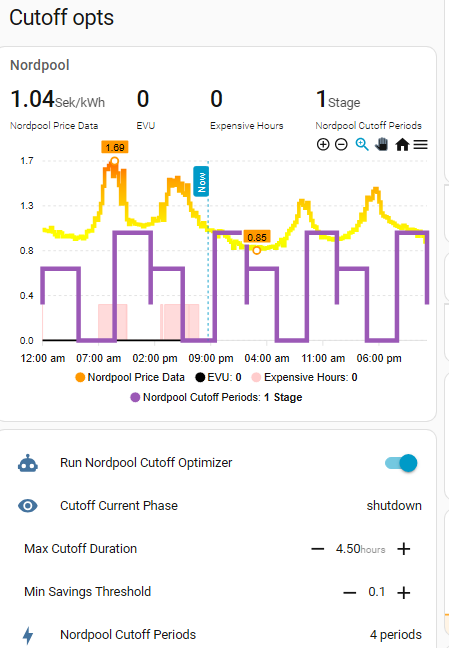
I managed to get some visualization, but not sure I fully understand why it cuts-off so early compared to price peak…

type: custom:apexcharts-card
experimental:
  color_threshold: true
header:
  show: true
  title: Nordpool
  show_states: true
apex_config:
  yaxis:
    tickAmount: 5
    decimalsInFloat: 2
    forceNiceScale: true
  chart:
    toolbar:
      show: true
      tools:
        zoom: true
        zoomin: true
        zoomout: true
        pan: true
        reset: true
    zoom:
      type: x
      enabled: true
      autoScaleYaxis: false
graph_span: 48h
span:
  start: day
now:
  show: true
  label: Now
series:
  - entity: sensor.nordpool_price_data_helper
    name: ""
    yaxis_id: first
    curve: stepline
    unit: Sek/kWh
    float_precision: 2
    data_generator: |
      return (entity.attributes.raw_today.map((start, index) => {
        return [new Date(start["start"]).getTime(), entity.attributes.raw_today[index]["value"]];
      })).concat(entity.attributes.raw_tomorrow.map((start, index) => {
        return [new Date(start["start"]).getTime(), entity.attributes.raw_tomorrow[index]["value"]];
      }));
    stroke_width: 4
    show:
      legend_value: false
      in_header: before_now
      extremas: true
    extend_to: end
    color_threshold:
      - value: -2
        color: green
      - value: 1
        color: yellow
      - value: 1.5
        color: orange
      - value: 2
        color: red
      - value: 2.5
        color: darkred
      - value: 3
        color: red
      - value: 4
        color: purple
  - entity: input_boolean.thermiq_mqtt_vp1_heatpump_evu_block
    name: EVU
    type: line
    transform: "return x === \"1\" ? 1 : 0;"
    stroke_width: 2
    curve: stepline
    yaxis_id: second
    color: "#00"
    extend_to: now
  - entity: binary_sensor.vp1_cheapest_hours
    name: Expensive Hours
    type: area
    yaxis_id: second
    curve: stepline
    color: "#ffcccc"
    transform: "return x === \"off\" ? 1 : 0;"
    stroke_width: 1
    extend_to: now
  - entity: sensor.nordpool_cutoff_periods_python
    unit: Stage
    type: line
    curve: stepline
    data_generator: |
      let res=[];
      res.push([new Date(start).getTime(), 1.0  ]);

      entity.attributes.periods.map(
      (period, index) => 
      {

       res.push([new Date(period["preheat_start"]).getTime(), 2.0  ]);
       res.push([new Date(period["shutdown_start"]).getTime(),0.0  ]);
       res.push([new Date(period["recovery_start"]).getTime(),3.0  ]);
       res.push([new Date(period["recovery_end"]).getTime(),  1.0  ]);
      } 
      );
      console.log(res)
      return res;
    yaxis_id: second
yaxis:
  - id: first
    min: ~0
  - id: second
    opposite: true
    show: false
    min: 0
    max: 5

Thanks for your work, @nikop . I’m thinking of adopting your solution to cabin heating to preserve minimum temperature while minimizing heating costs. Our cabin is heated with electricity and with the enormous fluctuation in prices it makes sense to preheat the cabin so that the heat lasts over the expensive period.

Given this use case, is “recovery” mode really needed at all? Is there a downside with blasting the heating at HIGH from the get go once the prices drop?

Secondly, I’m finding that some electric heaters act differently from others: an oil radiator takes time to start producing heat and it’s produced quite locally, so 1-2 C increase can be quite significant. However, a blower heater produces heat very fast but also results in a larger temporary spike so an increase in 3-4 C is needed for it to “count”. This difference seems to be dependent on how cold it is outside: if it’s cold the spike is smaller → less increase is needed. I wonder how your solution should be adopted to different heaters being used?

Hi @alizbazar — thanks for the thoughtful questions, and your cabin use case is actually a perfect fit for this approach. You’re already thinking in the right direction: protect a minimum temperature while “shifting” energy into cheaper slots.

  • Recovery isn’t mandatory — it’s mainly there to avoid overshoot and unnecessary power spikes after a cutoff. If your cabin goal is just a safe minimum temperature, you can often shorten recovery a lot, or replace it with a simple step ramp (e.g., Medium → Normal) instead of “blast HIGH for long”.

  • Treat your heaters as different “roles”:

    • Oil radiator = baseline / temperature insurance (stable, slow, good for riding through expensive windows).
    • Blower = short boost tool (good for brief preheat or a short controlled return; easiest to overshoot if you go full power too long).
  • Outdoor temperature matters (you already noticed this): colder weather = higher heat loss, so boosts/cutoffs behave differently. If you can, use weather-aware tuning or separate “mild vs cold” settings.


A practical way to find your limits (quick calibration loop)

If you want a safe way to discover the right parameters for your cabin, do this:

  1. Pick your “hard floor” minimum indoor temp (e.g., 10–12°C for an unoccupied cabin, or whatever you need).
  2. On a cold day, run a test cutoff of 30–60 minutes and observe:
  • how many °C you drop
  • how long it takes to recover
  1. Increase duration gradually until you find the point where the drop approaches your comfort/safety limit.
  2. Use that as your max_cutoff_duration (and keep min_cutoff_duration small if you want only short events).

Then tune the economics side:

  • base_price_diff (how big the price difference must be before it’s worth doing anything)
  • min_savings_pct (don’t bother unless savings are meaningful)
  • (optional) preheat/recovery multipliers — and if you have outdoor temperature available, you can lean on the weather-adaptive behavior as described in the thread.
1 Like