Strap in for my crazy solution. I’m going to explain the whole thing but the key piece relies on running an automation based on my phones timezone.
I did try to do this in pure jinja template but it was not reliable to get the correct time. Dug into homeassistant/utils/dt.py and saw they use zoneinfo instead of tzinfo so used that.
Time and day of phone based on phone time zone
- sensor:
    name: Mike - Day
    icon: mdi:clock
    command: python3 -c "from datetime import datetime; import zoneinfo; print(datetime.now(zoneinfo.ZoneInfo('{{ state_attr('sensor.mike_iphone_geocoded_location', 'Time Zone') if not 'null' else 'America/New_York' }}')).strftime('%w'))"
    scan_interval: 30
- sensor:
    name: Mike - Time
    icon: mdi:clock
    command: python3 -c "from datetime import datetime; import zoneinfo; print(datetime.now(zoneinfo.ZoneInfo('{{ state_attr('sensor.mike_iphone_geocoded_location', 'Time Zone') if not 'null' else 'America/New_York' }}')).strftime('%H:%M:00'))"
    scan_interval: 30
I have 4 input_datetime helpers that are just times. These are for AM/PM Alert times on Weekdays and Weekends
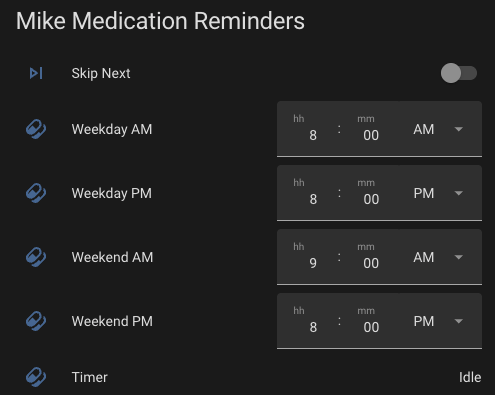
Next I have a binary_sensor template based on all of that. This triggers a time to start.
{{ states('sensor.mike_time') not in ('unknown', 'unavailable') and
(
  states('sensor.mike_time') in (
      states('input_datetime.pills_weekday_morning_mike'),
      states('input_datetime.pills_weekday_evening_mike'))
  and states('sensor.mike_day') in ('1','2','3','4','5')
) or (
  states('sensor.mike_time') in (
      states('input_datetime.pills_weekend_morning_mike'),
      states('input_datetime.pills_weekend_evening_mike'))
  and states('sensor.mike_day') in ('0','6')
)}}
With availabiltiy template
{{ states('sensor.mike_time') not in ('unknown', 'unavailable') and states('sensor.mike_day') not in ('unknown', 'unavailable')}}
Then I have a boolean that lets me skip the next alert, or another way to toggle the alert as action completed.
I also have a input_select that I put as options the zones I want the alert to trigger when I’m in. Not great but it at least lets me modify it easily from my phone instead of trying to work out yaml code or modify a template helper. Maybe we could get labels on zones or a group zone entity in the UI at some point.
Combine all that into another binary_sensor to trigger the alert automation.
{{ is_state('timer.pills_mike', 'active')
and states('person.mike') in state_attr('input_select.pill_alert_zones', 'options')
and is_state('input_boolean.pills_skip_next_mike', 'off') }}
Now, hopefully, when I head out on my next trip my alerts will happen at my then local time at 8PM instead of my server 8PM when I’m at my hotel. I just need to create a zone around the hotel when I get there and add that to my input_select and magic things should happen. Right?
I paired on that with ⚠️ Repeating Alert Notifications w/ Actionable Buttons and other features
The automations:
- Phone time == Alert time then Start a timer
- Repeating Alert blueprint
Cleanup automations:
- Skip next is turned on. If time active then turn cancel timer
- When Timer changes from active. Turn off Skip next