Do you mind explaining that? What yaml file is that? And what/where does it belong to?
Thanks for suggesting that. I wasted like an hour or so re-reading the instructions until I figured that out. Came here to propose the same thing.
PLEASE share with me how you got that working. I have just spent 2 hours trying to figure it out. It looks like the discovery script works fine after looking at the automation traces, but no device is created anywhere.
My current guess it is about this, but I have no clue what I am supposed to do with these instructions.
For battery powered devices, the script requires you to set the value of 12h for sleep_mode.periodor to configureexpire_after yourself.
Hello,
After lot of time spent on connecting my Shelly 1PM Gen3 to HiveMQ, then Mosquitto (in HA) to HiveIQ, I am still stuck on having the device in HA 
I do need MQTT bridges as the Shelly is not on the same location as my HA server.
I can see MQTT messages in HA MQTT (in configure/ Listen to a topic) but the discovery script does not create any device.
I may see 2 problems :
- I cannot see any discovery message from Shelly 1PM Gen 3. It just sends “homeassistant/shellies/shelly1pmg3-xxxxxxx/online” with true or false values on reboot
- “out of the box” MQTT messages are “shelly1pmg3-xxxxxxx/”, I had to add “homeassistant/shellies/” before to have MQTT messages that looks compliant (but are they ?).
Can you please put me in the right direction ?
Thanks!
Shellies Discovery supports only Gen1 devices. To configure Gen2+ device you need to use Shellies Discovery Gen2 GitHub - bieniu/ha-shellies-discovery-gen2: Script that adds MQTT discovery support for Shellies Gen2 devices
Hi,
im just facing some problem by adding a Shelly 1 mini gen3.
I’m running an mosquitto broker, not directly on the ha server.
I added mosquitto with the standard device option in home assistant.
i also installed both shelly discovery scripte.
the gen 1 script for a few flood sensors and also a door sensor was running with out any problems.
Thanks a lot for this.
also added the gen2 script to my homeassistant setup using the instruction on github page. Copy the script and also added the automation.
i was activating the mqtt setting like normaly in the shelly 1 mini gen3
but nothing happening, the device isn’t shown in the mqtt server and will also not been added to the server.
Did i need to do anything more to get the mini gen3 added to my system?
Cheers Robert
This script doesn’t support Gen2+ devices. You need to use GitHub - bieniu/ha-shellies-discovery-gen2: Script that adds MQTT discovery support for Shellies Gen2 devices
Thanks for your answer Bieniu.
Sorry i think i did not write it clear enough.
So I allread installed both scripts. according to you github page.
But i didnt get the mini gen3 shown up in the mqtt device.
Did i need to add each new device_ids in the automation.yml to get the device deiscovered?
Cheers Robert
This is not the right place to discuss Gen2 script, this thread is about Gen1 script. Go to Shellies Discovery Gen2 Script
Hi,
is the script workin with the Shelly GAS Sensor?
I found some information that you add teh support in Versionm 0.25 but i cant find it in the github list of supported devices.
Cheers Robert
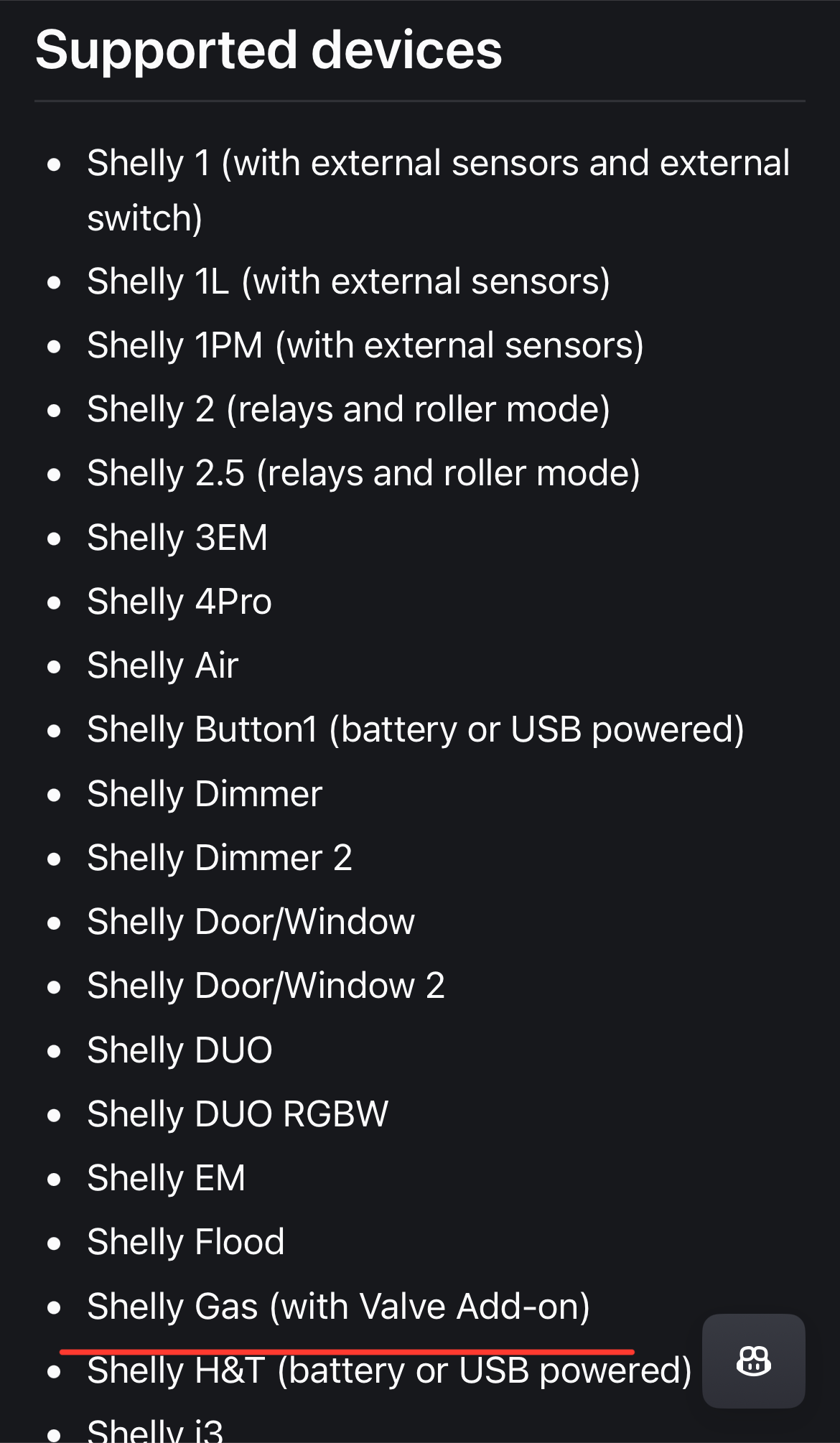
@Bieniu Thx!
Hi,
I tried to configure the system, my shelly device is communicating but I cannot see it in MQTT device list. Would you help me, please? Here is the log I get:
‘’’
2025-09-14 23:26:55.076 INFO (MainThread) [homeassistant.components.automation.shellies_announce_gen2] Shellies Announce Gen2: Running automation actions
2025-09-14 23:26:55.092 INFO (MainThread) [homeassistant.components.automation.shellies_announce_gen2] Shellies Announce Gen2: Repeating sequence: Iteration 1 of 2 with item: ‘shellyplus1-7c87ce723470’
2025-09-14 23:26:55.094 INFO (MainThread) [homeassistant.components.automation.shellies_announce_gen2] Shellies Announce Gen2: Repeat at step 1: Running automation actions
2025-09-14 23:26:55.094 INFO (MainThread) [homeassistant.components.automation.shellies_announce_gen2] Shellies Announce Gen2: Repeat at step 1: Executing step call service
2025-09-14 23:26:55.095 DEBUG (MainThread) [homeassistant.components.mqtt.client] Mosquitto Mqtt Broker: register write 29
2025-09-14 23:26:55.110 DEBUG (MainThread) [homeassistant.components.mqtt.client] Transmitting message on shellyplus1-7c87ce723470/rpc: ‘{“id”:1,“src”:“shellies_discovery”,“method”:“Shelly.GetConfig”}’, mid: 89, qos: 0
2025-09-14 23:26:55.122 DEBUG (MainThread) [homeassistant.components.mqtt.client] Mosquitto Mqtt Broker: unregister write 29
2025-09-14 23:26:55.130 INFO (MainThread) [homeassistant.components.automation.shellies_announce_gen2] Shellies Announce Gen2: Repeat at step 1: Executing step call service
2025-09-14 23:26:55.152 DEBUG (MainThread) [homeassistant.components.mqtt.client] Mosquitto Mqtt Broker: register write 29
2025-09-14 23:26:55.154 DEBUG (MainThread) [homeassistant.components.mqtt.client] Transmitting message on shellyplus1-7c87ce723470/rpc: ‘{“id”:1,“src”:“shellies_discovery”,“method”:“Shelly.GetComponents”,“params”:{“include”:[“config”]}}’, mid: 90, qos: 0
2025-09-14 23:26:55.160 DEBUG (MainThread) [homeassistant.components.mqtt.client] Mosquitto Mqtt Broker: unregister write 29
2025-09-14 23:26:55.161 INFO (MainThread) [homeassistant.components.automation.shellies_announce_gen2] Shellies Announce Gen2: Repeating sequence: Iteration 2 of 2 with item: ‘custom-prefix/Cameracantina’
2025-09-14 23:26:55.163 INFO (MainThread) [homeassistant.components.automation.shellies_announce_gen2] Shellies Announce Gen2: Repeat at step 1: Running automation actions
2025-09-14 23:26:55.255 INFO (MainThread) [homeassistant.components.automation.shellies_announce_gen2] Shellies Announce Gen2: Repeat at step 1: Executing step call service
2025-09-14 23:26:55.256 DEBUG (MainThread) [homeassistant.components.mqtt.client] Mosquitto Mqtt Broker: register write 29
2025-09-14 23:26:55.257 DEBUG (MainThread) [homeassistant.components.mqtt.client] Transmitting message on custom-prefix/Cameracantina/rpc: ‘{“id”:1,“src”:“shellies_discovery”,“method”:“Shelly.GetConfig”}’, mid: 91, qos: 0
2025-09-14 23:26:55.262 DEBUG (MainThread) [homeassistant.components.mqtt.client] Mosquitto Mqtt Broker: unregister write 29
2025-09-14 23:26:55.285 INFO (MainThread) [homeassistant.components.automation.shellies_announce_gen2] Shellies Announce Gen2: Repeat at step 1: Executing step call service
2025-09-14 23:26:55.317 DEBUG (MainThread) [homeassistant.components.mqtt.client] Mosquitto Mqtt Broker: register write 29
2025-09-14 23:26:55.317 DEBUG (MainThread) [homeassistant.components.mqtt.client] Transmitting message on custom-prefix/Cameracantina/rpc: ‘{“id”:1,“src”:“shellies_discovery”,“method”:“Shelly.GetComponents”,“params”:{“include”:[“config”]}}’, mid: 92, qos: 0
2025-09-14 23:26:55.363 DEBUG (MainThread) [homeassistant.components.mqtt.client] Mosquitto Mqtt Broker: unregister write 29
2025-09-14 23:27:18.494 DEBUG (MainThread) [homeassistant.components.mqtt.client] Mosquitto Mqtt Broker: register write 29
2025-09-14 23:27:18.516 DEBUG (MainThread) [homeassistant.components.mqtt.client] Mosquitto Mqtt Broker: unregister write 29
‘’’
Thank you
Does your device use this as a MQTT ID?
@Bieniu could you tell us if the upgrade to the lastest HA version 2026-10 &11 will go smoothly due to the disappearance of HACS ?
thank you again for your amazing work, it still working smoothly after many years.
If the script is installed it will remain installed even after any update of HA and/or HACS.