Le mode Zigbee bridge de la vale est actif seulement si la vale est connectée par Wi-Fi à Neviweb. Elle ne peut pas en même temps être une gateway Zigbee et un client Zigbee.
Je comprend ! Donc le modèle exclusivement zigbee de cette valve ne peut pas être un bridge si lier avec un SLZB06
Non la valve ne peut pas servir de gateway Zigbee si elle est connectée en Zigbee sur ZHA. Mais elle peut avoir un binding avec un autre appareil zigbee. Les deux appareils sont connecté à votre ZHA/SLZB06 mais on fait un binding directe entre les deux sur un cluster/attribut précis. Détecte une fuite ferme la valve. En théorie ça fonctionne mais il faudra tester.
Bonjour Claude, j’ai un petit soucis. Je tente de désactivées les deux intégrateurs sinope 130 et standard pour un certain temps car ils font trop de demande au serveur sinope et bloque mon compte J’aimerais seulement les désactiver sans les effacer . Je dois quitter pour quelques mois bientôt et ma conjointe a un peu de difficulté à se connecter à Sinope et est mais à l’aise…et moi de mon côté je ne sais pas ce qui se passe je ne sais pas comment faire autre chose que d’effacer les integration . Merci pour ton aide
Il faut préserver ton WAF au maximum 
La méthode la plus simple est de seulement commenter la section de neviweb et neviweb130 dans configuration.yaml. Tu fais juste ajouter un # au début de chaque ligne comme ceci:
#neviweb130:
# username: !secret climate_username
#  password: !secret climate_password
#  network: !secret climate_gateway130
#  scan_interval: 360
#  stat_interval: 1800
#  notify: "notification"
Ensuite tu redémarre HA et les deux applications ne seront pas chargées. Tu pourras les réactiver en enlevant les # au début des lignes et redémarrer HA.
Mais je suis curieux, c’est quoi ton scan_interval. Moi j’ai 360 (6 min) tu peux aussi essayer de le monter à 590(9min 50 sec) ca va réduire beaucoup les updates.
merci beaucoup Claude, tes instructions ont fonctionné , je te reviens au début de l’hiver
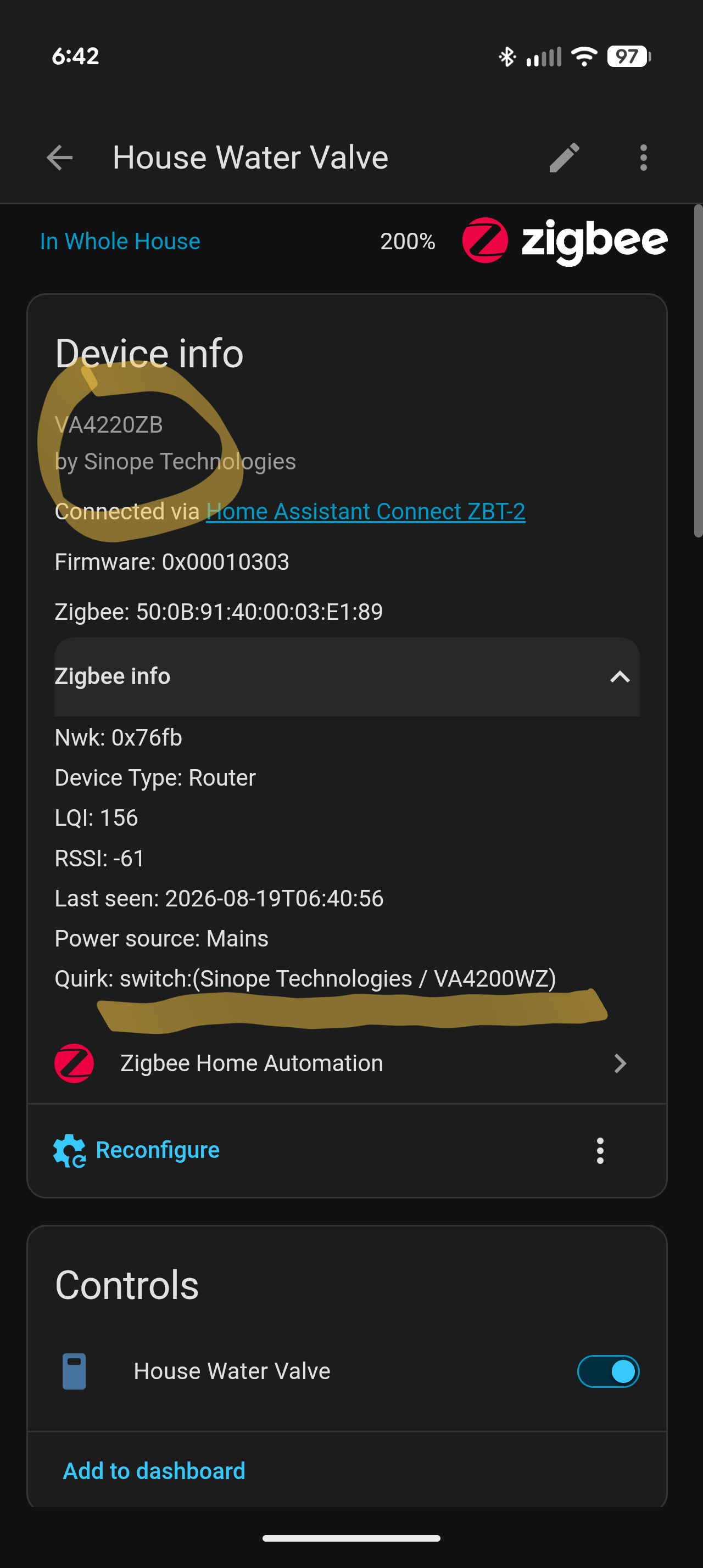
I’m away until Friday night. I’ll check when I’m back home
Nothing wrong with the fact that you have a VA4220ZB and the quirks is named (sinope Technologies / VA4200WZ). The quirks is named as this:
QuirkBuilder(SINOPE, "VA4200WZ")
    .applies_to(SINOPE, "VA4201WZ")
    .applies_to(SINOPE, "VA4200ZB")
    .applies_to(SINOPE, "VA4201ZB")
    .applies_to(SINOPE, "VA4220ZB")
    .applies_to(SINOPE, "VA4221ZB")
...
So the quirks name is based on first line but it managed all those devices including yours, VA4220ZB
Today I’m releasing a new version of sinope-zha that improve valve management with flow meter.
Awesome! I should’ve looked into the file and would’ve seen that.
I’m excited to try the new version (I do have a flow meter).
Hello Claude,
I am ready to test neviweb130 v5.0.0b0. Following the instructions you gave in a previous post, I still cannot see the pre-release.
I went to Settings > Devices & Services > HACS, clicked on Sinope Neviweb130, and enabled the toggle to show pre-releases. However, the pre-release still does not appear.
Is there anything I might be missing?
Thanks,
Hi @stherien The neviweb130 V2 is not published yet as a pre-release. I just finished to update the files to fix some bug that was in neviweb130 v4.2.9
I’m gonna publish neviweb130 v4.3.0 soon and V2 is updated to the same level
Presently the files for V2 are in branch V2-update. I’ll merge them into the branch neviweb130-V2.
If you want to test you just need to copy files from branch V2-update or neviweb130-V2 once updated into config/custom_components/neviweb130. There are more files then the regular neviweb130. Make a complete backup before.
Once the files are in place just restart HA. neviweb130 V2 will start and import your configuration.yaml config for neviweb130. You won’t need them anymore. You can delete or comment that config.
V2 will create sensors, select, binary_sensors, number and buttons for all devices attributes. maybe I still need to add some that I miss because I don’t have all Sinopé devices. This can be done after easily. You can find all them in parameter / devices and services / neviweb130. All your devices will have a device page with all attributes directly available there to configure your devices. Your automations from V1 will still work but you will have possibility to replace them with the new attributes sensors etc.
You can see documentation in branch V2-doc in the readme.md available in french and english. V2 should be published soon once I’ve finished last fix in V1 about PRESET_BOOST for some climate devices.
Hi @claudegel, the migration didn’t go as expected. While the migration itself completed, none of the devices are reporting their state. I can open a detailed issue with diagnostic info generated with the help of ChatGPT if that helps.
Yes open an issue. But if you can send me the beginning of your file neviweb130_log.txt
In V2 you can download this file via parameters / devices and service by clicking on neviweb130 you will see a configuration wheel. It open the Neviweb130 parameters and the last one is a check box to download the file.
I need to see if the login goes well and the setup of the devices.
Thanks we’ll switch to the issue. As I see you pick V2-update branch which is the up to date version.
We could start debugging
I’ll restore version 4.2.9 from a backup for now. Once the new V2 update is released, I’ll give it another try. Thanks!
There were two updates today to the GT125 integration. I installed them both and now it says full up to date. The only problem is now under devices the interpretation didn’t load and I don’t see any thermostats anymore.
It was working flawlessly i guess it was a bad idea to do that update.